




 here!
here!
I’m your shopping assistant for PC builds, upgrades, and everything tech.
Got questions? Ask away!
Start a conversation
here!
I’m your shopping assistant for PC builds, upgrades, and everything tech.
Got questions? Ask away!
Start a conversation


Any questions? Ask CelesteSM will help you find out quickly.


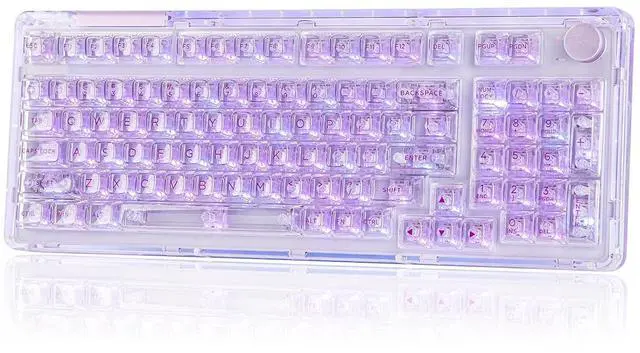
KiiBOOM Phantom98 tri-mode wireless keyboard works flawlessly across PC, Mac laptops, and Android tablets, with up to 5 devices memorized at the same time.
How to pair BT mode:
1. Check that the connection mode switch is in BT mode. Press Fn+1!/2@/3# for 3-5 seconds and make sure the indicator under each key flashes quickly
3. Open up the BT connectivity on your device and find the "KiiBOOM98-1/2/3" and connect


What is the battery life of this wireless keyboard? How can I check the remaining battery on my keyboard?
The KiiBOOM Phantom98 is equipped with an 8000mAh battery.
Hold FN + Backspace to view the battery status: The 1-0 keys will light up to show the current battery percentage (e.g., 6 lit keys = 60% charge)
Where can I download the keyboard software?
Please download the driver from the KiiBOOM official site.
Can I use this keyboard with the Mac system?
Yes, the Phantom98 keyboard supports Windows, Android, Mac, and iOS systems.
Can I replace the switches or keycaps with another set?
Yes, the Phantom98 hot-swappable keyboard is compatible with 3-pin/5-pin mechanical switches and MX keycaps.
Why is the indicator light below the knob on the left constantly red?
It is the battery indicator. When the keyboard is at low battery, it flashes red. When charging, it keeps red. When it is fully charged, the indicator light is off.


Whether you want to assign distinct colors to each layer of your design workspace or accentuate your gaming actions with dynamic backlighting, the Phantom98 RGB keyboard delivers. Equipped with 98 per-key south-facing LEDs, it blends striking visual appeal with practical functionality—becoming an essential tool to enhance your workflow.
KiiBOOM Phantom98 tri-mode wireless keyboard works flawlessly across PC, Mac laptops, and Android tablets, with up to 5 devices memorized at the same time.
How to pair BT mode:
1. Check that the connection mode switch is in BT mode. Press Fn+1!/2@/3# for 3-5 seconds and make sure the indicator under each key flashes quickly
3. Open up the BT connectivity on your device and find the "KiiBOOM98-1/2/3" and connect
What is the battery life of this wireless keyboard? How can I check the remaining battery on my keyboard?
The KiiBOOM Phantom98 is equipped with an 8000mAh battery.
Hold FN + Backspace to view the battery status: The 1-0 keys will light up to show the current battery percentage (e.g., 6 lit keys = 60% charge)
Where can I download the keyboard software?
Please download the driver from the KiiBOOM official site.
Can I use this keyboard with the Mac system?
Yes, the Phantom98 keyboard supports Windows, Android, Mac, and iOS systems.
Can I replace the switches or keycaps with another set?
Yes, the Phantom98 hot-swappable keyboard is compatible with 3-pin/5-pin mechanical switches and MX keycaps.
Why is the indicator light below the knob on the left constantly red?
It is the battery indicator. When the keyboard is at low battery, it flashes red. When charging, it keeps red. When it is fully charged, the indicator light is off.
Details
South-Facing Dynamic RGB Backlits Whether you want to assign distinct colors to each layer of your design workspace or accentuate your gaming actions with dynamic backlighting, the Phantom98 RGB keyboard delivers. Equipped with 98 per-key south-facing LEDs, it blends striking visual appeal with practical functionalitybecoming an essential tool to enhance your workflow.Details
Surround


