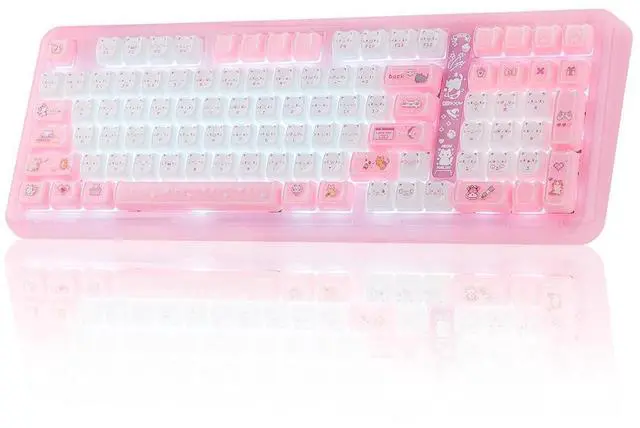
96% Compact & Ergonomic Design The Phantom98 Lite mechanical keyboard embraces a 97 keys layout while inheriting the core design philosophy of the Phantom81 Lite, striking the ideal balance between space-saving efficiency and full-function convenience by packing all essential keys without bulky gapsperfect for cramped desks or minimalistic setups. This keyboard ensures consistent, reliable performance, catering to both casual typists and competitive gamers in search of a compact yet fully-featured input device that doesnt compromise on functionality or comfort.; 3 Modes Wireless + 8000mAh Battery Enjoy seamless performance in gaming and daily typing with the Phantom98 Lite wireless keyboards tri-mode connectivity options of 2.4GHz, USB-C, and BT 5.0 support. Thanks to this feature, users can easily toggle between 5 devices, which is great for those balancing work on a PC, laptop, or tablet. Compatible with Windows and Mac OS, this versatile keyboard serves well in an office setting while also doubling as a gaming controller.; Vibrant RGB Backlight & Hot-Swappable Switch Enhance your workspace with a stunning array of 16.8 million RGB colors and customizable lighting modes that sync with music or games. The south-facing RGB backlighting on this keyboard offers dynamic and adjustable illumination, enhancing its aesthetic appeal. Pre-lubed at the factory, the Phantom98 Lite hot swappable keyboard features linear switches that produce a smooth and delightful sound remin
+
+
Overview
Specs
Reviews
Any questions? Our AI mode will help you find out quickly.
Phantom98 Lite Pink Keyboard with RGB Backlit, Triple Modes Connectivity and VIA Software
RGB Control / Size & Weight / Receiver Storage / Packing List
Customizable with VIA Driver
Dynamic RGB Lights
FN+\|: Toggle Backlight Effect
FN+????: Backlight Brightness & Speed
FN+[{ }] ;: '" : Backlight Hue & Saturation
FN+Backspace: Turn On/Off Backlight
KiiBOOM Phantom98 Lite Keyboard with RGB Backlits
US QWERTY Layout, 98 Keys
Compact 96% Keyboard
The Phantom98 Lite keyboard features a dedicated numeric keypad—ideal for crunching spreadsheets, balancing budgets, or inputting in-game codes without tab-switching. Plus, its full row of function keys lets you adjust volume, skip tracks, or launch shortcuts in one tap, boosting workflow efficiency.
Typing Angles: 6, 8.2, and 11.3 degrees
Neat, Secure, Convenient
Magnetic 2.4GHz Receiver Storage
The built-in magnetic storage slot securely holds the 2.4G receiver when not in use, effectively preventing loss and keeping your workspace clean and organized. Its magnetic design ensures easy insertion and removal, while making the keyboard more compact and portable for travel and daily use. This thoughtful feature brings better convenience and a tidier experience to your daily typing or gaming.
What will I receive?
Package Content
Phantom98 Lite Keyboard
Braided USB-C Cable, Switch&Keycaps Puller, User Manual
Extra Switches
KiiBOOM IP Stickers, Dust Cover
Where can I download the JSON file of the Phantom98 Lite keyboard to customize? Can I remap the FN key?
You can download it on the KiiBOOM official website. And yes, you can use QMK/VIA to remap the FN key.
Why isn't the VIA software detecting my keyboard?
1. Make sure your keyboard is connected in wired mode.
2. Verify you have downloaded the correct JSON file for the Phantom 98 Lite in the software.
3. Try resetting the keyboard to factory settings.
Why does my keyboard's RGB turn off suddenly?
1. Sleep mode: The keyboard enters sleep mode after two minutes without key presses, turning off the RGB. Press any key to wake it up.
2. Connection problems: Check if the cable is loose or if there are issues with the wireless connection.
Can I use this keyboard with a Mac system?
Yes, the KiiBOOM Phantom 98 Lite pink keyboard is compatible with both Windows and Mac systems. You can toggle between the two modes by pressing Fn + A (for Windows) or Fn + S (for Mac).
Why are my Alt key and Win key swapped functions?
The keyboard might be in Mac mode. Press Fn + A to switch the keyboard back to Windows mode
Phantom98 Lite Pink Keyboard with RGB Backlit, Triple Modes Connectivity and VIA Software
RGB Control / Size & Weight / Receiver Storage / Packing List
KiiBOOM Phantom98 Lite Keyboard with RGB Backlits
Customizable with VIA Driver
Dynamic RGB Lights
FN+\|: Toggle Backlight Effect
FN+????: Backlight Brightness & Speed
FN+[{ }] ;: '" : Backlight Hue & Saturation
FN+Backspace: Turn On/Off Backlight
US QWERTY Layout, 98 Keys
Compact 96% Keyboard
The Phantom98 Lite keyboard features a dedicated numeric keypad—ideal for crunching spreadsheets, balancing budgets, or inputting in-game codes without tab-switching. Plus, its full row of function keys lets you adjust volume, skip tracks, or launch shortcuts in one tap, boosting workflow efficiency.
Typing Angles: 6, 8.2, and 11.3 degrees
Neat, Secure, Convenient
Magnetic 2.4GHz Receiver Storage
The built-in magnetic storage slot securely holds the 2.4G receiver when not in use, effectively preventing loss and keeping your workspace clean and organized. Its magnetic design ensures easy insertion and removal, while making the keyboard more compact and portable for travel and daily use. This thoughtful feature brings better convenience and a tidier experience to your daily typing or gaming.
What will I receive?
Package Content
Phantom98 Lite Keyboard
Braided USB-C Cable, Switch&Keycaps Puller, User Manual
Extra Switches
KiiBOOM IP Stickers, Dust Cover
Where can I download the JSON file of the Phantom98 Lite keyboard to customize? Can I remap the FN key?
You can download it on the KiiBOOM official website. And yes, you can use QMK/VIA to remap the FN key.
Why isn't the VIA software detecting my keyboard?
1. Make sure your keyboard is connected in wired mode.
2. Verify you have downloaded the correct JSON file for the Phantom 98 Lite in the software.
3. Try resetting the keyboard to factory settings.
Why does my keyboard's RGB turn off suddenly?
1. Sleep mode: The keyboard enters sleep mode after two minutes without key presses, turning off the RGB. Press any key to wake it up.
2. Connection problems: Check if the cable is loose or if there are issues with the wireless connection.
Can I use this keyboard with a Mac system?
Yes, the KiiBOOM Phantom 98 Lite pink keyboard is compatible with both Windows and Mac systems. You can toggle between the two modes by pressing Fn + A (for Windows) or Fn + S (for Mac).
Why are my Alt key and Win key swapped functions?
The keyboard might be in Mac mode. Press Fn + A to switch the keyboard back to Windows mode
Product description Pink Keyboard Mewsic Keycaps Mossy Silent Switch Translucent & Smooth Case Creamy Gasket Phantom98 Lite Pink Keyboard with RGB Backlit, Triple Modes Connectivity and VIA Software 1 Backlit Keyboard 2 Hot Swap 3 Wireless & Wired 4 Ergonomic Typing 5 VIA Support RGB Control / Size & Weight / Receiver Storage / Packing List Customizable with VIA Driver Dynamic RGB Lights FN+\|: Toggle Backlight Effect FN+: Backlight Brightness & Speed FN+[{ }];: '": Backlight Hue & Saturation FN+Backspace: Turn On/Off Backlight Click to play video US QWERTY Layout, 98 Keys Compact 96% Keyboard The Phantom98 Lite keyboard features a dedicated numeric keypadideal for crunching spreadsheets, balancing budgets, or inputting in-game codes without tab-switching. Plus, its full row of function keys lets you adjust volume, skip tracks, or launch shortcuts in one tap, boosting workflow efficiency. Typing Angles: 6, 8.2, and 11.3 degrees Neat, Secure, Convenient Magnetic 2.4GH z Receiver Storage The built-in magnetic storage slot securely holds the 2.4G receiver when not in use, effectively preventing loss and keeping your workspace clean and organized. Its magnetic design ensures easy insertion and removal, while making the keyboard more compact and portable for travel and daily use. This thoughtful feature brings better convenience and a tidier experience to your daily typing or gaming. What will I receive? Package Content Phantom98 Lite Keyboard Braided USB-C Cable, Switch&Keycaps Puller, User Manual Extra Switches KiiBOOM IP Stickers, Dust Cover Where can I download the JSON file of the Phantom98 Lite keyboard to customize? Can I remap the FN key? Why isn't the VIA software detecting my keyboard? Why does my keyboard's RGB turn off suddenly Can I use this keyboard with a Mac system? Why are my Alt key and Win key swapped functions? KiiBOOM Custom Mechanical Keyboard Phantom 98 Add to Cart Phantom81 Lite Add to Cart Phantom 81 V3 Add to Cart Jade75 Add to Cart Moonshadow V2 Add to Cart Customer Reviews 4.4 out of 5 stars 174 4.6 out of 5 stars 176 4.2 out of 5 stars 19 4.0 out of 5 stars 42 4.6 out of 5 stars 53 Price $ 197.99 $197.
99 $ 90.09 $90. 09 $ 199.99 $199. 99 $ 199.99 $199. 99 $ 159.99 $159. 99 Case Material Acrylic Plastic Acrylic Resin Aluminum Keycaps PC ABS+PC PC PC PBT Connections BT/ 2.4GH z Wireless, USB Wired BT/ 2.4GH z Wireless, USB Wired BT/ 2.4GH z Wireless, USB Wired BT/ 2.4GH z Wireless, USB Wired BT/ 2.4GH z Wireless, USB Wired Battery 8000mAh 4000mAh 8000mAh 3750mAh 4000mAh Weight 1.6 kg 0.94 kg 1.5 kg 1.1 kg 1.8 kg Driver KiiBOOM Driver QMK/VIA KiiBOOM Driver QMK/VIA QMK/VIA RGB Backlights Hot Swap
Learn more about the Detailed Specifications
Additional Information
First Listed on Newegg
July 20, 2026
There are no reviews yet.
Do you own this product?
Warranty & Returns
Warranty, Returns, And Additional Information
Warranty
Please contact the Seller directly for warranty information. Warranty information may also be found on the Manufacturer's website.