




 here!
here!
I’m your shopping assistant for PC builds, upgrades, and everything tech.
Got questions? Ask away!
Start a conversation
here!
I’m your shopping assistant for PC builds, upgrades, and everything tech.
Got questions? Ask away!
Start a conversation


Any questions? Ask CelesteSM will help you find out quickly.

The Rhythm of Reliability. Engineered for over 50 million clicks, the Aula blue clicky switches provide a crisp, tactile response and a resonant click—crafted for those who appreciate a deliberate and durable keystroke.


The USB connection of the S500 is directly soldered to the PCB. Ensures a permanent connection for a lifetime of reliable use.

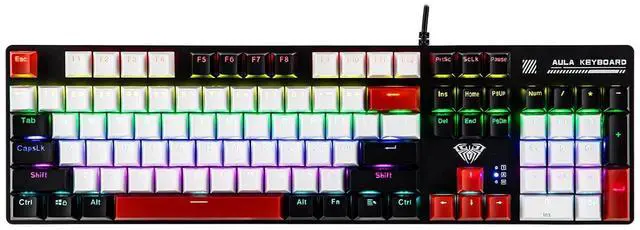
This full 100% layout comes complete with a dedicated Numpad, giving you the ultimate toolset for data entry, spreadsheets, and coding.

Engineered for All-Day Comfort. The kickstand provides the perfect, fixed ergonomic tilt—scientifically calculated to promote a natural wrist posture.

Aula S500 Keyboard * 1
User Manual * 1
Keycap Puller * 1
How to change the lighting mode of this gaming keyboard?
There are 8 gaming backlight modes and 2 customizable backlight modes.
FN + 1-8: Switch between 8 different gaming modes.
FN + 9/0: Switch between 2 custom modes.
How to custom the backlight modes of the keyboard?
FN + End: Recording Key/Storage Key
FN + 9/0: Enter custom mode
Press any key that needs to light up or go out to the specified state, press FN + End to store.
Press FN + ESC to clear the light recording and restore the normal light mode.
Is this mechanical keyboard hot swappable?
No, the switches of the S500 keyboard is soldered. But you are free to replace the keycaps.
What is the polling rate of this wired keyboard?
The polling rate is 1000Hz.
Does this wired keyboard connect via a USB-C port?
No, this keyboard features a permanently soldered cable, so the connection wire is not replaceable.


Aula Tactile Blue Switch
The Rhythm of Reliability. Engineered for over 50 million clicks, the Aula blue clicky switches provide a crisp, tactile response and a resonant click—crafted for those who appreciate a deliberate and durable keystroke.


The USB connection of the S500 is directly soldered to the PCB. Ensures a permanent connection for a lifetime of reliable use.
This full 100% layout comes complete with a dedicated Numpad, giving you the ultimate toolset for data entry, spreadsheets, and coding.
Engineered for All-Day Comfort. The kickstand provides the perfect, fixed ergonomic tilt—scientifically calculated to promote a natural wrist posture.
Aula S500 Keyboard * 1
User Manual * 1
Keycap Puller * 1
How to change the lighting mode of this gaming keyboard?
There are 8 gaming backlight modes and 2 customizable backlight modes.
FN + 1-8: Switch between 8 different gaming modes.
FN + 9/0: Switch between 2 custom modes.
How to custom the backlight modes of the keyboard?
FN + End: Recording Key/Storage Key
FN + 9/0: Enter custom mode
Press any key that needs to light up or go out to the specified state, press FN + End to store.
Press FN + ESC to clear the light recording and restore the normal light mode.
Is this mechanical keyboard hot swappable?
No, the switches of the S500 keyboard is soldered. But you are free to replace the keycaps.
What is the polling rate of this wired keyboard?
The polling rate is 1000Hz.
Does this wired keyboard connect via a USB-C port?
No, this keyboard features a permanently soldered cable, so the connection wire is not replaceable.
Details
Hardwired The USB connection of the S500 is directly soldered to the PCB. Ensures a permanent connection for a lifetime of reliable use. Numpad This full 100% layout comes complete with a dedicated Numpad, giving you the ultimate toolset for data entry, spreadsheets, and coding. Ergonomic Kickstands Engineered for All-Day Comfort. The kickstand provides the perfect, fixed ergonomic tiltscientifically calculated to promote a natural wrist posture. Packing List Aula S500 Keyboard * 1 User Manual * 1 Keycap Puller * 1 How to change the lighting mode of this gaming keyboard? How to custom the backlight modes of the keyboard? Is this mechanical keyboard hot swappable? What is the polling rate of this wired keyboard? Does this wired keyboard connect via a USB-C port? 1800-Layout Gaming Keyboard Vibe99 Add to Cart AK980 Add to Cart F99 PRO Add to Cart Phantom 98 Add to Cart Blade101 Buying Options Customer Reviews 4.8 out of 5 stars 171 4.6 out of 5 stars 291 4.8 out of 5 stars 372 4.4 out of 5 stars 174 3.4 out of 5 stars 63 Price $ 82.99 $82.


