



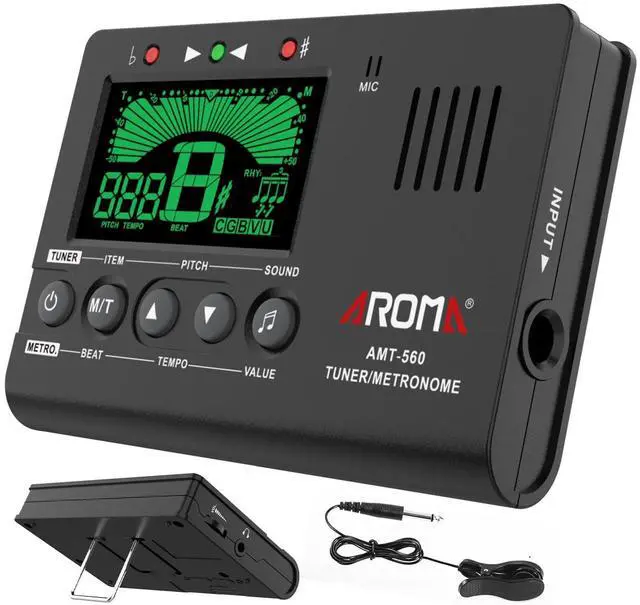


3 in 1, Digital Musical Metronome, Digital Tuner and Tone Generator, all housed in a pocket size unit.
Get 3 devices in one.
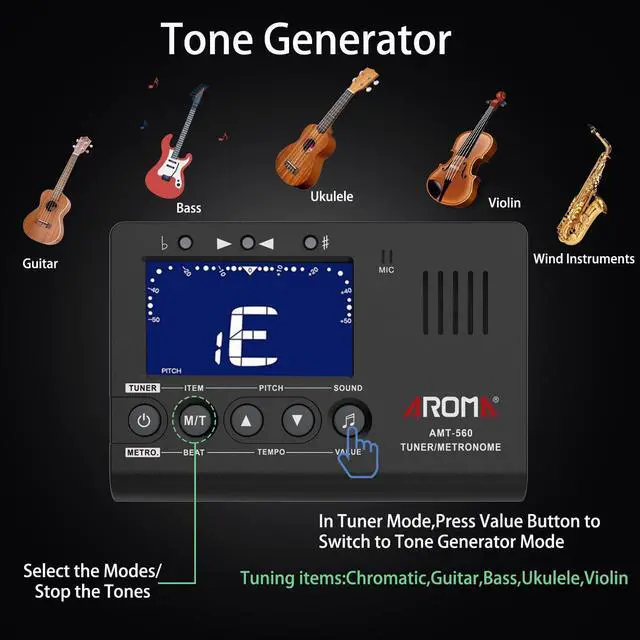
Tone Generator Mode:
- Press the button SOUND in TUNE Mode to switch to Tone Generator Mode.
- Volume is adjustable by the Volume button on the side.
- There are sound for Chromatic, Guitar, Bass, Ukulele, Violin. Press the button ITEM to select the needed mode for your instrument and press the button SOUND to select the needed sound. Ref: C(Chromatic), G(Guitar), B(Bass), U(Ukulele), V(Violin).
- Press the button PITCH to set the pitch.
- Press the button ITEM to turn off the Tone Generator Mode.
Moreup Digital Tuner is compatible musical instruments: Chromatic, Guitar, Bass, Violin, Ukulele C, Ukulele D.
Idea tools for beginners, music teachers, professional players to tune your instrument accuracy and easily.
In TUNER Mode:
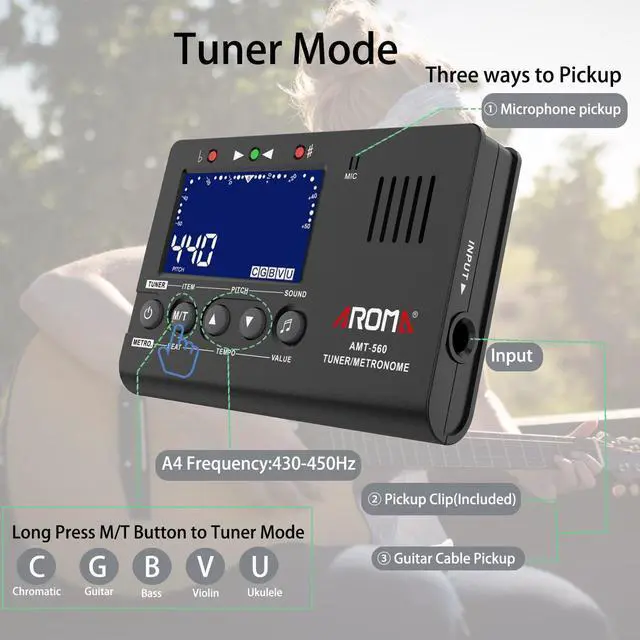
3 Ways to pickup:
- The built-in microphone in the tuner: Get your instrument close to the tuner, press the string that you'd like to tune, the tuner will recognize the string you’re playing.
Note: To pickup by this way, please do not plug any cable into the INPUT jack.
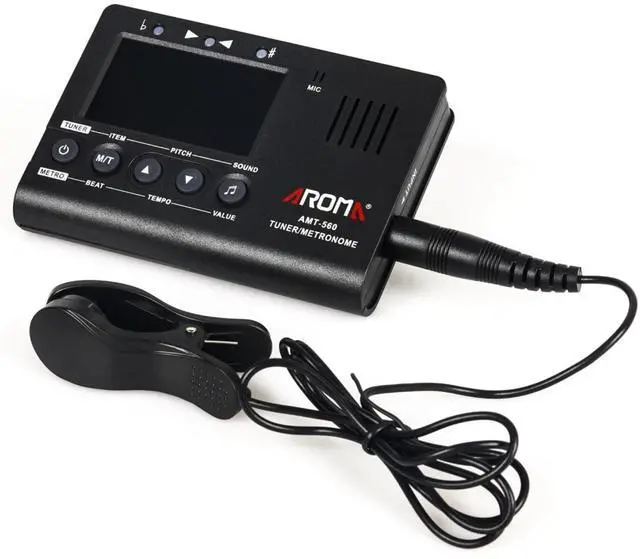
2. Pickup clip(included): Plug the pickup-clip into the INPUT jack and clip the pickup cable on your instrument, press the string that you'd like to tune, the tuner will recognize the string you’re playing.
3. Guitar Cable(not included)
Button Function:
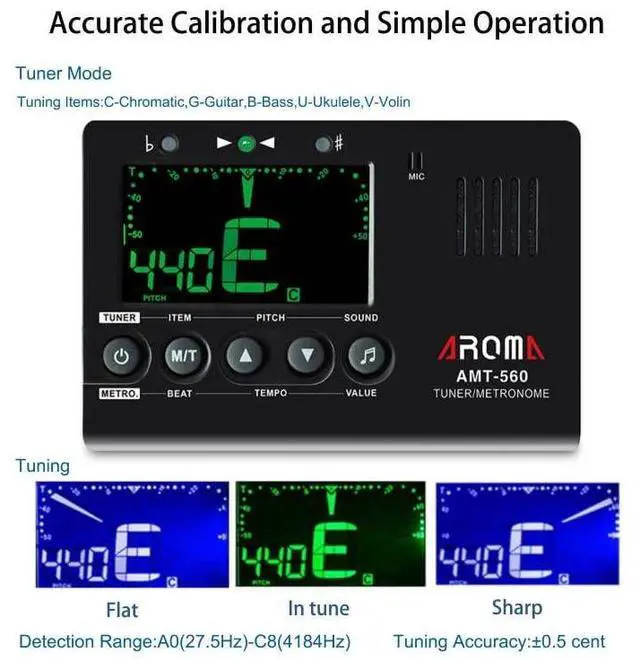
- Press the M/T button for 2 seconds to switch to the TUNE Mode. It shows PITCH at the left bottom means it is in TUNE mode.
- Press the button ITEM to select the tuning mode: C(Chromatic), G(Guitar), B(Bass), U(Ukulele), V(Violin).
- Press the button PITCH(up and down) to set the pitch, pitch range 430Hz to 450Hz.
- Press the string on your instrument, it shows note name on the screen for Chromatic and it shows both not name & string number for Guitar, Bass, Ukulele, Violin.
How to identify whether the tone is correct or not.:
- The Meter points to 0 and the indicator light above the screen shows Green color, means In Tune.
- The Meter points to the left side and the indicator light shows Red color, means Flat Note.
- The Meter points to the right side and the indicator light shows Red color, means Sharp Note.
Features in TUNER Mode
Digital Metronome for All Musical Instruments - Guitar, Piano, Bass ,Violin, Ukulele, Chromatic etc.
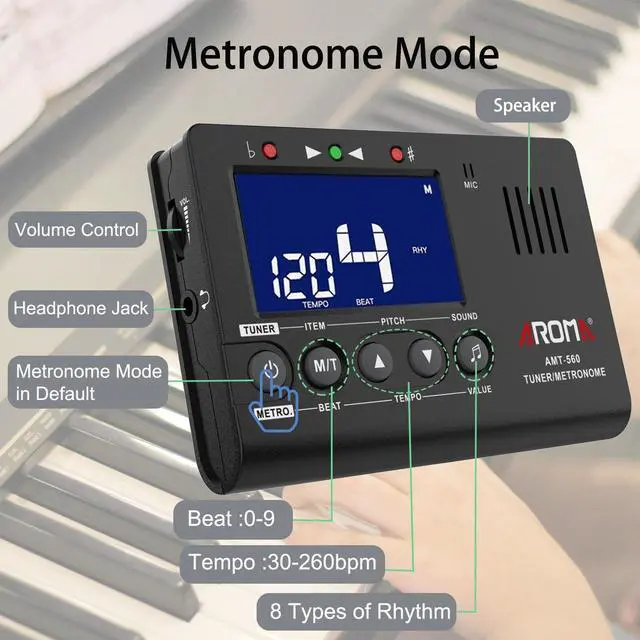
Metronome Mode:
- Press the button M/T for 2 seconds to switch to Metronome Mode. It shows a "M" on the top right corner means it is in Metronome Mode.
- Press the button METRO to start the metronome. The metronome meter will swing left to right at the specfied tempo. You can easily read the TEMPO, BEAT and RHY on the screen.
- Press the button BEAT to change beats, beats range 0, 1, 2, 3, 4, 5, 6, 7, 8, 9.
- Press the button TEMPO(up and down) to set the tempo, tempo range 30bpm to 260bpm.
- Press the button VALUE to change the rhythms, there are 8 different rhythms.
- Press the button METRO to stop the metronome.
- Volume is adjustable by the Volume button on the side.
- Plug in your headphone into the Headphone hole on the side if you need to play quitely.
A digital metronome offers accurancy beats, rich features and it is compact size for easy to carry.
A metronome is a MUST have to improve your timing no matter what musical styles you do.
Features in Metronome Mode
 Portable Guitar Chords Trainer w/ Screen |  Guitar Bow - Makes Your Guitar a Cello/Violin - 2-in-1 Bow and Pick Fun and C... |  Premium Kazoo Instrument – MOREUP Easy to Play Humming Kazoo, No Membrane Rep... |  Piano Finger Hand Shape Trainers Correct Hand Posture Tool |  Portable Electronic Roll-Up Drum Set - 9-Pad Rechargeable Roll-Up MIDI Drum P... |  Moreup Guitar Stand Universal Folding A-Frame Non-Slip Tripod Strong Holder f... | |
|---|---|---|---|---|---|---|
| Customer Reviews | — | — | — | — | — | — |
| Price | — | — | — | — no data | — | — |
| For Musical Instruments | Guitar | Guitar | Kazoo | Piano | Drum | Guitar/Ukulele |
3 in 1, Digital Musical Metronome, Digital Tuner and Tone Generator, all housed in a pocket size unit.
Get 3 devices in one.
Tone Generator Mode:
- Press the button SOUND in TUNE Mode to switch to Tone Generator Mode.
- Volume is adjustable by the Volume button on the side.
- There are sound for Chromatic, Guitar, Bass, Ukulele, Violin. Press the button ITEM to select the needed mode for your instrument and press the button SOUND to select the needed sound. Ref: C(Chromatic), G(Guitar), B(Bass), U(Ukulele), V(Violin).
- Press the button PITCH to set the pitch.
- Press the button ITEM to turn off the Tone Generator Mode.
Moreup Digital Tuner is compatible musical instruments: Chromatic, Guitar, Bass, Violin, Ukulele C, Ukulele D.
Idea tools for beginners, music teachers, professional players to tune your instrument accuracy and easily.
In TUNER Mode:
3 Ways to pickup:
- The built-in microphone in the tuner: Get your instrument close to the tuner, press the string that you'd like to tune, the tuner will recognize the string you’re playing.
Note: To pickup by this way, please do not plug any cable into the INPUT jack.
2. Pickup clip(included): Plug the pickup-clip into the INPUT jack and clip the pickup cable on your instrument, press the string that you'd like to tune, the tuner will recognize the string you’re playing.
3. Guitar Cable(not included)
Button Function:
- Press the M/T button for 2 seconds to switch to the TUNE Mode. It shows PITCH at the left bottom means it is in TUNE mode.
- Press the button ITEM to select the tuning mode: C(Chromatic), G(Guitar), B(Bass), U(Ukulele), V(Violin).
- Press the button PITCH(up and down) to set the pitch, pitch range 430Hz to 450Hz.
- Press the string on your instrument, it shows note name on the screen for Chromatic and it shows both not name & string number for Guitar, Bass, Ukulele, Violin.
How to identify whether the tone is correct or not.:
- The Meter points to 0 and the indicator light above the screen shows Green color, means In Tune.
- The Meter points to the left side and the indicator light shows Red color, means Flat Note.
- The Meter points to the right side and the indicator light shows Red color, means Sharp Note.
Features in TUNER Mode
| Tuning Musical Instruments | Chromatic, guitar, bass, Ukulee, violin |
| Pitch Range | 430Hz - 450Hz |
| Detection Range | A0(27.5Hz) - C8(4186Hz) |
| Tuning Accuracy | ± 0.5 cent |
Digital Metronome for All Musical Instruments - Guitar, Piano, Bass ,Violin, Ukulele, Chromatic etc.
Metronome Mode:
- Press the button M/T for 2 seconds to switch to Metronome Mode. It shows a "M" on the top right corner means it is in Metronome Mode.
- Press the button METRO to start the metronome. The metronome meter will swing left to right at the specfied tempo. You can easily read the TEMPO, BEAT and RHY on the screen.
- Press the button BEAT to change beats, beats range 0, 1, 2, 3, 4, 5, 6, 7, 8, 9.
- Press the button TEMPO(up and down) to set the tempo, tempo range 30bpm to 260bpm.
- Press the button VALUE to change the rhythms, there are 8 different rhythms.
- Press the button METRO to stop the metronome.
- Volume is adjustable by the Volume button on the side.
- Plug in your headphone into the Headphone hole on the side if you need to play quitely.
A digital metronome offers accurancy beats, rich features and it is compact size for easy to carry.
A metronome is a MUST have to improve your timing no matter what musical styles you do.
Features in Metronome Mode
| Mode Switch | In Metronome mode, sign "M" shows on the right top, see" TEMPO""BEAT" on the screen. Press M/T button to switch to Metronome mode. |
| Tempo Range | 30bpm - 260bpm |
| Beats | 0, 1, 2, 3, 4, 5, 6, 7, 8, 9 |
| Rhythm | 8 rhythms |
Portable Guitar Chords Trainer w/ Screen | Guitar Bow - Makes Your Guitar a Cello/Violin - 2-in-1 Bow and Pick Fun and C... | Premium Kazoo Instrument – MOREUP Easy to Play Humming Kazoo, No Membrane Rep... | Piano Finger Hand Shape Trainers Correct Hand Posture Tool | Portable Electronic Roll-Up Drum Set - 9-Pad Rechargeable Roll-Up MIDI Drum P... | Moreup Guitar Stand Universal Folding A-Frame Non-Slip Tripod Strong Holder f... | |
|---|---|---|---|---|---|---|
| Customer Reviews | — | — | — | — | — | — |
| Price | — | — | — | — no data | — | — |
| For Musical Instruments | Guitar | Guitar | Kazoo | Piano | Drum | Guitar/Ukulele |