




M.2 SSD NVME/SATA External Case
*Please note that this product is not applicable to B key NGFF/SATA.
Transfer rate:
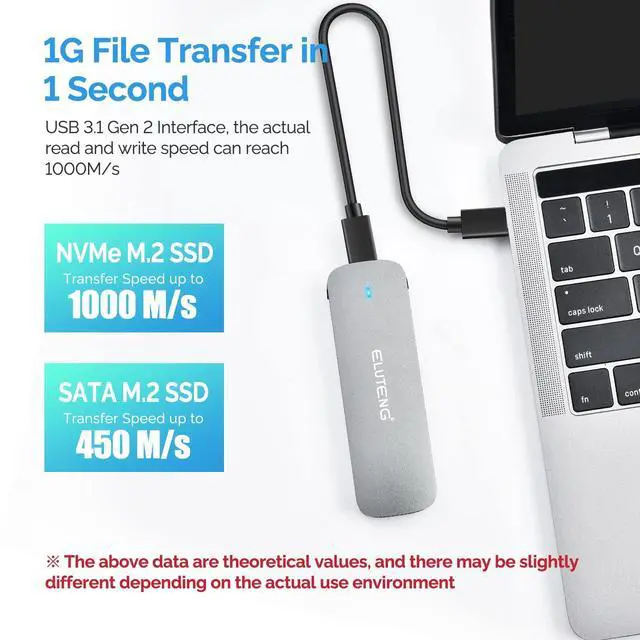
NVMe protocol: 10Gbps SATA protocol: 5Gbps
Material:
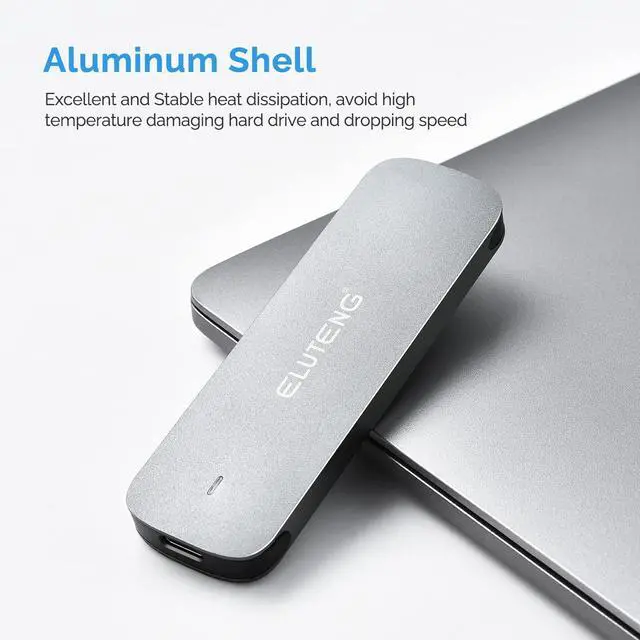
Aluminum alloy
Supported OS:
Windows 11/10/8/7/Mac OS/Linux
Multi-OS, Windows, Mac OS, Linux, Android
Output ports:
USB3.1 GEN2 USB Type-C
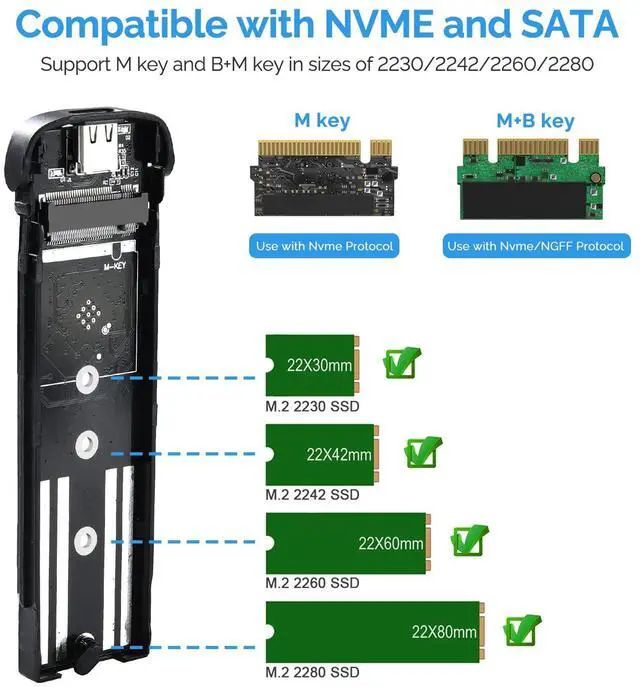
Supported sizes:
2230/2242/2260/2280mm
UASP and TRIM functions are provided.


Equipped with High-performance Chip
The RTL9210B chip enables stable data transfer and can reach a transfer rate of 10 Gbps! (For NVME)
The external output port is USB3.1 GEN2 USB Type-C, which improves read/write efficiency for large amounts of data and accelerates the transfer of large files.

Compatible OS
Compatible with Windows 11/10/8/7/Mac OS/Linux systems. Supports Multi-OS, Windows, Mac OS, Linux, Android; compatible with PC, Smartphone, PC, Smart TV, Intelligent Router, PS4, etc.

Two Cables Included
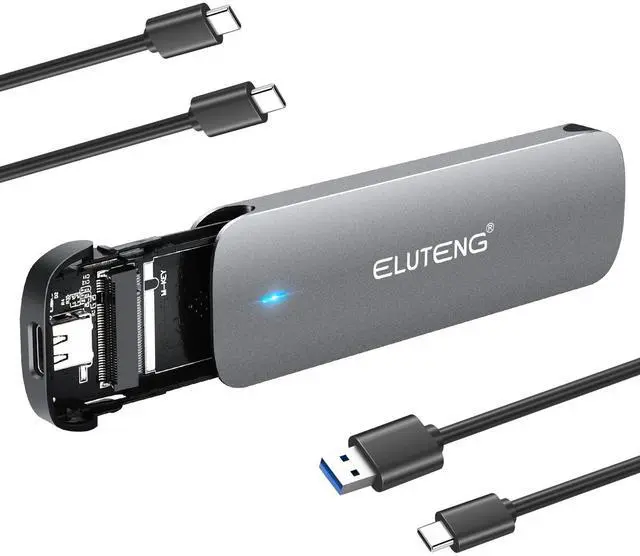
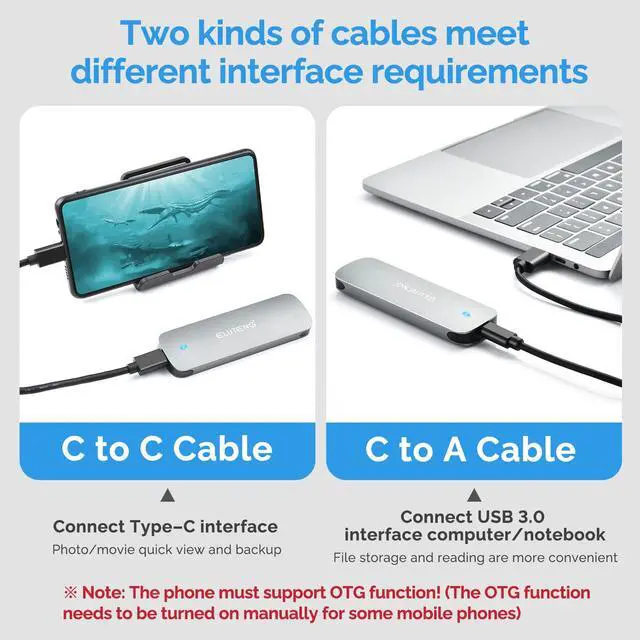
USB Type-A to Type-C and USB Type-C to Type-C data cable (0.5m).
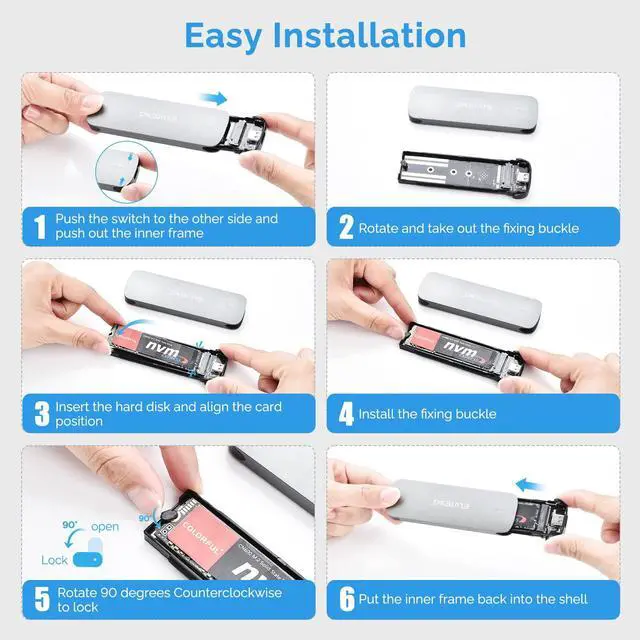
Easy to install and disassemble; easy to replace hard disks.

Equipped with LED Indicators
Equipped with LED indicators to monitor hard disk operating status.


Handling precautions:
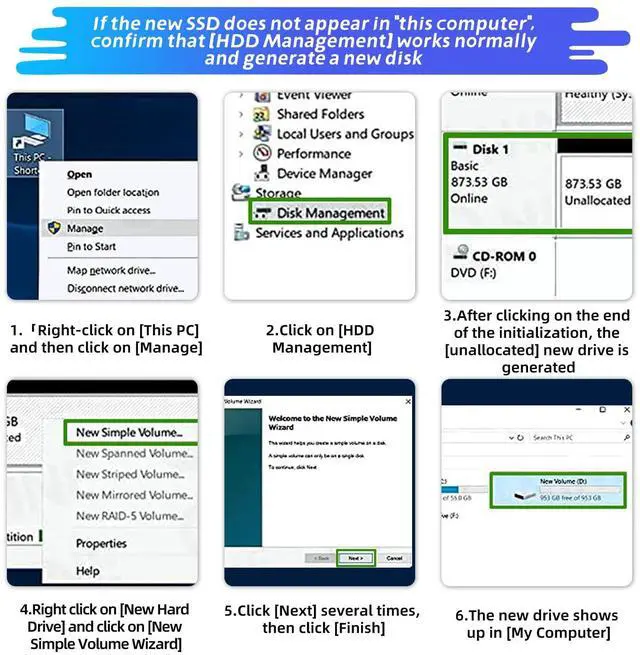
1. If you use a new SSD, you need to partition it.
2. Due to the nature of SSD and aluminum has high thermal conductivity, the surface may become hot during use. Please be careful when touching directly.
3. The m.2 external SSD case is best connected to the USB port on the back of the desktop.
4. The drive speed itself is different, so it depends on the OS and drive you are using.
5. When removing the hard drive, do the removal on your PC before removing it from your PC. Be aware that forceful removal of hard disk cases or hard disks can result in data loss and hard disk corruption.
6. The rubber clasp in the case is easy to break, so you can not push this part when installing the SSD.
 M.2 NVME/NGFF to USB C Adapter |  M.2 NVME SATA SSD Enclosure |  M.2 SATA to USB |  M.2 NVME/SATA to USB Adapter |  M.2 NVME to USB Adapter |  M.2 NVMe to USB C Adapter | |
|---|---|---|---|---|---|---|
| Customer Reviews | — | — | — | — | — | — |
| Price | — no data | — | — no data | — | — | — no data |
| Compatibility | M.2 SATA M Key & (B+M) Key 2280/2260/2242 SSD | M.2 SATA M Key & (B+M) Key 2280/2260/2242 SSD | M.2 SATA B Key & (B+M) Key 2280/2260/2242 SSD | M.2 SATA M Key & (B+M) Key 2280/2260/2242 SSD | M.2 M Key2280/2260/2242/2230 SSD | M.2 M Key2280/2260/2242/2230 SSD |
| USB Interface | USB 3.1 Gen 2 | USB 3.1 Gen 2 | USB 3.1 Gen 1 | USB 3.1 Gen 2 | USB 3.1 Gen 2 | USB 3.1 Gen 2 |
| Transmission Speed | 10Gbps / 5Gbps | 10Gbps / 6Gbps | 6Gbps | 10Gbps / 6Gbp | 10Gbps | 10Gbps |
| Material | PCB | Aluminum | PCB | PCB | PCB | PCB |
M.2 SSD NVME/SATA External Case
*Please note that this product is not applicable to B key NGFF/SATA.
Transfer rate:
NVMe protocol: 10Gbps SATA protocol: 5Gbps
Material:
Aluminum alloy
Supported OS:
Windows 11/10/8/7/Mac OS/Linux
Multi-OS, Windows, Mac OS, Linux, Android
Output ports:
USB3.1 GEN2 USB Type-C
Supported sizes:
2230/2242/2260/2280mm
UASP and TRIM functions are provided.
Equipped with High-performance Chip
The RTL9210B chip enables stable data transfer and can reach a transfer rate of 10 Gbps! (For NVME)
The external output port is USB3.1 GEN2 USB Type-C, which improves read/write efficiency for large amounts of data and accelerates the transfer of large files.
Compatible OS
Compatible with Windows 11/10/8/7/Mac OS/Linux systems. Supports Multi-OS, Windows, Mac OS, Linux, Android; compatible with PC, Smartphone, PC, Smart TV, Intelligent Router, PS4, etc.
Two Cables Included
USB Type-A to Type-C and USB Type-C to Type-C data cable (0.5m).
Easy to install and disassemble; easy to replace hard disks.
Equipped with LED Indicators
Equipped with LED indicators to monitor hard disk operating status.
Handling precautions:
1. If you use a new SSD, you need to partition it.
2. Due to the nature of SSD and aluminum has high thermal conductivity, the surface may become hot during use. Please be careful when touching directly.
3. The m.2 external SSD case is best connected to the USB port on the back of the desktop.
4. The drive speed itself is different, so it depends on the OS and drive you are using.
5. When removing the hard drive, do the removal on your PC before removing it from your PC. Be aware that forceful removal of hard disk cases or hard disks can result in data loss and hard disk corruption.
6. The rubber clasp in the case is easy to break, so you can not push this part when installing the SSD.
M.2 NVME/NGFF to USB C Adapter | M.2 NVME SATA SSD Enclosure | M.2 SATA to USB | M.2 NVME/SATA to USB Adapter | M.2 NVME to USB Adapter | M.2 NVMe to USB C Adapter | |
|---|---|---|---|---|---|---|
| Customer Reviews | — | — | — | — | — | — |
| Price | — no data | — | — no data | — | — | — no data |
| Compatibility | M.2 SATA M Key & (B+M) Key 2280/2260/2242 SSD | M.2 SATA M Key & (B+M) Key 2280/2260/2242 SSD | M.2 SATA B Key & (B+M) Key 2280/2260/2242 SSD | M.2 SATA M Key & (B+M) Key 2280/2260/2242 SSD | M.2 M Key2280/2260/2242/2230 SSD | M.2 M Key2280/2260/2242/2230 SSD |
| USB Interface | USB 3.1 Gen 2 | USB 3.1 Gen 2 | USB 3.1 Gen 1 | USB 3.1 Gen 2 | USB 3.1 Gen 2 | USB 3.1 Gen 2 |
| Transmission Speed | 10Gbps / 5Gbps | 10Gbps / 6Gbps | 6Gbps | 10Gbps / 6Gbp | 10Gbps | 10Gbps |
| Material | PCB | Aluminum | PCB | PCB | PCB | PCB |