




 here!
here!
I’m your shopping assistant for PC builds, upgrades, and everything tech.
Got questions? Ask away!
Start a conversation
here!
I’m your shopping assistant for PC builds, upgrades, and everything tech.
Got questions? Ask away!
Start a conversation



Any questions? Ask CelesteSM will help you find out quickly.

Speed:
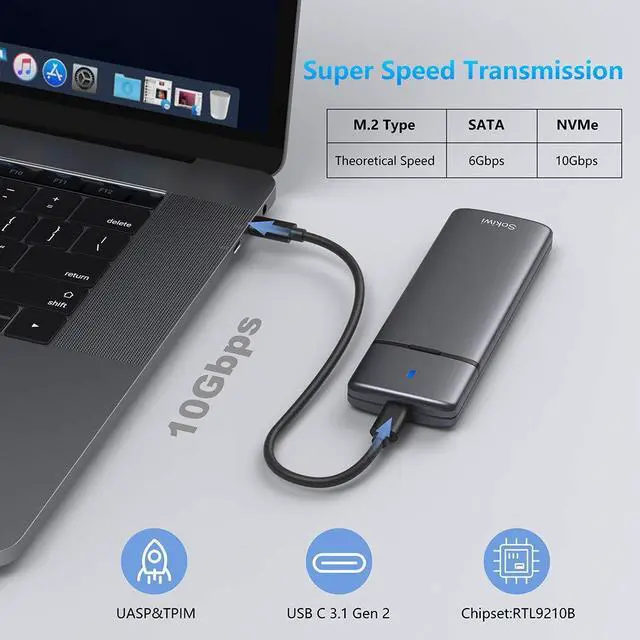
USB C 3.2 Gen 2 10Gbps to M.2 NVME PCIe; USB C 3.1 Gen 2 6Gbps to M.2 SATA PCIe
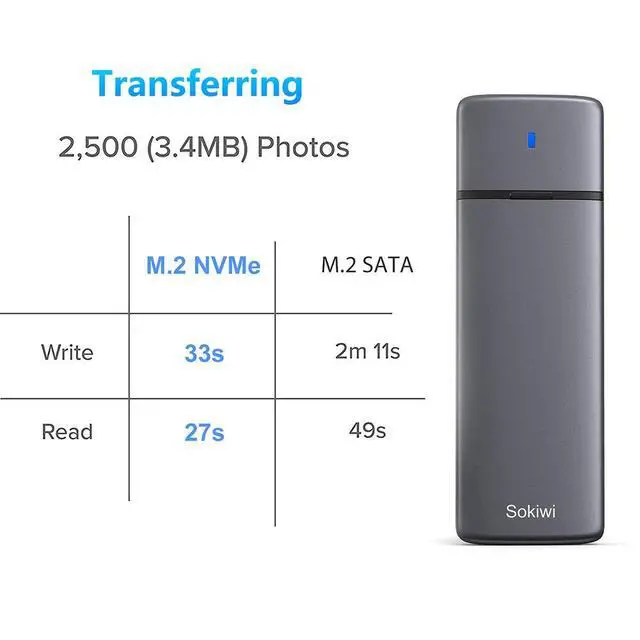
Read and write speeds of over 900 MBps/600MBps, when connected to a Thunderbolt 3 or USB 3.2 Gen 2 port.
Read and write speeds of under 500 Mb/s, when connected to usb 3.0 port or install SATA protocol SSD.
Overheating Protection :
If your SSD overheating when transfer large of data, enclosure will run the overheating protection auto and goes into read-only mode or stop the transfer or down the speed of transfer data. Avoiding your SSD damage due to overheating and improving the life of your SSD.
Computer have different show about overheating protection. Once your SSD cool down then can use again. Your file won't lose.
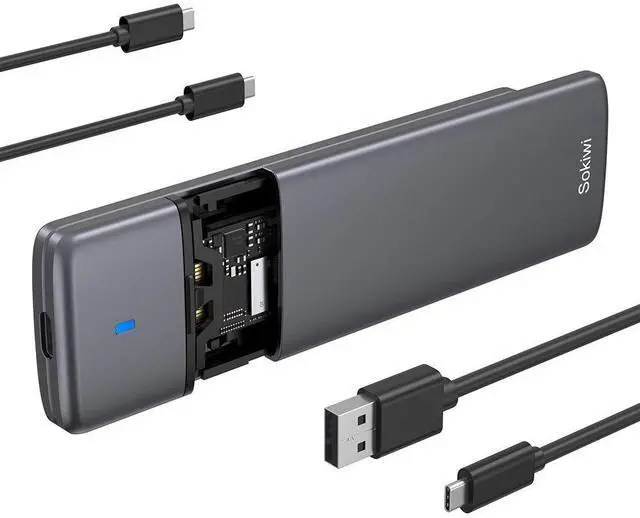
Includes both USB Type-C and USB 3.1 (Type-A) cables

Warm Note - If you computer can't recognize the SSD enclosure. Please Following Steps
Tips: How to start disk management?
Right click "Computer" - "Manage" - "Disk Management". Find your unallocated disk, right click "Unallocated", and choose "New Simple Volume Wizard".
Click Start -> Run -> type compmgmt.msc -> click OK. Alternatively, right-click on the My Computer icon and select 'Manage'. In the console tree, click Disk Management.

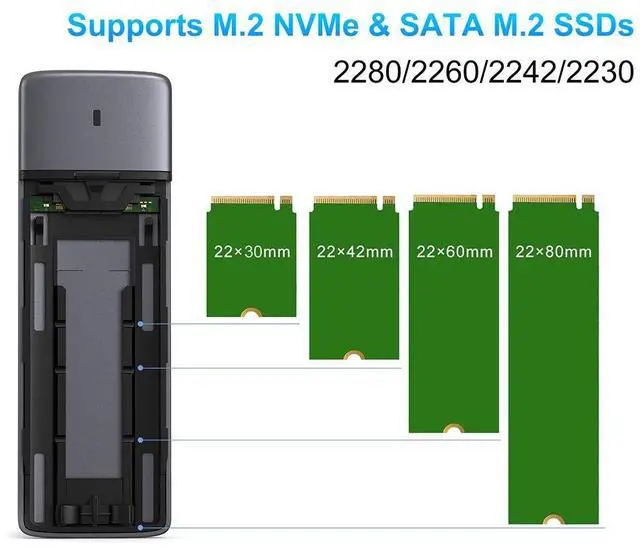
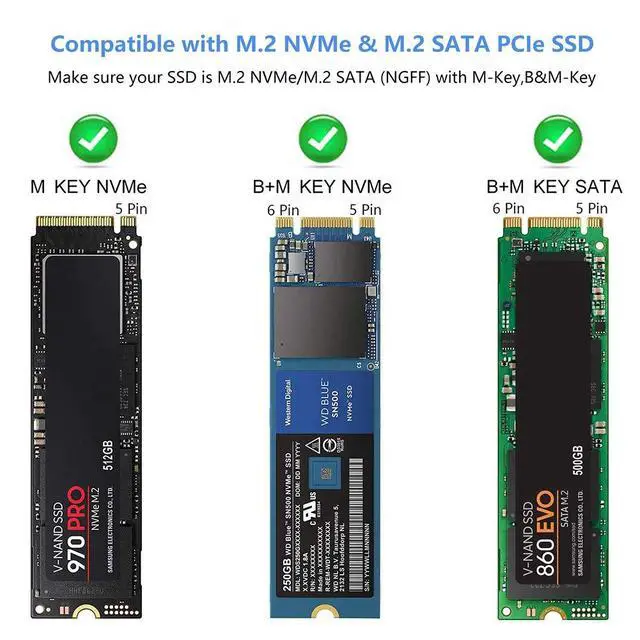
Applicable to sizes 2230/2242 / 2260 / 2280 solid state drivers.
For Samsung:Samsung 980 PRO/970 EVO Plus/970 EVO/970 Pro/960 EVO/950 PRO/860 EVO/850 EVO(NOT SUPPORT SAMSUNG 980 PRO SSD with Heatsink)
For Crucial: P1/P2/P5
For Western Digital: WD Blue SN550/ WD_Black SN750/ WD_Black SN850/WD Blue 3D NAND SATA SSD M.2 2280/
WD Red SA500 NAS SATA SSD M.2/480GB WD Green SATA SSD M.2 2280
For Intel: 600P/660P/665P/760P/545S/Optane 800P/Optane H10
For Kingston: A2000/KC2000/KC2500/SA400M8
For ADATA: SX8200Pro/XPG SX6000 Lite/S11 Lite/S11 Pro/SP580M
For Seagate:BarraCuda 510/FireCuda 510/FireCuda 520
For Toshiba: RC500/RD500/RC100/RC10
For Pioneer: APS-SE20/SE20QN/APS-SE20P/APS-SE10N
If your ssd not included in the list,please let us know, we are very gladly to help you check if the enclosure can work with your ssd.

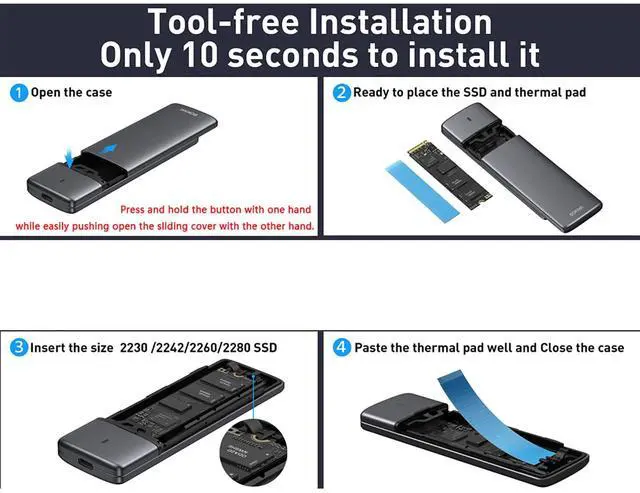
How to use the thermal pad?
a.Please remove the clear plastic side and blue plastic side of the thermal pad.
b. Paste it on your SSD directly.
c.This action can protect your SSD and cool down the temperature.


 MOKiN M.2 NVMe SATA SSD Enclosure Reader Tool-Free, NVMe PCIe SSD to USB C Ad... |  M.2 NVMe SATA SSD Enclosure Adapter Tool-Free,Sokiwi USB 3.2 Gen2 10Gbps Exte... |  Sokiwi 10Gbps NVMe Docking Station with Cooling Fan - Dual-Bay Offline Clone ... |  40Gbps NVMe M.2 Duplicator Dual-Bay Offline Clone |  MOKiN M.2 NVMe Enclosure, 20Gbps M.2 Enclosure Adapter, SSD Drive Reader to U... | |
|---|---|---|---|---|---|
| Customer Reviews | — | — | — | — | — |
| Price | — | — | — | — | — |
| Protocol | NVMe & SATA | NVMe & SATA | NVMe | NVMe | NVMe |
| Compatible with Size | M.2 2230/2242/2260/2280 SSD | M.2 2230/2242/2260/2280 SSD | M.2 2230/2242/2260/2280 SSD | M.2 2230/2242/2260/2280 SSD | M.2 2242/2260/2280 SSD |
| Transmission Speed | NVMe: Max 10Gbps; SATA: Max 6Gbps | NVMe: Max 10Gbps; SATA: Max 6Gbps | NVMe Cloner: Max 10Gbps | NVMe Cloner: Max 40Gbps | NVMe: Max 20Gbps |
| Tool Free & Aluminum Enclosure | ? | ? | ? | ? | ? |
| Max Capacity | 8TB | 8TB | 8TB | 8TB | no data |
| Chipset | RTL9210B | RTL9210B | no data | no data | RTL9220 |
| UASP & Trim | ? | ? | ? | ? | ? |
| Including USB Type-C and Type-A cables | ? | ? | ? | ? | ? |
Speed:
USB C 3.2 Gen 2 10Gbps to M.2 NVME PCIe; USB C 3.1 Gen 2 6Gbps to M.2 SATA PCIe
Read and write speeds of over 900 MBps/600MBps, when connected to a Thunderbolt 3 or USB 3.2 Gen 2 port.
Read and write speeds of under 500 Mb/s, when connected to usb 3.0 port or install SATA protocol SSD.
Overheating Protection :
If your SSD overheating when transfer large of data, enclosure will run the overheating protection auto and goes into read-only mode or stop the transfer or down the speed of transfer data. Avoiding your SSD damage due to overheating and improving the life of your SSD.
Computer have different show about overheating protection. Once your SSD cool down then can use again. Your file won't lose.
Includes both USB Type-C and USB 3.1 (Type-A) cables
Warm Note - If you computer can't recognize the SSD enclosure. Please Following Steps
Tips: How to start disk management?
Right click "Computer" - "Manage" - "Disk Management". Find your unallocated disk, right click "Unallocated", and choose "New Simple Volume Wizard".
Click Start -> Run -> type compmgmt.msc -> click OK. Alternatively, right-click on the My Computer icon and select 'Manage'. In the console tree, click Disk Management.
Applicable to sizes 2230/2242 / 2260 / 2280 solid state drivers.
For Samsung:Samsung 980 PRO/970 EVO Plus/970 EVO/970 Pro/960 EVO/950 PRO/860 EVO/850 EVO(NOT SUPPORT SAMSUNG 980 PRO SSD with Heatsink)
For Crucial: P1/P2/P5
For Western Digital: WD Blue SN550/ WD_Black SN750/ WD_Black SN850/WD Blue 3D NAND SATA SSD M.2 2280/
WD Red SA500 NAS SATA SSD M.2/480GB WD Green SATA SSD M.2 2280
For Intel: 600P/660P/665P/760P/545S/Optane 800P/Optane H10
For Kingston: A2000/KC2000/KC2500/SA400M8
For ADATA: SX8200Pro/XPG SX6000 Lite/S11 Lite/S11 Pro/SP580M
For Seagate:BarraCuda 510/FireCuda 510/FireCuda 520
For Toshiba: RC500/RD500/RC100/RC10
For Pioneer: APS-SE20/SE20QN/APS-SE20P/APS-SE10N
If your ssd not included in the list,please let us know, we are very gladly to help you check if the enclosure can work with your ssd.
How to use the thermal pad?
a.Please remove the clear plastic side and blue plastic side of the thermal pad.
b. Paste it on your SSD directly.
c.This action can protect your SSD and cool down the temperature.

MOKiN M.2 NVMe SATA SSD Enclosure Reader Tool-Free, NVMe PCIe SSD to USB C Ad... | M.2 NVMe SATA SSD Enclosure Adapter Tool-Free,Sokiwi USB 3.2 Gen2 10Gbps Exte... | Sokiwi 10Gbps NVMe Docking Station with Cooling Fan - Dual-Bay Offline Clone ... | 40Gbps NVMe M.2 Duplicator Dual-Bay Offline Clone | MOKiN M.2 NVMe Enclosure, 20Gbps M.2 Enclosure Adapter, SSD Drive Reader to U... | |
|---|---|---|---|---|---|
| Customer Reviews | — | — | — | — | — |
| Price | — | — | — | — | — |
| Protocol | NVMe & SATA | NVMe & SATA | NVMe | NVMe | NVMe |
| Compatible with Size | M.2 2230/2242/2260/2280 SSD | M.2 2230/2242/2260/2280 SSD | M.2 2230/2242/2260/2280 SSD | M.2 2230/2242/2260/2280 SSD | M.2 2242/2260/2280 SSD |
| Transmission Speed | NVMe: Max 10Gbps; SATA: Max 6Gbps | NVMe: Max 10Gbps; SATA: Max 6Gbps | NVMe Cloner: Max 10Gbps | NVMe Cloner: Max 40Gbps | NVMe: Max 20Gbps |
| Tool Free & Aluminum Enclosure | ? | ? | ? | ? | ? |
| Max Capacity | 8TB | 8TB | 8TB | 8TB | no data |
| Chipset | RTL9210B | RTL9210B | no data | no data | RTL9220 |
| UASP & Trim | ? | ? | ? | ? | ? |
| Including USB Type-C and Type-A cables | ? | ? | ? | ? | ? |


