


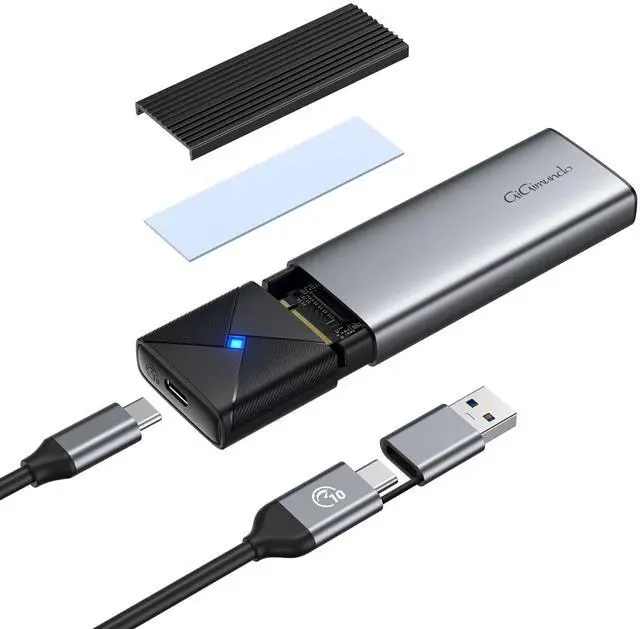

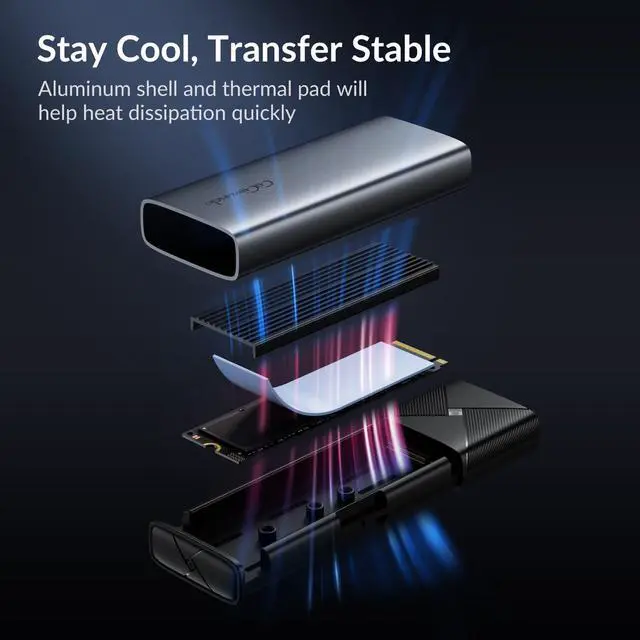
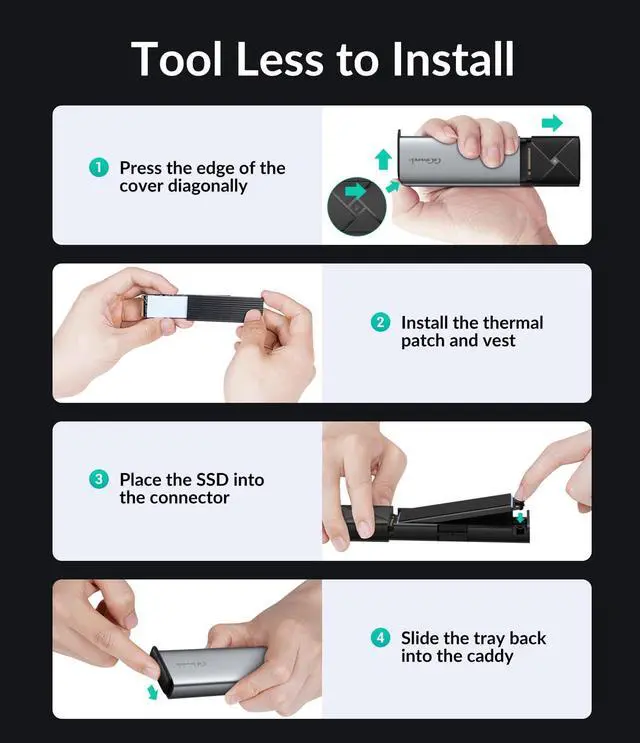


GiGimundo USB 3.2 10Gbps M.2 NVMe SATA SSD Enclosure

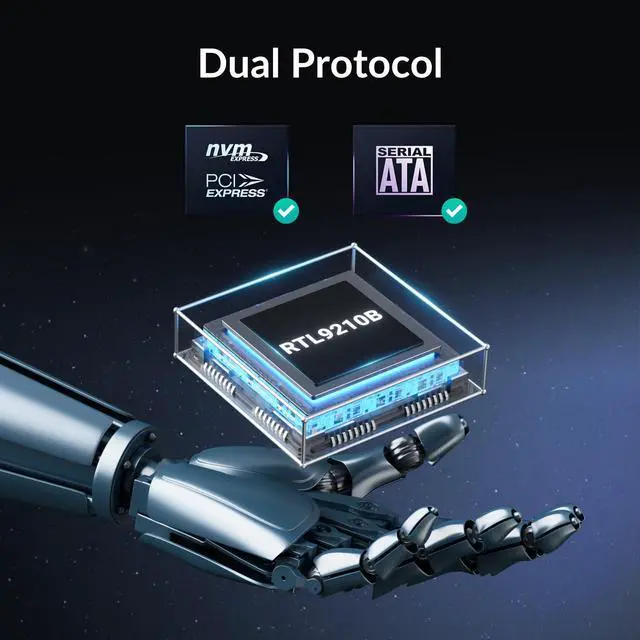
Support NVMe and M.2 SATA SSDs.
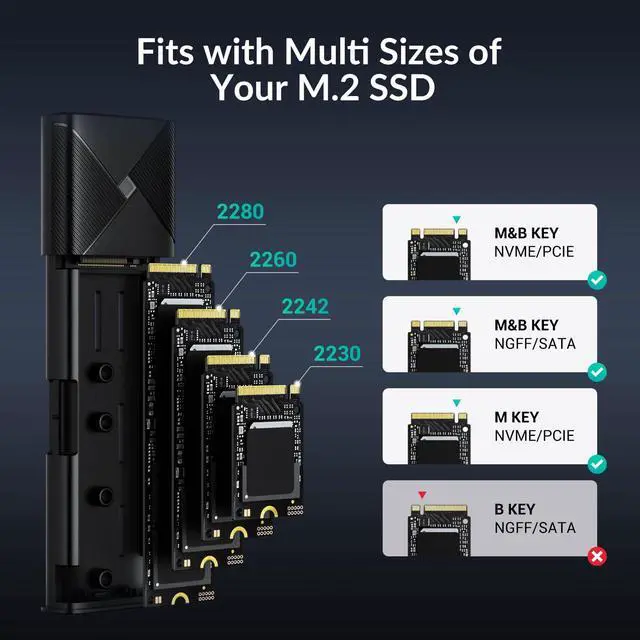
Note: SATA only support B+M key.


How to increase speed on Windows platform?
Please follow: Right-click on PC to open - Manage - Storage - Disk Management - Find the SSD storaged in the enclosure - Right-click to open and find Properties - Policise - Tick Better Performance - Enable wire caching on the device - OK. Job done.
What models of 8TB ssd have been tested?
Sure, but so far only tested Corsair MP600 PRO XT 8TB and Corsair MP600 PRO NH 8TB, both run smoothly.
Why is my SSD not recognized by the computer?
1. Poor connection and installation, the pins are not in complete contact.
2. An SSD with mismatched protocols is installed.
3. There is a fault in the cable or computer interface.
4. The SSD or hard disk enclosure is faulty.
Does it support tablets and mobile phones?
Supported, but the data transfer rate will be limited by the USB-C interface of tablets and mobile phones.
Can it be connected to the docking station for work?
Yes, that's no problem.
Comparision Table
 GGPWEM2-G2 NVMe/SATA |  GGPWEM2-G2 NVMe/SATA |  GGPWEM2-G2 NVMe/SATA |  GGPWM2-G2 NVMe |  HBM2-10G NVMe |  GGPWM2 SATA |  HBM2-6G SATA | |
|---|---|---|---|---|---|---|---|
Customer Reviews | — | — | — | — | — | — | — |
Price | — | — | — | — | — | — | — |
Protocol | NVMe & SATA | NVMe & SATA | NVMe & SATA | NVMe | NVMe | M.2 SATA | M.2 SATA |
Compatible with Size | M.2 2230/2242/2260/2280 SSD | M.2 2230/2242/2260/2280 SSD | M.2 2230/2242/2260/2280 SSD | M.2 2230/2242/2260/2280 SSD | M.2 2230/2242/2260/2280 SSD | M.2 2230/2242/2260/2280 SSD | M.2 2230/2242/2260/2280 SSD |
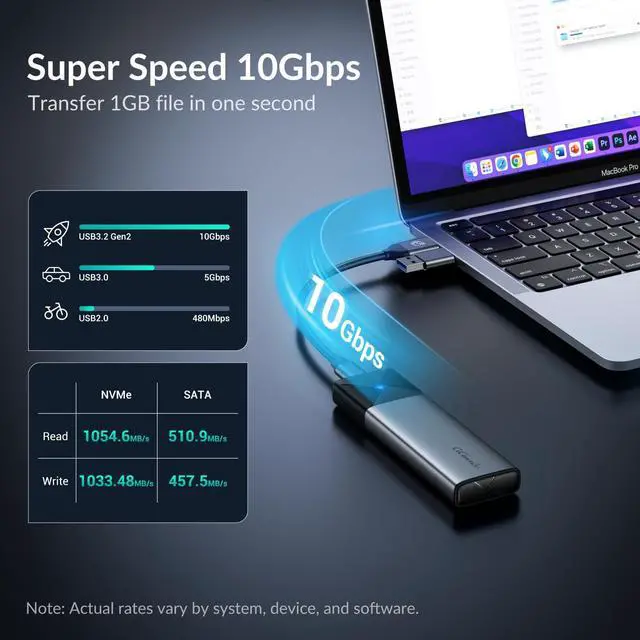
Transmission Speed | NVMe: 10Gbps; SATA: 6Gbps | NVMe: 10Gbps; SATA: 6Gbps | NVMe: 10Gbps; SATA: 6Gbps | NVMe: 10Gbps | NVMe: 10Gbps | SATA: 6Gbps | SATA: 6Gbps |
Max Capacity | Max 8TB | Max 8TB | Max 8TB | Max 8TB | 4TB | Max 8TB | 4TB |
Chipset | RTL9210B | RTL9210B | RTL9210B | RTL9210B | RTL9210B | Asmedia ASM225CM | Asmedia ASM225CM |
Cable Type | 1xUSB-C to USB-C 10Gbps | 1xUSB-C to USB-C 10Gbps | 1xUSB-C to USB-C 10Gbps | 1xUSB-C to USB-C 10Gbps | 1xUSB-C to USB-C 10Gbps | 1xUSB-C to USB-A 6Gbps | 1xUSB-C to USB-A 6Gbps |
USB Adapter | 1xUSB-C to USB-A Adapter | 1xUSB-C to USB-A Adapter | 1xUSB-C to USB-A Adapter | NO | 1xUSB-C to USB-A Adapter | NO | NO |
UASP & Trim | ? | ? | ? | ? | ? | ? | ? |
Tool Free Enclosure | ? | ? | ? | ? | ? | ? | ? |
GiGimundo USB 3.2 10Gbps M.2 NVMe SATA SSD Enclosure

Support NVMe and M.2 SATA SSDs.
Note: SATA only support B+M key.


Powerful and fast


Small and handy


How to increase speed on Windows platform?
Please follow: Right-click on PC to open - Manage - Storage - Disk Management - Find the SSD storaged in the enclosure - Right-click to open and find Properties - Policise - Tick Better Performance - Enable wire caching on the device - OK. Job done.
What models of 8TB ssd have been tested?
Sure, but so far only tested Corsair MP600 PRO XT 8TB and Corsair MP600 PRO NH 8TB, both run smoothly.
Why is my SSD not recognized by the computer?
1. Poor connection and installation, the pins are not in complete contact.
2. An SSD with mismatched protocols is installed.
3. There is a fault in the cable or computer interface.
4. The SSD or hard disk enclosure is faulty.
Does it support tablets and mobile phones?
Supported, but the data transfer rate will be limited by the USB-C interface of tablets and mobile phones.
Can it be connected to the docking station for work?
Yes, that's no problem.
Comparision Table
GGPWEM2-G2 NVMe/SATA | GGPWEM2-G2 NVMe/SATA | GGPWEM2-G2 NVMe/SATA | GGPWM2-G2 NVMe | HBM2-10G NVMe | GGPWM2 SATA | HBM2-6G SATA |
|---|---|---|---|---|---|---|
| Customer Reviews | ||||||
| — | — | — | — | — | — | — |
| Price | ||||||
| — | — | — | — | — | — | — |
| Protocol | ||||||
| NVMe & SATA | NVMe & SATA | NVMe & SATA | NVMe | NVMe | M.2 SATA | M.2 SATA |
| Compatible with Size | ||||||
| M.2 2230/2242/2260/2280 SSD | M.2 2230/2242/2260/2280 SSD | M.2 2230/2242/2260/2280 SSD | M.2 2230/2242/2260/2280 SSD | M.2 2230/2242/2260/2280 SSD | M.2 2230/2242/2260/2280 SSD | M.2 2230/2242/2260/2280 SSD |
| Transmission Speed | ||||||
| NVMe: 10Gbps; SATA: 6Gbps | NVMe: 10Gbps; SATA: 6Gbps | NVMe: 10Gbps; SATA: 6Gbps | NVMe: 10Gbps | NVMe: 10Gbps | SATA: 6Gbps | SATA: 6Gbps |
| Max Capacity | ||||||
| Max 8TB | Max 8TB | Max 8TB | Max 8TB | 4TB | Max 8TB | 4TB |
| Chipset | ||||||
| RTL9210B | RTL9210B | RTL9210B | RTL9210B | RTL9210B | Asmedia ASM225CM | Asmedia ASM225CM |
| Cable Type | ||||||
| 1xUSB-C to USB-C 10Gbps | 1xUSB-C to USB-C 10Gbps | 1xUSB-C to USB-C 10Gbps | 1xUSB-C to USB-C 10Gbps | 1xUSB-C to USB-C 10Gbps | 1xUSB-C to USB-A 6Gbps | 1xUSB-C to USB-A 6Gbps |
| USB Adapter | ||||||
| 1xUSB-C to USB-A Adapter | 1xUSB-C to USB-A Adapter | 1xUSB-C to USB-A Adapter | NO | 1xUSB-C to USB-A Adapter | NO | NO |
| UASP & Trim | ||||||
| ? | ? | ? | ? | ? | ? | ? |
| Tool Free Enclosure | ||||||
| ? | ? | ? | ? | ? | ? | ? |