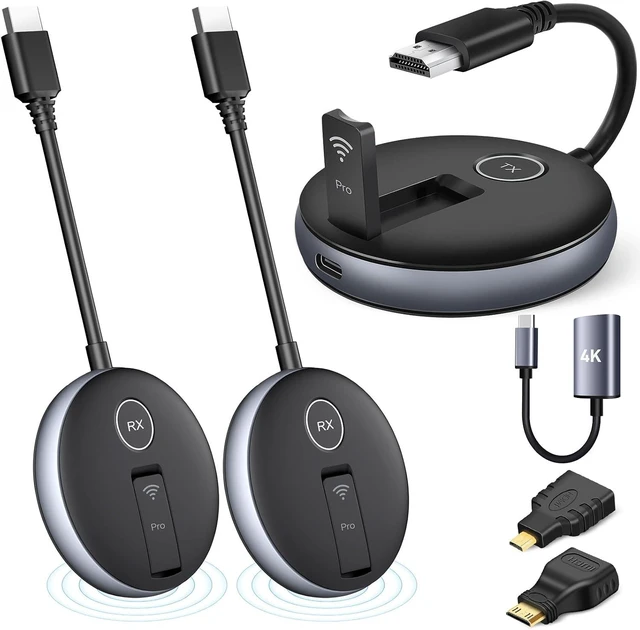
Seamless Multi-Screen ExpansionWireless HDMI G9R PRO resolves the challenge of streaming smooth video, audio, or presentations (PPTs) across 165FT/50M with multiple displays. Comes with 1TX + 2RX (2x TVs, Monitors, Screens) simultaneously, without any delay. Buy Extra RX at ASIN: B0DSLHBQW1 Up to 6 Screens.TX Need Correct Connection- Important: TX cannot connect directly to a TV; it must be connected to an HDMI output device like a laptop or TV box for proper functionality.
Plug-and-PlayYAOMAISI Original G9R Pro Sets come Pre-paired transmitter and receiver. Simply wait for 5-10 seconds, and the RX will automatically pair with the TX. Operate and function on the 2.4G/5G Hz wireless band-- no apps, no drivers, no software, no Wi-Fi, or no Bluetooth connections are required. No Support for TV/Smart TV to Other TV Transmission: Most TVs do not have HDMI output functionality.
Stay Cooling/Heat-Control TechnologyWireless HDMI Transmitter Pro w/ Heat-Control Technology ensures automatic cooling, preventing overheating and guaranteeing stable performance during long-term use. Whether you're hosting business meetings, church services, or streaming sports events, the G9R PRO remains cool and reliable.
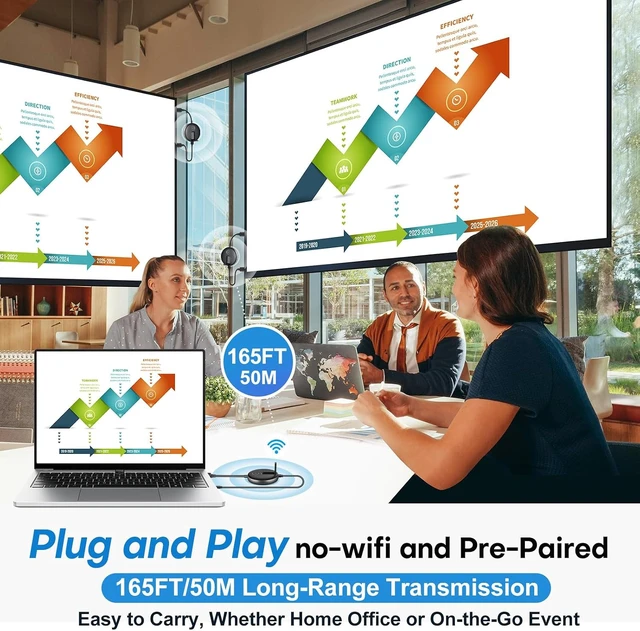
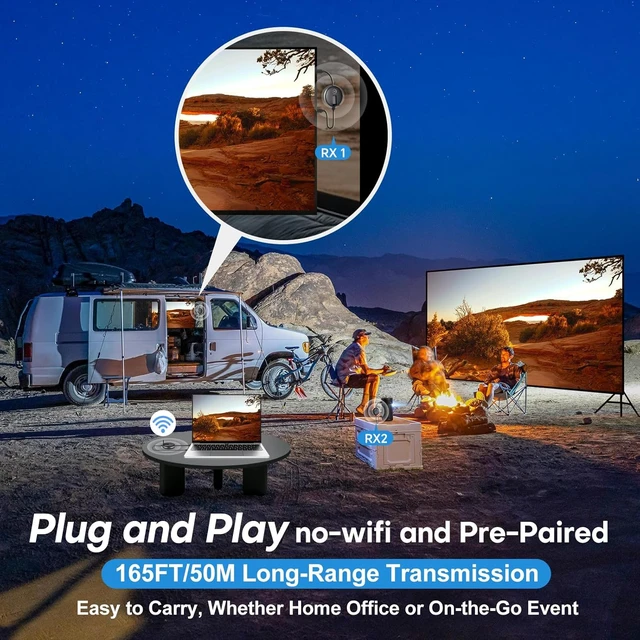
Long Transmission Range, 5.8G/2.4G Dual-Band165FT/50M Ultra-Long-Range Stable Transmission in open area (No Barriers). 5G Technology Support to Transmit through Walls or Ceilings-- About 50 FT(15 Meters). Experience stable transmission across devices using both 2.4GHz and 5.8GHz dual-band Wi-Fi for uninterrupted connectivity- Only ultra-low 0.1s latency.
@60Hz High Screen Refresh RateUltra-Fast Streaming-Experience seamless 1080P@60Hz video with powerful 5GHz chip.Providing high-definition video and synchronized audio. Compression, artifact video with a direct HDMI signal connection for low-latency, video playback. RX - Support 4K Decoding Input. TX Support 1080P Output only. Please check and adjust your device to 1080P before plugging the TX in.
5V/1A Power Supply Note Utilize a 5V/1A power supply for stable connectivity. Low battery in a laptop/TV insufficient USB interface power may cause interruptions or delays. Suggestion use a charger ensures a consistent power supply. If using a laptops USB port to power the TX, please ensure the laptop is plugged into a power source for stable performance.
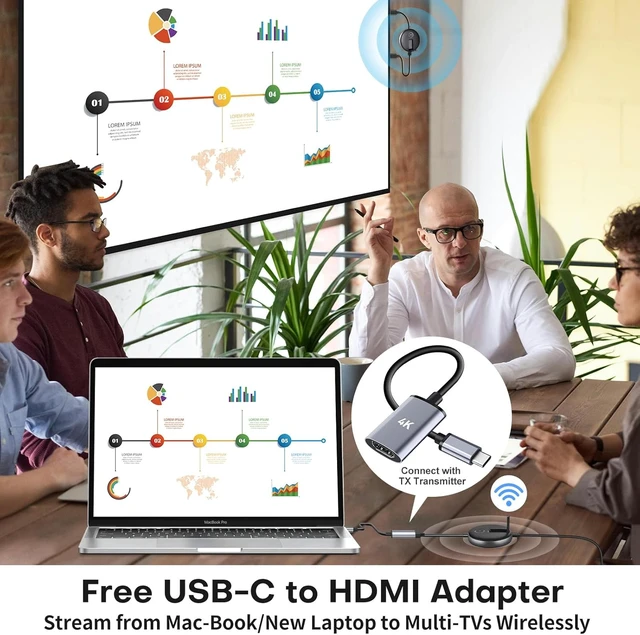
USB-C to HDMI Adapter (included)Hdmi Sender and Receiver Wireless PRO includes a USB-C to HDMI Adapter, making it easy to connect your MacBook or other newer laptops to multiple TVs or displays. Ideal for future-proof streaming, ensuring smooth, hassle setup from your portable devices to your larger screens.
Portable ConvenienceOur wireless HDMI PRO transmitter and receiver feature a portable design that lets you enjoy streaming anytime, anywhere. Whether you are streaming live sports events, watching movies, playing games, or giving presentations on a large screen, it effortlessly meets your professional needs. Perfect for conference rooms, classrooms, bars, restaurants, banks, live broadcasts, and other places where multiple displays can be installed.
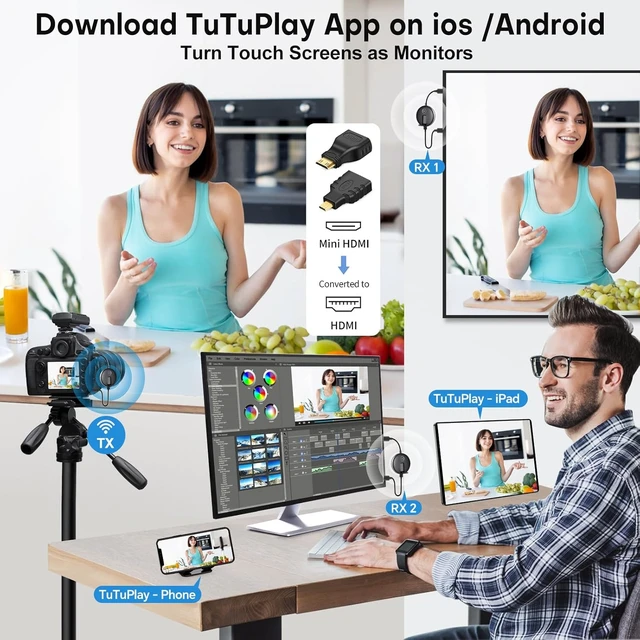
Ensure TX Correct SetupG9R PRO HDMI Wireless Splitter is clearly marked with TX (Transmitter) for laptop connection and RX (Receiver) for display devices. 1 Transmitter to 6 Receivers - 6RXs Options (Under Limited Conditions) . TuTuPlay App (Android or iOS) -Wireless Mirror Laptop-to-Phones, iPhone, iPad, Smartphones or Tablets!
Supports Extended Mode on Windows/MacStream MacBook/Laptop to Multi-TVs Wirelessly. Supports extended display mode, allowing users to expand their workspace across multiple screens for enhanced productivity. On Windows, press Windows + P to duplicate the display; on Mac, go to System Preferences > Displays to mirror displays.
G9R PRO WIRELESS HDMI EXTENDER KIT
Expand Simultaneous Streaming to Multiple TVs
Experience seamless high-definition content streaming with the G9R PRO Wireless HDMI Adapter, transforming any space into a cutting-edge multimedia hub.
. For addressing pairing and extended distance concerns, it's crucial to follow these steps for using the receiver and transmitter:
- 1. Connect to a Type-C cable (included) with a 5V/1A charger for stable power. P.S.: If using the TX with a laptop USB port power, Ensure the laptop is plugged in to a power source for stable TX power.
- Unfold the antennas on both RX and TX surfaces to enhance signal transmission.
- TX Need Correct Connection- Not Support TV/Smart TV to Other TV Transmission. Please do not plug the TX into a TV. Most TVs do not have HDMI output functionality. TX/Transmitter Plug into an HDMI output device such as a Laptop, PC, or TV Box only.
G9R PRO Wireless HDMI Splitter device removes the hassle of messy cables, allowing for a more convenient and comfortable display setup, especially during events like the Sports Events and Games.
- Plug-and-Play Convenience: with a pre-paired transmitter and receiver, - Simply wait for 3-30 seconds, and the RX will automatically pair with the TX. Operate and function on the 5.8G/2.4G Hz wireless band-- no apps, no drivers, no software, no Wi-Fi, or no Bluetooth.
- USB-C to HDMI Adapter(included- Connect with TX Transmitter)- Stream from Mac-book/Newer Laptop to Muti-TVs Wirelessly.
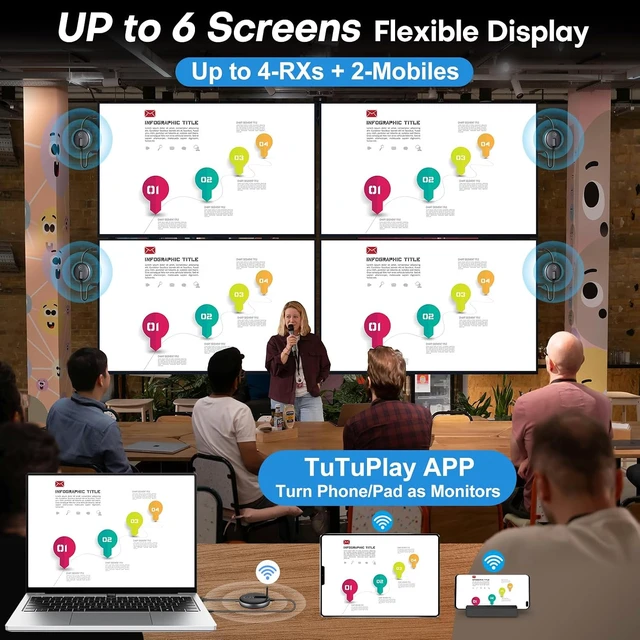
- 165FT Long Range with Multiple TVs: 165FT/50M Long-Transmission Range in open areas, 50FT/15M Through Walls (Avoid Thick Walls or Large Obstacles). Up to 6 Screens (Recommended 4 RXs + 2 Mobiles) and Up to 6RXs Options (Under Limited Conditions)
- Enhance 5GHz Chip/ 5.8G/2.4G Dual-Band : Real-Time Streaming with Multi-Screens , Even in Crowded Environments. Ultra-Low 0.1s Latency.
- Stay Cooling/Heat-Control Technology ensures Automatic Cooling. Preventing Overheating and guaranteeing stable performance during Long-Term Use.
- @60Hz High Screen Refresh Rate: Enjoy seamless 1080P@60Hz video w/ G9R PRO, fueled by a powerful 5GHz chip. With a direct HDMI connection, experience low-latency, tear-free video, free from compression or artifacts, ensuring top-quality visuals and synchronized audio.
- Portable Design for Versatile Use: Our G9R PRO Wireless Video Transmitter and Receiver boast a portable design 2.95x0.59inch, enabling streaming convenience anytime, anywhere. Perfect for Mobile Users or Events-No Wi-Fi connection is required.
- TuTuPlay App (Android or iOS) -Wireless Mirror Laptop-to-Phones, Pad, Smartphones or Tablets! Enjoy streamlined mobility by transforming your mobile device into a convenient secondary screen, accessing vital information effortlessly.
- MINI/MICRO HDMI : Offers free Mini and Micro HDMI adapters for wider device compatibility.
Stream from Mac-book/Laptop to Muti-TVs Wirelessly
Elevating Your Streaming Experience!
Effortless helpful tips, to ensure a smoother experience:
- To Ensure Correct Connection: TX (transmitter) and RX (receiver) are marked on the surface of the product. TX- is connected to the laptop and RX- is connected to the display. - TX cannot be connected with TV,Projector or display device.
- Optimize Signal Strength: Open the antennas on both RX and TX surfaces for seamless connectivity,superior signal quality between devices.
- 5V1A Stable Power Source: Connect both the TX and RX devices to a Type-C cable and a 5V/1A charger to maintain stable signal transmission.
- Power Requirements: Ensure adequate power for uninterrupted transmission. For instance, USB interfaces on laptops or TVs may not consistently provide sufficient power. Low power in a laptop/TVs might cause interruptions, audio-only output, blinking, color loss, or delays.
- Unplug and Plug: Re-insert electronic devices if issues arise. Sometimes electronic devices may encounter problems that can be resolved by resetting them. Unplug TX and RX for a while, then Plug Back again.
- HDMI Interface Maintenance: Regular checks and reinsertion can resolve connection issues caused by prolonged use of the HDMI interface on devices such as TVs and laptops.
- Distance and Obstacles: Try moving the TX and RX closer to each other. Aviod any thick walls or significant obstacles between the TX and RX.
- TuTuPlay App (Android or iOS)-enables seamless pairing with smartphones and tablets via Wi-Fi, eliminating the need for plug-ins.- The exact steps are below -TuTuPlay App: Wireless Laptop to Phone Mirroring Guide
Upon RX/Receiver successfully plugging into TVs/Monitors- then a connection interface will appear on the receiver's screen with Connection Solution, Troubleshooting, and Useful Tips.
- G9R PRO Pre-paired transmitter and receiver - offer a hassle-free setup within secondsno apps, no driver downloads, no software, no Wi-Fi, or no Bluetooth connections required. They operate and function on the 2.4G/5G Hz wireless band.
- G9R PRO wireless HDMI adapter employs dual-band WIFI technology (2.4G and 5G) to cater to your essential needs. It efficiently transmits presentation, movie video, and audio signals wirelessly from the source to the target. For seamless wireless mirroring from Output Device (Laptop, PC) to Display Devices like TVs and projectors, can mirror content onto up to Up to 6 Screens (Recommended 4 RXs + 2 Mobiles) and Up to 6RXs Options (Under Limited Conditions) large-screen displays simultaneously.
- Delivering a 165FT/50M Long Transmission Range in Open Environments (No Barriers). With 5G Technology Support, it can transmit through walls or ceilings, covering about50FT (15 Meters).
- RX - Support 4K Decording Input. TX Support 1080P Output only. Please check and adjust your Device set of 1080P Before Plug the TX.
Enhance Multi-Screen Streaming Capability
TuTuPlay App - Wireless Mirror Laptop to Phone, iPad, Tablet!
Unlock Seamless Screen Extension
YAOMAISI G9R PRO HDMI transmitter and receiver introduces the TuTuPlay app, revolutionizing screen extension by wirelessly transmitting HDMI output devices, such as laptops, directly to your mobile devices. Transform your phone or tablet into a secondary screen effortlessly.
Key Features:
- Streamlined Mobility: Enjoy the flexibility of monitoring camera shots or checking details on your Phone/Pad/Smartphones/Tablet (iOS and Android) without the hassle of bulky displays or cables. Your mobile device becomes a convenient second screen.
- Effortless Connectivity: With the TuTuPlay app, wirelessly mirror your laptop screen to your mobile device, ensuring easy access to crucial information anytime, anywhere.
- Enhanced Convenience: Perfect for professionals on the move or anyone seeking a portable and versatile solution for screen extension needs. Experience the freedom of a second screen on your mobile device with the TuTuPlay appa practical and efficient solution for seamless screen mirroring.
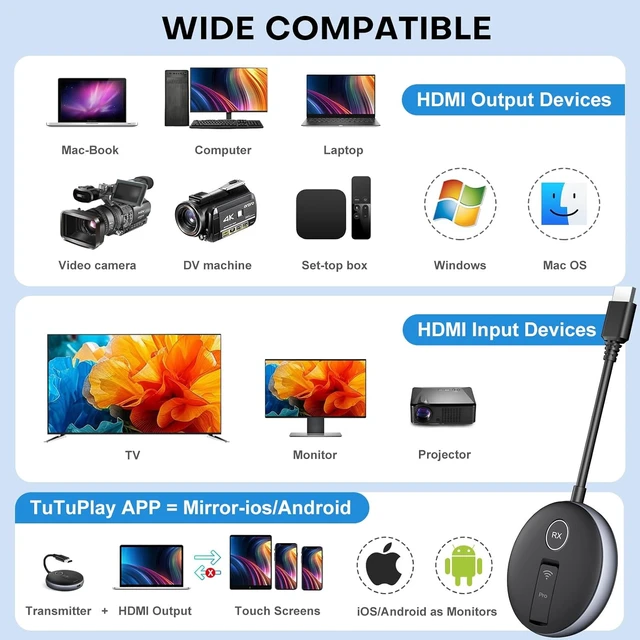
Wide Device Compatibility:
- Output Devices- Laptop, Personal Computer (PC), DSLR Camera, Gaming Console, TV Box
- Display Devices- HDTVs, Projectors, TVs, Monitors, Advertising Machines, Conference Screens, and Televisions;
- Mobile Display Devices- Smart Phones, Tablets, Phone/Pad/Tablet (iOS and Android) and Android Phones;
G9R PRO only supports laptop-to-smartphone transmission and doesn't mirror mobile devices to large screens. The design is tailored for using Phone/Pad/Smartphones/Tablet (iOS and Android) as receivers, allowing your smartphones to function as a mirroring device.

Wireless HDMI Receiver Setup Guide
Effortless Four-Steps Installation offers quick setup for instant streaming :
- Unfold antennas: Open the antennas on both RX and TX surfaces for seamless connectivity and superior signal between devices.
- Connect TX/Transmitter and RX/Receiver to HDMI ports and Type-C cables:
- TX/Transmitter Connection: Plug the transmitter into the output device's HDMI port (Laptop, PC, satellite box, game console, DSLR camera).
- RX/Receiver Connection: Plug the receiver into the display device's HDMI Port(TVs, Projectors, TVs, Monitors, Conference Screens).
- Power Supply: Connect both the TX and RX devices to a Type-C cable and a 5V/1A charger for consistent signal transmission.
- Pairing Process/Plug-and-Play: Original G9R PRO Sets come pre-paired, Simply wait for 5-30 seconds, the RX will auto-pair with the TX.
- Start Streaming: Enjoy seamless streaming without delay.
Note: YAOMAISI's G9R PRO wireless HDMI sender and receiver support Up to 6 Screens (Recommended 4 RXs + 2 Mobiles) and Up to 6RXs Options (Under Limited Conditions), allowing flexible combinations based on your preferences. To expand your display setup, easily purchase additional RXs at ASIN: B0DSLHBQW1. (Separately Purchased RX/Receivers manual pairing is necessary)
- Mixing Receivers & Phones:
- 1 Transmitter to 3 Receiver & 3 Mobiles (Recommended)
- 1 Transmitter to 4 Receivers +2 Mobiles (Recommended 4 RXs + 2 Mobiles)
- 1 Transmitter to 6 Receivers - 6RXs Options (Under Limited Conditions)
YAOMAISI's G9R Pro wireless HDMI adapter Explore various combinations to suit your multi-screen needs for an enhanced viewing experience.

TuTuPlay App: Wireless Laptop to Phone Mirroring Guide
Seamless Connectivity in Four Steps
- Transmitter Setup: Connect the TX into output device's HDMI port and Type-C cables to power it up.
- Mobile Device-Phone/Pad Preparation: Install the TuTuPlay app on your Phone/Pad/Smartphones/Tablet (iOS and Android) or other compatible Smart Mobile Device.
- WiFi Connection: Access your WiFi settings and locate "TuTuPlay-xxx."
- Connect to this network using the provided password: "12345678."
- App Activation: Open the TuTuPlay app on your Phone/Pad/Smartphones/Tablet (iOS and Android) to begin syncing.
Effortlessly mirror your laptop screen onto your phone using the TuTuPlay App. Follow these four simple steps for quick and efficient wireless mirroring.
- Home Entertainment - Dive into seamless streaming experiences, effortlessly enjoying movies, and videos from your laptop, camera, or gaming console on large screens Up to 6 Screens (Recommended 4 RXs + 2 Mobiles) and Up to 6RXs Options (Under Limited Conditions))
- Office Presentations - Perfectly suited for presentations, video conferences, or sharing various content from laptops within meeting rooms and conference areas.
- Bar/Restaurant - Elevate customer experiences by wirelessly streaming live sports events or entertainment content across Multiple Televisions, eliminating tangled wires.
- Outdoor Events - Wirelessly projecting content across multiple displays, ideal for open-air gatherings or screenings, providing a seamless solution for event media transmission.
- School - Ideal for education, seamlessly sharing presentations, lectures, or educational content wirelessly on multiple larger conference screens or projectors. Perfect for classrooms or lecture halls, enhancing the learning experience.
- Church - Facilitate seamless streaming of presentations and content across multiple monitors, perfect for congregations or gatherings
- Live Streaming - Seamlessly broadcast live events or streams across multiple displays.
- live Streaming (with DSLR Camera) - Effortlessly broadcast live content captured by a DSLR camera across multiple displays. Enhance your live broadcasts with high-quality, professional visuals through seamless wireless transmission.

Multiple Receivers - Up to 6 Screens Setup Guide
Establishing Connections in Three Simple Steps
G9R PRO Wirelessly Stream to Multiple TVs enables transmission from the transmitter to multiple receivers.
Receiver Pairing:
- · For new receivers- Pair the new receiver with the transmitter again.
- · Connect the newly paired receiver into the display device's HDMI port and Type-C cables to a 5V1A charger (Separately Purchased RX/Receivers require manual-pairing; Original G9R PRO Sets come pre-paired, offering a plug-and-play experience for seamless setup and operation.).
Connection Setup:
- . Upon successful plug, a connection interface will appear on the receiver's screen.
- · For Original G9R PRO Sets , they come pre-paired. Simply wait for 5-10 seconds, and the RX will automatically pair with the TX.
- . For Separately Purchased RX/Receivers, (Manual-Pairing required), Once the connection interface appears on the screen, Simultaneously press the TX and RX buttons, Until the TX starts flashing for connection. · Release the buttons and wait for 5-10 seconds, Until the TX stops flashing, the pairing is complete.
Synchronization Process:
- · All successfully paired receivers will synchronize with the screen.
If receivers fail connection/pairing, or signal loss issues, please try:
- Once the connection interface appears on the screen, simultaneously press the TX and RX buttons, Until the TX starts flashing for connection.
- Release the buttons and Simply wait for 5-10 seconds, Until TX stops flashing, pairing complete.




 here!