

Your Browsing History

Meet Your Seller

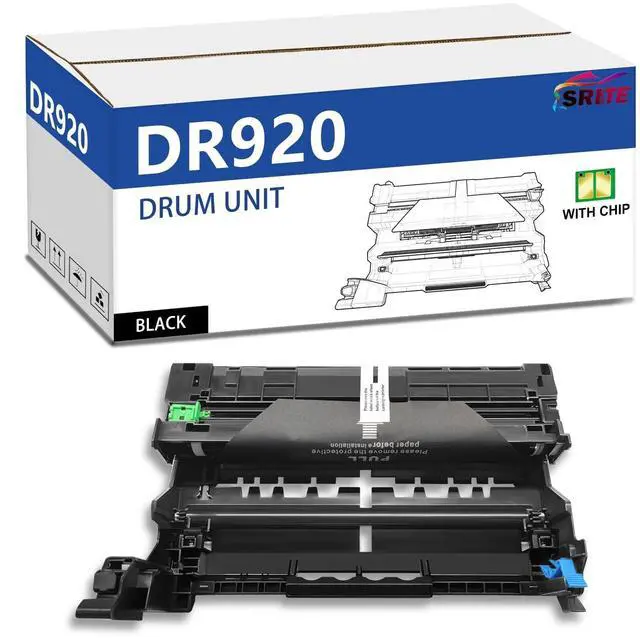




SRITE DR920 DR-920 Drum Unit Replacement for Brother DR 920 use with TN920 TN920XL TN920XXL Work for Brother HL-L5210DWT HL-L5215DW HL-L6310DW HL-L6210DW DCP-L5510DN Printer (Not Toner)
- Packaging:1 Pack High Yield DR920 DR-920 Drum Unit replacement for Brother DR 920 DR-920 Drum Unit Black (not toner)
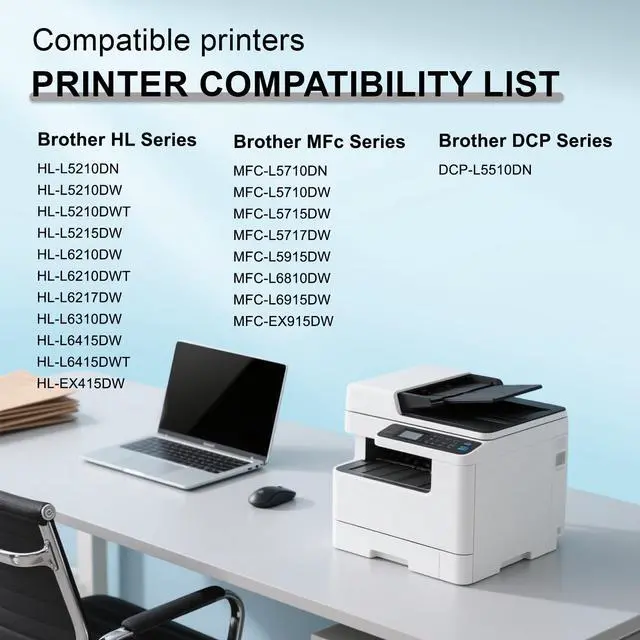
- Compatible With Printers: DR920 drum unit is for use with the Brother HL-L5210DN, HL-L5210DW, HL-L5210DWT, HL-L6210DW, HL-L6210DWT, HL-L6217DW, HL-L6310DW, DCP-L5510DN, MFC-L5710DN, MFC-L5710DW, MFC-L5717DW, MFC-L5915DW, and MFC-L6810DW Printers
- High Page Yield: Up to 45,000 Pages DR920 in black at 5% coverage on letter a4
- High-quality DR920 Drum: The DR920-compatible DrumUnit can produce high-quality images and text, which is comparable to the original cartridge in performance and output quality, allowing you to save money without sacrificing quality
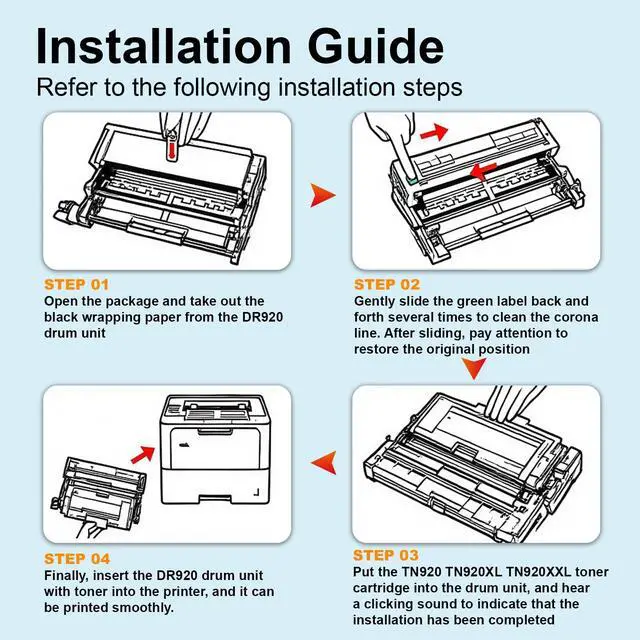
- Installation Steps: Open the package and tear off the black paper, gently slide the green tab, clean the corona wire several times, put the TN920 toner cartridge into the drum unit, and then put it into the printer
+
+
Overview
Specs
Reviews

Any questions? Our AI mode will help you find out quickly.
Try me now
Packaging: 1 Pack High Yield DR920 DR-920 Drum Unit replacement for Brother DR 920 DR-920 Drum Unit Black (not toner) ^^
Compatible With Printers: DR920 drum unit is for use with the Brother HL-L5210DN, HL-L5210DW, HL-L5210DWT, HL-L6210DW, HL-L6210DWT, HL-L6217DW, HL-L6310DW, DCP-L5510DN, MFC-L5710DN, MFC-L5710DW, MFC-L5717DW, MFC-L5915DW, and MFC-L6810DW Printers ^^
High Page Yield: Up to 45, 000 Pages DR920 in black at 5% coverage on letter a4 ^^
High-quality DR920 Drum: The DR920-compatible DrumUnit can produce high-quality images and text, which is comparable to the original cartridge in performance and output quality, allowing you to save money without sacrificing quality ^^
Installation Steps: Open the package and tear off the black paper, gently slide the green tab, clean the corona wire several times, put the TN920 toner cartridge into the drum unit, and then put it into the printer
Compatible With Printers: DR920 drum unit is for use with the Brother HL-L5210DN, HL-L5210DW, HL-L5210DWT, HL-L6210DW, HL-L6210DWT, HL-L6217DW, HL-L6310DW, DCP-L5510DN, MFC-L5710DN, MFC-L5710DW, MFC-L5717DW, MFC-L5915DW, and MFC-L6810DW Printers ^^
High Page Yield: Up to 45, 000 Pages DR920 in black at 5% coverage on letter a4 ^^
High-quality DR920 Drum: The DR920-compatible DrumUnit can produce high-quality images and text, which is comparable to the original cartridge in performance and output quality, allowing you to save money without sacrificing quality ^^
Installation Steps: Open the package and tear off the black paper, gently slide the green tab, clean the corona wire several times, put the TN920 toner cartridge into the drum unit, and then put it into the printer
Warranty & Returns
Warranty, Returns, And Additional Information
Warranty
- Please contact the Seller directly for warranty information. Warranty information may also be found on the Manufacturer's website.
- CONTACT
Return Policies
- Return for refund within: 30 days
- Return for replacement within: 30 days
- This item is covered by HyperCore Return Policy
Manufacturer Contact Info
- For a directory of all our manufacturers, please click below.
- Manufacturers Directory
LOADING...