

Your Browsing History
- Free 30-day Returns
$116.99

Meet Your Seller


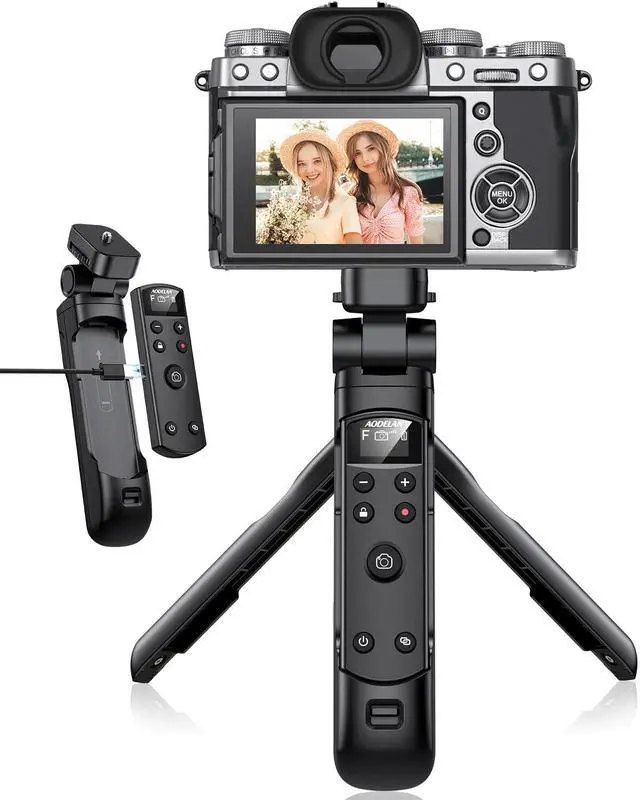


for Fujifilm Tripod with Rechargeable Remote Control - Aodelan Wireless Shooting Grip Tripod with OLED Screen for Vlogging for Fuji X-T30 II, X-S10, X-H2S, X-H2, X-T5, X-T4, X-T3, X-S20, X-T50, X-T30
- 1.Compatible with Fujifilm Camera Models - for X-H2,X-H2S,X-T4,X-T5,X-T3,X-S20,X-S10,X-T50,X-T30 II,X-T30,X-M5,X100VI,X-E5,X half;*Note: Some models require firmware updates to specific versions for compatibility: X-H2S (Ver.3.00 or later),X-H2 (Ver.1.20 or later);X-T5 (Ver.1.00 or later), X-T4 (Ver.1.70 or later);X-T3 (Ver.4.50 or later),X-S10 (Ver.2.60 or later);X-T30II (Ver.1.20 or later),X-T30 (Ver.1.50 or later).Remote zoom is only available with zoom lenses.(Even with a zoom lens, the X-T30 II/X-T30/X100Vl does not support remote zoom for the time being.)
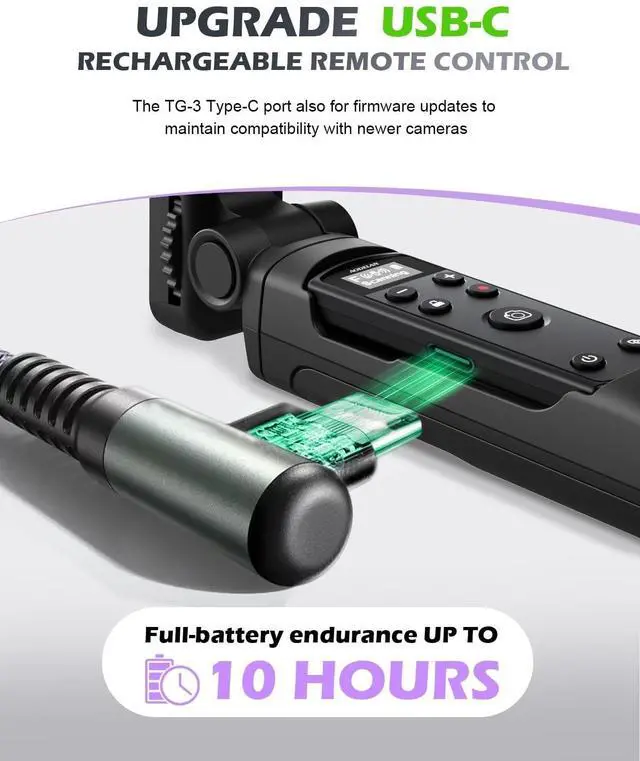
- 2.Upgraded USB-C Rechargeable Design: This for Fujifilm camera tripod features a built-in rechargeable battery and a universal USB-C charging port, allowing you to conveniently charge it with your smartphone charger. With a full-battery endurance of up to 10 hours, this for Fujifilm vlogger kit ensures reliable performance. Additionally, its USB-C port supports firmware updates to maintain compatibility with newer camera mode
+
+
Overview
Specs
Reviews

Any questions? Our AI mode will help you find out quickly.
Try me now
1. Compatible with Fujifilm Camera Models - for X-H2, X-H2S, X-T4, X-T5, X-T3, X-S20, X-S10, X-T50, X-T30 II, X-T30, X-M5, X100VI, X-E5, X
half; *Note: Some models require firmware updates to specific versions for compatibility: X-H2S (Ver. 3.00 or later), X-H2 (Ver. 1.20 or later); X-T5 (Ver. 1.00 or later), X-T4 (Ver. 1.70 or later); X-T3 (Ver. 4.50 or later), X-S10 (Ver. 2.60 or later); X-T30II (Ver. 1.20 or later), X-T30 (Ver. 1.50 or later). Remote zoom is only available with zoom lenses. (Even with a zoom lens, the X-T30 II/X-T30/X100Vl does not support remote zoom for the time being. ) ^^ 2.
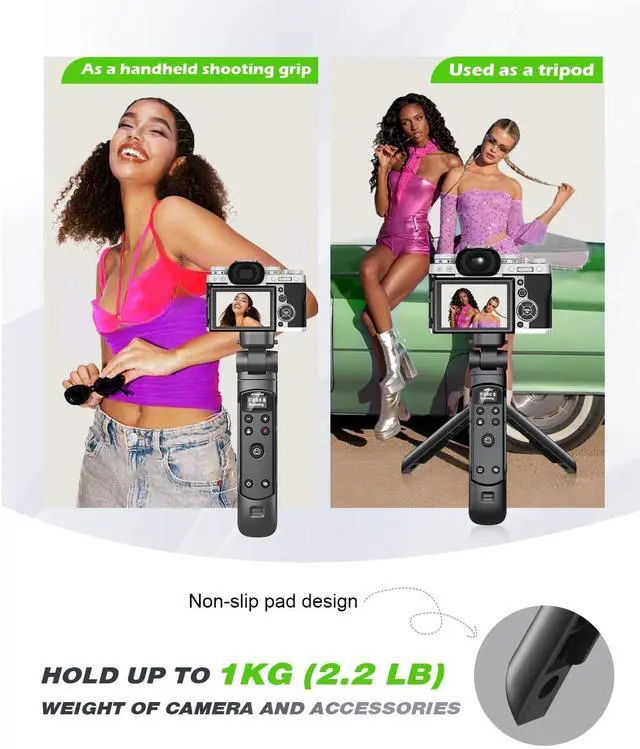
Upgraded USB-C Rechargeable Design: This for Fujifilm camera tripod features a built-in rechargeable battery and a universal USB-C charging port, allowing you to conveniently charge it with your smartphone charger. With a full-battery endurance of up to 10 hours, this for Fujifilm vlogger kit ensures reliable performance. Additionally, its USB-C port supports firmware updates to maintain compatibility with newer camera models ^^ 3. AODELAN for Fujifilm Mini Tripod Grip with Remote Control can be used either as wireless shooting grip and tabletop tripod (hold up to 1 kg ( 2.2 lb) weight of camera). Light weight and easy to carry. Ideal for camera vlogging live streamingcontent creation and selfie ^^ 4.
Used as a tripod: the bottom of tripod equipped with a non-slip pad supplies stable support, leave your hand free and ensuring a clear video;
As a handheld shooting grip: holding the grip to shoot for still and movie, and controlling your camera with the buttons on remote; it aslo can
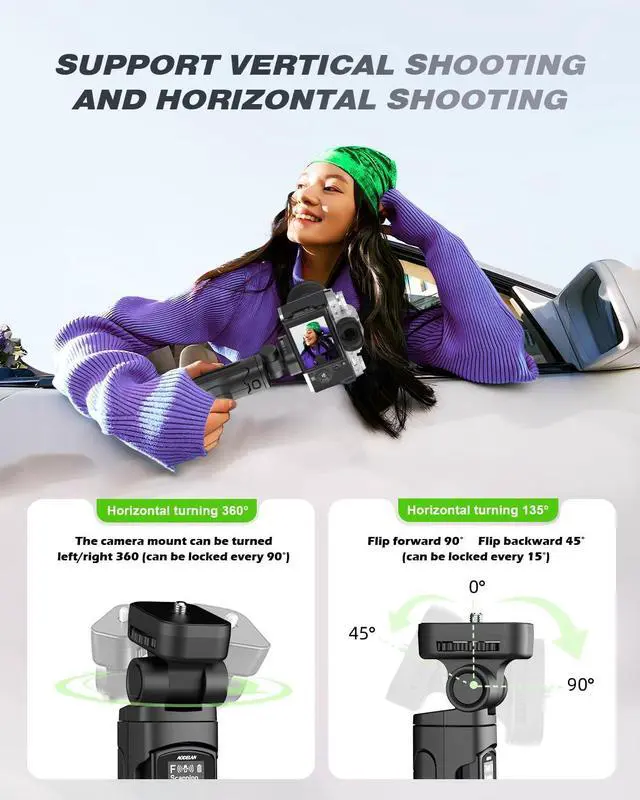
Adjust angles: Tilt the gimbal forward 90 or backward 45 (with 15 locking steps) and rotate 360 horizontally (locks every 90) for precise framing. ^^ 5. Photo Shooting /
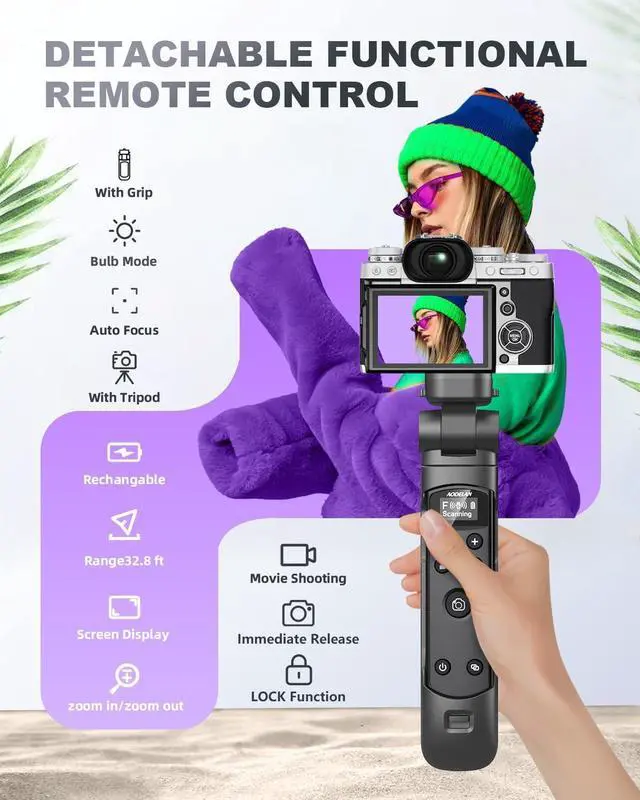
Video Recording/BULB/AF: This Wireless Shooting Grip for Fujifilm supports shooting still photos, short videos, continuous shooting, self timer, Bulb shooting. It requires no line of sight to the camera with operating range up to 10m/ 32.8 ft; Press the button halfway down to focus (the camera needs to be set to AF (auto focus) mode). Good aider for selfies, group photos, wild animals, macro photography, star trails, landscape photography ^^ 6. Focus/Zoom & LOCK FunctionThe Wireless Shooting Grip support zoom function, the zoom speed is controlled by the distance the button is pressed. The zoom function is available only for power zoom lenses and when the camera supports remote zoom. The LOCK button disables the remote control buttons to prevent accidental operation
half; *Note: Some models require firmware updates to specific versions for compatibility: X-H2S (Ver. 3.00 or later), X-H2 (Ver. 1.20 or later); X-T5 (Ver. 1.00 or later), X-T4 (Ver. 1.70 or later); X-T3 (Ver. 4.50 or later), X-S10 (Ver. 2.60 or later); X-T30II (Ver. 1.20 or later), X-T30 (Ver. 1.50 or later). Remote zoom is only available with zoom lenses. (Even with a zoom lens, the X-T30 II/X-T30/X100Vl does not support remote zoom for the time being. ) ^^ 2.
Upgraded USB-C Rechargeable Design: This for Fujifilm camera tripod features a built-in rechargeable battery and a universal USB-C charging port, allowing you to conveniently charge it with your smartphone charger. With a full-battery endurance of up to 10 hours, this for Fujifilm vlogger kit ensures reliable performance. Additionally, its USB-C port supports firmware updates to maintain compatibility with newer camera models ^^ 3. AODELAN for Fujifilm Mini Tripod Grip with Remote Control can be used either as wireless shooting grip and tabletop tripod (hold up to 1 kg ( 2.2 lb) weight of camera). Light weight and easy to carry. Ideal for camera vlogging live streamingcontent creation and selfie ^^ 4.
Used as a tripod: the bottom of tripod equipped with a non-slip pad supplies stable support, leave your hand free and ensuring a clear video;
As a handheld shooting grip: holding the grip to shoot for still and movie, and controlling your camera with the buttons on remote; it aslo can
Adjust angles: Tilt the gimbal forward 90 or backward 45 (with 15 locking steps) and rotate 360 horizontally (locks every 90) for precise framing. ^^ 5. Photo Shooting /
Video Recording/BULB/AF: This Wireless Shooting Grip for Fujifilm supports shooting still photos, short videos, continuous shooting, self timer, Bulb shooting. It requires no line of sight to the camera with operating range up to 10m/ 32.8 ft; Press the button halfway down to focus (the camera needs to be set to AF (auto focus) mode). Good aider for selfies, group photos, wild animals, macro photography, star trails, landscape photography ^^ 6. Focus/Zoom & LOCK FunctionThe Wireless Shooting Grip support zoom function, the zoom speed is controlled by the distance the button is pressed. The zoom function is available only for power zoom lenses and when the camera supports remote zoom. The LOCK button disables the remote control buttons to prevent accidental operation
Warranty & Returns
Warranty, Returns, And Additional Information
Warranty
- Please contact the Seller directly for warranty information. Warranty information may also be found on the Manufacturer's website.
- CONTACT
Return Policies
- Return for refund within: 30 days
- Return for replacement within: 30 days
- This item is covered by DuronTechnologies Return Policy
Manufacturer Contact Info
- For a directory of all our manufacturers, please click below.
- Manufacturers Directory
LOADING...