Your Browsing History
- Free 30-day Returns
$63.99
Meet Your Seller
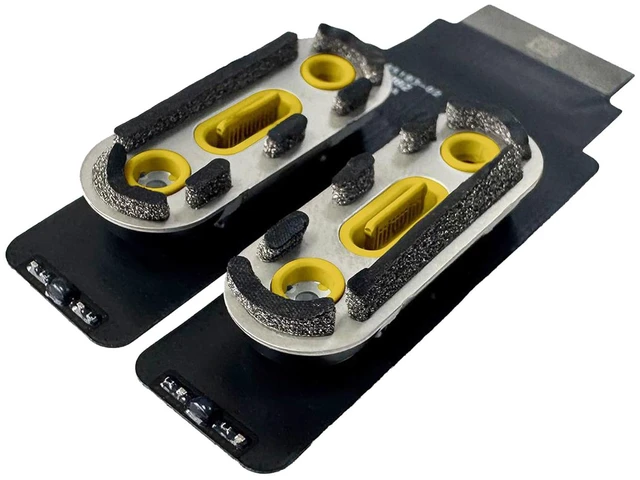
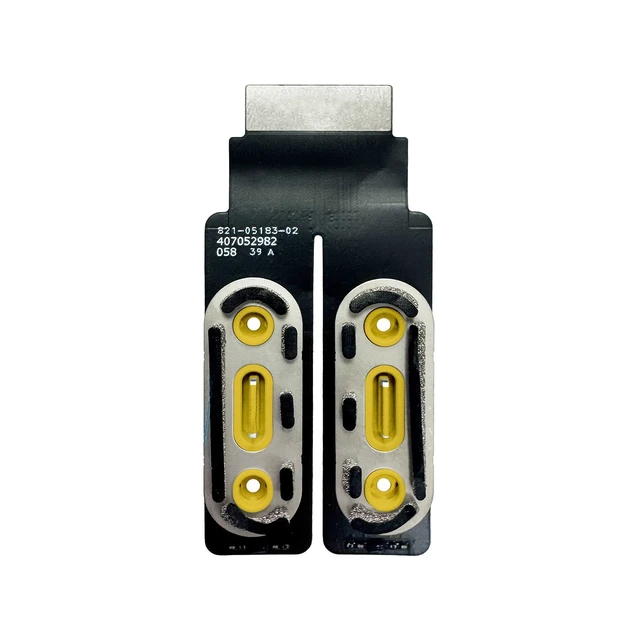
iPartsleader Thunderbolt USB-C 4 Boards Type-C Port Jack Connector with Cable Repair Replacement for iMac (24-inch,M4,2024) A3247 A3137 821-05183-02 923-10854 (Yellow)
- Compatible Models iMac 24 inch M1 2021 or M3 2023 Models , for iMac (24-inch,M4,2024) A3247 (2-ports) A3137 (4-ports),Model Identifier: Mac16,2 (2-ports) Mac16,3 (4-ports),Model Number: A3247 (2-ports) A3137 (4-ports),EMC: 8531 (2-ports) 8532 (4-ports)
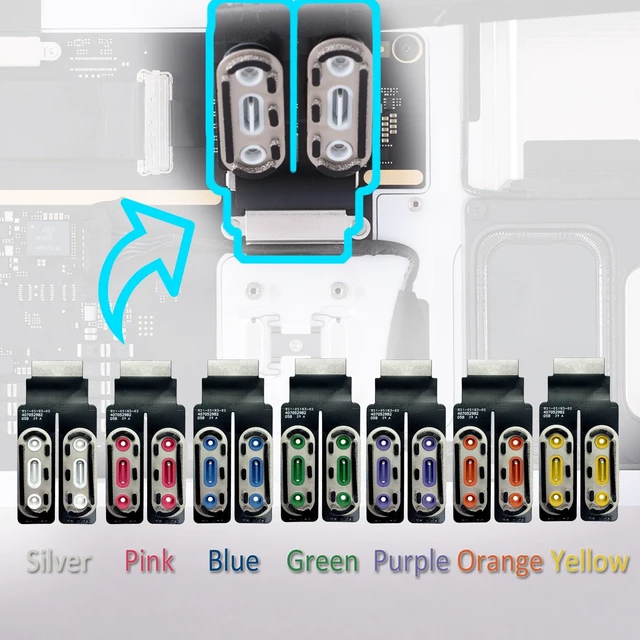
- What's Include1 Piece x USB-C Boards (with printed part number 821-05183-02 ) , Note: the manufacturer part number 923-10853, silver /923-10854, yellow /923-10855, green /923-10856, blue /923-10857, pink /923-10858, purple /923-10859, orange
- Functions & CompatibilityDual vs. Quad Array Configs: The base 8-core M4 iMac has two Thunderbolt / USB 4 ports. The 10-core models add an extra module housing two USB 3 ports (totaling 4 ports).High-Speed Display Matrix: The M4 Thunderbolt ports support up to dual external 6K/60Hz displays.Generational Compatibility: Physically identical to M1/M3 iMac port modules, but firmware and pinouts are mismatched. M4 models require dedicated M4-generation USB-C modules; older modules will trigger h
+
+
Overview
Specs
Reviews
Any questions? Ask CelesteSM will help you find out quickly.
Try me now
Compatible Models iMac 24 inch M1 2021 or M3 2023 Models, for iMac (24-inch, M4, 2024) A3247 (2-ports) A3137 (4-ports),
Model Identifier: Mac16, 2 (2-ports) Mac16, 3 (4-ports),
Model Number: A3247 (2-ports) A3137 (4-ports), EMC: 8531 (2-ports) 8532 (4-ports) ^^ What's Include1 Piece x USB-C Boards (with printed part number 821-05183-02 ), Note: the manufacturer part number 923-10853, silver /923-10854, yellow /923-10855, green /923-10856, blue /923-10857, pink /923-10858, purple /923-10859, orange ^^ Functions & CompatibilityDual vs.
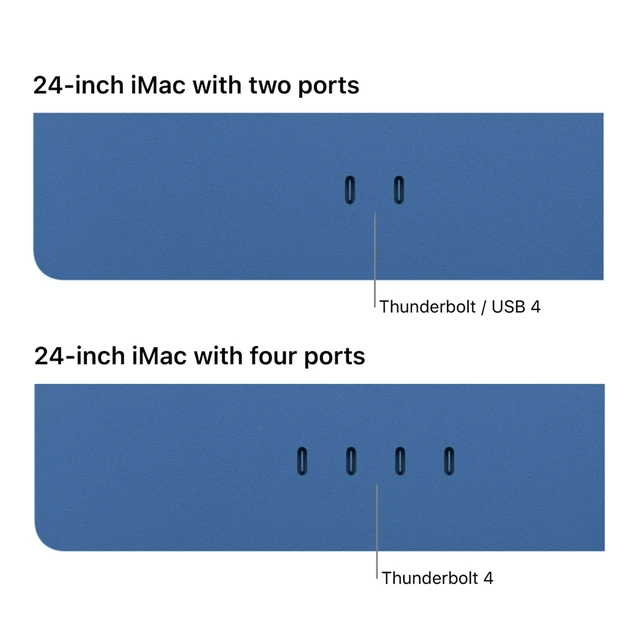
Quad Array Configs: The base 8-core M4 iMac has two Thunderbolt / USB 4 ports. The 10-core models add an extra module housing two USB 3 ports (totaling 4 ports).
High-Speed Display Matrix: The M4 Thunderbolt ports support up to dual external 6K/60Hz displays.
Generational Compatibility: Physically identical to M1/M3 iMac port modules, but firmware and pinouts are mismatched. M4 models require dedicated M4-generation USB-C modules; older modules will trigger hardware communication drops or refuse display handshakes.
Aesthetic Color-Matching: The physical plastic interior housings are uniquely color-coordinated to match the exterior aluminum chassis shade ^^
RepairabilityZero Solder Design: Unlike the Mac mini where rear ports are permanently attached, the iMac's ports are entirely modular. They snap out cleanly using a simple press connector, The "Display
Barrier" Penalty: To access these modules, you must cut the structural foam adhesive sealing the 24-inch display panel to the chassis, No
Software Lockout: The USB-C modules do not contain cryptographic pairing keys. Aftermarket or donor replacements work immediately without Apple Diagnostic calibration tools ^^ Common FailuresWobbly Fatigue or
Total Mechanical Breakage: Heavy external desk hubs or constant accessory swapping stretches the internal pins, causing the port to drop connection when nudged.
Voltage Spikes from Hot-Plugging: Plugging high-wattage external docks into the ports can cause back-fed voltage surges, killing the local Thunderbolt controller chip on the daughterboard.
Corrosion: Dust and ambient moisture settle into the rear-facing ports, triggering localized oxidization on the VBUS or high-speed data pins ^^ Pro-TipsThe Hidden
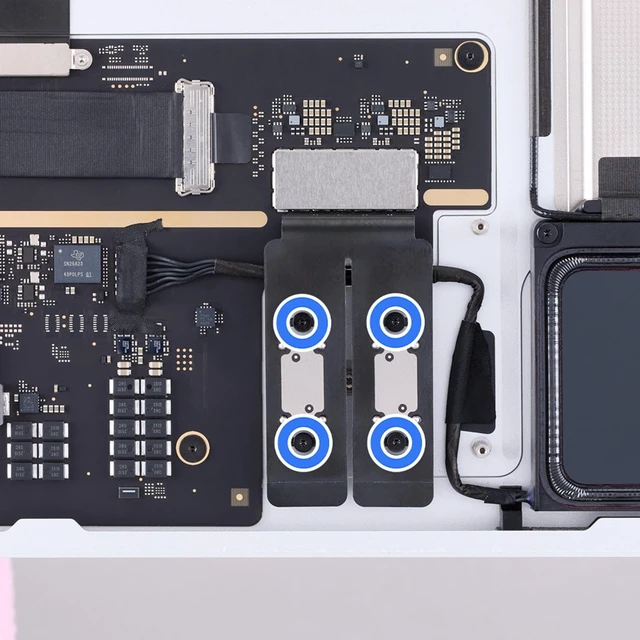
Tape Screws: When gutting the inner layout, the iMac (24-inch, 2024) Repair Manual notes that the USB-C retaining shield has four hidden screws tucked beneath black tape. Always peel back the grounding tape before prying, or you will snap the internal frame. The "Flip and
Lift" Technique: The USB-C boards swing upward like a hinge before popping loose from the interconnect matrix. Pulling straight back will shear the delicate logic board pins.
Discharge Main Power Rails: The iMac has large internal power capacitors. Unplug the magnetic wall brick and hold the power button for 15 seconds before popping the screen to completely drop residual currents
Model Identifier: Mac16, 2 (2-ports) Mac16, 3 (4-ports),
Model Number: A3247 (2-ports) A3137 (4-ports), EMC: 8531 (2-ports) 8532 (4-ports) ^^ What's Include1 Piece x USB-C Boards (with printed part number 821-05183-02 ), Note: the manufacturer part number 923-10853, silver /923-10854, yellow /923-10855, green /923-10856, blue /923-10857, pink /923-10858, purple /923-10859, orange ^^ Functions & CompatibilityDual vs.
Quad Array Configs: The base 8-core M4 iMac has two Thunderbolt / USB 4 ports. The 10-core models add an extra module housing two USB 3 ports (totaling 4 ports).
High-Speed Display Matrix: The M4 Thunderbolt ports support up to dual external 6K/60Hz displays.
Generational Compatibility: Physically identical to M1/M3 iMac port modules, but firmware and pinouts are mismatched. M4 models require dedicated M4-generation USB-C modules; older modules will trigger hardware communication drops or refuse display handshakes.
Aesthetic Color-Matching: The physical plastic interior housings are uniquely color-coordinated to match the exterior aluminum chassis shade ^^
RepairabilityZero Solder Design: Unlike the Mac mini where rear ports are permanently attached, the iMac's ports are entirely modular. They snap out cleanly using a simple press connector, The "Display
Barrier" Penalty: To access these modules, you must cut the structural foam adhesive sealing the 24-inch display panel to the chassis, No
Software Lockout: The USB-C modules do not contain cryptographic pairing keys. Aftermarket or donor replacements work immediately without Apple Diagnostic calibration tools ^^ Common FailuresWobbly Fatigue or
Total Mechanical Breakage: Heavy external desk hubs or constant accessory swapping stretches the internal pins, causing the port to drop connection when nudged.
Voltage Spikes from Hot-Plugging: Plugging high-wattage external docks into the ports can cause back-fed voltage surges, killing the local Thunderbolt controller chip on the daughterboard.
Corrosion: Dust and ambient moisture settle into the rear-facing ports, triggering localized oxidization on the VBUS or high-speed data pins ^^ Pro-TipsThe Hidden
Tape Screws: When gutting the inner layout, the iMac (24-inch, 2024) Repair Manual notes that the USB-C retaining shield has four hidden screws tucked beneath black tape. Always peel back the grounding tape before prying, or you will snap the internal frame. The "Flip and
Lift" Technique: The USB-C boards swing upward like a hinge before popping loose from the interconnect matrix. Pulling straight back will shear the delicate logic board pins.
Discharge Main Power Rails: The iMac has large internal power capacitors. Unplug the magnetic wall brick and hold the power button for 15 seconds before popping the screen to completely drop residual currents
Warranty & Returns
Warranty, Returns, And Additional Information
Warranty
- Please contact the Seller directly for warranty information. Warranty information may also be found on the Manufacturer's website.
- CONTACT
Return Policies
- Return for refund within: 30 days
- Return for replacement within: non-replaceable
- This item is covered by SIMPLIZED Return Policy
Manufacturer Contact Info
- For a directory of all our manufacturers, please click below.
- Manufacturers Directory
LOADING...