

Your Browsing History

Meet Your Seller

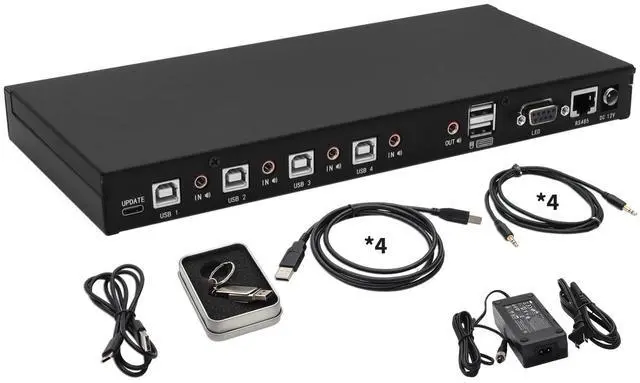


4-Port KM Switch with Mouse Roaming Control, Independent Audio Switching, Supports Multi-Monitor, Hotkey Control, Includes Cables and Management Software to Customize Switching Modes,New Version
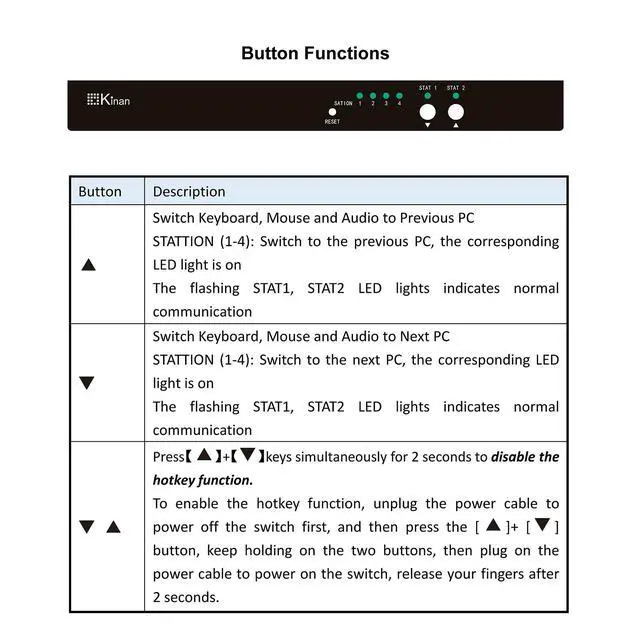
- Four-Port Keyboard and Mouse Switch: Effortlessly manage and switch KM (Keyboard and Mouse) functions across four computers, including multi-head setups, with the 4 Port KM Switch. This device supports seamless KM commands from a single workstation, streamlining your workflow without needing additional software. Simply use front panel push buttons or keyboard hotkeys for easy port selection.
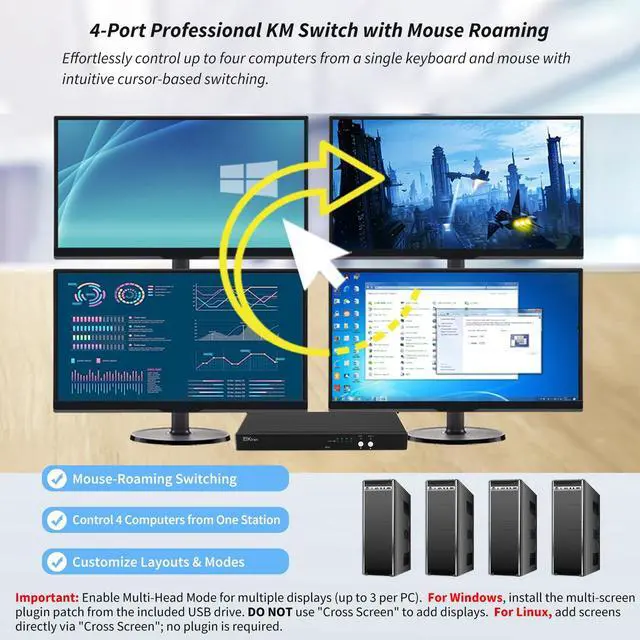
- Mouse Roaming Function: Switch between computers seamlessly by moving the mouse cursor from one display to another. This intuitive mouse roaming feature allows for smooth transitions and enhanced control. You can also switch using front panel buttons or hotkeys.
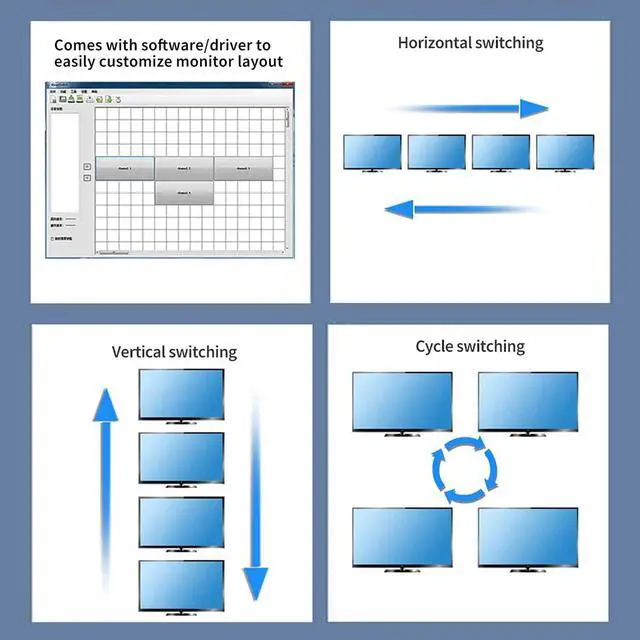
- Customizable Monitor Layouts: Personalize your monitor layouts by connecting the KM switch to your computer via the included USB-C cable. Install the management software from the provided U-disk to customize the switching modes. This feature ensures an efficient and personalized setup, adapting to your specific workflow requirements.
+
+
Overview
Specs
Reviews

Any questions? Our AI mode will help you find out quickly.
Try me now
Four-Port Keyboard and
Mouse Switch: Effortlessly manage and switch KM (Keyboard and Mouse) functions across four computers, including multi-head setups, with the 4 Port KM Switch. This device supports seamless KM commands from a single workstation, streamlining your workflow without needing additional software. Simply use front panel push buttons or keyboard hotkeys for easy port selection.
^^ Mouse Roaming Function: Switch between computers seamlessly by moving the mouse cursor from one display to another. This intuitive mouse roaming feature allows for smooth transitions and enhanced control. You can also switch using front panel buttons or hotkeys.
^^ Customizable Monitor Layouts: Personalize your monitor layouts by connecting the KM switch to your computer via the included USB-C cable. Install the management software from the provided U-disk to customize the switching modes. This feature ensures an efficient and personalized setup, adapting to your specific workflow requirements.
^^ Independent Audio Switching: Experience superior audio quality with the stereo audio output and independent audio switching function. This allows you to listen to audio from one computer while controlling another, enhancing multitasking capabilities and providing a richer user experience. Advanced Features and
Reliable Support: This KM switch supports hot-plugging, USB-C firmware upgrades, and RS485 communication management with a baud rate of 115200bps. ^^ Multi-Head
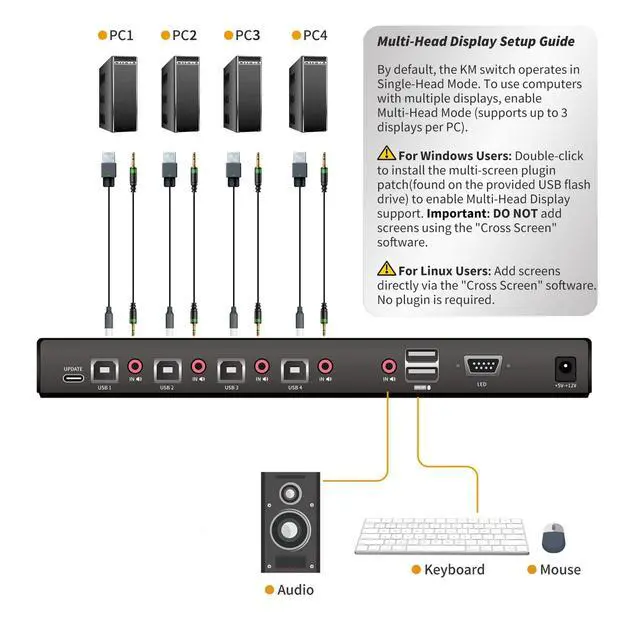
Display Setup Guide: By default, the KM switch operates in Single-Head Mode. To use computers with multiple displays, enable Multi-Head Mode (supports up to 3 displays per PC).
For Windows Users: Double-click to install the multi-screen plugin patch (found on the provided USB flash drive) to enable Multi-Head Display support.
Important: DO NOT add screens using the "Cross Screen" software.
For Linux Users: Add screens directly via the "Cross Screen" software. No plugin is required.
Mouse Switch: Effortlessly manage and switch KM (Keyboard and Mouse) functions across four computers, including multi-head setups, with the 4 Port KM Switch. This device supports seamless KM commands from a single workstation, streamlining your workflow without needing additional software. Simply use front panel push buttons or keyboard hotkeys for easy port selection.
^^ Mouse Roaming Function: Switch between computers seamlessly by moving the mouse cursor from one display to another. This intuitive mouse roaming feature allows for smooth transitions and enhanced control. You can also switch using front panel buttons or hotkeys.
^^ Customizable Monitor Layouts: Personalize your monitor layouts by connecting the KM switch to your computer via the included USB-C cable. Install the management software from the provided U-disk to customize the switching modes. This feature ensures an efficient and personalized setup, adapting to your specific workflow requirements.
^^ Independent Audio Switching: Experience superior audio quality with the stereo audio output and independent audio switching function. This allows you to listen to audio from one computer while controlling another, enhancing multitasking capabilities and providing a richer user experience. Advanced Features and
Reliable Support: This KM switch supports hot-plugging, USB-C firmware upgrades, and RS485 communication management with a baud rate of 115200bps. ^^ Multi-Head
Display Setup Guide: By default, the KM switch operates in Single-Head Mode. To use computers with multiple displays, enable Multi-Head Mode (supports up to 3 displays per PC).
For Windows Users: Double-click to install the multi-screen plugin patch (found on the provided USB flash drive) to enable Multi-Head Display support.
Important: DO NOT add screens using the "Cross Screen" software.
For Linux Users: Add screens directly via the "Cross Screen" software. No plugin is required.
Warranty & Returns
Warranty, Returns, And Additional Information
Warranty
- Please contact the Seller directly for warranty information. Warranty information may also be found on the Manufacturer's website.
- CONTACT
Return Policies
- Return for refund within: 30 days
- Return for replacement within: 30 days
- This item is covered by kaipuda Return Policy
Manufacturer Contact Info
- For a directory of all our manufacturers, please click below.
- Manufacturers Directory
LOADING...