

Your Browsing History

Meet Your Seller


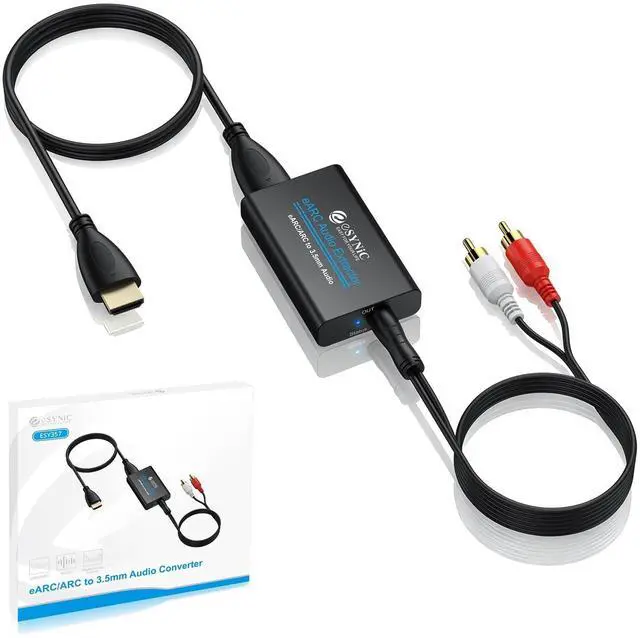



eSynic 7 FT Long eARC/ARC Audio Extractor-Plug & Play-Only Work For HDTV ARC/eARC Interface-192KHZ ARC to RCA&3.5MM Aux Adapter From HDTV to 3.5MM Headphone&L/R Stereo Audio System-No Optical Soundbar
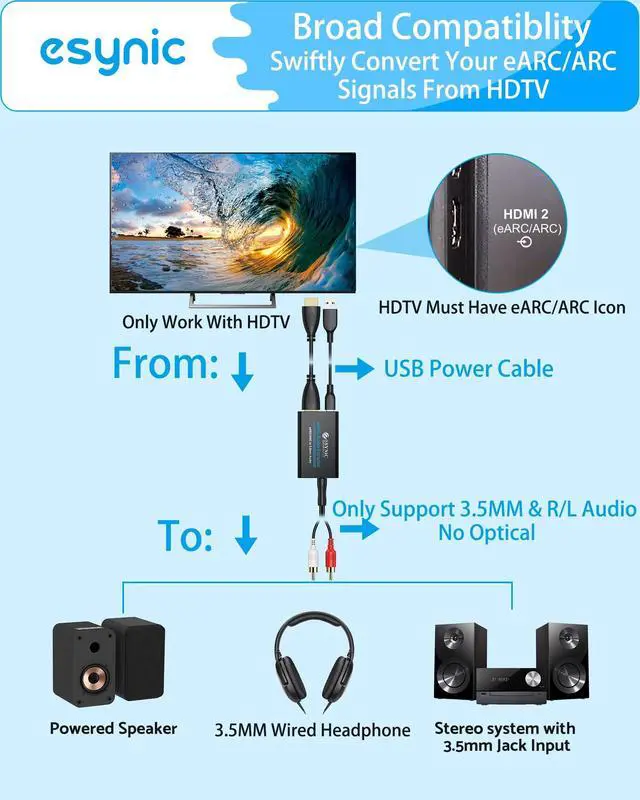
- [eSynic Professional ARC/eARC Audio Extractor]----:Our eSynic Professional eARC/ARC to 3.5mm& L/R Audio Extractor Support From HDTV eARC/ARC to 3.5MM Headphone & L/R Stereo Audio System [Only Work With HDTV ARC/eARC Interface and Not Support Others HDMI Devices]
- [Support 192KHz High Sampling Rate] ----:Our eSynic eARC/ARC to RCA Converter Supports High Sampling Rate up to 24bit/192KHz, Ensuring Clean Sound Quality.By Seamlessly Connecting the HDTV to the 3.5mm Audio Speaker , This HDMI ARC Audio Converter Makes the eARC/ARC Audio Extractor an Indispensable Upgrade for Home Entertainment Systems.
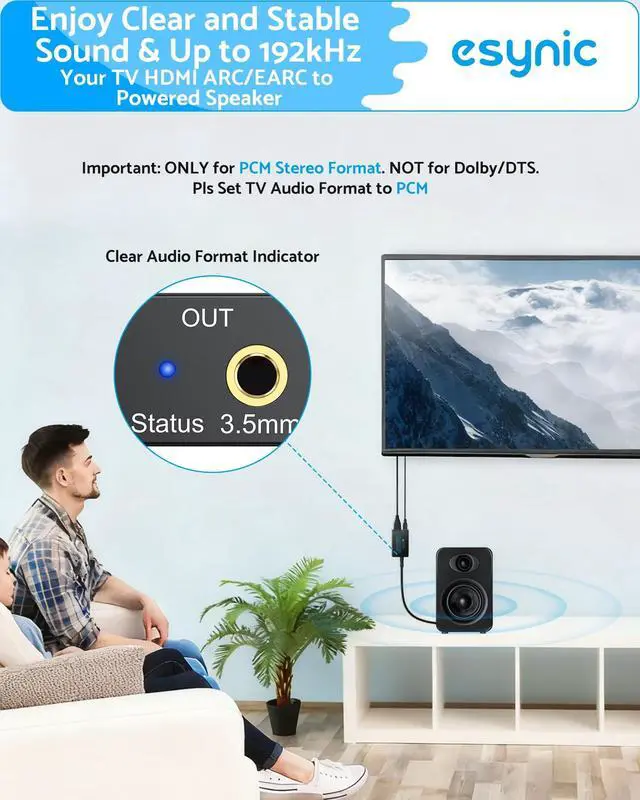
- [Support High Quality Audio Formats]---:Our eSynic Professional eARC/ARC Audio Extractor Supports PCM & PCM 2.0Audio Formats to Provide You with High Quality Audio for an Immersive Entertainment Experience.Equipped with Audio Signal Indicators, It is Convenient for You to Accurately Understand the Working Status of the Product and Improve the You Experience. [No Optical/No Dolby-Only for
+
+
Overview
Specs
Reviews

Any questions? Our AI mode will help you find out quickly.
Try me now
[eSynic Professional ARC/eARC
Audio Extractor]----: Our eSynic Professional eARC/ARC to 3.5 mm& L/R Audio Extractor Support From HDTV eARC/ARC to 3.5MM Headphone & L/R Stereo Audio System [Only Work With HDTV ARC/eARC Interface and Not Support Others HDMI Devices] ^^ [Support 192KHz High
Sampling Rate] ----: Our eSynic eARC/ARC to RCA Converter Supports High Sampling Rate up to 24bit/192KHz, Ensuring Clean Sound Quality. By Seamlessly Connecting the HDTV to the 3.5 mm Audio Speaker, This HDMI ARC Audio Converter Makes the eARC/ARC Audio Extractor an Indispensable Upgrade for Home Entertainment Systems. ^^ [Support High
Quality Audio Formats]---: Our eSynic Professional eARC/ARC Audio Extractor Supports PCM & PCM 2.0A udio Formats to Provide You with High Quality Audio for an Immersive Entertainment Experience. Equipped with Audio Signal Indicators, It is Convenient for You to Accurately Understand the Working Status of the Product and Improve the You Experience. [No Optical/No Dolby-Only for PCM] ^^ [ + Plug and
Play]---: Our eSynic Professional ARC to 3.5 mm Audio Adapter Work With USB Power supply No Software or Drivers are Required. Its Advanced Audio Processing Technology Efficiently and Cleanly Extracts Audio Signals from HDTV (ARC/eARC) Ports, Minimizing Potential Interference or Distortion and Providing You with a Smooth, Lag-free and High-quality Audio Experience.
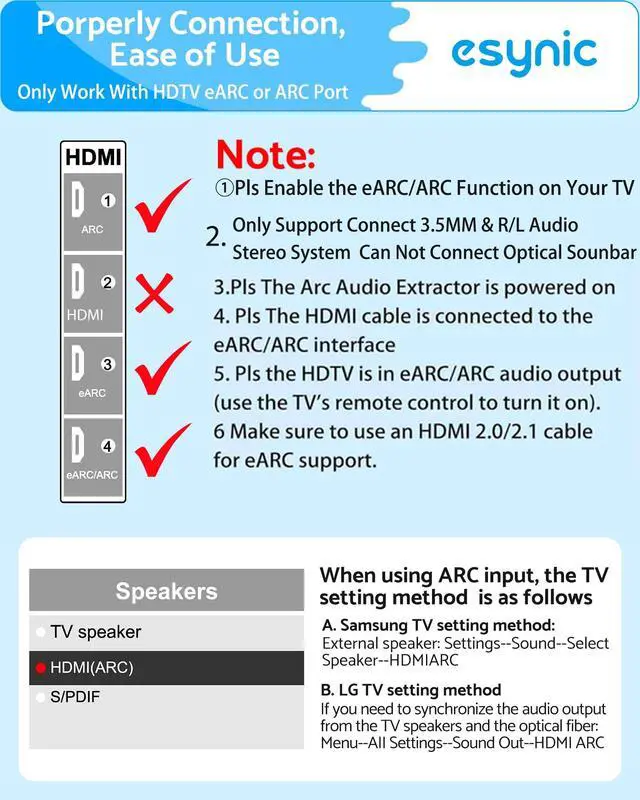
^^ [ Attention ]-----: 1. Ensure Your HDTV support eARC/ARC function. 2. Ensure the adapter is powered on. 3. Ensure the HDMI ARC Cable is Connected to the HDTV eARC/ARC Interface 4. Ensure the HDTV is in eARC/ARC Audio Output (Use the TV's Remote Control to Turn it on). 5. Please Connect the HDMI port with the eARC/ARC Mark and Make sure the eARC/ARC Function is Enabled on your TV 6. Please Set the Audio Formats to PCM.
Audio Extractor]----: Our eSynic Professional eARC/ARC to 3.5 mm& L/R Audio Extractor Support From HDTV eARC/ARC to 3.5MM Headphone & L/R Stereo Audio System [Only Work With HDTV ARC/eARC Interface and Not Support Others HDMI Devices] ^^ [Support 192KHz High
Sampling Rate] ----: Our eSynic eARC/ARC to RCA Converter Supports High Sampling Rate up to 24bit/192KHz, Ensuring Clean Sound Quality. By Seamlessly Connecting the HDTV to the 3.5 mm Audio Speaker, This HDMI ARC Audio Converter Makes the eARC/ARC Audio Extractor an Indispensable Upgrade for Home Entertainment Systems. ^^ [Support High
Quality Audio Formats]---: Our eSynic Professional eARC/ARC Audio Extractor Supports PCM & PCM 2.0A udio Formats to Provide You with High Quality Audio for an Immersive Entertainment Experience. Equipped with Audio Signal Indicators, It is Convenient for You to Accurately Understand the Working Status of the Product and Improve the You Experience. [No Optical/No Dolby-Only for PCM] ^^ [ + Plug and
Play]---: Our eSynic Professional ARC to 3.5 mm Audio Adapter Work With USB Power supply No Software or Drivers are Required. Its Advanced Audio Processing Technology Efficiently and Cleanly Extracts Audio Signals from HDTV (ARC/eARC) Ports, Minimizing Potential Interference or Distortion and Providing You with a Smooth, Lag-free and High-quality Audio Experience.
^^ [ Attention ]-----: 1. Ensure Your HDTV support eARC/ARC function. 2. Ensure the adapter is powered on. 3. Ensure the HDMI ARC Cable is Connected to the HDTV eARC/ARC Interface 4. Ensure the HDTV is in eARC/ARC Audio Output (Use the TV's Remote Control to Turn it on). 5. Please Connect the HDMI port with the eARC/ARC Mark and Make sure the eARC/ARC Function is Enabled on your TV 6. Please Set the Audio Formats to PCM.
Warranty & Returns
Warranty, Returns, And Additional Information
Warranty
- Please contact the Seller directly for warranty information. Warranty information may also be found on the Manufacturer's website.
- CONTACT
Return Policies
- Return for refund within: 30 days
- Return for replacement within: 30 days
- This item is covered by LANMEll Return Policy
Manufacturer Contact Info
- For a directory of all our manufacturers, please click below.
- Manufacturers Directory
LOADING...