Your Browsing History
Meet Your Seller
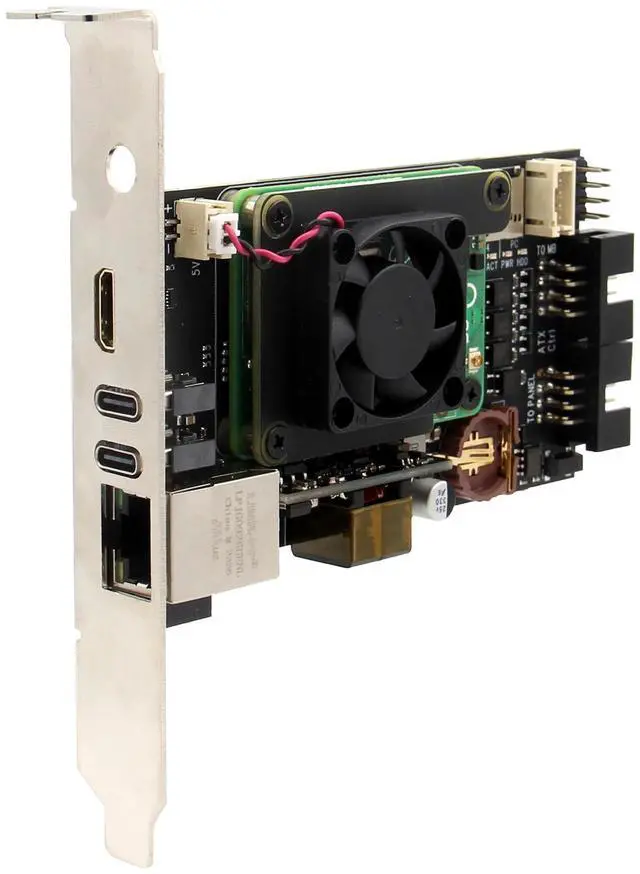
Geekworm X651 Open Source KVM Over IP Kit PCIe Version Support KVM V3 PoE ATX Video CSI for Raspberry Pi Compute Module 4 (Not Include Raspberry Pi CM4)
- What is it: This kit allows user to realize a KVM project with Raspberry Pi Compute Module 4 (CM4) which can control a computer using a web browser; Supports video and audio; Model: X651 V1.0
- Compatiblity and User Manual: 1. for use with Raspberry Pi Compute Module 4 and compatible with all variants; 2. Google Geekworm Wiki and search X651 for user manual
- Function: Remotely turn on/ turn off / restart your computer; configure configure the UEFI/BIOS; reinstall the OS using the Virtual CD-ROM or Flash Drive; remote use your keyboard and mouse; Simulate a keyboard, mouse, and a monitor and presented in a web browser, etc
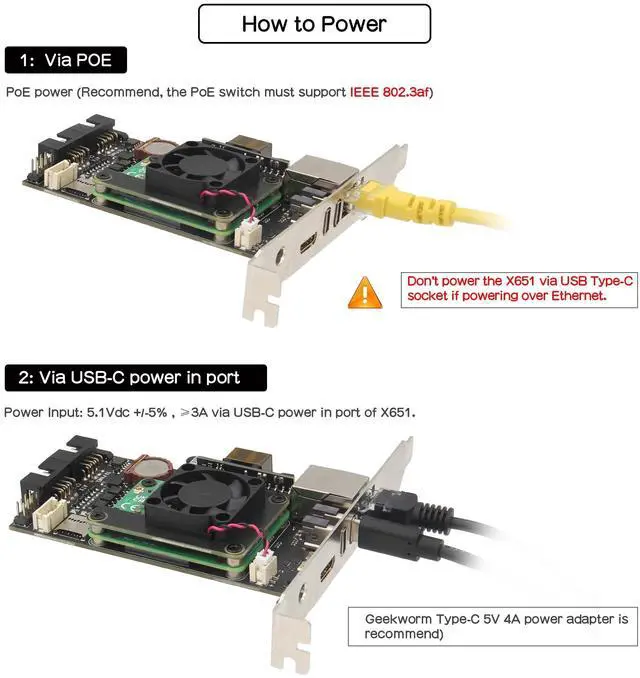
- How to Power: 5Vdc +/-5% via POE (IEEE 802.3af, need a POE switch) or Power Input: 5.1Vdc +/-5% , 3A power via USB-C port of X651
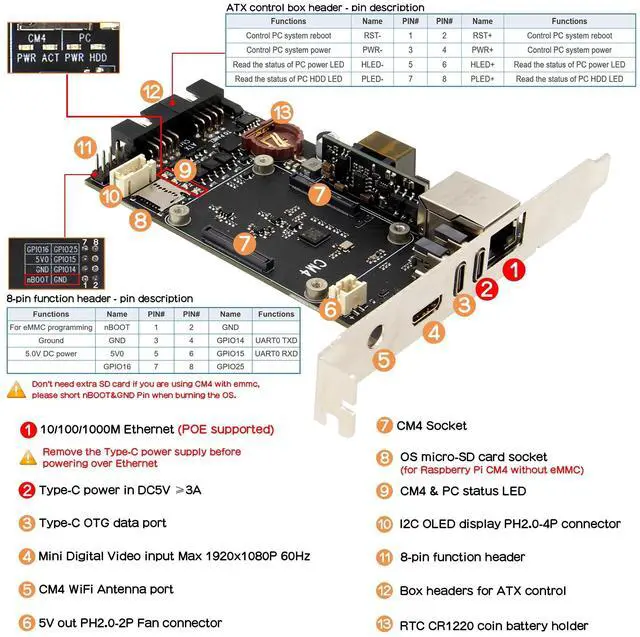
- How to Cool: X651 comes with an active cooling fan (X-FAN30 V1.0) to cool down the Raspberry Pi Compute Module 4, you can also replace it with C235 heatsink
- Extra Need to be Prepared: Raspberry Pi CM4, TF Card(only need to CM4 w
+
+
Overview
Specs
Reviews
Any questions? Our AI beta will help you find out quickly.
Try me now
What is it: This kit allows user to realize a KVM project with Raspberry Pi Compute Module 4 (CM4) which can control a computer using a web browser; Supports video and audio;
Model: X651 V 1.0 ^^ Compatiblity and
User Manual: 1. for use with Raspberry Pi Compute Module 4 and compatible with all variants;
2. Google Geekworm Wiki and search X651 for user manual ^^
Function: Remotely turn on/ turn off / restart your computer; configure configure the UEFI/BIOS; reinstall the OS using the Virtual CD-ROM or Flash Drive; remote use your keyboard and mouse; Simulate a keyboard, mouse, and a monitor and presented in a web browser, etc ^^ How to
Power: 5Vdc +/-5% via POE (IEEE 802.3 af, need a POE switch) or
Power Input: 5.1V dc +/-5%, 3A power via USB-C port of X651 ^^ How to
Cool: X651 comes with an active cooling fan (X-FAN30 V 1.0 ) to cool down the Raspberry Pi Compute Module 4, you can also replace it with C235 heatsink ^^ Extra Need to be
Prepared: Raspberry Pi CM4, TF Card (only need to CM4 without eMMC), Poe Switch or Power Adapter (Not included, need to prepare by yourself)

Model: X651 V 1.0 ^^ Compatiblity and
User Manual: 1. for use with Raspberry Pi Compute Module 4 and compatible with all variants;
2. Google Geekworm Wiki and search X651 for user manual ^^
Function: Remotely turn on/ turn off / restart your computer; configure configure the UEFI/BIOS; reinstall the OS using the Virtual CD-ROM or Flash Drive; remote use your keyboard and mouse; Simulate a keyboard, mouse, and a monitor and presented in a web browser, etc ^^ How to
Power: 5Vdc +/-5% via POE (IEEE 802.3 af, need a POE switch) or
Power Input: 5.1V dc +/-5%, 3A power via USB-C port of X651 ^^ How to
Cool: X651 comes with an active cooling fan (X-FAN30 V 1.0 ) to cool down the Raspberry Pi Compute Module 4, you can also replace it with C235 heatsink ^^ Extra Need to be
Prepared: Raspberry Pi CM4, TF Card (only need to CM4 without eMMC), Poe Switch or Power Adapter (Not included, need to prepare by yourself)
Warranty & Returns
Warranty, Returns, And Additional Information
Warranty
- Please contact the Seller directly for warranty information. Warranty information may also be found on the Manufacturer's website.
- CONTACT
Return Policies
- Return for refund within: 30 days
- Return for replacement within: non-replaceable
- This item is covered by FoundationSurge Return Policy
Manufacturer Contact Info
- For a directory of all our manufacturers, please click below.
- Manufacturers Directory
LOADING...