Your Browsing History
- Free 30-day Returns
$199.99
Meet Your Seller
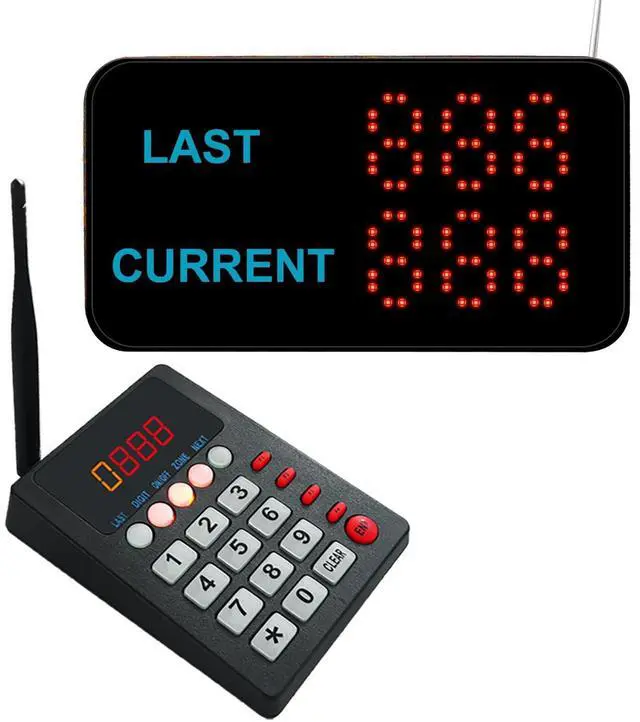
Take A Number System Wireless Calling System Restaurant Pager System Queue Management Loud Speakers System 1 Display Receiver Voice Call Host 2 Number Caller Pagers for Hospital Cafes (999+Q23 1+1)
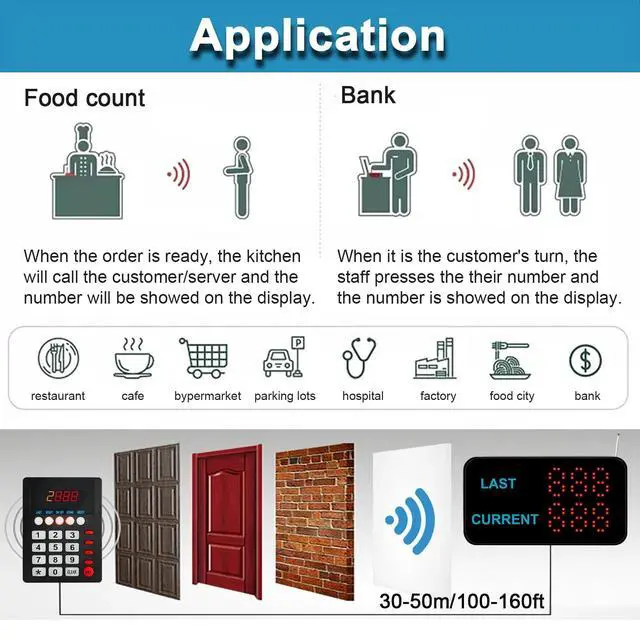
- Long Distance Signal Range: Calling system highly anti-interference and system signal range covers 328 feet in open area(Walls, building and other objects will reduce operating distance, depends on practical distance).
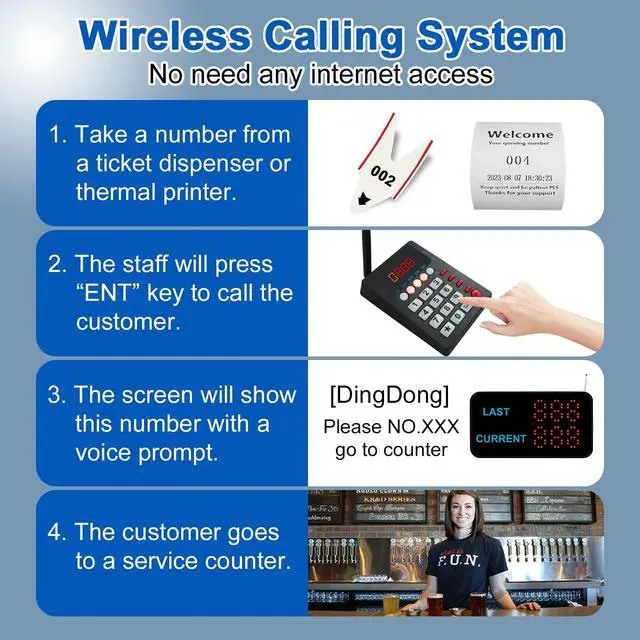
- How to work: give a numeric serial number within 999 to the customers, when order is ready, just press the number you want to call, the wireless display will broadcast accompanied by number show on the screen, easy to alert the guests their food is ready.
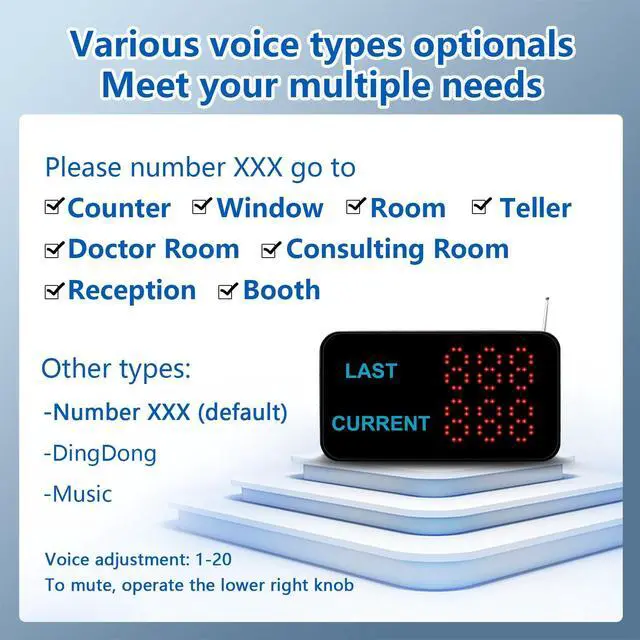
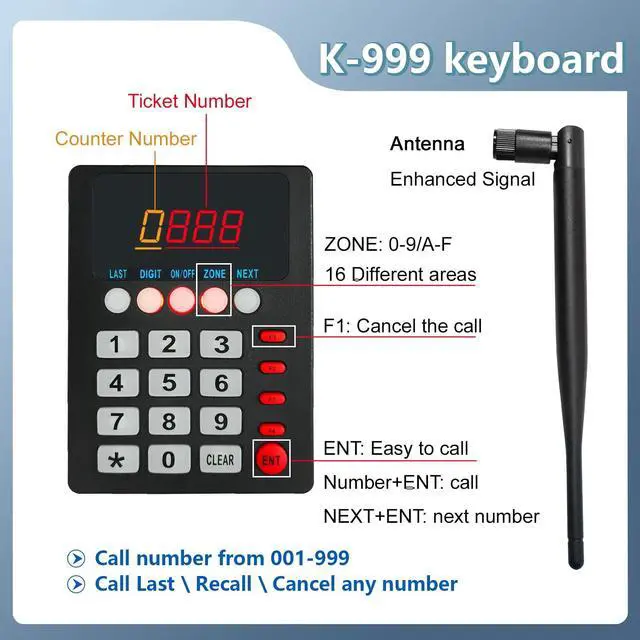
- Display Receiver: It can be wall installed or desktop style. Can dingdong sound or English voice to prompt the customer. Display's voice mode, volume, prompt times, brightness can be adjusted. Keypad Transmitter: Call number from 001-999. It can call back and recall any number. Have a NEXT key, the number will go to next one when pressing NEXT + ENT.
- Plug and Play: the keypad have been paired with the receiver before shipment, you don't need set anymore.
- Application: Wireless paging system is widely used in
+
+
Overview
Specs
Reviews
Any questions? Our AI mode will help you find out quickly.
Try me now
This Queue call system is great for government offices, pharmacies, retail, patient waiting areas and anywhere waiting line flow can be improved. Eliminates waiting lines and avoid to stand in a long queue. Customers can browse and relax without fear of losing their place in line. How Queue Calling System works? 1. Customer go to the service station and take a number ticket by thermal printer or ticket dispenser. 2. Customer wait for their service on waiting area. 3. When it is their turn, the counter worker will press the number + ENT to call.
4. The customer's number will show on the display screen with prompt voice, so that customer know which counter they should attend. Wireless queue call system set includes: (1)
Display monitor: To display calling number. (2) KeyboardTo call the customer. (3) Adaptor power supply (4) English user manualK-Q23 display receiver specification: 1. With high strength ABS plastic shell2. Show 3-digit number3. Show last number and current calling number4. Can put it on the waiting area to prompt the customer5. Touch screen and English prompt voice6. Can install on the wall and desk 7.110V -240V Power supply8.
Working voltage: DC12V9.
Dimension: 290*155*40mmK-999
keypad transmitter specification: 1. With high strength ABS material cover2. Using digital code technology3. It can call 999 persons in max4. With CLEAR and NEXT functionSignal
Range: 100M
in open areaColor:
blackDimension: 160*118*60mmEasy
to operate: 1. Press number + ENT to call2. Press number + F2 to cancel this call3. Default first number is for counter(0-9/A-F), last 3-digit number for customer(001-999)4. Press NEXT + ENT can go to next number quickly. For example, last number is 009, just press NEXT + ENT, then keypad will call 010 automatic, you needn't press 10 + ENT.

4. The customer's number will show on the display screen with prompt voice, so that customer know which counter they should attend. Wireless queue call system set includes: (1)
Display monitor: To display calling number. (2) KeyboardTo call the customer. (3) Adaptor power supply (4) English user manualK-Q23 display receiver specification: 1. With high strength ABS plastic shell2. Show 3-digit number3. Show last number and current calling number4. Can put it on the waiting area to prompt the customer5. Touch screen and English prompt voice6. Can install on the wall and desk 7.110V -240V Power supply8.
Working voltage: DC12V9.
Dimension: 290*155*40mmK-999
keypad transmitter specification: 1. With high strength ABS material cover2. Using digital code technology3. It can call 999 persons in max4. With CLEAR and NEXT functionSignal
Range: 100M
in open areaColor:
blackDimension: 160*118*60mmEasy
to operate: 1. Press number + ENT to call2. Press number + F2 to cancel this call3. Default first number is for counter(0-9/A-F), last 3-digit number for customer(001-999)4. Press NEXT + ENT can go to next number quickly. For example, last number is 009, just press NEXT + ENT, then keypad will call 010 automatic, you needn't press 10 + ENT.
Warranty & Returns
Warranty, Returns, And Additional Information
Warranty
- Please contact the Seller directly for warranty information. Warranty information may also be found on the Manufacturer's website.
- CONTACT
Return Policies
- Return for refund within: 30 days
- Return for replacement within: 30 days
- This item is covered by FortressTek Return Policy
Manufacturer Contact Info
- For a directory of all our manufacturers, please click below.
- Manufacturers Directory
LOADING...