

Your Browsing History
- Free 30-day Returns
$577.99

Meet Your Seller

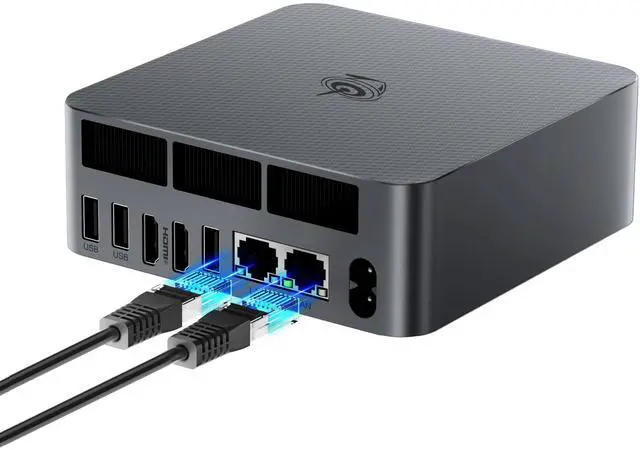


Beelink Mini PC EQR5 5625U AMD Ryzen 5 Processor(6C/12T, up to 4.3GHz), Micro Computer 16GB DDR4 500GB SSD Built-in PSU, Mini Computers Dual HDMI/4K 60Hz/WiFi6/BT5.2 Home/Office/HTPC
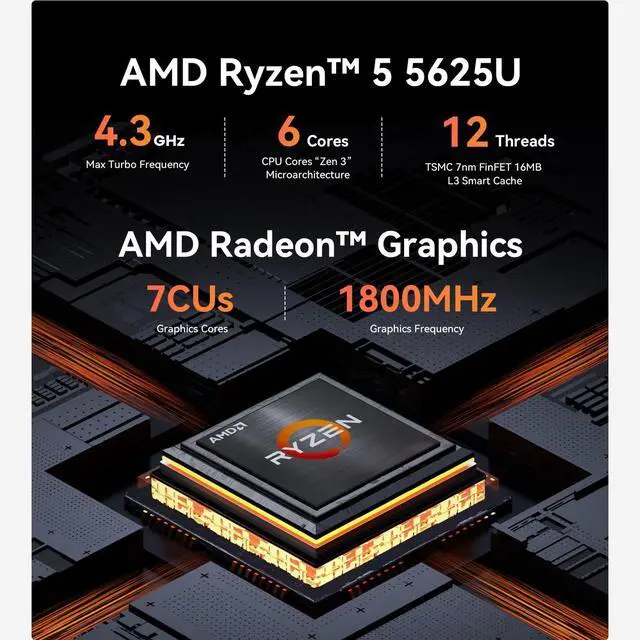
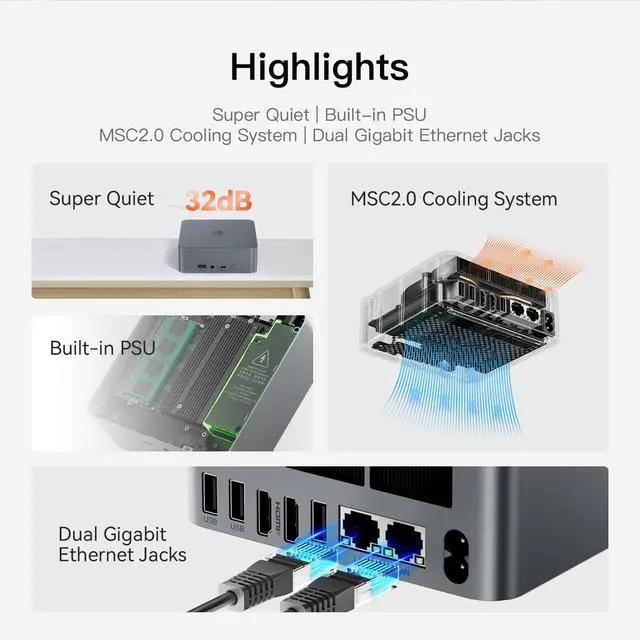
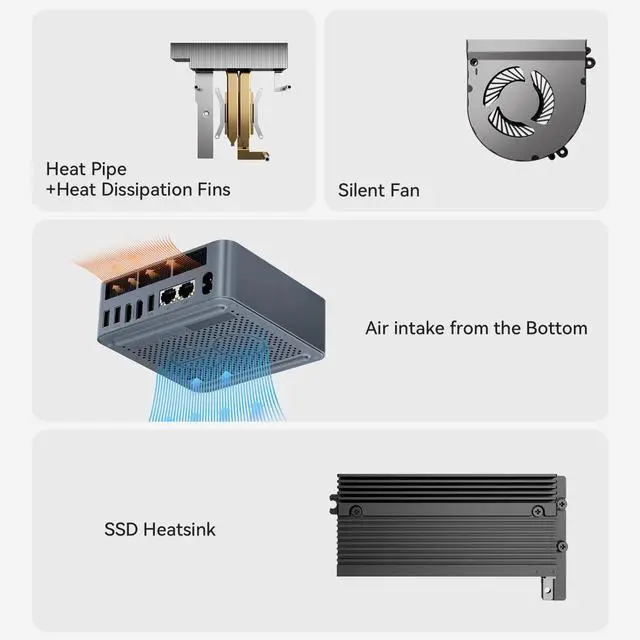
- Powerful Performance & Efficient CoolingBeelink EQR5 Mini PC is powered by AMD Ryzen 5 5625U (6C/12T, up to 4.3GHz). Beelink mini pc delivers lightning-fast processing for office tasks, programming, 4K video editing, light gaming and seamless multitasking. Beelink micro pc is equipped with advanced heat fins, heat pipe and quiet cooling fan (32dB low noise), it stays cool and stable even for all-day non-stop use, pre-installed with W-11 for instant out-of-the-box experience.
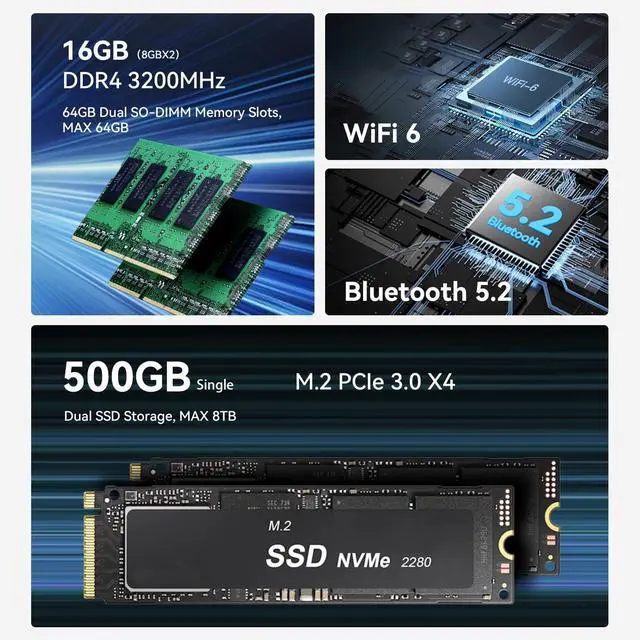
- High Capacity & Expansion OptionsMini PC comes with 16GB 3200MHz DDR4 dual-channel RAM (2 slots, upgradable to 64GB) for smooth multi-program operation, and 500GB M.2 PCIe 3.0 NVMe SSD for ultra-fast boot and file loading speeds. And this mini pc features 2M.2 PCIe 3.0 slots (each up to 4TB, total 8TB expandable) to store all your files, photos, videos and games with ease.
- 4K@60Hz UHD Dual Display & Powerful AMD GraphicsThis EQR5 Mini Computer is integrated with AMD Radeon 7-core 1800MHz graphics delivers stu
+
+
Overview
Specs
Reviews

Any questions? Our AI mode will help you find out quickly.
Try me now
Product SpecificationDimension: 126x126x 45.5 mm (Without
Rubber Feet) CPU: AMD Ryzen 5 5650U processor, Max Turbo Frequency 4.2GH z(6C/12T) 16MB
CacheGraphics: AMD Radeon Graphic 7 Cores 1800MHzSystem
Disk: M. 2 2280 PCle 3.0 x4 4TB MAX
Internal Slot: SO-DIMM DDR4 Slot*2, M. 2 2280 PCle 3.0 x4 4TB MAX
Interface: USB-C 10Gbps*1, USB 3.0 10Gbps*3, USB 2.0 480Mbps*1, HDMI (Max 4K 60Hz) *2, LAN (1000M) *2, 3.5 mm
Audio Jack*1Wireless Network: WiFi 6 (intel
AX200): Bluetooth 5.2AC
Cable: 100V-240V; 50/60Hz; 1.9AO perating
Environment: 0-40,
Humidity 30%-90%Storage Environment: -20C-60CHumidity
10%-90%Accessories: HDMI 100cm, AC Cable 150cm, User
ManualAdditional Functions: Auto Power On, WOL
Quick Setup Guide Connect the device to a monitor usingan HDMl cable, Connect a keyboard and mouse to thedevice through the USB ports or viaBluetooth (Mice or keyboards are notincluded in the retail package). Connect the device to a power socketwith the provided Ac power cord andboot it up. Use an Ethernet cable or Wi-Fi toconnect the device to the internet.
Note: You need to configure the Wi-Fisettings on the device for wirelessnetwork connection. Installation TipsTo avoid initial setup problems, the first time you use the Beelink Mini PC, follow the steps below to set it up. 1) Please do not connect the network or wifi until your mini computer's operating system is working. Please remember not to fill in the email, skip this step, you can use the machine normally. 2) If you only use the wired network to connect the micro pc, please disconnect the wired network directly, restart the machine, and connect to the network after successfully entering the operating system. 3) If you have connected to WIFI when it cannot load on OS, please turn off the router you are using. Excellent Service1-Free replacement for one year. Lifetime Technical Support. Passed FCC, CE, ROHS safety certificates. Questions & Answers What do I need to be aware of when using this mini pc for the first time? To avoid initial setup issues, the first time you use this mini pc, don't connect network or wifi until the windows system of your mini pc is running.
How to enter BIOS? Press "delete" to enter the BIOS settings; press "F7" to enter the boot options menu (click continuously immediately after booting). How to Switch the Audio Playback Device in Windows? If your Windows Mini PC is connected to multiple audio playback devices(e. g. speakers, headphones, webcams with built-in microphones, and Bluetoothheadsets)simultaneously, you will need to choose one of them for audio playback. Can I take the mini computer to other countries for use? Of course, this beelink mini pc supports 100-240V, you can use a power converter. If you need other specifications such as British regulations or European regulations, please contact me and I can send the power cable to you for free. Does the Beelink Mini PC have a built-in system? The mini computer has a built-in universal system that meets the needs of more than 99% of people. If you need other systems such as Linux, you can install the system yourself after receiving the mini pc. What's in the box? 1 x Mini PC, 1 x HDMI Cable, 1 x Power Adapter, 1 x User ManualAfter-sales SolutionsWhat to do if the machine cannot enter sleep mode? Please disable startup in the power option.
In Control Panel, click the Power Options. Select the Choose what the power buttons do. Uncheck the Turn on fast startup. Click Save the changes. Restore Default Power Plan Settings. Open the Control Panel on your PC by clicking on the Start button and by typing "Control Panel" in the search bar. Select "Control Panel" from the list of search results. In the Control Panel, set your viewing mode to "Large icons" and then click on "Power Options. "Find your current power plan and click on "Change plan settings" next to it. On the screen that opens, click on "Restore default settings for this plan. "A prompt will appear asking if you're sure you want to restore the default settings. Click "Yes" to confirm your action. Turn Off
Rubber Feet) CPU: AMD Ryzen 5 5650U processor, Max Turbo Frequency 4.2GH z(6C/12T) 16MB
CacheGraphics: AMD Radeon Graphic 7 Cores 1800MHzSystem
Disk: M. 2 2280 PCle 3.0 x4 4TB MAX
Internal Slot: SO-DIMM DDR4 Slot*2, M. 2 2280 PCle 3.0 x4 4TB MAX
Interface: USB-C 10Gbps*1, USB 3.0 10Gbps*3, USB 2.0 480Mbps*1, HDMI (Max 4K 60Hz) *2, LAN (1000M) *2, 3.5 mm
Audio Jack*1Wireless Network: WiFi 6 (intel
AX200): Bluetooth 5.2AC
Cable: 100V-240V; 50/60Hz; 1.9AO perating
Environment: 0-40,
Humidity 30%-90%Storage Environment: -20C-60CHumidity
10%-90%Accessories: HDMI 100cm, AC Cable 150cm, User
ManualAdditional Functions: Auto Power On, WOL
Quick Setup Guide Connect the device to a monitor usingan HDMl cable, Connect a keyboard and mouse to thedevice through the USB ports or viaBluetooth (Mice or keyboards are notincluded in the retail package). Connect the device to a power socketwith the provided Ac power cord andboot it up. Use an Ethernet cable or Wi-Fi toconnect the device to the internet.
Note: You need to configure the Wi-Fisettings on the device for wirelessnetwork connection. Installation TipsTo avoid initial setup problems, the first time you use the Beelink Mini PC, follow the steps below to set it up. 1) Please do not connect the network or wifi until your mini computer's operating system is working. Please remember not to fill in the email, skip this step, you can use the machine normally. 2) If you only use the wired network to connect the micro pc, please disconnect the wired network directly, restart the machine, and connect to the network after successfully entering the operating system. 3) If you have connected to WIFI when it cannot load on OS, please turn off the router you are using. Excellent Service1-Free replacement for one year. Lifetime Technical Support. Passed FCC, CE, ROHS safety certificates. Questions & Answers What do I need to be aware of when using this mini pc for the first time? To avoid initial setup issues, the first time you use this mini pc, don't connect network or wifi until the windows system of your mini pc is running.
How to enter BIOS? Press "delete" to enter the BIOS settings; press "F7" to enter the boot options menu (click continuously immediately after booting). How to Switch the Audio Playback Device in Windows? If your Windows Mini PC is connected to multiple audio playback devices(e. g. speakers, headphones, webcams with built-in microphones, and Bluetoothheadsets)simultaneously, you will need to choose one of them for audio playback. Can I take the mini computer to other countries for use? Of course, this beelink mini pc supports 100-240V, you can use a power converter. If you need other specifications such as British regulations or European regulations, please contact me and I can send the power cable to you for free. Does the Beelink Mini PC have a built-in system? The mini computer has a built-in universal system that meets the needs of more than 99% of people. If you need other systems such as Linux, you can install the system yourself after receiving the mini pc. What's in the box? 1 x Mini PC, 1 x HDMI Cable, 1 x Power Adapter, 1 x User ManualAfter-sales SolutionsWhat to do if the machine cannot enter sleep mode? Please disable startup in the power option.
In Control Panel, click the Power Options. Select the Choose what the power buttons do. Uncheck the Turn on fast startup. Click Save the changes. Restore Default Power Plan Settings. Open the Control Panel on your PC by clicking on the Start button and by typing "Control Panel" in the search bar. Select "Control Panel" from the list of search results. In the Control Panel, set your viewing mode to "Large icons" and then click on "Power Options. "Find your current power plan and click on "Change plan settings" next to it. On the screen that opens, click on "Restore default settings for this plan. "A prompt will appear asking if you're sure you want to restore the default settings. Click "Yes" to confirm your action. Turn Off
Warranty & Returns
Warranty, Returns, And Additional Information
Warranty
- Please contact the Seller directly for warranty information. Warranty information may also be found on the Manufacturer's website.
- CONTACT
Return Policies
- Return for refund within: 30 days
- Return for replacement within: 30 days
- This item is covered by HyperCore Return Policy
Manufacturer Contact Info
- For a directory of all our manufacturers, please click below.
- Manufacturers Directory
LOADING...