

Your Browsing History
- Free 30-day Returns
$71.99


Meet Your Seller

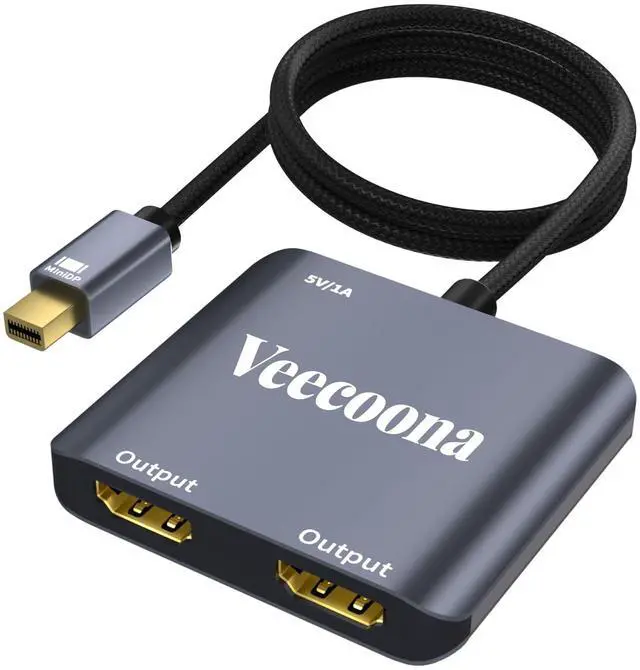
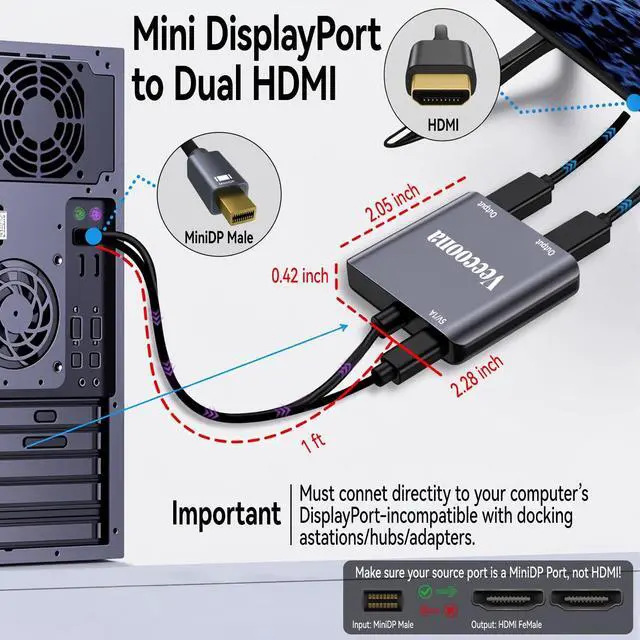


Mini DisplayPort to Dual HDMI Adapter ^^ 4K60Hz, Thunderbolt 2 DP Male to HDMI Female Splitter Extended Display port splitter for Dual monitors, for MacBook Air/Pro, Mac mini, Surface Pro/Dock
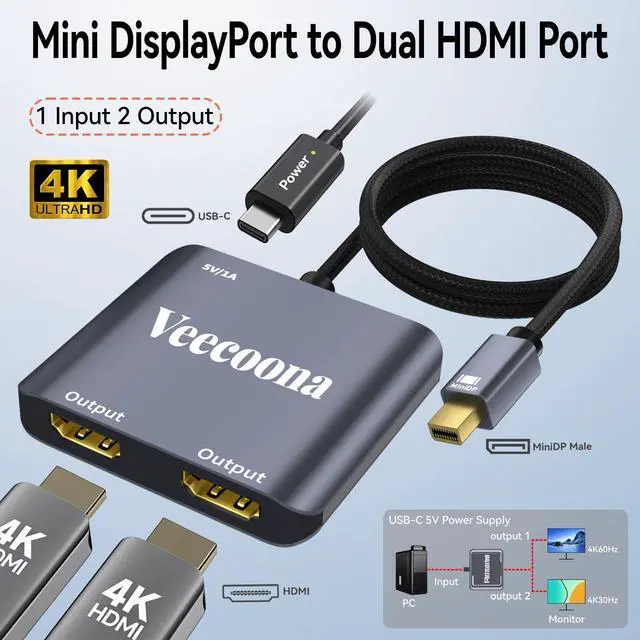
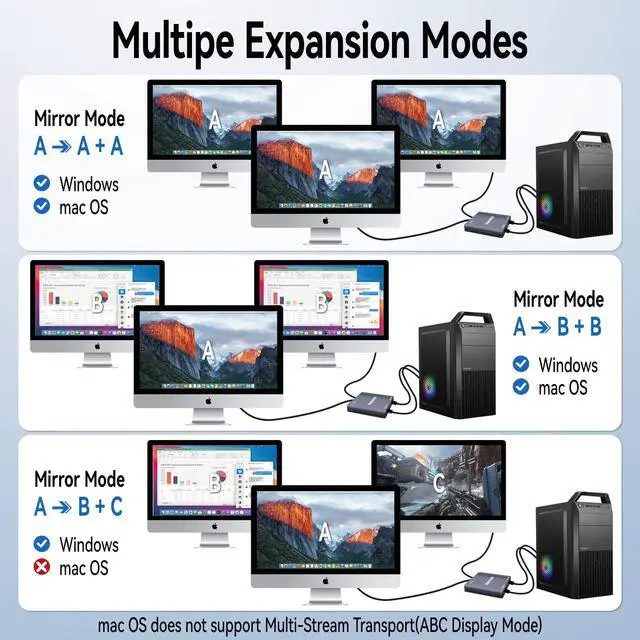
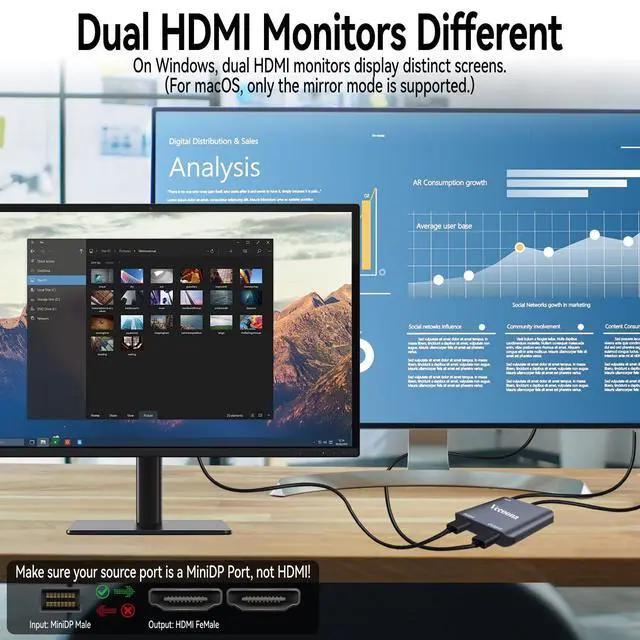
- Mini DisplayPort to Dual HDMI AdapterWith a Mini DP to dual HDMI adapter, this adapter enables extended display on dual monitors for Windows PCs, supporting both SST and MST modes. Note: macOS only supports screen mirroring (no extended mode).
- 4K60Hz Ultra HDThis hdmi splitter for dual monitors delivers stunning 4K@60Hz resolution on a single display or 4K@30Hz when extending to dual monitors. Fully backward compatible with 2K/1080P/720P resolutions. Important: Must connect directly to your computer's Mini DisplayPort - not compatible with docking stations/hubs/adapters.
- Plug and PlayFeaturing a hassle-free setup, this HDMI splitter for extended display works instantly. Here's how to use it: 1. Connect it to your display with a 4K@60Hz HDMI cable. 2. Power it via USB if needed. 3. Plug the Mini DP connector into your PC's Mini DisplayPort(Thunderbolt 1/2).
- Universal CompatibilityThis Mini Display port splitter for dual monitors works seamlessly with Windows, macOS, and Linux s
+
+
Overview
Specs
Reviews

Any questions? Our AI mode will help you find out quickly.
Try me now
Mini DisplayPort to Dual HDMI AdapterWith a Mini DP to dual HDMI adapter, this adapter enables extended display on dual monitors for Windows PCs, supporting both SST and MST modes.
Note: macOS only supports screen mirroring (no extended mode). ^^ 4K60Hz Ultra HDThis hdmi splitter for dual monitors delivers stunning 4K@60Hz resolution on a single display or 4K@30Hz when extending to dual monitors. Fully backward compatible with 2K/1080P/720P resolutions.
Important: Must connect directly to your computer's Mini DisplayPort - not compatible with docking stations/hubs/adapters. ^^ Plug and PlayFeaturing a hassle-free setup, this HDMI splitter for extended display works instantly.
Here's how to use it: 1. Connect it to your display with a 4K@60Hz HDMI cable. 2. Power it via USB if needed. 3. Plug the Mini DP connector into your PC's Mini DisplayPort(Thunderbolt 1/2). ^^ Universal CompatibilityThis Mini Display port splitter for dual monitors works seamlessly with Windows, macOS, and Linux systems, supporting various devices including desktops, laptops, and workstations. Perfect for business presentations, home theaters, gaming setups, and office workstations. For best performance, ensure proper power connection via included USB-C cable. ^^ Premium Aluminum HousingBuilt with a durable aluminum alloy casing, this Mini DisplayPort/Thunderbolt 2 to Dual HDMI Splitter resists scratches, fingerprints, and overheating, making it perfect for travel, office, or home use. If any issues arise, our 18/7 customer support team guarantees a quick resolution. ^^ Key Tips1. Connect USB-C cable (5V/1A min. ) before use. 2. This adapter is not compatible with hubs, docking stations, KVM switches, or adaptersonly direct Mini DP connection to graphics cards/laptops is supported. 3. macOS supports mirroring (SST) but no MST extension.
4. Ensure Mini DP device has >18Gbps; update GPU driver if no display.
Note: macOS only supports screen mirroring (no extended mode). ^^ 4K60Hz Ultra HDThis hdmi splitter for dual monitors delivers stunning 4K@60Hz resolution on a single display or 4K@30Hz when extending to dual monitors. Fully backward compatible with 2K/1080P/720P resolutions.
Important: Must connect directly to your computer's Mini DisplayPort - not compatible with docking stations/hubs/adapters. ^^ Plug and PlayFeaturing a hassle-free setup, this HDMI splitter for extended display works instantly.
Here's how to use it: 1. Connect it to your display with a 4K@60Hz HDMI cable. 2. Power it via USB if needed. 3. Plug the Mini DP connector into your PC's Mini DisplayPort(Thunderbolt 1/2). ^^ Universal CompatibilityThis Mini Display port splitter for dual monitors works seamlessly with Windows, macOS, and Linux systems, supporting various devices including desktops, laptops, and workstations. Perfect for business presentations, home theaters, gaming setups, and office workstations. For best performance, ensure proper power connection via included USB-C cable. ^^ Premium Aluminum HousingBuilt with a durable aluminum alloy casing, this Mini DisplayPort/Thunderbolt 2 to Dual HDMI Splitter resists scratches, fingerprints, and overheating, making it perfect for travel, office, or home use. If any issues arise, our 18/7 customer support team guarantees a quick resolution. ^^ Key Tips1. Connect USB-C cable (5V/1A min. ) before use. 2. This adapter is not compatible with hubs, docking stations, KVM switches, or adaptersonly direct Mini DP connection to graphics cards/laptops is supported. 3. macOS supports mirroring (SST) but no MST extension.
4. Ensure Mini DP device has >18Gbps; update GPU driver if no display.
Warranty & Returns
Warranty, Returns, And Additional Information
Warranty
- Please contact the Seller directly for warranty information. Warranty information may also be found on the Manufacturer's website.
- CONTACT
Return Policies
- Return for refund within: 30 days
- Return for replacement within: 30 days
- This item is covered by Detail Driven Return Policy
Manufacturer Contact Info
- For a directory of all our manufacturers, please click below.
- Manufacturers Directory
LOADING...