Your Browsing History
- Free 30-day Returns
$103.99
Meet Your Seller
KVM Switch 2 Monitors 2 Computers, 4K60Hz HDMI Dual Monitor KVM Switch
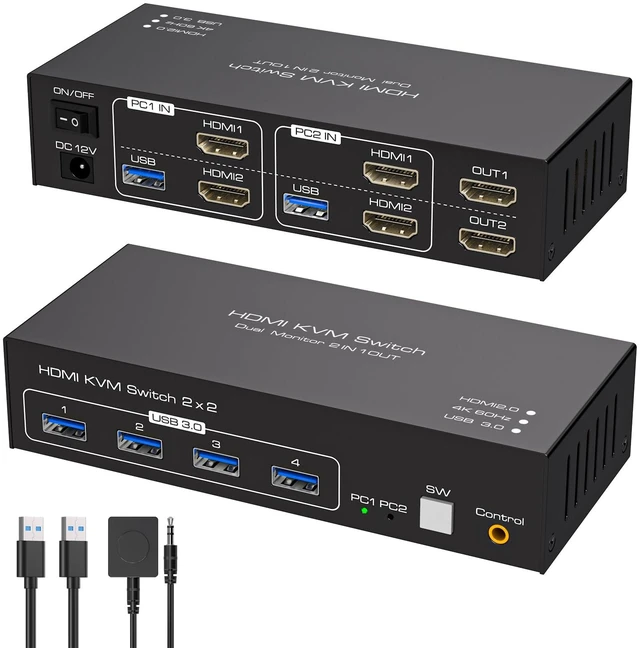
- [HDMI2.0 KVM Switch]: KVM Switch 2 Monitors 2 Computers Display port allow two computers to share two HD monitors and 4 USB 3.0 ports, such as mouse, keyboard, printer U disk, etc.KVM switches includes 12V power adapter.(The current provided by the pc host is small, can't support USB devices such as hard disks). With the external power design, USB devices can obtain a stable working environment through the switch. Note: To output to two monitors, the DP1 and DP2 ports must be connected to the same computer
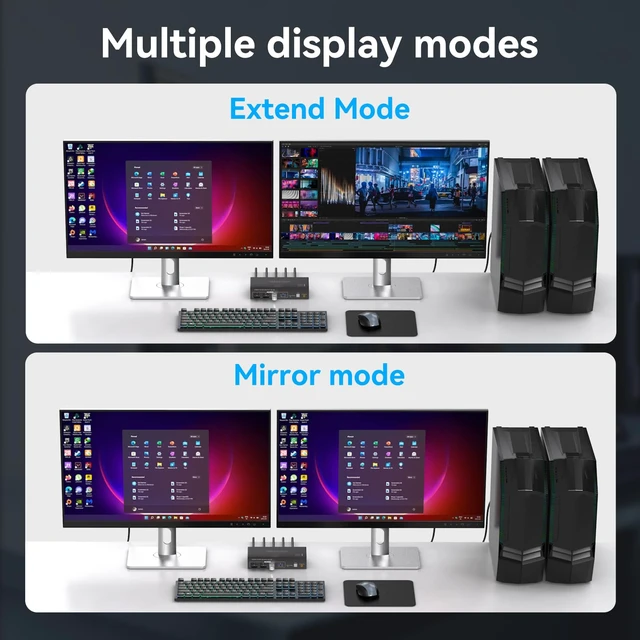
- [Extended & Duplicate Display Modes]: HDMI KVM switches support Extended&Copy Mode.Extended Mode: windows on the main screen can be dragged to the second output screen and display two different screens. Copy Mode: Codisplayport kvm switch displayport switch dp kvm switch kvm displayport dual monitor kvm kvm switch 2 monitors 2 computers display port display port kvmmputer host outputs 2 identical images on 2 monitors. (Note: Please make sure your computer supports multi-display an
+
+
Overview
Specs
Reviews
Any questions? Ask CelesteSM will help you find out quickly.
Try me now
[HDMI 2.0
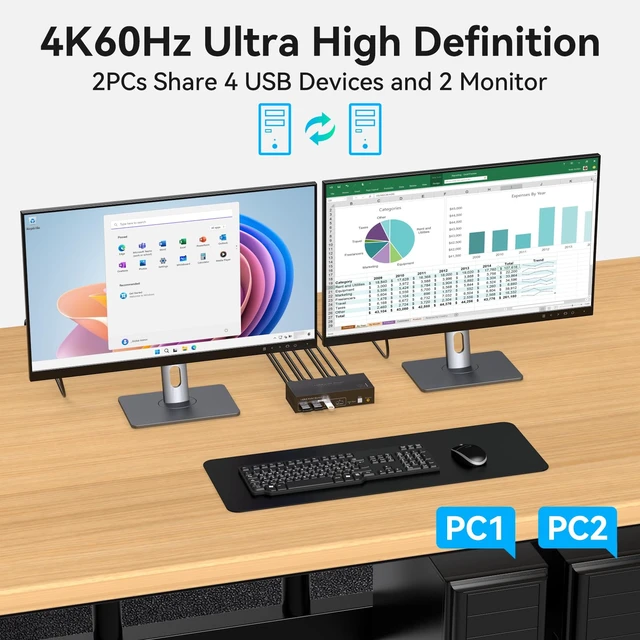
KVM Switch]: KVM Switch 2 Monitors 2 Computers Display port allow two computers to share two HD monitors and 4 USB 3.0 ports, such as mouse, keyboard, printer U disk, etc. KVM switches includes 12V power adapter. (The current provided by the pc host is small, can't support USB devices such as hard disks). With the external power design, USB devices can obtain a stable working environment through the switch.
Note: To output to two monitors, the DP1 and DP2 ports must be connected to the same computer ^^ [Extended & Duplicate
Display Modes]: HDMI KVM switches support Extended&Copy Mode.
Extended Mode: windows on the main screen can be dragged to the second output screen and display two different screens.
Copy Mode: Codisplayport kvm switch displayport switch dp kvm switch kvm displayport dual monitor kvm kvm switch 2 monitors 2 computers display port display port kvmmputer host outputs 2 identical images on 2 monitors.
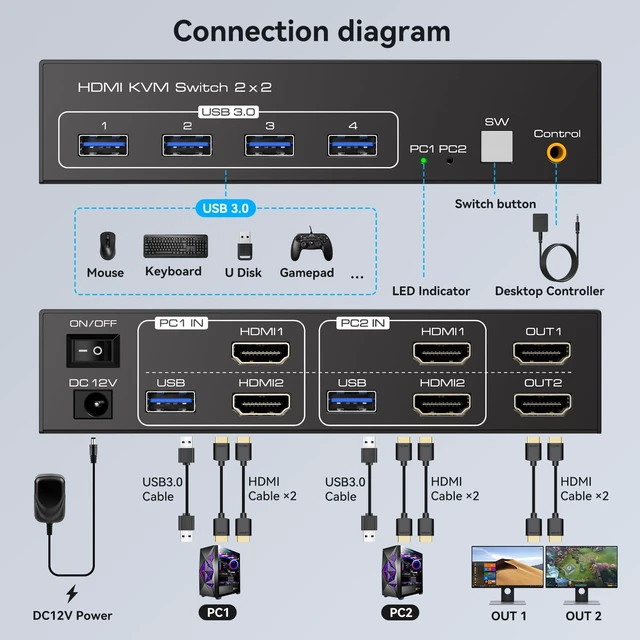
(Note: Please make sure your computer supports multi-display and each connected computer requires 2 HDMI ports) ^^ [HDMI 4K60Hz
High-Resolution]: The HDMI 2.0 KVM Switch 4K60Hz Dual
Monitor Display: Supports up to 4K60Hz for high-quality UHD video and is backward compatible with 2K120Hz and 1080P resolutions.
Note: 4K60Hz output requires both the computer and monitor to support 4K60Hz and requires a 4K-capable HDMI cable. For optimal signal performance ^^ [Dual
Monitor KVM Switch HDMI]: The HDMI 2.0 KVM switch supports resolutions and refresh rates up to 8K@60Hz 4K@120Hz, and is backward compatible with 1080p 3D 720P, etc. Bringing you a realistic and smooth visual experience. For better experience, please
follow the recommended cables: less than 3m for 8K60Hz cables, less than 5m for 4K60Hz cables ^^ [Metal Housing, USB 3.0 & 12V 1A
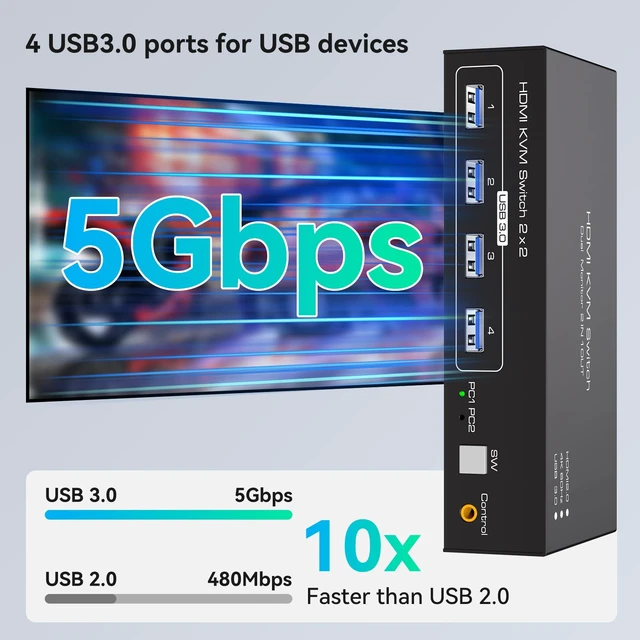
Power]: Stable Operation & Fast
USB Connectivity: The compact KVM switch features a sturdy metal housing designed to save desk space while providing drop resistance and noise reduction. The included DC 12V/1A power adapter provides power for stable operation. Four USB 3.0 ports support transfer speeds up to 5Gbps and are backward compatible with USB 2.0 devices ^^ [Connection Requirements &
Package Contents]: Connection
Requirements: Each computer requires 2 HDMI ports + 1 USB-A port. Connect each computer to the KVM using 2 HDMI cables + 1 USB-A cable for proper operation.
Packing List: 1 KVM switcher, 2 USB-A cables, 1 DC12V power adapter, 1 external controller kit, and 1 user guide
KVM Switch]: KVM Switch 2 Monitors 2 Computers Display port allow two computers to share two HD monitors and 4 USB 3.0 ports, such as mouse, keyboard, printer U disk, etc. KVM switches includes 12V power adapter. (The current provided by the pc host is small, can't support USB devices such as hard disks). With the external power design, USB devices can obtain a stable working environment through the switch.
Note: To output to two monitors, the DP1 and DP2 ports must be connected to the same computer ^^ [Extended & Duplicate
Display Modes]: HDMI KVM switches support Extended&Copy Mode.
Extended Mode: windows on the main screen can be dragged to the second output screen and display two different screens.
Copy Mode: Codisplayport kvm switch displayport switch dp kvm switch kvm displayport dual monitor kvm kvm switch 2 monitors 2 computers display port display port kvmmputer host outputs 2 identical images on 2 monitors.
(Note: Please make sure your computer supports multi-display and each connected computer requires 2 HDMI ports) ^^ [HDMI 4K60Hz
High-Resolution]: The HDMI 2.0 KVM Switch 4K60Hz Dual
Monitor Display: Supports up to 4K60Hz for high-quality UHD video and is backward compatible with 2K120Hz and 1080P resolutions.
Note: 4K60Hz output requires both the computer and monitor to support 4K60Hz and requires a 4K-capable HDMI cable. For optimal signal performance ^^ [Dual
Monitor KVM Switch HDMI]: The HDMI 2.0 KVM switch supports resolutions and refresh rates up to 8K@60Hz 4K@120Hz, and is backward compatible with 1080p 3D 720P, etc. Bringing you a realistic and smooth visual experience. For better experience, please
follow the recommended cables: less than 3m for 8K60Hz cables, less than 5m for 4K60Hz cables ^^ [Metal Housing, USB 3.0 & 12V 1A
Power]: Stable Operation & Fast
USB Connectivity: The compact KVM switch features a sturdy metal housing designed to save desk space while providing drop resistance and noise reduction. The included DC 12V/1A power adapter provides power for stable operation. Four USB 3.0 ports support transfer speeds up to 5Gbps and are backward compatible with USB 2.0 devices ^^ [Connection Requirements &
Package Contents]: Connection
Requirements: Each computer requires 2 HDMI ports + 1 USB-A port. Connect each computer to the KVM using 2 HDMI cables + 1 USB-A cable for proper operation.
Packing List: 1 KVM switcher, 2 USB-A cables, 1 DC12V power adapter, 1 external controller kit, and 1 user guide
Warranty & Returns
Warranty, Returns, And Additional Information
Warranty
- Please contact the Seller directly for warranty information. Warranty information may also be found on the Manufacturer's website.
- CONTACT
Return Policies
- Return for refund within: 30 days
- Return for replacement within: non-replaceable
- This item is covered by SIMPLIZED Return Policy
Manufacturer Contact Info
- For a directory of all our manufacturers, please click below.
- Manufacturers Directory
LOADING...