• $52.99
  • Sold by VersaCom

    Shipped by VersaCom

    Price alert
    Shop it at NeweggBusiness.

    Meet Your Seller

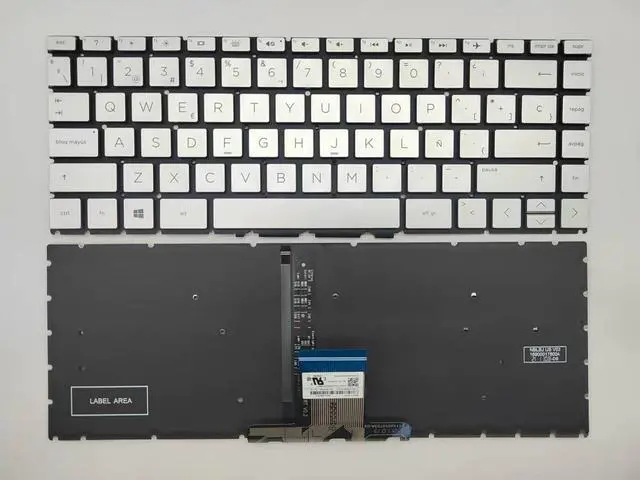
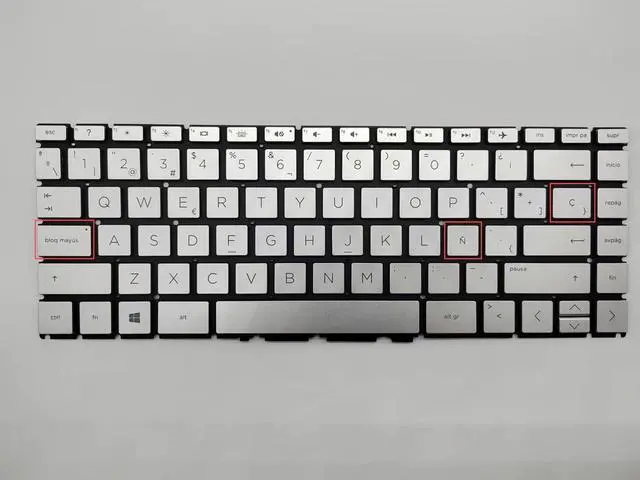
    Laptop Replacement Spanish Layout Keyboard for HP 14-CK 14-CD 14-CM 14-DG 14-DQ 14s-DQ 240 G7 245 G7 246 G7.Pavilion X360 14-CD 14-DH.Pavilion 14-CE Silver with Backlit

    • Note: Please check it before the purchase,The picture is the actual item(With Backlit)
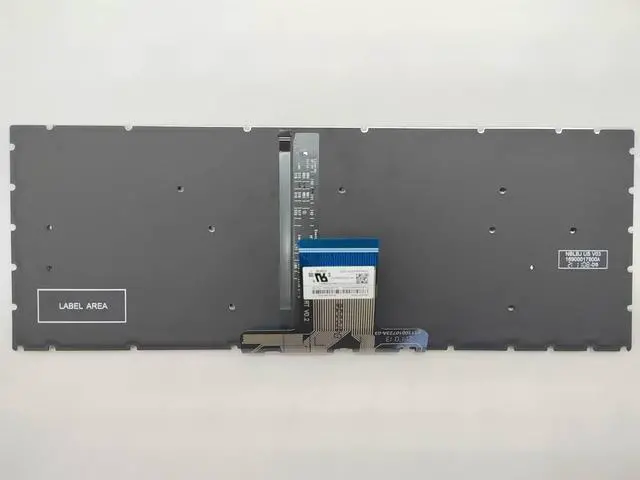
    • This keyboard has no frame/case around it, you need to remove your old keyobard from old keyboard frame/case, and put the new keyboard into the old frame/case to make a full keyboard with frame/case
    • Please make sure there is a backlit cable connector on your laptop mainboard to make the backlit feature work on your laptop
    • Laptop Models: For HP 14-CK 14-CD 14-CM 14-DG 14-DQ 14s-DQ 240 G7 245 G7 246 G7 Series laptop,For Pavilion X360 14-CD 14-DH Series laptop,For Pavilion 14-CE Series laptop Keyboard
    • Layout: Spanish SP(Latin Spanish Teclado)
    • Color: Silver
    • Remark: without frame-- Backlit
    • packing: Bulk pack (not in original box)
    • Unit: 1 pcs laptop keyboard
    +
    +
    Overview
    Specs
    Reviews
    avatar

    Any questions? Our AI beta will help you find out quickly.

    NEW Spanish layout For HP 14-CK 14-CD 14-CM 14-DG 14-DQ 14s-DQ 240 G7 245 G7 246 G7. Pavilion X360 14-CD 14-DH. Pavilion 14-CE keyboard Silver Backlit---------without frame---------Small Enter Key- (Can not fit Big enter key version) ----------- Spanish layout---------- with Backlit.
    ATTENTION: 1. Please make sure your keyboard has an Spanish style enter key, not "7" shape enter key, otherwise the keyboard won't fit in your keyboard frame/case. 2. This keyboard has no frame/case around it, you need to remove your old keyobard from old keyboard frame/case, and put the new keyboard into the old frame/case to make a full keyboard with frame/case. 3. Please make sure there is a backlit cable connector on your laptop mainboard to make the backlit feature work on your laptop. 4. If some keys will don't work after installed, this is not because keyboard is broken, the most posiibility is ribbon cable don't connect well with your laptop, pls try to reconnect more times.

    Warranty & Returns

    Warranty, Returns, And Additional Information

    Warranty

    • Please contact the Seller directly for warranty information. Warranty information may also be found on the Manufacturer's website.
    • CONTACT

    Return Policies

    Manufacturer Contact Info

    LOADING...