Your Browsing History
- Free 30-day Returns
$60.99
Meet Your Seller
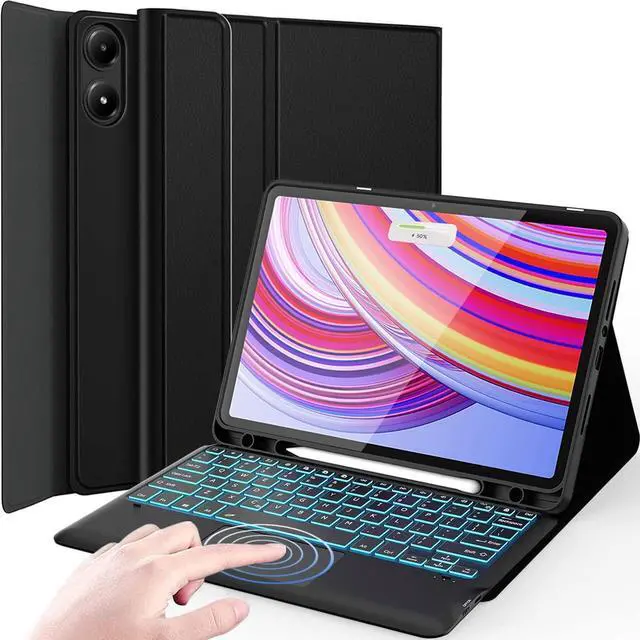
Nanhent Touchpad Keyboard Case for Xiaomi Redmi Pad Pro 12.1 Inch 2024/Xiaomi Poco Pad 12.1", 7 Colors Backlit, Detachable Bluetooth Wireless Trackpad Keyboard & Slim PU Stand Cover with Pencil Holder
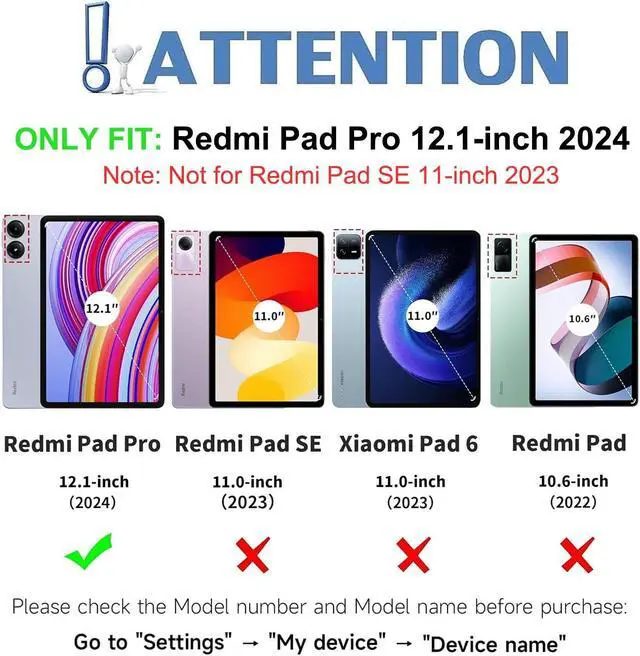
- Perfect CompatibilityDesigned exclusively for 12.1 inch Xiaomi Redmi Pad Pro 12.1/Xiaomi Poco Pad 12.1 Released 2024. Not compatible with any other devices. Please kindly check the model number before purchase.
- 7 Colors Backlit KeyboardEquipping with 3 adjustable levels of brightness and 7 vibrant backlight colors, make typing fun and easy in the dark/night. Bring you different visual experience and comfortable typing experience in a dark environment.
- Multi-Touch TrackpadOur integrated multi-touch trackpad perfectly adapts to Xiaomi Tablet system, with plentiful trackpad gestures, delivering a comfortable user experience while allowing you to click, scroll, and swipe through content effortlessly.
- Detachable Wireless Keyboard CaseThe magnetic Bluetooth keyboard and case are separated, magnetically attached, the keyboard can be removed from the case, the case is not removable. The well-made woven fabric case gives you a comfortable touch feeling, wireless keybo
+
+
Overview
Specs
Reviews
Any questions? Our AI beta will help you find out quickly.
Try me now
Compatibility
Exclusively designed for 12.1 inch Xiaomi Redmi Pad Pro 12.1 /Xiaomi Poco Pad 12.1 2024 tablet. NOT for other tablet model.
(Please check your tablet model carefully).
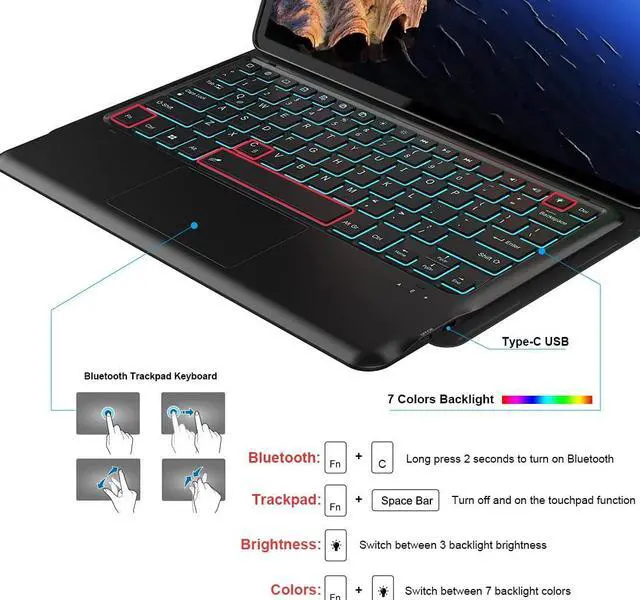
Press and hold the "Fn + C" button for 2 seconds to turn on the keyboard Bluetooth.
Search the keyboard via your tablet Bluetooth and connect it.
How to change the backlight color and backlight brightness?
Press "light bulb" you can change the colors for the backlight.
Press "Fn + light bulb" you can change the brightness of the backlight.
Exclusively designed for 12.1 inch Xiaomi Redmi Pad Pro 12.1 /Xiaomi Poco Pad 12.1 2024 tablet. NOT for other tablet model.
(Please check your tablet model carefully).
Press and hold the "Fn + C" button for 2 seconds to turn on the keyboard Bluetooth.
Search the keyboard via your tablet Bluetooth and connect it.
How to change the backlight color and backlight brightness?
Press "light bulb" you can change the colors for the backlight.
Press "Fn + light bulb" you can change the brightness of the backlight.
Warranty & Returns
Warranty, Returns, And Additional Information
Warranty
- Please contact the Seller directly for warranty information. Warranty information may also be found on the Manufacturer's website.
- CONTACT
Return Policies
- Return for refund within: 30 days
- Return for replacement within: 30 days
- This item is covered by StarDragon Return Policy
Manufacturer Contact Info
- For a directory of all our manufacturers, please click below.
- Manufacturers Directory
LOADING...