Your Browsing History
Meet Your Seller
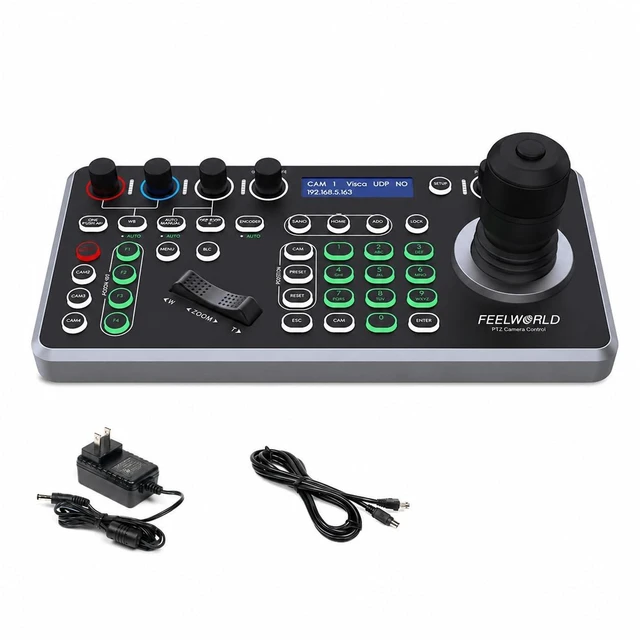
FEELWORLD KBC20 PTZ Camera Controller with 4D Joystick,for Live Streaming
- Centralized Control For Multi-Camera Productions: Manage compatible PTZ cameras from one dedicated control panel during church services, conferences, lectures and live events. with four direct-access camera keys for quickly selecting frequently used cameras
- 4D Joystick For Precise Framing: Pan, tilt and zoom with a responsive joystick instead of repeatedly clicking camera web controls. Joystick movement determines control speed, while dedicated pan/tilt and zoom speed knobs help you adapt movements to a speaker, presenter or stage performance. A separate zoom rocker offers another convenient framing option
- IP & Serial Connection Options: Integrate compatible cameras using ONVIF, VISCA over IP with UDP/TCP, SONY VISCA, or serial VISCA and PELCO-P/D protocols. Ethernet, RS232, RS422 and RS485 connections accommodate different installations. Match the cameras protocol and connection settings; IP devices must share the same LAN and subnet
- Preset Recall For Repeatable Shots: Save a
+
+
Overview
Specs
Reviews
Any questions? Ask CelesteSM will help you find out quickly.
Try me now
Centralized Control For Multi-Camera Productions: Manage compatible PTZ cameras from one dedicated control panel during church services, conferences, lectures and live events. with four direct-access camera keys for quickly selecting frequently used cameras ^^ 4D
Joystick For Precise Framing: Pan, tilt and zoom with a responsive joystick instead of repeatedly clicking camera web controls. Joystick movement determines control speed, while dedicated pan/tilt and zoom speed knobs help you adapt movements to a speaker, presenter or stage performance. A separate zoom rocker offers another convenient framing option ^^ IP &
Serial Connection Options: Integrate compatible cameras using ONVIF, VISCA over IP with UDP/TCP, SONY VISCA, or serial VISCA and PELCO-P/D protocols. Ethernet, RS232, RS422 and RS485 connections accommodate different installations. Match the cameras protocol and connection settings; IP devices must share the same LAN and subnet ^^
Preset Recall For Repeatable Shots: Save and recall camera presets using the number keys and dedicated PRESET and CALL buttons. Return to a lectern, stage overview or conference table without manually rebuilding each shot. Available preset positions and supported functions depend on the connected camera and protocol ^^ Hands-On Focus, Exposure &
Color Control: Adjust supported camera settings directly from the panel, including focus, iris/shutter and red/blue gain. Dedicated buttons provide access to auto/manual focus, one-push autofocus, white balance, exposure modes and backlight compensation, helping you respond to changing scenes without returning to a browser ^^
POE Support For Simpler Installation: Supply power and network connectivity to the controller through one Ethernet cable when connected to compatible PoE equipment. A DC 12V/1A power option and included power adapter provide an alternative for your setup. The LCD displays working status and menu information to assist configuration and operation ^^ Custom Shortcuts &
Metal Panel Construction: Configure F1F4 keys for supported functions such as home position, camera power, image flip or custom VISCA commands. Adjustable button lighting helps keep controls visible in different environments. A metal panel and CNC-oxidized lower shell complete the desktop design for regular production use
Joystick For Precise Framing: Pan, tilt and zoom with a responsive joystick instead of repeatedly clicking camera web controls. Joystick movement determines control speed, while dedicated pan/tilt and zoom speed knobs help you adapt movements to a speaker, presenter or stage performance. A separate zoom rocker offers another convenient framing option ^^ IP &
Serial Connection Options: Integrate compatible cameras using ONVIF, VISCA over IP with UDP/TCP, SONY VISCA, or serial VISCA and PELCO-P/D protocols. Ethernet, RS232, RS422 and RS485 connections accommodate different installations. Match the cameras protocol and connection settings; IP devices must share the same LAN and subnet ^^
Preset Recall For Repeatable Shots: Save and recall camera presets using the number keys and dedicated PRESET and CALL buttons. Return to a lectern, stage overview or conference table without manually rebuilding each shot. Available preset positions and supported functions depend on the connected camera and protocol ^^ Hands-On Focus, Exposure &
Color Control: Adjust supported camera settings directly from the panel, including focus, iris/shutter and red/blue gain. Dedicated buttons provide access to auto/manual focus, one-push autofocus, white balance, exposure modes and backlight compensation, helping you respond to changing scenes without returning to a browser ^^
POE Support For Simpler Installation: Supply power and network connectivity to the controller through one Ethernet cable when connected to compatible PoE equipment. A DC 12V/1A power option and included power adapter provide an alternative for your setup. The LCD displays working status and menu information to assist configuration and operation ^^ Custom Shortcuts &
Metal Panel Construction: Configure F1F4 keys for supported functions such as home position, camera power, image flip or custom VISCA commands. Adjustable button lighting helps keep controls visible in different environments. A metal panel and CNC-oxidized lower shell complete the desktop design for regular production use
Warranty & Returns
Warranty, Returns, And Additional Information
Warranty
- Please contact the Seller directly for warranty information. Warranty information may also be found on the Manufacturer's website.
- CONTACT
Return Policies
- Return for refund within: 30 days
- Return for replacement within: 30 days
- This item is covered by JMDesign Return Policy
Manufacturer Contact Info
- For a directory of all our manufacturers, please click below.
- Manufacturers Directory
LOADING...