Your Browsing History
Meet Your Seller
Tiergrade 15-in-1 Docking Station, 4K Triple Display Dock with 2HDMI&DP, 100W PD Charging, 10Gbps USB-C/USB-A Data Trasfer, 3USB-A Ports with 5Gbps, SD/TF, LAN, Audio for MacBook/USB-C Windows
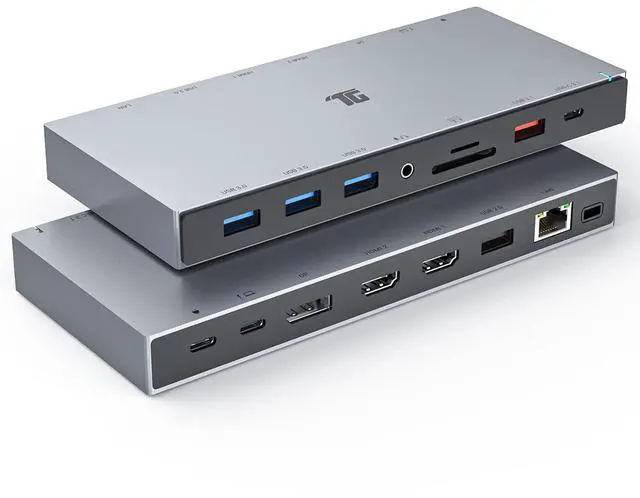
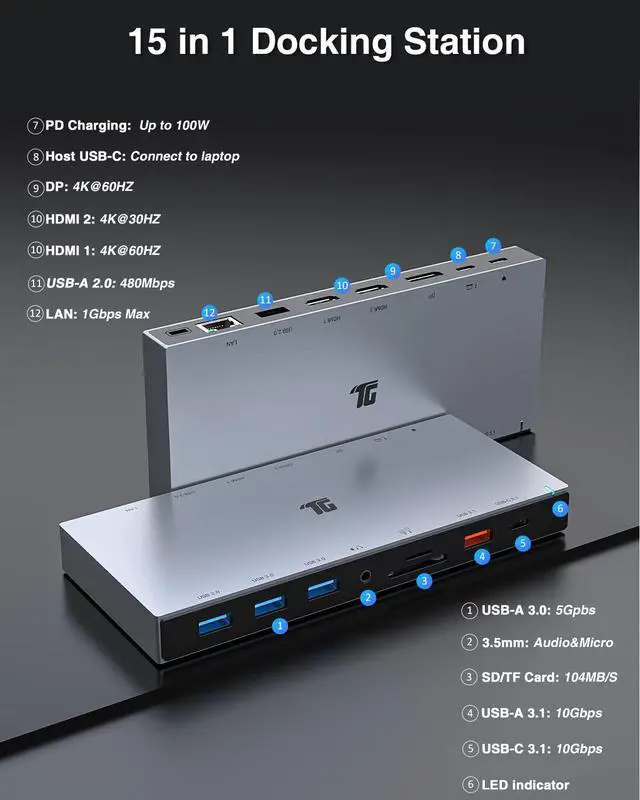
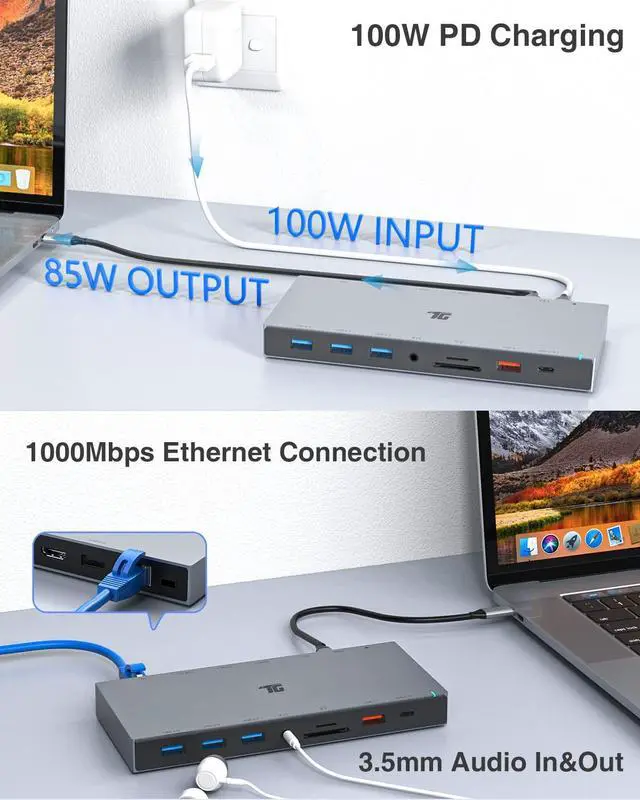
- 1. [15 in 1 Docking Station] Tiergrade 15 in 1 USB C Docking Station features 2 HDMI ports, 1 DisplayPort, 2 USB 3.1 ports(1 USB-A, 1 USB-C), 4 USB-A ports(3 USB 3.0, 1 USB 2.0), 100W PD charging, 1 Gigabit Ethernet port, SD&TF card slot, and 3.5mm audio jack. This Dock lets you connect multiple devices through a laptop's built-in USB-C port.
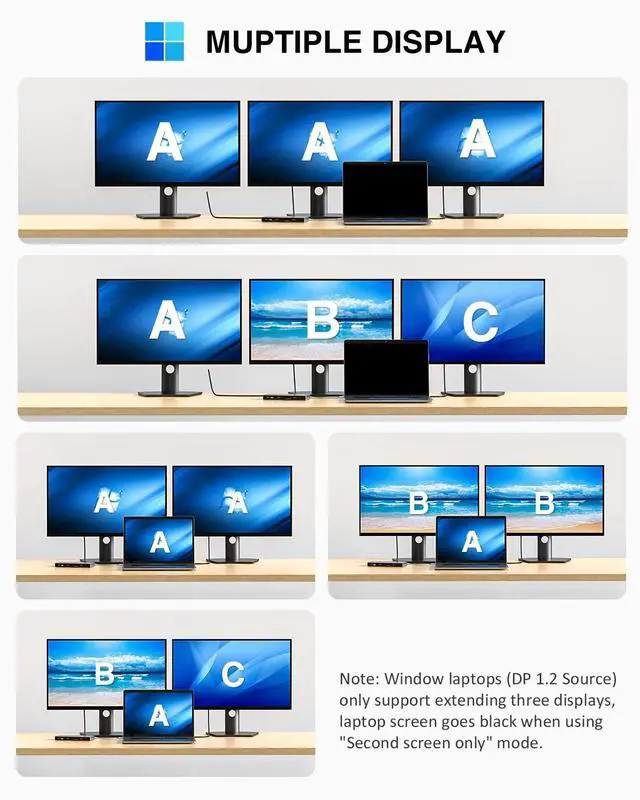
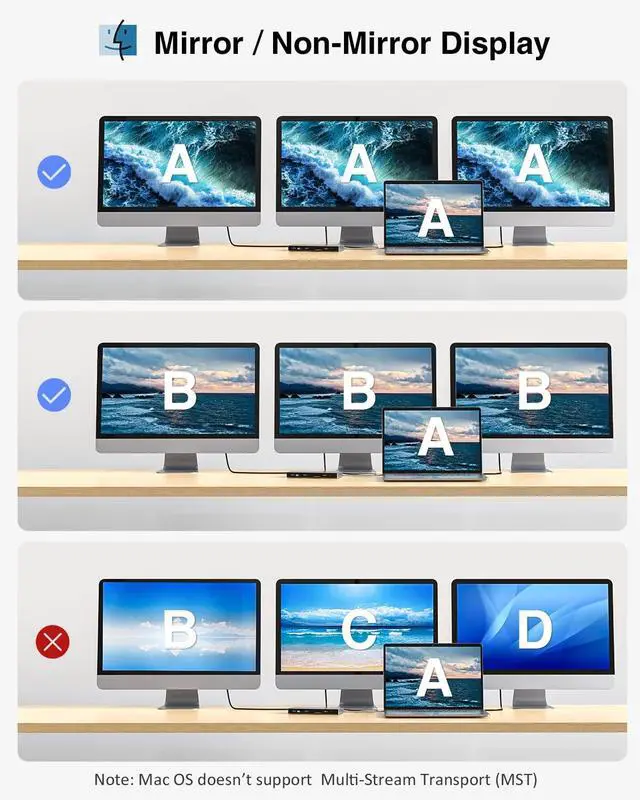
- 2. [Triple Extended Display] This docking station supports single video output up to 3840*2160(backward-compatible with 2560*1440, 1920*1080, and more) through DisplayPort or HDMI. For Windows DP1.2 source, Please note that a single display only reaches 4K@30Hz, and the connected displays will be lower to 1080P when using two or more Video ports. Since macOS doesn't support MST, the connected monitors show the same content.
- 3. [Ultra Transfer Speeds] The Dock is equipped with many USB ports for laptop peripherals, 1*USB3.1-A port(10Gbps), 1*USB3.1-C port(10Gbps), 3*USB3.0-A(5Gbps)ports, and 1*USB2.0(480Mbps), suitable for flash disk, hard di
+
+
Overview
Specs
Reviews
Any questions? Our AI beta will help you find out quickly.
Try me now
1. [15 in 1 Docking Station] Tiergrade 15 in 1 USB C Docking Station features 2 HDMI ports, 1 DisplayPort, 2 USB 3.1 ports(1 USB-A, 1 USB-C), 4 USB-A ports(3 USB 3.0, 1 USB 2.0 ), 100W PD charging, 1 Gigabit Ethernet port, SD&TF card slot, and 3.5 mm audio jack. This Dock lets you connect multiple devices through a laptop's built-in USB-C port. ^^ 2. [Triple Extended Display] This docking station supports single video output up to 3840*2160(backward-compatible with 2560*1440, 1920*1080, and more) through DisplayPort or HDMI.
For Windows DP 1.2 source, Please note that a single display only reaches 4K@30Hz, and the connected displays will be lower to 1080P when using two or more Video ports. Since macOS doesn't support MST, the connected monitors show the same content. ^^ 3. [Ultra Transfer Speeds] The Dock is equipped with many USB ports for laptop peripherals, 1*USB 3.1 -A port (10Gbps), 1*USB 3.1 -C port (10Gbps), 3*USB 3.0 -A (5Gbps) ports, and 1*USB 2.0 (480Mbps), suitable for flash disk, hard disk, printer, camera, keyboards, and mouse.
USB 3.1 transfer rate top to 10Gbps significantly enhanced the transmission efficiency of large files. ^^ 4. [SD & TF Card Reader] Built-in SD and TF slots can work simultaneously, and the reading speed is up to 104MB/S. The SD and TF slots easily transfer photos or videos from universal SD & Micro SD cards to your laptop, which makes you handy for editing or sharing your files. ^^ 5. [Wide Compatibility] Compatible with Macbook or Windows laptop with full-featured USB-C port[Video output/Power delivery/Data transfer]/Thunderbolt 3/Thunderbolt4/USB4. Plug and Play, no additional driver installation required.

For Windows DP 1.2 source, Please note that a single display only reaches 4K@30Hz, and the connected displays will be lower to 1080P when using two or more Video ports. Since macOS doesn't support MST, the connected monitors show the same content. ^^ 3. [Ultra Transfer Speeds] The Dock is equipped with many USB ports for laptop peripherals, 1*USB 3.1 -A port (10Gbps), 1*USB 3.1 -C port (10Gbps), 3*USB 3.0 -A (5Gbps) ports, and 1*USB 2.0 (480Mbps), suitable for flash disk, hard disk, printer, camera, keyboards, and mouse.
USB 3.1 transfer rate top to 10Gbps significantly enhanced the transmission efficiency of large files. ^^ 4. [SD & TF Card Reader] Built-in SD and TF slots can work simultaneously, and the reading speed is up to 104MB/S. The SD and TF slots easily transfer photos or videos from universal SD & Micro SD cards to your laptop, which makes you handy for editing or sharing your files. ^^ 5. [Wide Compatibility] Compatible with Macbook or Windows laptop with full-featured USB-C port[Video output/Power delivery/Data transfer]/Thunderbolt 3/Thunderbolt4/USB4. Plug and Play, no additional driver installation required.
Warranty & Returns
Warranty, Returns, And Additional Information
Warranty
- Please contact the Seller directly for warranty information. Warranty information may also be found on the Manufacturer's website.
- CONTACT
Return Policies
- Return for refund within: 30 days
- Return for replacement within: 30 days
- This item is covered by kaipuda Return Policy
Manufacturer Contact Info
- For a directory of all our manufacturers, please click below.
- Manufacturers Directory
LOADING...