Your Browsing History
Meet Your Seller
Prechen 14 Inch Triple Touchscreen Portable Monitor, Triple Screen Extender 1200P IPS Display, 10 Point Touch External Monitor, USB-C HDMI Touch Monitor for Windows PC MacBookNeed Driver
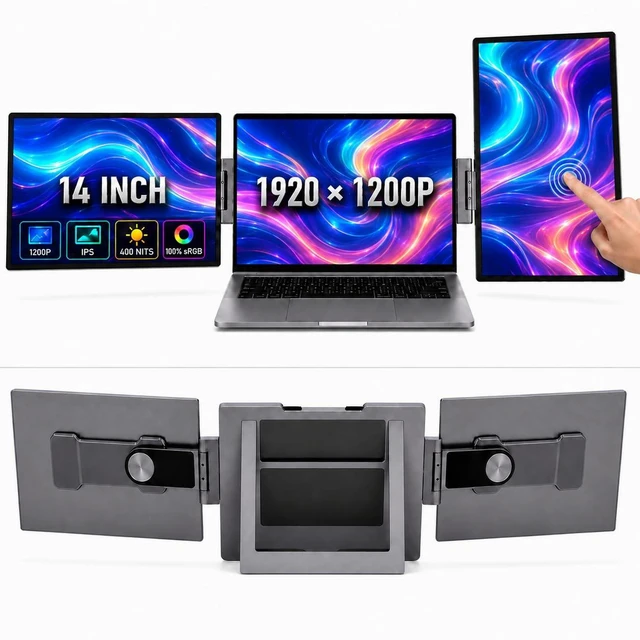
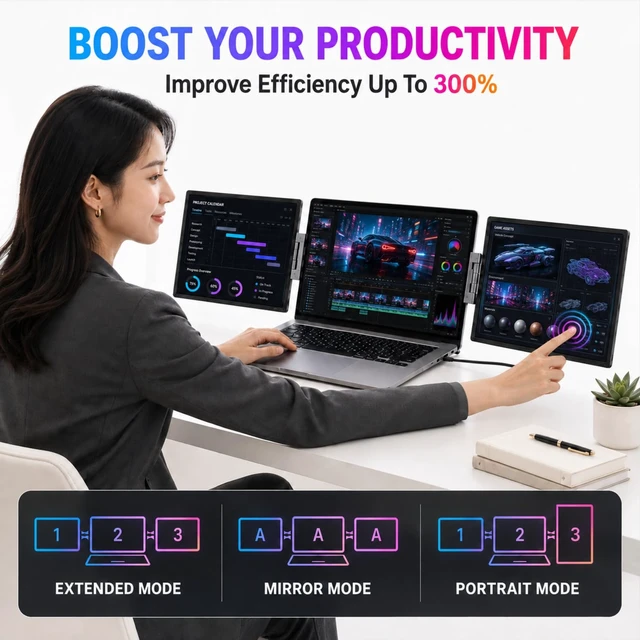
- 14 INCH TRIPLE SCREEN LAPTOP EXTENDER: Attach one 14-inch touchscreen to the left side of your laptop and the other to the right, turning the built-in laptop display into the center of a wide side-by-side triple screen workstation. Both external screens open in landscape orientation, keeping stock charts, spreadsheets, documents, meetings, coding tools and reference windows visible together.
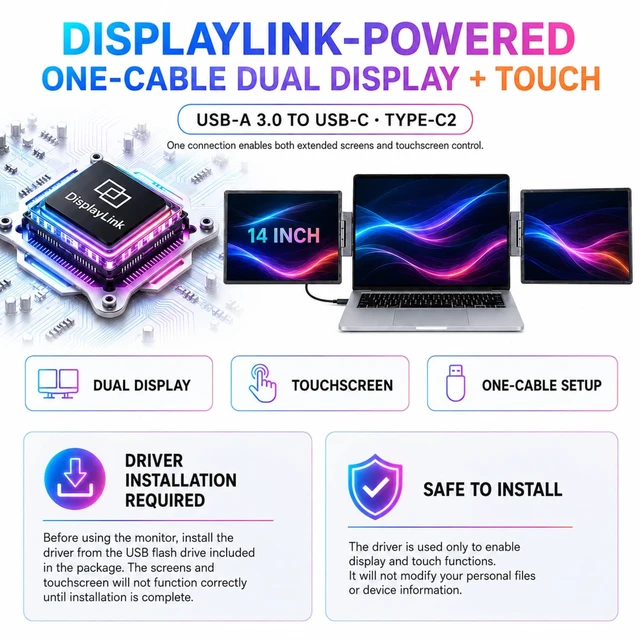
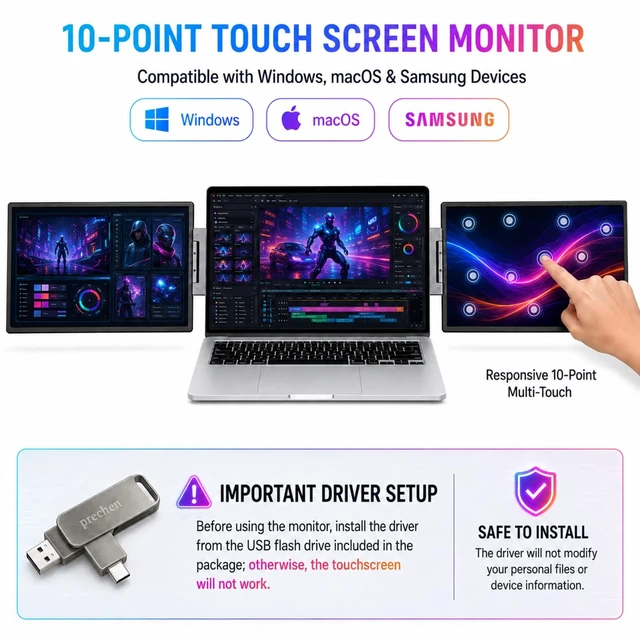
- 2. Triple-POINT TOUCHSCREEN CONTROL: The two external IPS displays support responsive 10-point capacitive touch through a USB data connection. Tap, swipe, drag, zoom or annotate directly on the screens. Install the supplied DisplayLink and touch driver from the included USB drive before using touch. HDMI alone carries video and cannot enable touch.
- 3.1200P IPS PORTABLE MONITOR FOR LAPTOP: Portable Monitor Touchscreen with 1920 1200 IPS panels combine a productivity-friendly 16:10 aspect ratio, 400-nit brightness and 100% sRGB color. This 1200P laptop monitor extender delivers crisp text, viv
+
+
Overview
Specs
Reviews
Any questions? Ask CelesteSM will help you find out quickly.
Try me now
14
INCH TRIPLE SCREEN LAPTOP EXTENDER: Attach one 14-inch touchscreen to the left side of your laptop and the other to the right, turning the built-in laptop display into the center of a wide side-by-side triple screen workstation. Both external screens open in landscape orientation, keeping stock charts, spreadsheets, documents, meetings, coding tools and reference windows visible together. ^^
2.
Triple-POINT TOUCHSCREEN CONTROL: The two external IPS displays support responsive 10-point capacitive touch through a USB data connection. Tap, swipe, drag, zoom or annotate directly on the screens. Install the supplied DisplayLink and touch driver from the included USB drive before using touch. HDMI alone carries video and cannot enable touch. ^^ 3.1200P
IPS PORTABLE MONITOR FOR LAPTOP: Portable Monitor Touchscreen with 1920 1200 IPS panels combine a productivity-friendly 16:10 aspect ratio, 400-nit brightness and 100% sRGB color. This 1200P laptop monitor extender delivers crisp text, vivid color and more usable screen space for spreadsheets, coding, photo editing, streaming and gaming ^^ 4.
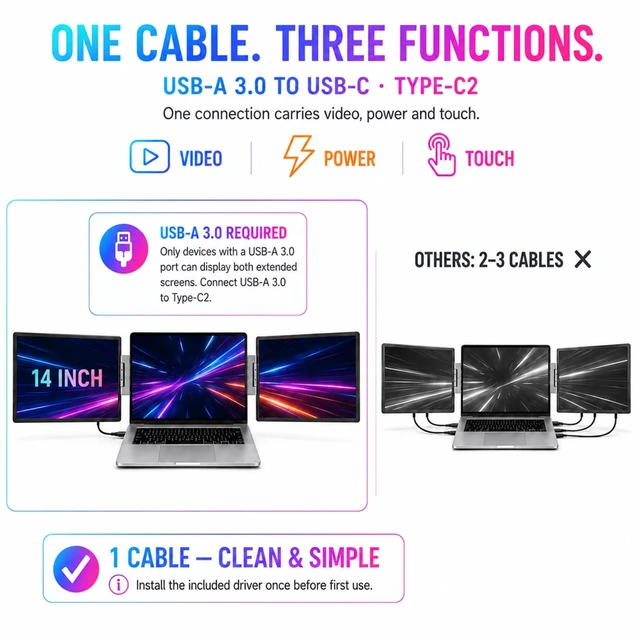
ONE-CABLE LAPTOP MONITOR EXTENDER: After driver setup, one USB-C connection carries power, video and touch. A laptop without the required USB-C connection can use USB-A 3.0 to Type-C2; the host must have a USB-A 3.0 port for the two external screens to work through one cable. If laptop power is insufficient, connect external power to Type-C1. ^^ 5. USB-C, USB-A 3.0 AND DUAL MINI
HDMI CONNECTIONS: Two Mini HDMI inputs provide a reliable video alternative for older laptops, desktops and Mini PCs. HDMI carries video only, so connect USB for touch/data and power, then use the Type-C1 power-only port when additional power is required. The multiple connection options make this a flexible triple screen monitor for laptop and desktop setups. ^^ 6. TWO FOLD-OUT SIDE SCREENS FOR WORK AND TRAVEL: The left and right screens attach beside the laptop through the integrated hinge/mount structure, and both open horizontally for a balanced three-screen workspace. Adjust the side-screen viewing angles for work or screen sharing, then fold both panels inward for storage and travel. Ideal for stock trading, remote work, coding, meetings, content creation and business trips. ^^ LAPTOP SCREEN EXTENDER FOR WINDOWS AND MAC: Supports display expansion on compatible Windows and macOS computers, plus USB-C video from devices such as iPhone 15/Pro/Max and Steam Deck when host video output is supported. Windows provides the fullest multi-touch support after setup; macOS touch behavior can vary by OS and driver. Game consoles and HDMI-only sources generally support display output without touch.
INCH TRIPLE SCREEN LAPTOP EXTENDER: Attach one 14-inch touchscreen to the left side of your laptop and the other to the right, turning the built-in laptop display into the center of a wide side-by-side triple screen workstation. Both external screens open in landscape orientation, keeping stock charts, spreadsheets, documents, meetings, coding tools and reference windows visible together. ^^
2.
Triple-POINT TOUCHSCREEN CONTROL: The two external IPS displays support responsive 10-point capacitive touch through a USB data connection. Tap, swipe, drag, zoom or annotate directly on the screens. Install the supplied DisplayLink and touch driver from the included USB drive before using touch. HDMI alone carries video and cannot enable touch. ^^ 3.1200P
IPS PORTABLE MONITOR FOR LAPTOP: Portable Monitor Touchscreen with 1920 1200 IPS panels combine a productivity-friendly 16:10 aspect ratio, 400-nit brightness and 100% sRGB color. This 1200P laptop monitor extender delivers crisp text, vivid color and more usable screen space for spreadsheets, coding, photo editing, streaming and gaming ^^ 4.
ONE-CABLE LAPTOP MONITOR EXTENDER: After driver setup, one USB-C connection carries power, video and touch. A laptop without the required USB-C connection can use USB-A 3.0 to Type-C2; the host must have a USB-A 3.0 port for the two external screens to work through one cable. If laptop power is insufficient, connect external power to Type-C1. ^^ 5. USB-C, USB-A 3.0 AND DUAL MINI
HDMI CONNECTIONS: Two Mini HDMI inputs provide a reliable video alternative for older laptops, desktops and Mini PCs. HDMI carries video only, so connect USB for touch/data and power, then use the Type-C1 power-only port when additional power is required. The multiple connection options make this a flexible triple screen monitor for laptop and desktop setups. ^^ 6. TWO FOLD-OUT SIDE SCREENS FOR WORK AND TRAVEL: The left and right screens attach beside the laptop through the integrated hinge/mount structure, and both open horizontally for a balanced three-screen workspace. Adjust the side-screen viewing angles for work or screen sharing, then fold both panels inward for storage and travel. Ideal for stock trading, remote work, coding, meetings, content creation and business trips. ^^ LAPTOP SCREEN EXTENDER FOR WINDOWS AND MAC: Supports display expansion on compatible Windows and macOS computers, plus USB-C video from devices such as iPhone 15/Pro/Max and Steam Deck when host video output is supported. Windows provides the fullest multi-touch support after setup; macOS touch behavior can vary by OS and driver. Game consoles and HDMI-only sources generally support display output without touch.
Warranty & Returns
Warranty, Returns, And Additional Information
Warranty
- Please contact the Seller directly for warranty information. Warranty information may also be found on the Manufacturer's website.
- CONTACT
Return Policies
- Return for refund within: 30 days
- Return for replacement within: 30 days
- This item is covered by kaipuda Return Policy
Manufacturer Contact Info
- For a directory of all our manufacturers, please click below.
- Manufacturers Directory
LOADING...