Your Browsing History
- Free 30-day Returns
$70.99
Meet Your Seller
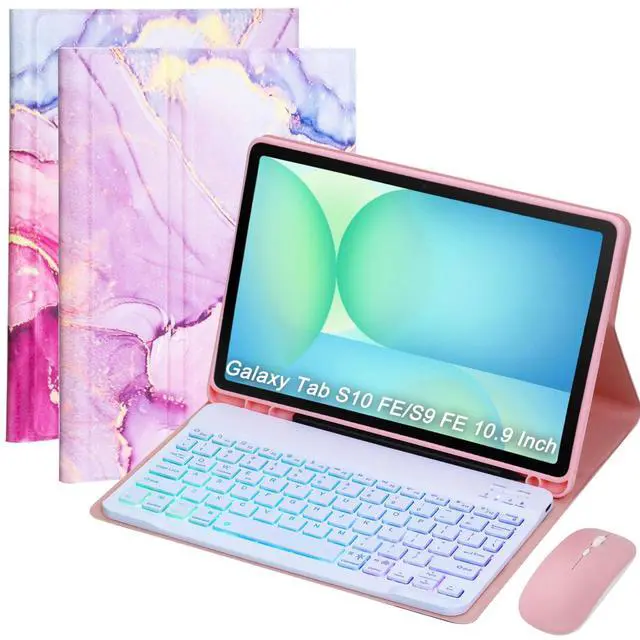
VLEAQC Keyboard Case for Samsung Galaxy Tab S10 FE/S10 Lite/S9 FE 10.9 2025/Galaxy Tab S9 11 Inch 2023, Mouse and Detachable Bluetooth Backlit Keyboard,Lightweight Cover with Pen Holder(Pink Marble)
- COMPATIBILITY Designed specifically for Samsung Galaxy Tab S10 Lite 5G 10.9" (Model SM-X400/SM-X406B) 2025/Galaxy Tab S10 FE 5G 10.9 inch (Model SM-X520/X526B/X528U) 2025 Release/ Galaxy Tab S9 FE 5G 10.9 inch (Models SM-X510/X516B/X518U) and also compatible with Galaxy Tab S9 11 inch (Models SM-X710/X716B/X718U) 2023 Release. Check model number before buying
- WIRELESS BACKLIT KEYBOARD Effortlessly connect to your tablet via Bluetooth and experience true wireless freedom.Type comfortably anytime with 3 colorful backlight zones and 7 lighting modes. Perfect for emails, streaming, or gaming, combining style and performance wherever you are
- BLUETOOTH MOUSE Achieve effortless control with the included Bluetooth mouse, designed to complement your Galaxy Tab S10 FE/S10 Lite/S9 FE/S9. Enjoy smooth tracking, precise movement, and enhanced efficiency whether you're working or browsing
- ADJUSTABLE VIEWING ANGLES Tailored for Galaxy Tab S10 FE/S9 FE (10.9") and S9 (11"),
+
+
Overview
Specs
Reviews
Any questions? Our AI beta will help you find out quickly.
Try me now
Keys
ON/OFF: Slide the switch to turn the device ON or OFF.
Connect Key: Press this key while the power is ON to activate Bluetooth pairing mode.
Indicator Lights
Power Indicator: Lights up for 4 seconds when powered ON, then turns off. WiFi (Bluetooth)
Indicator: Flashes during pairing and turns off once connected.
CAPS Lock Indicator: Stays ON when uppercase input mode is activated.
Charge Indicator: Lights up while charging and turns off when fully charged.
Bluetooth Keyboard Connection Steps
Slide the keyboard power switch to ON (Power indicator lights up for 4 seconds, then turns off). Press the Connect key to enter Bluetooth pairing mode (Bluetooth indicator flashes). Switch ON the mouse (if applicable). Open the tablet, go to Settings > Bluetooth, and turn Bluetooth ON. Select "Bluetooth Keyboard" and the mouse device when they appear, then complete the pairing.
Shortcut Keys
FN + Android Switch to Android system FN + Windows Switch to Windows system FN + iOS Switch to Apple system
Charging Instructions
Low Battery: The Power indicator flashes when the battery is low.
Charging: Connect the USB cable; the Charge indicator lights up.
Fully Charged: The Charge indicator turns off automatically.
Backlight & RGB Light Controls
Backlight Button: Press once Turn on the backlight Press twice Switch to breathing light mode Press three times Turn off all lights
RGB Button: Adjusts the light color. (Note: Color adjustment is not available in breathing light mode. )
Keyboard
Battery Capacity: 420mAh (long-lasting, rechargeable) Connectivity: Bluetooth
Materials
Exterior: PU leather (durable & stylish)
Inner Shell: TPU (shock-absorbent for enhanced protection)
Compatible Models
Galaxy Tab S9 FE 5G 10.9 inch (SM-X510/X516B/X518U) Galaxy Tab S10 FE 5G 10.9 inch (Model SM-X520/X526B/X528U) 2025 Galaxy Tab S9 11 inch (SM-X710/X716B/X718U) 2023 Release
Package Includes
1 × Tablet Case 1 × Wireless Bluetooth Keyboard 1 × Bluetooth Mouse 1 × User Manual
Upgrade Your Tablet Experience Today!
This ultimate keyboard case combo is designed to boost productivity, enhance comfort, and protect your device. Whether you're a professional, student, or creative, this all-in-one solution provides seamless typing, precise navigation, and reliable protection in a stylish and functional package.
Elevate Your Tablets Potential Work Smarter, Anywhere!

ON/OFF: Slide the switch to turn the device ON or OFF.
Connect Key: Press this key while the power is ON to activate Bluetooth pairing mode.
Indicator Lights
Power Indicator: Lights up for 4 seconds when powered ON, then turns off. WiFi (Bluetooth)
Indicator: Flashes during pairing and turns off once connected.
CAPS Lock Indicator: Stays ON when uppercase input mode is activated.
Charge Indicator: Lights up while charging and turns off when fully charged.
Bluetooth Keyboard Connection Steps
Slide the keyboard power switch to ON (Power indicator lights up for 4 seconds, then turns off). Press the Connect key to enter Bluetooth pairing mode (Bluetooth indicator flashes). Switch ON the mouse (if applicable). Open the tablet, go to Settings > Bluetooth, and turn Bluetooth ON. Select "Bluetooth Keyboard" and the mouse device when they appear, then complete the pairing.
Shortcut Keys
FN + Android Switch to Android system FN + Windows Switch to Windows system FN + iOS Switch to Apple system
Charging Instructions
Low Battery: The Power indicator flashes when the battery is low.
Charging: Connect the USB cable; the Charge indicator lights up.
Fully Charged: The Charge indicator turns off automatically.
Backlight & RGB Light Controls
Backlight Button: Press once Turn on the backlight Press twice Switch to breathing light mode Press three times Turn off all lights
RGB Button: Adjusts the light color. (Note: Color adjustment is not available in breathing light mode. )
Keyboard
Specifications
Battery Capacity: 420mAh (long-lasting, rechargeable) Connectivity: Bluetooth
Materials
Exterior: PU leather (durable & stylish)
Inner Shell: TPU (shock-absorbent for enhanced protection)
Compatible Models
Galaxy Tab S9 FE 5G 10.9 inch (SM-X510/X516B/X518U) Galaxy Tab S10 FE 5G 10.9 inch (Model SM-X520/X526B/X528U) 2025 Galaxy Tab S9 11 inch (SM-X710/X716B/X718U) 2023 Release
Package Includes
1 × Tablet Case 1 × Wireless Bluetooth Keyboard 1 × Bluetooth Mouse 1 × User Manual
Upgrade Your Tablet Experience Today!
This ultimate keyboard case combo is designed to boost productivity, enhance comfort, and protect your device. Whether you're a professional, student, or creative, this all-in-one solution provides seamless typing, precise navigation, and reliable protection in a stylish and functional package.
Elevate Your Tablets Potential Work Smarter, Anywhere!
Warranty & Returns
Warranty, Returns, And Additional Information
Warranty
- Please contact the Seller directly for warranty information. Warranty information may also be found on the Manufacturer's website.
- CONTACT
Return Policies
- Return for refund within: 30 days
- Return for replacement within: 30 days
- This item is covered by CloudBeast Return Policy
Manufacturer Contact Info
- For a directory of all our manufacturers, please click below.
- Manufacturers Directory
LOADING...