

Your Browsing History
- Free 30-day Returns
$243.99


Meet Your Seller

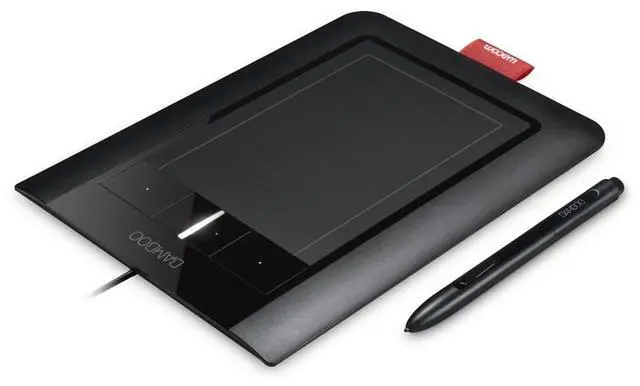

Wacom Bamboo Pen and Touch
- Two sensors for precise pen and Multi-Touch input
- Pressure-sensitive pen tip for natural pen and brush strokes
- Quick access to user-defined shortcuts with four ExpressKeys
- Adobe Photoshop Elements 7.0 Win / 6.0 Mac for editing, retouching, enhancing and sharing digital photos
- Battery-free, ergonomic pen with two switches
- Active Area Touch (W x H) - 4.9" x 3.4" (124mm x 86mm); Pen (W x H) - 5.8" x 3.6" (147mm x 91mm)
+
+
Overview
Specs
Reviews

Any questions? Our AI mode will help you find out quickly.
Try me now
Combining intuitive design and versatility, the Bamboo Pen and Touch is a powerful creative workstation that lets PC and Mac users create digital art with an organic, hands-on feel. Using an innovative tablet and Wacom's "Multi-Touch" system, users can manipulate images and navigate the Web using simple gestures and finger taps. When combined with Wacom's pen-input technology, Pen and Touch allows you to write, doodle, and embellish with ease. Included pen features 1, 024 levels of pressure sensitivity for precise drawings. Large, textured work surface and customizable keys give you artistic control.
View larger. Multi-Touch lets you scroll, zoom, and rotate your screen with simple hand gestures. Sleek, Stylish, and Easy to UseMeasuring 9.8 by 6.9 inches, the Pen and Touch is compact enough to store comfortably in a laptop case. It features a large and responsive active area, providing enough workspace for even your most ambitious projects. For added convenience, four ExpressKeys provide quick access to user-defined shortcuts. The tablet comes with a battery-free pen with an easy-to-grip design, so you can have maximum control over your drawing.
The work surface is textured, providing a pen-on-paper feel. It's also reversible, so you can use it comfortably whether you're right- or left-handed. The Pen and Touch is simple to set up. Simply plug the tablet into your computer via a USB port, install the provided drivers, and you're ready to go. You'll be doodling, writing, and painting in minutes. Enhance Creativity with Multi-Touch TechnologyWith the Pen and Touch, Wacom has implemented a new technology called Multi-Touch. Typically, tablets require you to use the stylus for navigation, but Multi-Touch provides a comfortable hands-on alternative.
It allows you to quickly navigate through your computer with a single finger. You can also scroll, zoom, and rotate your screen with simple hand gestures. It's intuitively-designed and easy to use -- even if you're new to the touch experience. For precision work, you can use the included pen. When you use the pen, the screen will automatically recalibrate for more precise use. In your hands, the pen quickly becomes an all-purpose art tool. It features 1, 024 levels of pressure sensitivity, allowing you to perform tasks ranging from fine hand-writing to wide-brush painting.
You can add hand-drawn embellishments to your favorite photos, add life to your digital sketches, or provide a personal touch to your scrapbooking pages. First-Class Visual Editing SoftwareThe tablet also comes with a full suite of visual editing software, including Adobe Photoshop Elements 7.0 Win/ 6.0 Mac and Nik Color Efex Pro 3.0 WE3--valued separately at several hundred dollars. Pen and Touch is compatible with Windows 7, Windows Vista, Windows XP (Service Pack 2) and Mac OS X ( 10.4. 8 or higher. ) It requires a powered USB drive, a colored screen, and a CD/DVD drive.
What's in the BoxBamboo Pen and Touch tablet, Bamboo pen, Quick Start guide, installation CD (includes driver software, interactive tutorial and user's manual), software DVD. Product DescriptionBamboo Pen and Touch combines the benefits of Multi-Touch with the comfort and precision of Wacoms ergonomically-designed pen, giving you a powerful new way to work with your computer. Multi-Touch allows you to use simple gestures and finger taps in an area larger than on standard mobile devices or laptop trackpads. Easily move around your desktop, scroll through documents, navigate the web, zoom in and out of photos, and rotate images.
For precision work, pick up the pressure-sensitive pen to edit photos, create personal greetings, make sketches, and mark up documents in your own handwriting. The tablets generous active area makes it more natural to use. Its easy - even if youre new to the touch experience. You can even customize your Bamboo Pen and Touch experience by assigning your own shortcuts to the four ExpressKeys. Bamboo Pen and Touch works with your existing comput
View larger. Multi-Touch lets you scroll, zoom, and rotate your screen with simple hand gestures. Sleek, Stylish, and Easy to UseMeasuring 9.8 by 6.9 inches, the Pen and Touch is compact enough to store comfortably in a laptop case. It features a large and responsive active area, providing enough workspace for even your most ambitious projects. For added convenience, four ExpressKeys provide quick access to user-defined shortcuts. The tablet comes with a battery-free pen with an easy-to-grip design, so you can have maximum control over your drawing.
The work surface is textured, providing a pen-on-paper feel. It's also reversible, so you can use it comfortably whether you're right- or left-handed. The Pen and Touch is simple to set up. Simply plug the tablet into your computer via a USB port, install the provided drivers, and you're ready to go. You'll be doodling, writing, and painting in minutes. Enhance Creativity with Multi-Touch TechnologyWith the Pen and Touch, Wacom has implemented a new technology called Multi-Touch. Typically, tablets require you to use the stylus for navigation, but Multi-Touch provides a comfortable hands-on alternative.
It allows you to quickly navigate through your computer with a single finger. You can also scroll, zoom, and rotate your screen with simple hand gestures. It's intuitively-designed and easy to use -- even if you're new to the touch experience. For precision work, you can use the included pen. When you use the pen, the screen will automatically recalibrate for more precise use. In your hands, the pen quickly becomes an all-purpose art tool. It features 1, 024 levels of pressure sensitivity, allowing you to perform tasks ranging from fine hand-writing to wide-brush painting.
You can add hand-drawn embellishments to your favorite photos, add life to your digital sketches, or provide a personal touch to your scrapbooking pages. First-Class Visual Editing SoftwareThe tablet also comes with a full suite of visual editing software, including Adobe Photoshop Elements 7.0 Win/ 6.0 Mac and Nik Color Efex Pro 3.0 WE3--valued separately at several hundred dollars. Pen and Touch is compatible with Windows 7, Windows Vista, Windows XP (Service Pack 2) and Mac OS X ( 10.4. 8 or higher. ) It requires a powered USB drive, a colored screen, and a CD/DVD drive.
What's in the BoxBamboo Pen and Touch tablet, Bamboo pen, Quick Start guide, installation CD (includes driver software, interactive tutorial and user's manual), software DVD. Product DescriptionBamboo Pen and Touch combines the benefits of Multi-Touch with the comfort and precision of Wacoms ergonomically-designed pen, giving you a powerful new way to work with your computer. Multi-Touch allows you to use simple gestures and finger taps in an area larger than on standard mobile devices or laptop trackpads. Easily move around your desktop, scroll through documents, navigate the web, zoom in and out of photos, and rotate images.
For precision work, pick up the pressure-sensitive pen to edit photos, create personal greetings, make sketches, and mark up documents in your own handwriting. The tablets generous active area makes it more natural to use. Its easy - even if youre new to the touch experience. You can even customize your Bamboo Pen and Touch experience by assigning your own shortcuts to the four ExpressKeys. Bamboo Pen and Touch works with your existing comput
Warranty & Returns
Warranty, Returns, And Additional Information
Warranty
- Please contact the Seller directly for warranty information. Warranty information may also be found on the Manufacturer's website.
- CONTACT
Return Policies
- Return for refund within: 30 days
- Return for replacement within: 30 days
- This item is covered by GoBeRotie Return Policy
Manufacturer Contact Info
- For a directory of all our manufacturers, please click below.
- Manufacturers Directory
LOADING...