

Your Browsing History

Meet Your Seller


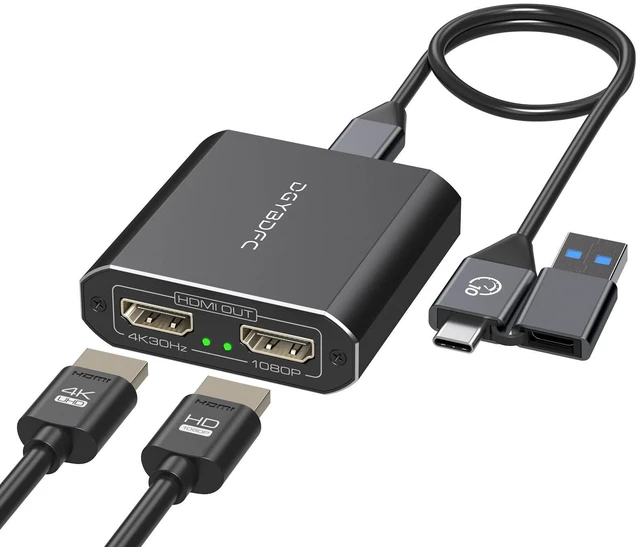


USB A/C to Dual HDMI Adapter Extended Display for Dual Monitor, USB A & USB C to Dual HDMI Splitter Display 3 Separate Screens for Windows, MacOS (Drivers Install Need, Output1 4K30Hz Output2 1080p)
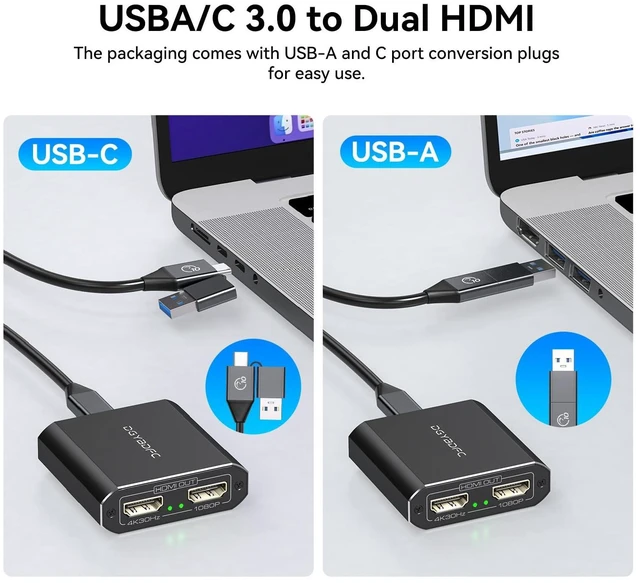
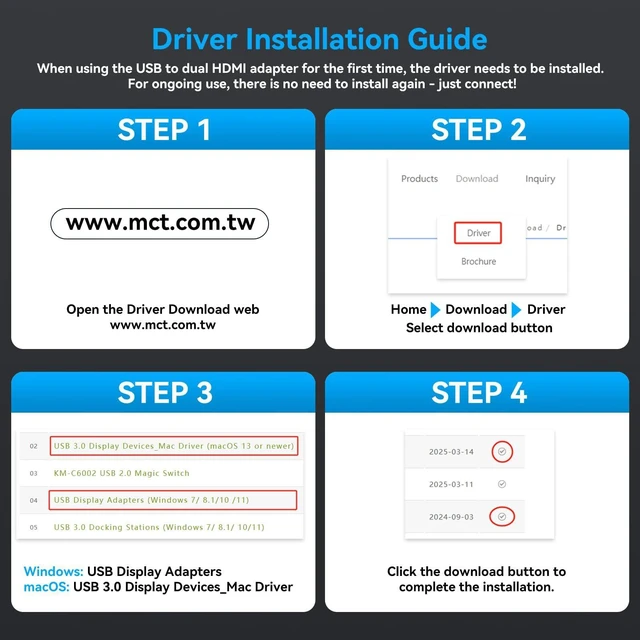
- USB A or USB C to Dual HDMI AdapterThis versatile USB to dual HDMI adapter functions as an efficient HDMI splitter 1 in 2 out extended display solution, enabling seamless multi-monitor setups for both work and entertainment. Connect a single laptop or computer to two external monitors via USB-A or USB-Cports, delivering flexible extended display for dual monitorsor mirrored screen configurations.This HDMI dual monitor adapter supports USB 3.0 to dual HDMI connectivity and ensures broad compatibility with both Windows and macOS systems. (Note: Requires program installationplease follow the included instructions to set up the appropriate software for your operating system.)
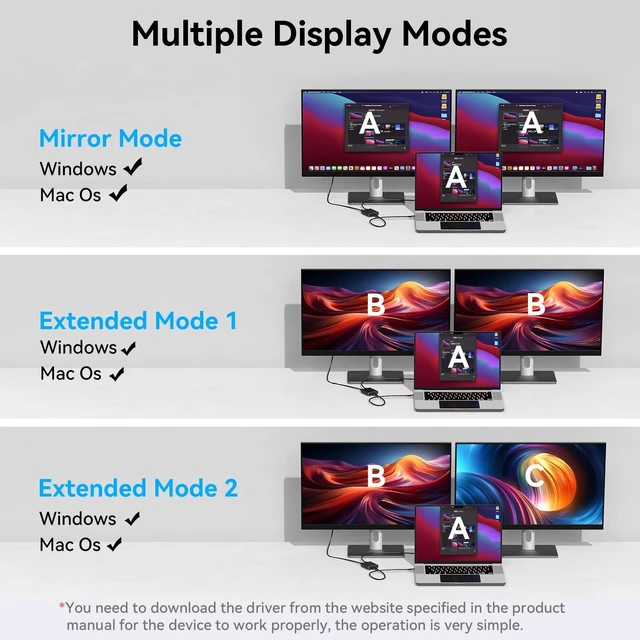
- Dual-Mode HDMI Display AdapterThe USB to HDMI multiport adapter supports both mirroring and expanding display modes. Mirroring mode allows two monitors to display the same screen, which is perfect for PPT presentations or other application scenarios; expanding mode allows two monitors to display different screens,
+
+
Overview
Specs
Reviews

Any questions? Our AI mode will help you find out quickly.
Try me now
USB A or USB C to Dual HDMI AdapterThis versatile USB to dual HDMI adapter functions as an efficient HDMI splitter 1 in 2 out extended display solution, enabling seamless multi-monitor setups for both work and entertainment. Connect a single laptop or computer to two external monitors via USB-A or USB-Cports, delivering flexible extended display for dual monitorsor mirrored screen configurations. This HDMI dual monitor adapter supports USB 3.0 to dual HDMI connectivity and ensures broad compatibility with both Windows and macOS systems.
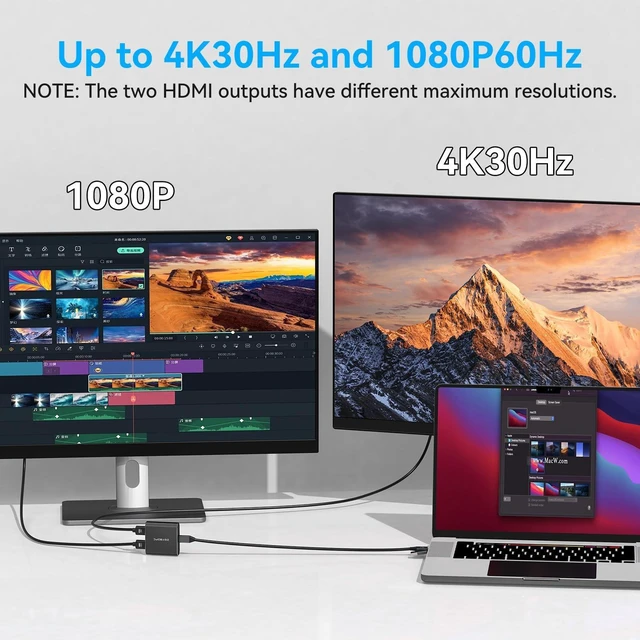
(Note: Requires program installationplease follow the included instructions to set up the appropriate software for your operating system. ) ^^ Dual-Mode HDMI Display AdapterThe USB to HDMI multiport adapter supports both mirroring and expanding display modes. Mirroring mode allows two monitors to display the same screen, which is perfect for PPT presentations or other application scenarios; expanding mode allows two monitors to display different screens, or the computer and the monitor to display three different contents, which provides enough space for efficient multitasking. ^^ 4K & 1080P Dual Monitor AdapterConnect 2 HDMI monitors from a single USB-C or USB-A port. Expand your display capabilities with this versatile USB to dual HDMI adapter, delivering simultaneous output to 2 external monitors. Compatible with USB-C, Thunderbolt 3/4, USB 3.0, and USB 2.0 ports, this HDMI splitter for dual monitors supports 4K@30Hz and 1080P@60Hz resolution combinationsperfect for extending your workspace across multiple screens in work and play.
(Note: USB 2.0 connection limits output to 1080P resolution; ultra-wide monitors and macOS screen rotation are not supported. ) ^^ Flexible Connection Dual HDMI AdapterThis practical HDMI splitter extended display 2 monitorsadapter features a detachable input designno fixed cable attached. The package includes a 0.5 -meter USB-A/USB-C to USB-C cable for convenient connection between your computer and this HDMI splitter for dual monitors extended display unit. For extended reach, you may also use your own USB cable (up to 1.5 meters maximum recommended length) to connect to the input side of this dual monitor adapter. ^^ Wide Compatibility for MacOS & WindowsThis USB to dual HDMI adapter delivers broad compatibility with major operating systems including Windows 7/8/10/11 and macOS 11 or later. Perfect as a dual monitor adapter for laptop, it enables seamless HDMI splitter extended display for 2 monitors, offering both extended and mirrored screen modes for versatile workspace setups.
Note: If the display fails after driver installation, add the driver to your Anti-Virus Whitelist and PC Manager Whitelist.
(Note: Requires program installationplease follow the included instructions to set up the appropriate software for your operating system. ) ^^ Dual-Mode HDMI Display AdapterThe USB to HDMI multiport adapter supports both mirroring and expanding display modes. Mirroring mode allows two monitors to display the same screen, which is perfect for PPT presentations or other application scenarios; expanding mode allows two monitors to display different screens, or the computer and the monitor to display three different contents, which provides enough space for efficient multitasking. ^^ 4K & 1080P Dual Monitor AdapterConnect 2 HDMI monitors from a single USB-C or USB-A port. Expand your display capabilities with this versatile USB to dual HDMI adapter, delivering simultaneous output to 2 external monitors. Compatible with USB-C, Thunderbolt 3/4, USB 3.0, and USB 2.0 ports, this HDMI splitter for dual monitors supports 4K@30Hz and 1080P@60Hz resolution combinationsperfect for extending your workspace across multiple screens in work and play.
(Note: USB 2.0 connection limits output to 1080P resolution; ultra-wide monitors and macOS screen rotation are not supported. ) ^^ Flexible Connection Dual HDMI AdapterThis practical HDMI splitter extended display 2 monitorsadapter features a detachable input designno fixed cable attached. The package includes a 0.5 -meter USB-A/USB-C to USB-C cable for convenient connection between your computer and this HDMI splitter for dual monitors extended display unit. For extended reach, you may also use your own USB cable (up to 1.5 meters maximum recommended length) to connect to the input side of this dual monitor adapter. ^^ Wide Compatibility for MacOS & WindowsThis USB to dual HDMI adapter delivers broad compatibility with major operating systems including Windows 7/8/10/11 and macOS 11 or later. Perfect as a dual monitor adapter for laptop, it enables seamless HDMI splitter extended display for 2 monitors, offering both extended and mirrored screen modes for versatile workspace setups.
Note: If the display fails after driver installation, add the driver to your Anti-Virus Whitelist and PC Manager Whitelist.
Warranty & Returns
Warranty, Returns, And Additional Information
Warranty
- Please contact the Seller directly for warranty information. Warranty information may also be found on the Manufacturer's website.
- CONTACT
Return Policies
- Return for refund within: 30 days
- Return for replacement within: 30 days
- This item is covered by Hanbo Supply Store Return Policy
Manufacturer Contact Info
- For a directory of all our manufacturers, please click below.
- Manufacturers Directory
LOADING...