

Your Browsing History

Meet Your Seller


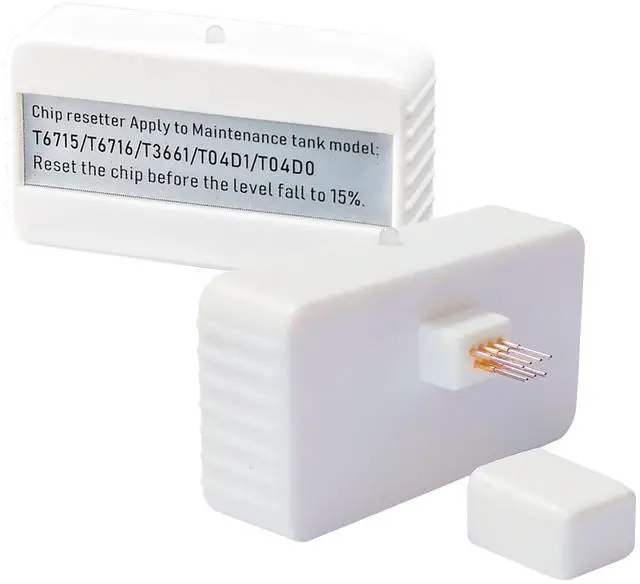


BAALAND T04D1 Maintenance Tank Chip Resetter T04D100 T3661 T6715 T6716 T04D0 Maintenance Box Chip Resetter for Epson XP-15000 XP-6000 XP-6100 XP-6001 XP-6005 XP-8500 XP-970 XP-15050 ET-15000 ET-3750
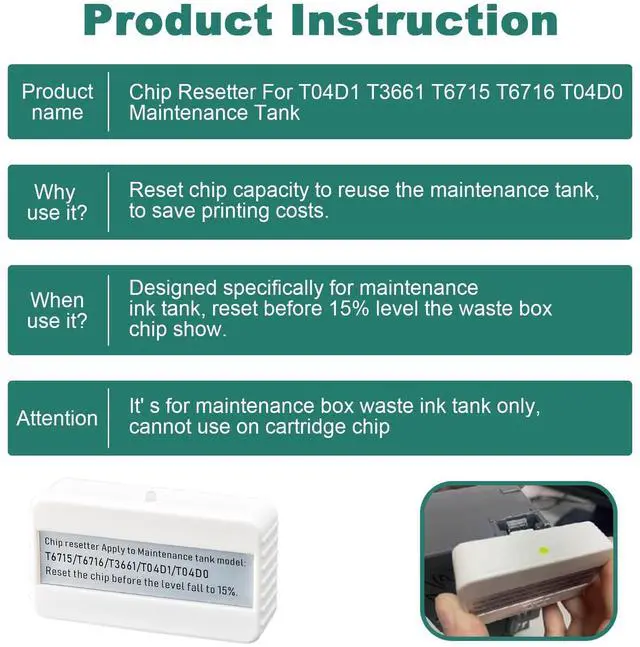
- Product Model: T04D1 T04D0 T3661 T6715 T6716 Maintenance Box Chip Resetter. *It is Designed specifically for T04D1 /T04D0 /T3661 /T6715 /T6716 maintenance ink tank, reset the waste box chip show to save your printing cost
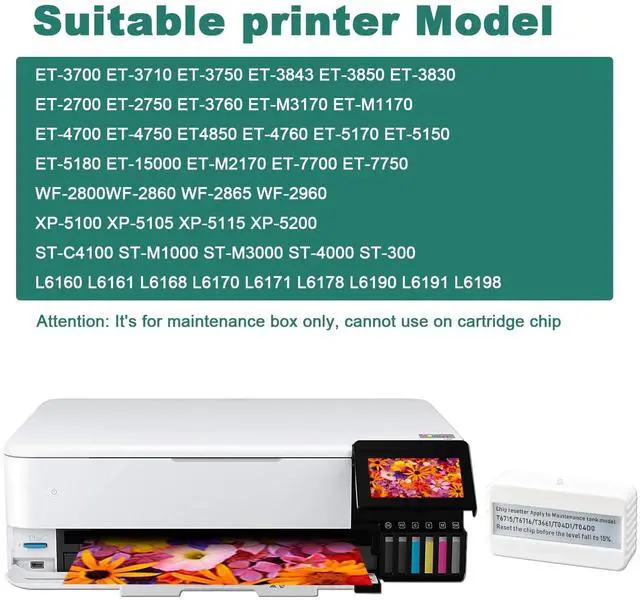
- T04D1 Maintenance Ink Tank Chip Resetter: Fits for printer model T-3700 ET-3710 ET-3750 ET-3760 ET-3830 ET-3850 ET-4750 ET-4760 ET-4850 ET-5150 ET-5170 ET-15000 ET-M1140 ET-M1170 ET-M1180 ET-M2140 ET-M2170 ET-M3170 ET-M3180 ET-M3140 ST-M1000 ST-3000 ST-M3000 ST-4000, WorkForce WF-2860 WF-2860DWF WF-2865DWF WF-2861, Expression Home XP-5100 XP-5105
- T3661 Maintenance Ink Tank Chip Resetter: Fits for printer model XP-6105 XP-6100 XP-6005 XP-6000 XP-6001 XP-8500 XP-8505 XP-8600 XP-8605 XP-15000 XP-15050 XP-15080
- T6715 Maintenance Ink Tank Chip Resetter: Fits for printer model WF-3820 WF-3823 WF-4720 WF-4730 WF-4737 WF-4740 WF-4820 WF-4830 WF-4833 WF-4834 WF-C4310 WF-C4810 EC-4040 EC-4030 EC-4020
- T6716 Maintenance Ink Tank Chip Resetter: WF-C5790 WF-C5710 WF-C52
+
+
Overview
Specs
Reviews

Any questions? Our AI mode will help you find out quickly.
Try me now
Product Name: T04D1 T04D0 T3661 T6715 T6716 Maintenance box chip resetter /
Maintenance tank chip resetterNote: This chip resetter works for Maintenance box / Maintenance tank / Waste ink tank Only! It CAN NOT work on Ink cartridges! The chip resetter works for the Printer
Maintenance tank list: 1) TT04D1/ T04D100/ C13T04D100 Maintenance Box chip
Resetter for printer: Expression Home XP-5100 XP-5200EcoTank ET-M1140 / ET-M1170 / ET-M1180 / ET-M2140 / ET-M2170 / ET-M3140 / ET-M3170 / ET-M3180EcoTank ET-2760 / ET-3700 / ET-3710 / ET-3750 / ET-3750 Unlimited / ET-3760 / ET-3830 / ET-3843 / ET-3850 / ET-4750 / ET-4760 / ET-4850 / ET-15000EcoTank ET-M1170 / ET-M1180 / ET-M2170 / ET-M3170 / ET-M3180EcoTank L6168 / L6178 / L6190 / L6198EcoTank Pro ET-5150 / ET-5170 / ET-5180WorkForce ST-M1000 / ST-M3000 / ST-3000 / ST-4000 / ST-C4100 / WF-2860 /WF-2860DWF / WF-2861 / WF-2865DWF WF-29602) T3661/T366100 Maintenance Box chip
Resetter for printer: Expression Premium XP-6000 XP-6100Expression Photo XP-970 XP-8500 XP-8600 XP-8700 HD-XP-150003) T6715/T671500 Maintenance Box chip
Resetter for printer: WorkForce Pro WF-3820 WF-3823 WF-4720 WF-4730 WF-4737 WF-4740 WF-4820 WF-4830 WF-4833 WF-4834WF-C4310 WF-C4810 EC-4040 EC-4030 EC-40204) T6716/T671600 Maintenance Box chip
Resetter for printer: Compatible
for printer model list: WorkForce Pro WF-C5790 WF-C5710 WF-C5290 WF-C5210 WF-C529R WF-C579RET-8700 WF-M5299 WF-M57995) T04D0/T04D000 Maintenance Box chip
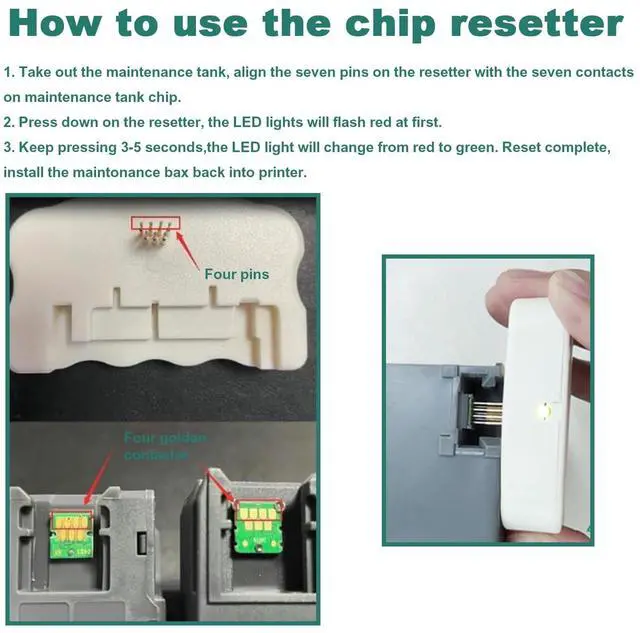
Resetter for printer: Expression Premium ET-7700 ET-7750Please find the step-by-step guide below on how to use the resetter: 1. Take out the maintenance tank from your printer. 2. Align the seven pins on the resetter with the seven contacts on the maintenance tank chip. 3. Press down on the resetter firmly. Initially, the LED lights will flash red. 4. Keep pressing for 3-5 seconds. The LED light will change from red to green, indicating that the reset is complete. 5. Once the reset is done, reinstall the maintenance tank back into your printer.
Maintenance tank chip resetterNote: This chip resetter works for Maintenance box / Maintenance tank / Waste ink tank Only! It CAN NOT work on Ink cartridges! The chip resetter works for the Printer
Maintenance tank list: 1) TT04D1/ T04D100/ C13T04D100 Maintenance Box chip
Resetter for printer: Expression Home XP-5100 XP-5200EcoTank ET-M1140 / ET-M1170 / ET-M1180 / ET-M2140 / ET-M2170 / ET-M3140 / ET-M3170 / ET-M3180EcoTank ET-2760 / ET-3700 / ET-3710 / ET-3750 / ET-3750 Unlimited / ET-3760 / ET-3830 / ET-3843 / ET-3850 / ET-4750 / ET-4760 / ET-4850 / ET-15000EcoTank ET-M1170 / ET-M1180 / ET-M2170 / ET-M3170 / ET-M3180EcoTank L6168 / L6178 / L6190 / L6198EcoTank Pro ET-5150 / ET-5170 / ET-5180WorkForce ST-M1000 / ST-M3000 / ST-3000 / ST-4000 / ST-C4100 / WF-2860 /WF-2860DWF / WF-2861 / WF-2865DWF WF-29602) T3661/T366100 Maintenance Box chip
Resetter for printer: Expression Premium XP-6000 XP-6100Expression Photo XP-970 XP-8500 XP-8600 XP-8700 HD-XP-150003) T6715/T671500 Maintenance Box chip
Resetter for printer: WorkForce Pro WF-3820 WF-3823 WF-4720 WF-4730 WF-4737 WF-4740 WF-4820 WF-4830 WF-4833 WF-4834WF-C4310 WF-C4810 EC-4040 EC-4030 EC-40204) T6716/T671600 Maintenance Box chip
Resetter for printer: Compatible
for printer model list: WorkForce Pro WF-C5790 WF-C5710 WF-C5290 WF-C5210 WF-C529R WF-C579RET-8700 WF-M5299 WF-M57995) T04D0/T04D000 Maintenance Box chip
Resetter for printer: Expression Premium ET-7700 ET-7750Please find the step-by-step guide below on how to use the resetter: 1. Take out the maintenance tank from your printer. 2. Align the seven pins on the resetter with the seven contacts on the maintenance tank chip. 3. Press down on the resetter firmly. Initially, the LED lights will flash red. 4. Keep pressing for 3-5 seconds. The LED light will change from red to green, indicating that the reset is complete. 5. Once the reset is done, reinstall the maintenance tank back into your printer.
Warranty & Returns
Warranty, Returns, And Additional Information
Warranty
- Please contact the Seller directly for warranty information. Warranty information may also be found on the Manufacturer's website.
- CONTACT
Return Policies
- Return for refund within: 30 days
- Return for replacement within: 30 days
- This item is covered by HyperCore Return Policy
Manufacturer Contact Info
- For a directory of all our manufacturers, please click below.
- Manufacturers Directory
LOADING...