

Your Browsing History

Meet Your Seller

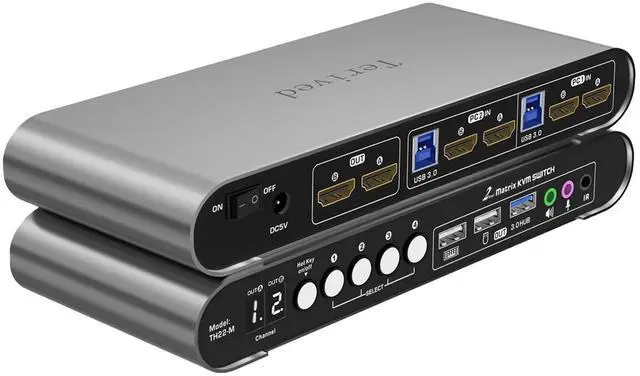
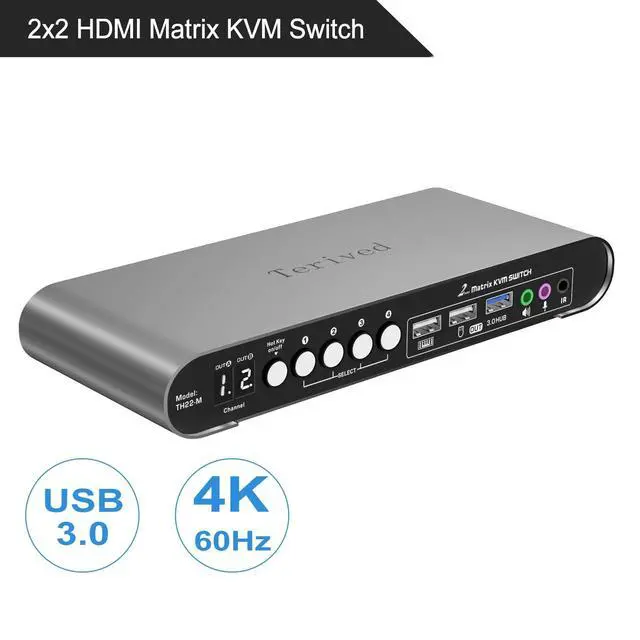


Terived 2 Computers 2 HDMI Monitors Matrix Automatic KVM Switch 4K@60Hz, Hotkey Switching, EDID, Digital Display and Aluminum Shell, USB 3.0 Hub Audio Microphone with Cables
- Attention: We strongly encourage you to watch our short demo video showcasing this product. Please ensure that your devices have at least two HDMI ports, 1 HDMI + 1 DP, or 1 HDMI + 1 Type C, that support two external monitors before making a purchase. If you require additional HDMI ports, we recommend using a high-quality converter cable that supports 4k@60Hz for a 1-to-1 connection. We don't recommend any laptop users to use a cheap 1-to-2 docking station with this product, as it will not work.
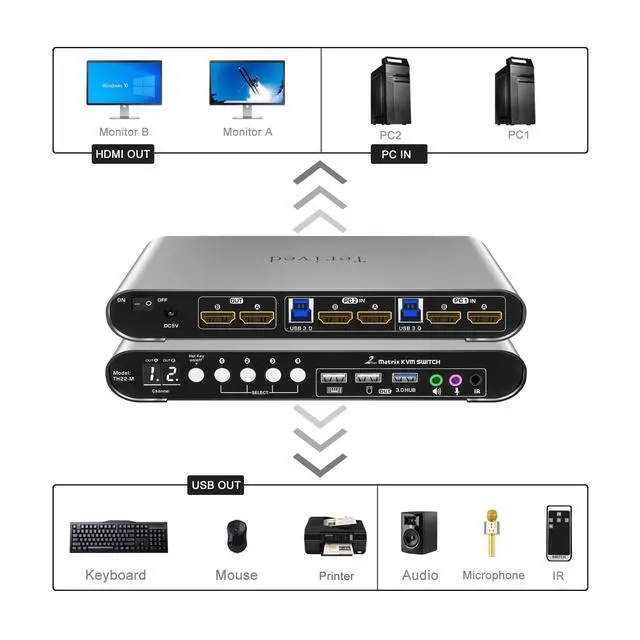
- Dual Mode: This Matrix KVM has two operating modes. In KVM mode (buttons 1 and 2), you can view both monitors for one computer and switch between them. In Matrix mode (buttons 3 or 4), you can view each monitor representing a different computer. To switch back to KVM mode, press button 4 twice.
- Aluminum Alloy Shell - Aiming to offer the best quality to our customers, we use an aluminum alloy for the body of this Matrix KVM, which provides an excellent premium look, significant drop resist
+
+
Overview
Specs
Reviews

Any questions? Our AI mode will help you find out quickly.
Try me now
Attention: We strongly encourage you to watch our short demo video showcasing this product. Please ensure that your devices have at least two HDMI ports, 1 HDMI + 1 DP, or 1 HDMI + 1 Type C, that support two external monitors before making a purchase. If you require additional HDMI ports, we recommend using a high-quality converter cable that supports 4k@60Hz for a 1-to-1 connection. We don't recommend any laptop users to use a cheap 1-to-2 docking station with this product, as it will not work.
^^ Dual Mode: This Matrix KVM has two operating modes. In KVM mode (buttons 1 and 2), you can view both monitors for one computer and switch between them. In Matrix mode (buttons 3 or 4), you can view each monitor representing a different computer. To switch back to KVM mode, press button 4 twice. ^^ Aluminum Alloy Shell - Aiming to offer the best quality to our customers, we use an aluminum alloy for the body of this Matrix KVM, which provides an excellent premium look, significant drop resistance, lightweight design, strength, and robust corrosion resistance.
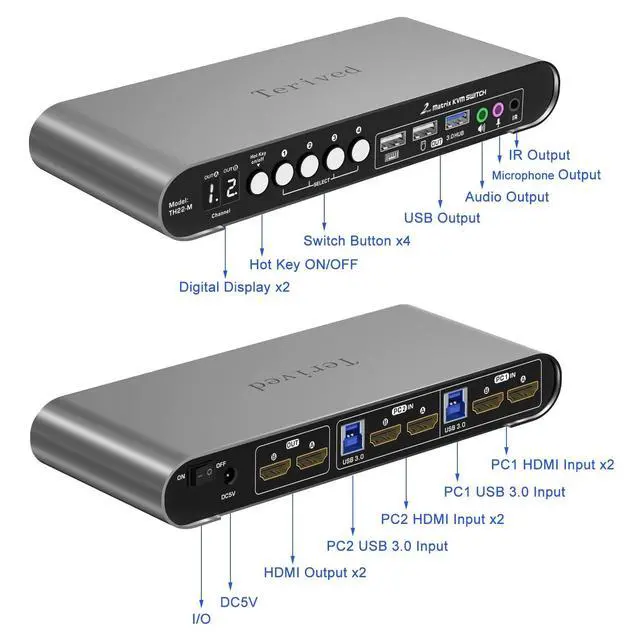
^^ Digital Display: This 2-port dual monitor Matrix KVM switch features two digital displays, making it easy for you to view the current channel even in low-light environments. ^^ Switch and Control in
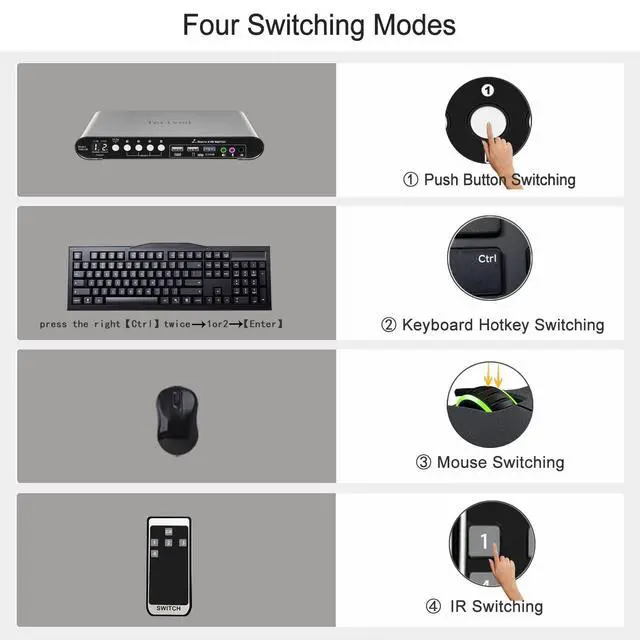
Multiple Ways: This product provides you with a convenient way to switch between modes, including keyboard hotkeys, manual button switching, and IR remote control. Please note that the IR remote does not come with a battery for safety reasons during shipping ^^ Two Computers, Two
Monitors: Control two HDMI interfaced computers or other applicable devices using one keyboard, mouse, two HDMI monitors with audio and microphone, and a USB 3.0 HUB for fast data transfer. ^^ HDMI Matrix Switch 4K 60Hz-
Supported resolutions: 480i, 480p, 720p, 1080i, 1080p, 2K@144Hz, 4K@60Hz
RGB 4:4: 4 HDR10, HDMI 2.0 compatible. Auto-Scan, auto-detection, auto EDID. Hot plug & play and HDCP.
Multi-platform: support Windows 11/10/7/2000/XP/Vista, Linux, and Mac ^^ KVM switch with
Automatic Switching: To enable the automatic switching feature of the KVM switch, press Right [CTRL] twice, then [S], and [Enter]. The default auto-switching time is 10 seconds. (To turn it off, simply press this shortcut combination again). You can adjust the auto-switching time by pressing Right [CTRL] twice, followed by [S], then [N], and [Enter], where 'N' represents the number of seconds for the switching time (ranging from 1 to 999 seconds).
^^ Dual Mode: This Matrix KVM has two operating modes. In KVM mode (buttons 1 and 2), you can view both monitors for one computer and switch between them. In Matrix mode (buttons 3 or 4), you can view each monitor representing a different computer. To switch back to KVM mode, press button 4 twice. ^^ Aluminum Alloy Shell - Aiming to offer the best quality to our customers, we use an aluminum alloy for the body of this Matrix KVM, which provides an excellent premium look, significant drop resistance, lightweight design, strength, and robust corrosion resistance.
^^ Digital Display: This 2-port dual monitor Matrix KVM switch features two digital displays, making it easy for you to view the current channel even in low-light environments. ^^ Switch and Control in
Multiple Ways: This product provides you with a convenient way to switch between modes, including keyboard hotkeys, manual button switching, and IR remote control. Please note that the IR remote does not come with a battery for safety reasons during shipping ^^ Two Computers, Two
Monitors: Control two HDMI interfaced computers or other applicable devices using one keyboard, mouse, two HDMI monitors with audio and microphone, and a USB 3.0 HUB for fast data transfer. ^^ HDMI Matrix Switch 4K 60Hz-
Supported resolutions: 480i, 480p, 720p, 1080i, 1080p, 2K@144Hz, 4K@60Hz
RGB 4:4: 4 HDR10, HDMI 2.0 compatible. Auto-Scan, auto-detection, auto EDID. Hot plug & play and HDCP.
Multi-platform: support Windows 11/10/7/2000/XP/Vista, Linux, and Mac ^^ KVM switch with
Automatic Switching: To enable the automatic switching feature of the KVM switch, press Right [CTRL] twice, then [S], and [Enter]. The default auto-switching time is 10 seconds. (To turn it off, simply press this shortcut combination again). You can adjust the auto-switching time by pressing Right [CTRL] twice, followed by [S], then [N], and [Enter], where 'N' represents the number of seconds for the switching time (ranging from 1 to 999 seconds).
Warranty & Returns
Warranty, Returns, And Additional Information
Warranty
- Please contact the Seller directly for warranty information. Warranty information may also be found on the Manufacturer's website.
- CONTACT
Return Policies
- Return for refund within: 30 days
- Return for replacement within: 30 days
- This item is covered by Luhang Return Policy
Manufacturer Contact Info
- For a directory of all our manufacturers, please click below.
- Manufacturers Directory
LOADING...