

Your Browsing History


Meet Your Seller


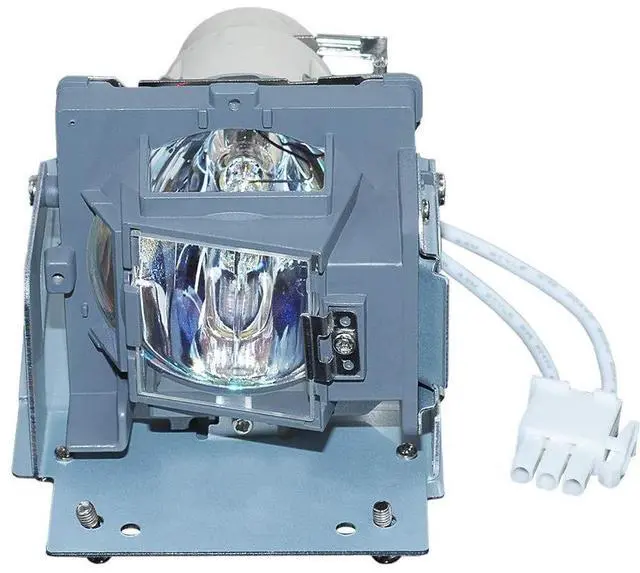


SW-LAMP 5811118154-SVV Replacement Projector Lamp with Housing for VIVITEK D548 D551 D552 D554 D555 D555WH D556 D557W D557WH D55AA D55BA D560ST DH558 DH559 DH559ST DX56AAA H1060 Lamps
- SW-LAMP 5811118154-SVV Replacement Projector Lamp with Housing for VIVITEK D548 D551 D552 D554 D555 D555WH D556 D557W D557WH D55AA D55BA D560ST DH558 DH559 DH559ST DX56AAA H1060 Lamps
- Premium Quality Projector Lamp Delivers high brightness
- Replacement lamp bulb comes with 180-day warranty
- Easy install: Housing included, minimize installation time to make sure your proujector function well.All lamps are under strict quality inspection and come with 180 day warranty
- Respond to customer inquiries promptly, 7X 24 hours instant response.If you need any more information, please contact us
+
+
Overview
Specs
Reviews

Any questions? Our AI mode will help you find out quickly.
Try me now
Lamp Model Premium Lamp Bulb 5811118154-SVV with
HousingCompatible with following projectors: D548 D551 D552 D554 D555 D555WH D556 D557W D557WH D55AA D55BA D560ST DH558 DH559 DH559ST DX56AAA H1060 LampsSteps to
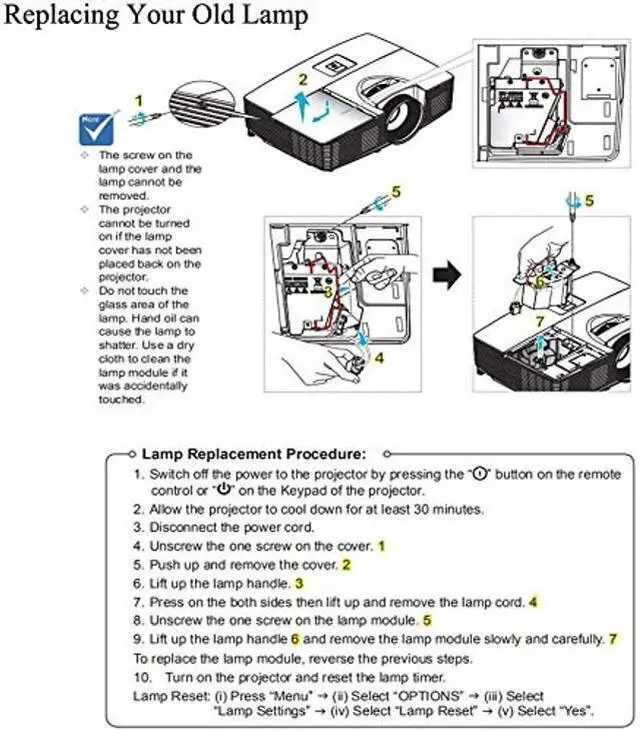
Replacement Your Old Projector Lamp: 1- Turn off the power before replacing the lamp. 2- Clean the fan and surrounding dust before replacing the lamp to avoid abnormal temperature and cause the projector to malfunction. 3- After replacing the new lamp, clear the lamp usage time. 4- After turning off the projector, wait for the cooling to complete before unplugging the power cord. 5- Avoid other objects blocking the projector, which will cause abnormal heat dissipation, so as not to affect the life of the lamp and other faults. Customer ServicesWe're always here to offer you 7x24hrs customers services for any of your inquiries before buying and also after-sales. You are welcomed to offer us your ideas and suggestions
HousingCompatible with following projectors: D548 D551 D552 D554 D555 D555WH D556 D557W D557WH D55AA D55BA D560ST DH558 DH559 DH559ST DX56AAA H1060 LampsSteps to
Replacement Your Old Projector Lamp: 1- Turn off the power before replacing the lamp. 2- Clean the fan and surrounding dust before replacing the lamp to avoid abnormal temperature and cause the projector to malfunction. 3- After replacing the new lamp, clear the lamp usage time. 4- After turning off the projector, wait for the cooling to complete before unplugging the power cord. 5- Avoid other objects blocking the projector, which will cause abnormal heat dissipation, so as not to affect the life of the lamp and other faults. Customer ServicesWe're always here to offer you 7x24hrs customers services for any of your inquiries before buying and also after-sales. You are welcomed to offer us your ideas and suggestions
Warranty & Returns
Warranty, Returns, And Additional Information
Warranty
- Please contact the Seller directly for warranty information. Warranty information may also be found on the Manufacturer's website.
- CONTACT
Return Policies
- Return for refund within: 30 days
- Return for replacement within: non-replaceable
- This item is covered by VersaCom Return Policy
Manufacturer Contact Info
- For a directory of all our manufacturers, please click below.
- Manufacturers Directory
LOADING...