Out of stock
  • $107.99
  • Free 30-day Returns
  • $5.99 Shipping ()
Ships from China.
Most customers receive within 7-9 days.
Price alert
Shop it at NeweggBusiness.

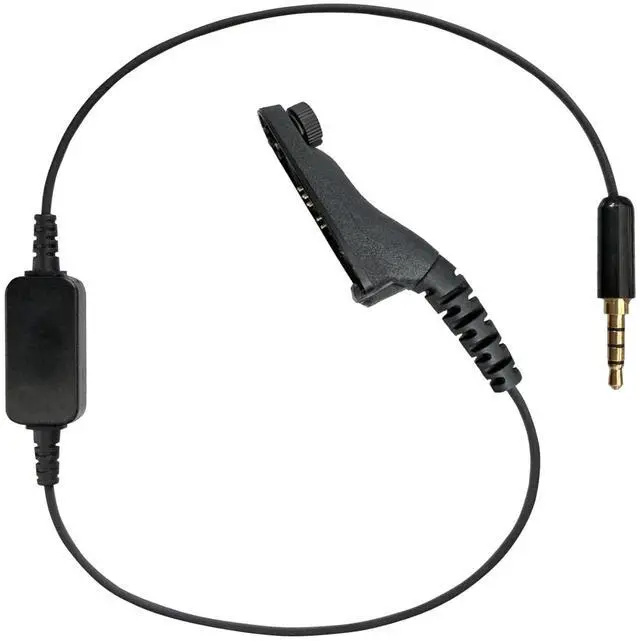
PRYME Link PoC/MCPTT Gateway Cable, Fits: Motorola TRBO (XPR6xxx/7xxx) Radios (LNK-83-ZU)

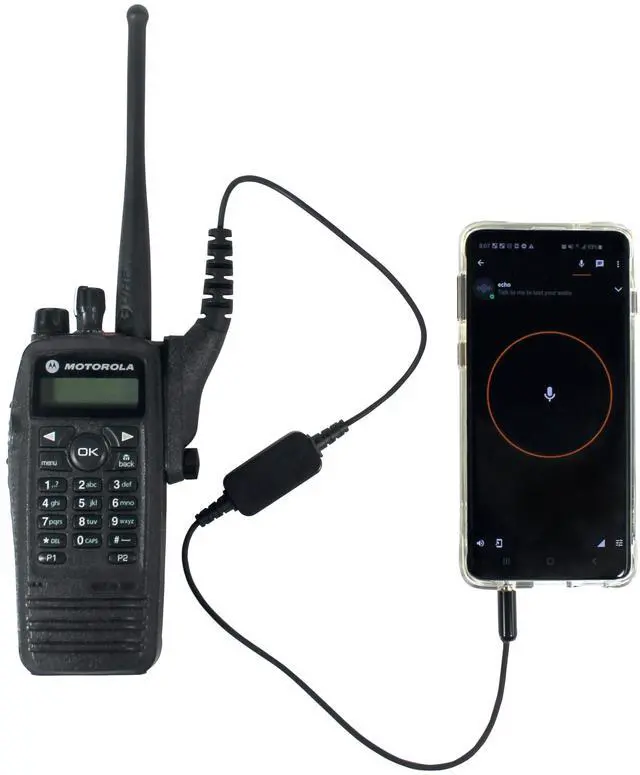
  • Turn the radio off and plug in the LNK Gateway cable. Then plug the other end of the cable into any Android device that has a 3.5mm, 4 conductor jack
  • Turn on the radio and make sure it is set on a channel with VOX programmed and enabled
  • Still in ZELLO App, navigate to the Contact or Channel list and choose the one you want for Gateway operation. Make sure "VOX" icon is highlighted in blue
  • If done correctly you should be ready to use. Calls received on the Two-way radio will be broadcast on the ZELLO App. Calls received on the Android device will be broadcast on the two-way radio. You may have to adjust the phone and radio volumes for best audio quality
  • Mobile Radio & Cell Phone are NOT includ
+
+
Overview
Specs
Reviews
avatar

Any questions? Our AI mode will help you find out quickly.

PRYME LINK PoC/MCPTT Gateway Cable for Motorola TRBO (XPR6xxx/7xxx) Radios (NOT compatible with APX series radios). Connects with Two-Way Radios, Cellphones and Tablets to provide Gateway between Radio System and PoC System.
FITS: Motorola TRBO models XPR6100, XPR6300, XPR6350, XPR6500, XPR6550, XPR6580, XPR7550, XPR7580. WILL NOT WORK ON ANY APX RADIO MODELS!
Note: Radio MUST be programmed for VOX Operation!

Warranty & Returns

Warranty, Returns, And Additional Information

Warranty

  • Please contact the Seller directly for warranty information. Warranty information may also be found on the Manufacturer's website.
  • CONTACT

Return Policies

Manufacturer Contact Info

LOADING...