Your Browsing History
- Free 30-day Returns
$212.99
Meet Your Seller
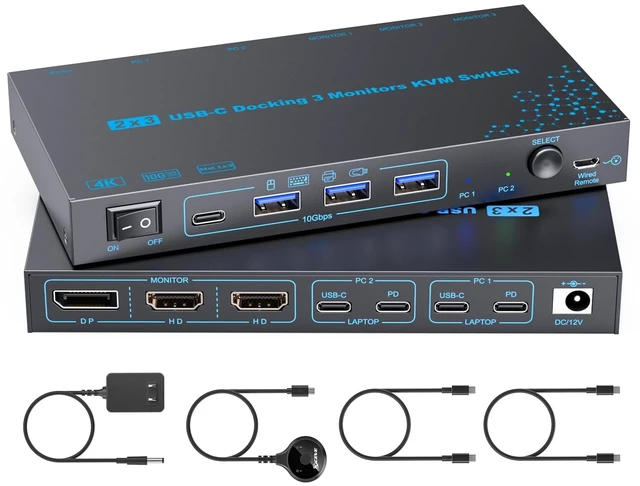
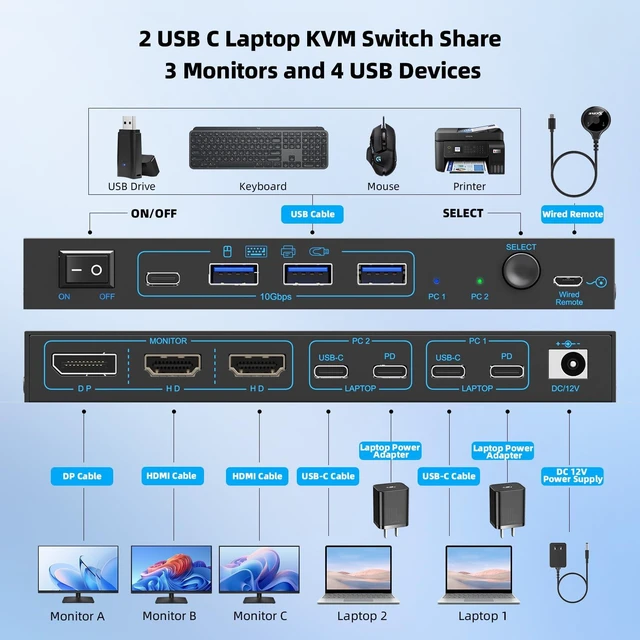
KVM Switch 2 Laptops 3 Monitors, 4K@60Hz Dual USB-C Docking KVM Switch, USB C Triple Monitor Switcher with PD Charging for 2 Computer Share 3 Display-2 HDMI + 1 DP, No Driver Required
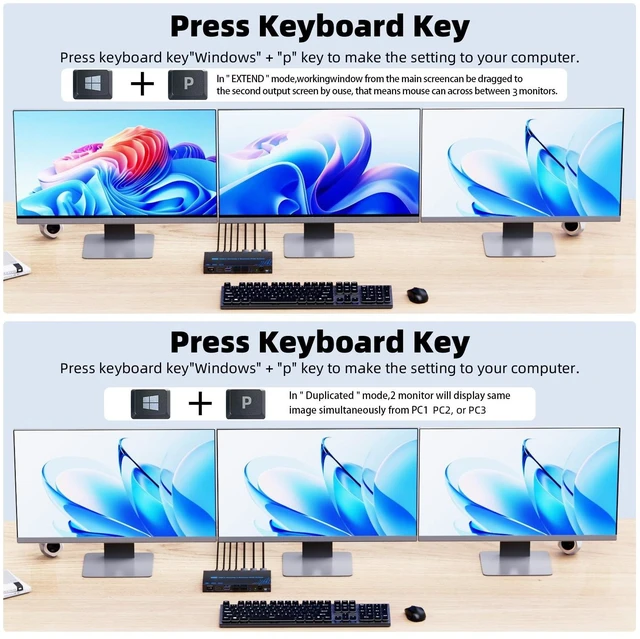
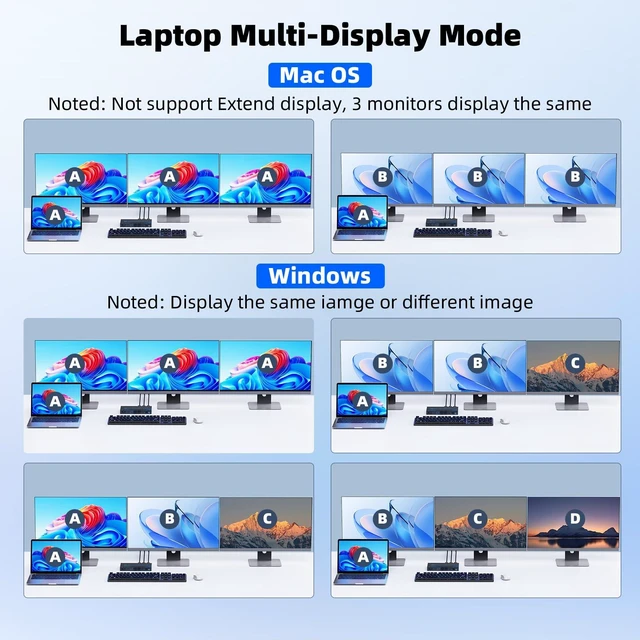
- MST/SST 2 laptops 3 monitors USB-C docking KVM switchNote that in Windows OS, SST and MST are supported to display the same or different content. In MacOS, only (SST) is supported, which means that 3 monitors will display the same picture. Noted: In Mirror mode of Windows system 3 monitors are support resolution up to 4k@60 Hz, in extended mode only 2 monitors support 4k@60 Hz, another only support 1080p@60 Hz.
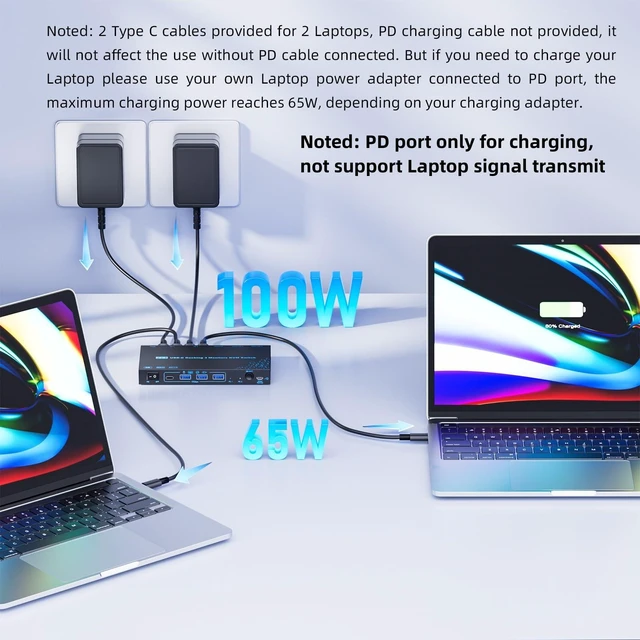
- Efficiently Transfer & Charging This 2 laptops 3 monitor USB-C KVM switch is designed with PD ports for charging the laptops. 2 Type C data cables provided for 2 Laptops, PD charging cable not provided, it will not affect the use without PD cable connected. But if you need to charge your Laptop please use your own Laptop cable connect to PD port, the maximum charging power reaches 65W, depending on your charging adapter.
- 10Gbps KVM Switch USB C MST Thunderbolt 2 laptops 3 monitors KVM Switch with 3 USB A + 1 USB-C ports securely identifies keyboard, mouse, printer, scan
+
+
Overview
Specs
Reviews
Any questions? Ask CelesteSM will help you find out quickly.
Try me now
MST/SST 2 laptops 3 monitors USB-C docking KVM switchNote that in Windows OS, SST and MST are supported to display the same or different content. In MacOS, only (SST) is supported, which means that 3 monitors will display the same picture.
Noted: In Mirror mode of Windows system 3 monitors are support resolution up to 4k@60 Hz, in extended mode only 2 monitors support 4k@60 Hz, another only support 1080p@60 Hz. ^^ Efficiently Transfer & Charging This 2 laptops 3 monitor USB-C KVM switch is designed with PD ports for charging the laptops. 2 Type C data cables provided for 2 Laptops, PD charging cable not provided, it will not affect the use without PD cable connected. But if you need to charge your Laptop please use your own Laptop cable connect to PD port, the maximum charging power reaches 65W, depending on your charging adapter. ^^ 10Gbps KVM Switch USB C MST Thunderbolt 2 laptops 3 monitors KVM Switch with 3 USB A + 1 USB-C ports securely identifies keyboard, mouse, printer, scanner and other USB devices. USB C KVM Switch 2 Laptops 2 monitors supports ultra-fast data transfer up to 10Gbps, backward compatible with USB 3.0 / 2.0 / 1.1. Dual monitor KVM switch USB C will not damage USB devices such as hard drives. ^^ 2 fast and efficient switching methods2 laptops 3 monitor USB-C KVM switch allows you switch 2 laptops on 3 screen via a button switch or a 1.5 m wired remote control (included).
The LED light indicates which laptop is being operated. This USB C 3 monitors KVM switch is the first choice for offices and homes. Enjoy the convenience of switching between work, life, and entertainment with 2 Laptops triple monitor USB C KVM switch. ^^ Important Note Read Before Purchase / Use() To get 3 screens output from laptops and make USB peripheral devices work properly, please ensure the USB-C port of the laptop supports DP Alt function(Video&Data&PD Transfer) and multiple-screen outputs; The CPU generation of laptop should be 11th or above; () To avoid flickering or black screen, please use standard USB-C 3.1 Gen 2 cable within 1M; The length of DP and HDMI cables should be within 1.5M; () For Mac Os, the 3 monitors only support displaying the same screen (Mirror or Extend ONE different screen from MAC), because MAC M1/M2 doesnt support MST (multi-stream transport)
Noted: In Mirror mode of Windows system 3 monitors are support resolution up to 4k@60 Hz, in extended mode only 2 monitors support 4k@60 Hz, another only support 1080p@60 Hz. ^^ Efficiently Transfer & Charging This 2 laptops 3 monitor USB-C KVM switch is designed with PD ports for charging the laptops. 2 Type C data cables provided for 2 Laptops, PD charging cable not provided, it will not affect the use without PD cable connected. But if you need to charge your Laptop please use your own Laptop cable connect to PD port, the maximum charging power reaches 65W, depending on your charging adapter. ^^ 10Gbps KVM Switch USB C MST Thunderbolt 2 laptops 3 monitors KVM Switch with 3 USB A + 1 USB-C ports securely identifies keyboard, mouse, printer, scanner and other USB devices. USB C KVM Switch 2 Laptops 2 monitors supports ultra-fast data transfer up to 10Gbps, backward compatible with USB 3.0 / 2.0 / 1.1. Dual monitor KVM switch USB C will not damage USB devices such as hard drives. ^^ 2 fast and efficient switching methods2 laptops 3 monitor USB-C KVM switch allows you switch 2 laptops on 3 screen via a button switch or a 1.5 m wired remote control (included).
The LED light indicates which laptop is being operated. This USB C 3 monitors KVM switch is the first choice for offices and homes. Enjoy the convenience of switching between work, life, and entertainment with 2 Laptops triple monitor USB C KVM switch. ^^ Important Note Read Before Purchase / Use() To get 3 screens output from laptops and make USB peripheral devices work properly, please ensure the USB-C port of the laptop supports DP Alt function(Video&Data&PD Transfer) and multiple-screen outputs; The CPU generation of laptop should be 11th or above; () To avoid flickering or black screen, please use standard USB-C 3.1 Gen 2 cable within 1M; The length of DP and HDMI cables should be within 1.5M; () For Mac Os, the 3 monitors only support displaying the same screen (Mirror or Extend ONE different screen from MAC), because MAC M1/M2 doesnt support MST (multi-stream transport)
Warranty & Returns
Warranty, Returns, And Additional Information
Warranty
- Please contact the Seller directly for warranty information. Warranty information may also be found on the Manufacturer's website.
- CONTACT
Return Policies
- Return for refund within: 30 days
- Return for replacement within: 30 days
- This item is covered by SmartJoy Shop Return Policy
Manufacturer Contact Info
- For a directory of all our manufacturers, please click below.
- Manufacturers Directory
LOADING...