Your Browsing History
Meet Your Seller
CAMWAY 192 KHz ARC Audio Extractor - ARC to Optical Converter for TV to AV Amplifier Optical Soundbar Home Theater(Not for HDMI or eARC Interface), Professional ARC Audio to OpticalCoaxial Adapter
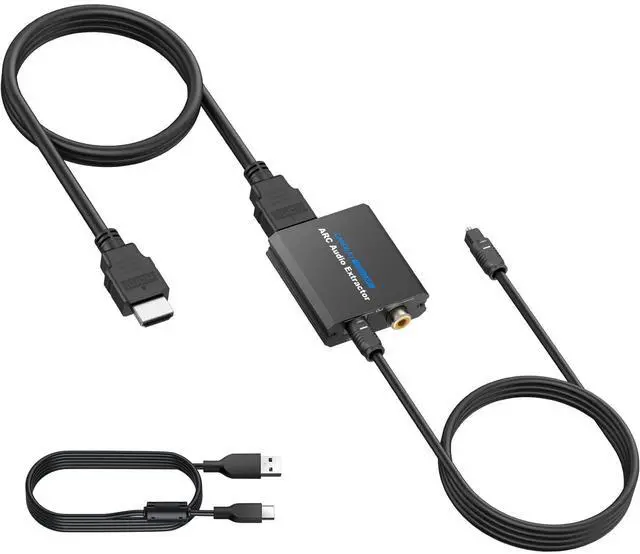
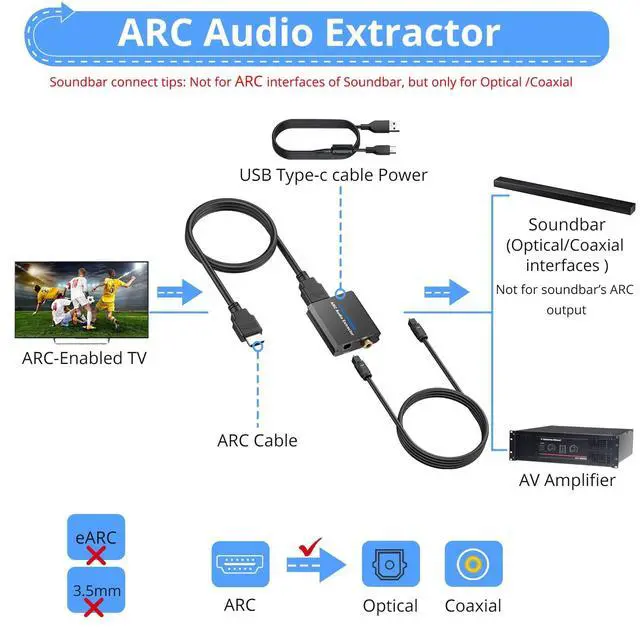
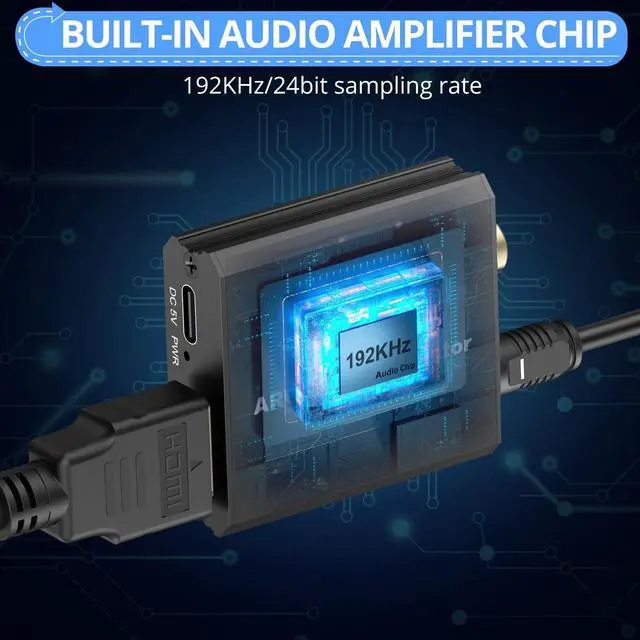
- ARC Audio Converter: 192 KHz ARC to Optical audio extractor connects to an ARC-enabled HDTV and outputs audio from the TV to a soundbar, amplifier, speakers, or headphones via optical/coaxial cable,professional chip lossless transmission,pure sound ARC audio extractor with 3.3ft optical cable for plug and play
- Input and Output: Input-- ARC Input,ARC input port (Connects to the ARC interface of the TV, does not fit for HDMI eARC) ; Output-- Optical Output: Optical digital audio output interface (connects to audio amplifier when using); Coaxial Output: Coaxial digital audio output interface (connects to audio amplifier when using)
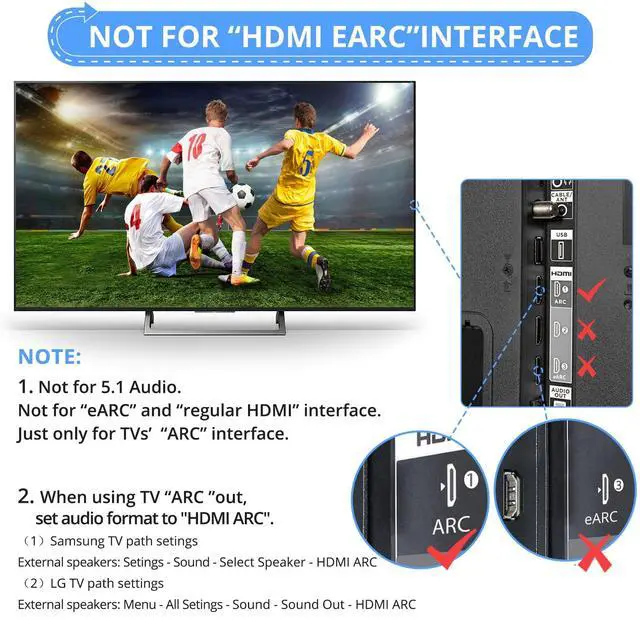
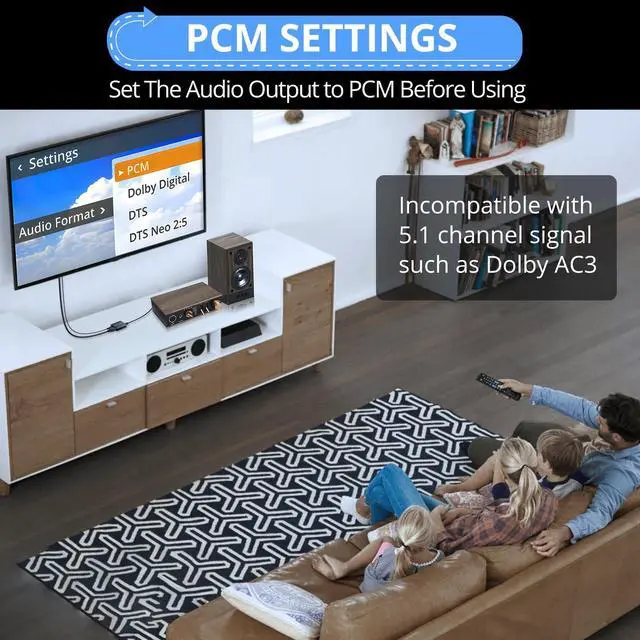
- Set PCM/ LPCM and CEC Before Using: Note that optical interface's inherent design does not support volume control via the TV remote. And please set the audio output to PCM or LPCM and CEC before using ARC input, the TV setting method varies by brand (The name and settings of CEC differ for each brand, please refer to the TV's user manual)
- Power Supply
+
+
Overview
Specs
Reviews
Any questions? Our AI mode will help you find out quickly.
Try me now
ARC Audio Converter: 192 KHz ARC to Optical audio extractor connects to an ARC-enabled HDTV and outputs audio from the TV to a soundbar, amplifier, speakers, or headphones via optical/coaxial cable, professional chip lossless transmission, pure sound ARC audio extractor with 3.3 ft optical cable for plug and play ^^
Input and Output: Input-- ARC Input, ARC input port (Connects to the ARC interface of the TV, does not fit for HDMI eARC);
Output-- Optical Output: Optical digital audio output interface (connects to audio amplifier when using);
Coaxial Output: Coaxial digital audio output interface (connects to audio amplifier when using) ^^ Set PCM/ LPCM and
CEC Before Using: Note that optical interface's inherent design does not support volume control via the TV remote. And please set the audio output to PCM or LPCM and CEC before using ARC input, the TV setting method varies by brand (The name and settings of CEC differ for each brand, please refer to the TV's user manual) ^^
Power Supply Interface: 3ft DC 5V 1A USB Type-c cable connect to the ARC audio extractor and the other end connect to the
TV for power (Tips: No plug and neednt plug for power) ^^
Compatibility: This is ARC to Optical, Please plug into the ARC interface, Incompatible with the eARC and regular HDMI interface; Make sure to use a standard 19+1 HDMI cable included; Incompatible with 5.1 channel Audio (e. g. Dolby AC3), Incompatible with Soundbar's ARC interfaces

Input and Output: Input-- ARC Input, ARC input port (Connects to the ARC interface of the TV, does not fit for HDMI eARC);
Output-- Optical Output: Optical digital audio output interface (connects to audio amplifier when using);
Coaxial Output: Coaxial digital audio output interface (connects to audio amplifier when using) ^^ Set PCM/ LPCM and
CEC Before Using: Note that optical interface's inherent design does not support volume control via the TV remote. And please set the audio output to PCM or LPCM and CEC before using ARC input, the TV setting method varies by brand (The name and settings of CEC differ for each brand, please refer to the TV's user manual) ^^
Power Supply Interface: 3ft DC 5V 1A USB Type-c cable connect to the ARC audio extractor and the other end connect to the
TV for power (Tips: No plug and neednt plug for power) ^^
Compatibility: This is ARC to Optical, Please plug into the ARC interface, Incompatible with the eARC and regular HDMI interface; Make sure to use a standard 19+1 HDMI cable included; Incompatible with 5.1 channel Audio (e. g. Dolby AC3), Incompatible with Soundbar's ARC interfaces
Warranty & Returns
Warranty, Returns, And Additional Information
Warranty
- Please contact the Seller directly for warranty information. Warranty information may also be found on the Manufacturer's website.
- CONTACT
Return Policies
- Return for refund within: 30 days
- Return for replacement within: 30 days
- This item is covered by LANMEll Return Policy
Manufacturer Contact Info
- For a directory of all our manufacturers, please click below.
- Manufacturers Directory
LOADING...