Your Browsing History
Meet Your Seller
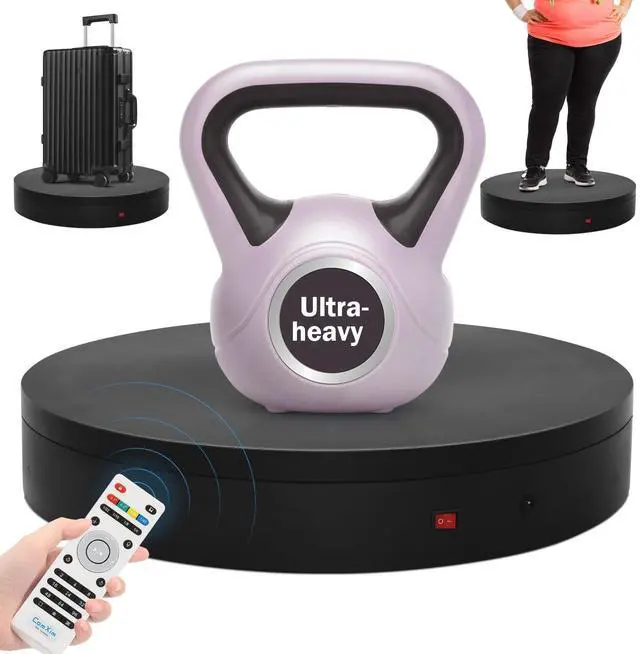
19.7In Remote Large Motorized electric turntable Rotating platform Photography Turntable Motorized lazy susan Base giratoria para for Photography,3D Scanner,Heavy duty display(Load Range:220~500lbs)
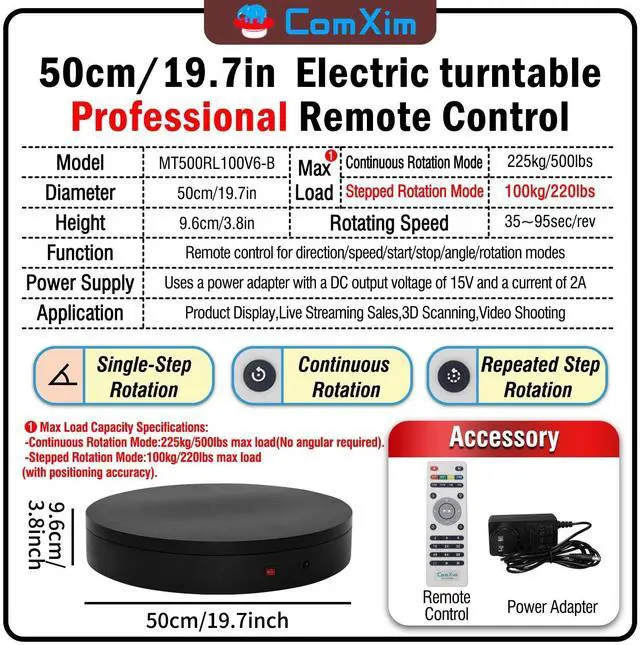
- NOTE:Max Load: Max Loading range is 220~500lbs100~228kg - Continuous Rotation Mode: "228kg" max load(No angular positioning required). - Stepped Rotation Mode: "100kg" max load(With positioning accuracy). NOTE:Dual Motor Drive
- Specifications of this 3d scanner turntable Diameter: "50cm/19.7 inches". Rotation Speed Range: "Adjustable speed range of 35 to 95 seconds per revolution". Direction: "Supports clockwise and counterclockwise rotation".
- Professional Photography Turntable Remote ControlPrecise angle settings and user-friendly combination key design enable support for a wider range of applications. Support: Set the current position as the origin point (used in conjunction with the "Return to Origin" button). Support: Save the current settings to the turntable's internal flash. More versatile angle buttons and mode button combinations provide greater flexibility for various applications.
- Large 3d scanner turntable Supports four rotation modes: Continuous Rotation Modefor Li
+
+
Overview
Specs
Reviews
Any questions? Our AI beta will help you find out quickly.
Try me now
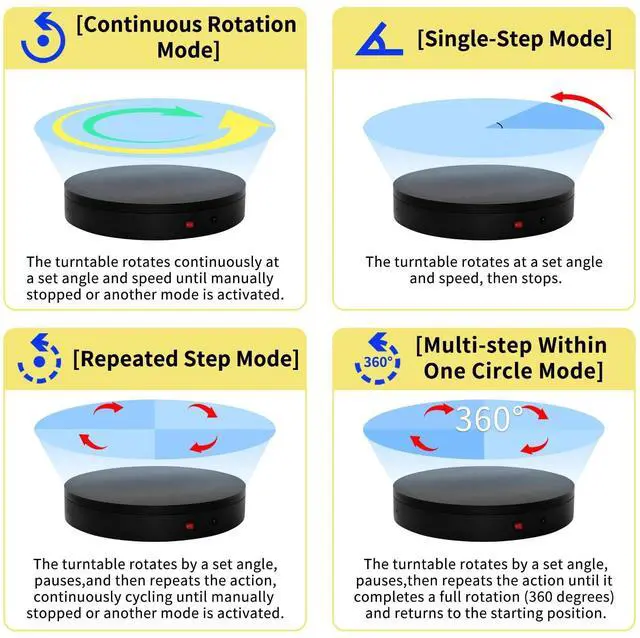
Multi-Rotation Modes: [Continuous
Rotation Mode]: The turntable rotates continuously at a set angle and speed until manually stopped or another mode is activated.
[Single-Step Mode]: The turntable rotates at a set angle and speed, then stops.
[Repeated Step Mode]: The turntable rotates by a set angle, pauses, and then repeats the action, continuously cycling until manually stopped or another mode is activated. [Multi-step
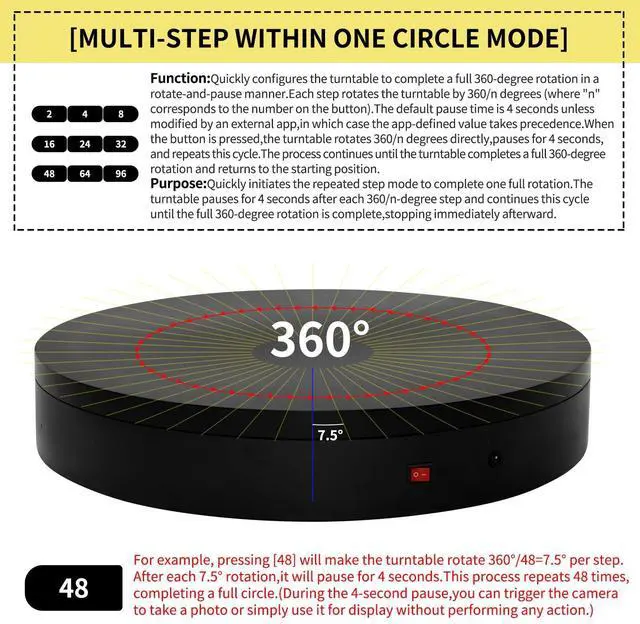
Within One Circle Mode]: The turntable rotates by a set angle, pauses, then repeats the action until it completes a full rotation (360 degrees) and returns to the starting position.
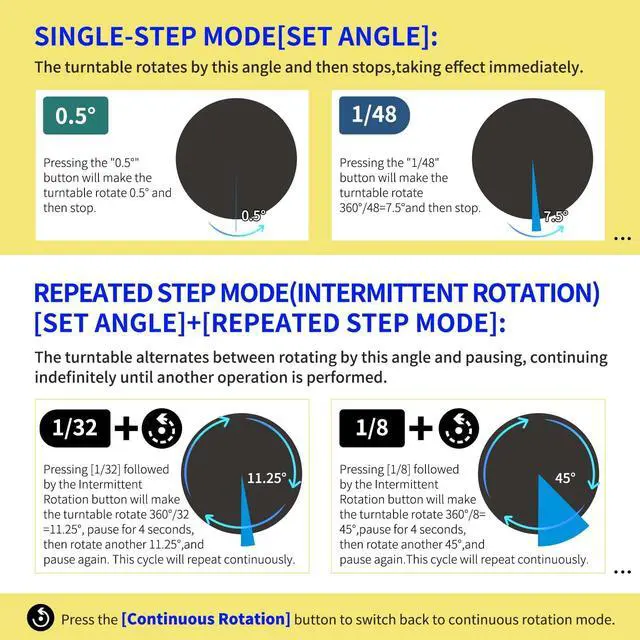
about [Set Angle]:
Purpose: 1.
Single-Step Mode: Rotates the specified angle and then stops. 2.
Repeated Step Mode: Rotates the specified angle, pauses, and repeats the cycle until interrupted by another operation.
about [Set Origin]:
Purpose: Allows the turntable to remember the current position. When the "Return to Origin" button is pressed, the turntable will return to this position.
about [Return to Origin]:
Purpose: When the "Return to Origin" button is pressed, the turntable moves back to the previously set origin position.
about [Speed Up]:
Purpose: Adjusts the turntable's rotation speed, taking effect immediately.
about [Speed Down]:
Purpose: Adjusts the turntable's rotation speed by one level, taking effect immediately.
about [Clockwise Direction]:
Purpose: Adjusts the turntable's rotation direction to clockwise, taking effect immediately.
about [Counterclockwise Direction]:
Purpose: Adjusts the turntable's rotation direction to counterclockwise, taking effect immediately.
about [Start/Stop]:
Purpose: Starts the turntable if it was stopped, or stops it if it was rotating. The state toggles between rotating and stopped each time this button is pressed.

Rotation Mode]: The turntable rotates continuously at a set angle and speed until manually stopped or another mode is activated.
[Single-Step Mode]: The turntable rotates at a set angle and speed, then stops.
[Repeated Step Mode]: The turntable rotates by a set angle, pauses, and then repeats the action, continuously cycling until manually stopped or another mode is activated. [Multi-step
Within One Circle Mode]: The turntable rotates by a set angle, pauses, then repeats the action until it completes a full rotation (360 degrees) and returns to the starting position.
about [Set Angle]:
Purpose: 1.
Single-Step Mode: Rotates the specified angle and then stops. 2.
Repeated Step Mode: Rotates the specified angle, pauses, and repeats the cycle until interrupted by another operation.
about [Set Origin]:
Purpose: Allows the turntable to remember the current position. When the "Return to Origin" button is pressed, the turntable will return to this position.
about [Return to Origin]:
Purpose: When the "Return to Origin" button is pressed, the turntable moves back to the previously set origin position.
about [Speed Up]:
Purpose: Adjusts the turntable's rotation speed, taking effect immediately.
about [Speed Down]:
Purpose: Adjusts the turntable's rotation speed by one level, taking effect immediately.
about [Clockwise Direction]:
Purpose: Adjusts the turntable's rotation direction to clockwise, taking effect immediately.
about [Counterclockwise Direction]:
Purpose: Adjusts the turntable's rotation direction to counterclockwise, taking effect immediately.
about [Start/Stop]:
Purpose: Starts the turntable if it was stopped, or stops it if it was rotating. The state toggles between rotating and stopped each time this button is pressed.
Warranty & Returns
Warranty, Returns, And Additional Information
Warranty
- Please contact the Seller directly for warranty information. Warranty information may also be found on the Manufacturer's website.
- CONTACT
Return Policies
- Return for refund within: 30 days
- Return for replacement within: non-replaceable
- This item is covered by VersaCom Return Policy
Manufacturer Contact Info
- For a directory of all our manufacturers, please click below.
- Manufacturers Directory
LOADING...