Your Browsing History
- Free 30-day Returns
$67.99
Meet Your Seller
Universal Mini Keyboard with Trackpad for iPhone Duo/Galaxy Z Fold 8/Ultra/7/6/5,Wireless Small Keyboard, Dual-Device Bluetooth Travel Keyboard with Touchpad & Any-Angle Stand for Android/iOS/W
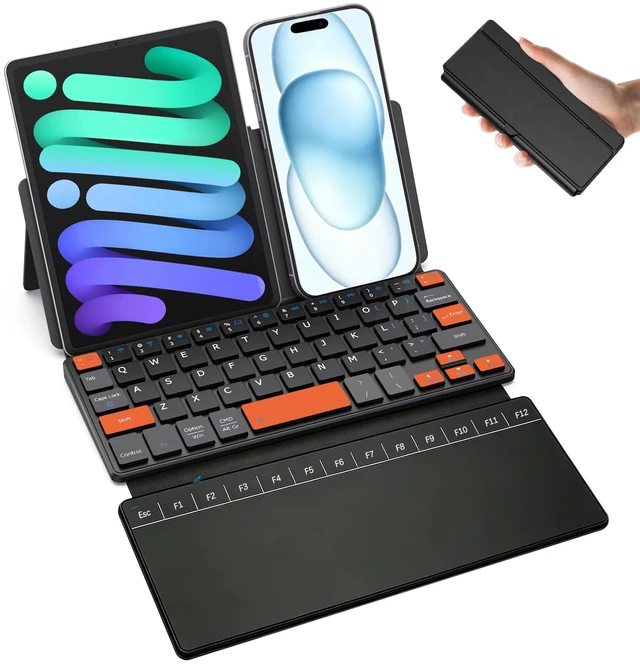
- All-in-one Bluetooth Keyboard with Touchpad: Integrated spacious touchpad removes the need for an independent mouse; equipped with complete F1-F12 function row to turn your smartphone and tablet into portable laptop workstation for office work, study and creative editing
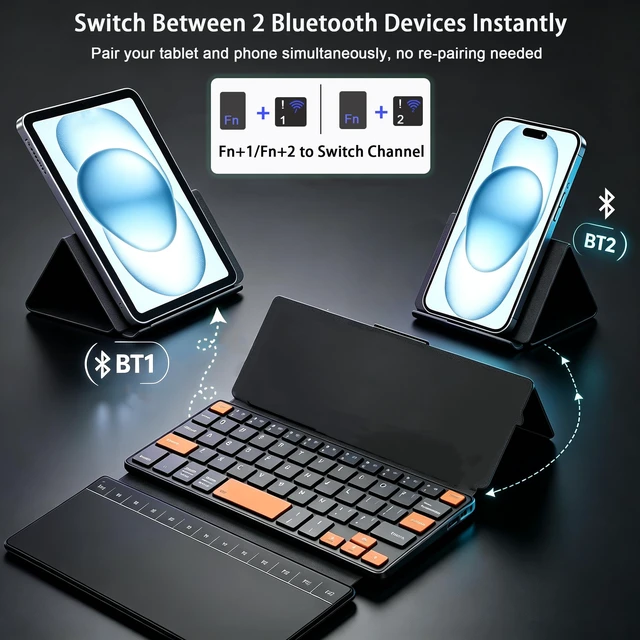
- Wide Compatibility & Dual Device Quick Switch: The iPad keyboard works with iPhone Duo, iPad, Galaxy Z Fold 8 Ultra/Fold 8 Wide/7/6/5/4/3 Series, and smartphones or laptops running Windows, iOS, or Android, intelligent shortcut keys adapt to different operating systems,simply press Fn +1 or Fn +2 to freely switch input between two paired bluetooth devices (Note:not compatible with televisions and game consoles)
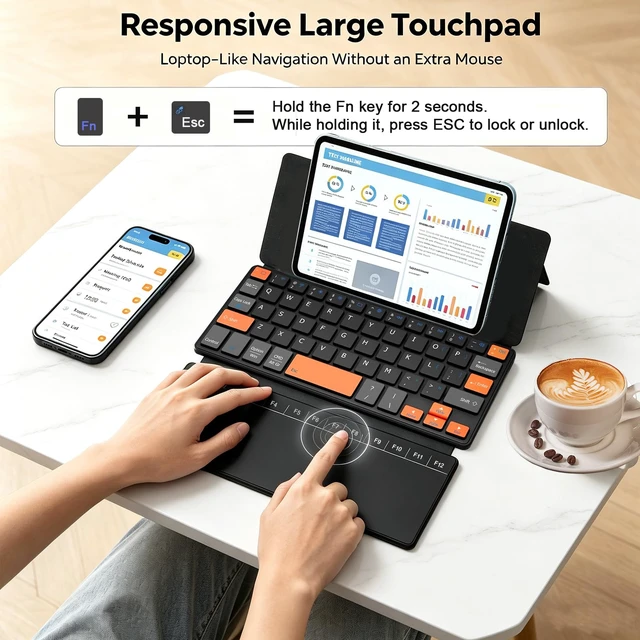
- Precision Touchpad & Operation GuideOur ipad a16 keyboard comes with a large high-precision touchpad and a full F1F12 function row to fully replace a standalone mouse. Hold 'Fn' for 2s + tap ESC to lock/unlock the touchpad.How to use touchpad pointer to "enter "?Press down the bottom zones of the touchpad
+
+
Overview
Specs
Reviews
Any questions? Ask CelesteSM will help you find out quickly.
Try me now
All-in-one Bluetooth
Keyboard with Touchpad: Integrated spacious touchpad removes the need for an independent mouse; equipped with complete F1-F12 function row to turn your smartphone and tablet into portable laptop workstation for office work, study and creative editing ^^ Wide Compatibility & Dual Device Quick Switch: The iPad keyboard works with iPhone Duo, iPad, Galaxy Z Fold 8 Ultra/Fold 8 Wide/7/6/5/4/3 Series, and smartphones or laptops running Windows, iOS, or Android, intelligent shortcut keys adapt to different operating systems, simply press Fn +1 or Fn +2 to freely switch input between two paired bluetooth devices (Note: not compatible with televisions and game consoles) ^^ Precision Touchpad & Operation GuideOur ipad a16 keyboard comes with a large high-precision touchpad and a full F1F12 function row to fully replace a standalone mouse. Hold 'Fn' for 2s + tap ESC to lock/unlock the touchpad. How to use touchpad pointer to "enter "? Press down the bottom zones of the touchpad to click, Single tap or double-tap does not work will not work. Press down the bottom-left area= Left Click (Confirm/Enter)/Press down the bottom-right area= Right Click (Context Menu) Tap the toprow keys directly to access F1F12 functions with no need to hold the Fn key ^^ Compact Portable Design with
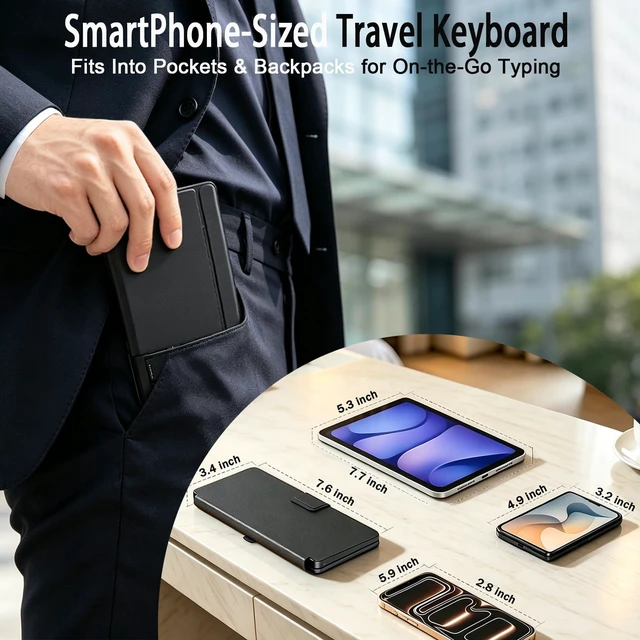
Built-in Device Stand: This compact wireless keyboard measures only 7.6 3.4 0.8 inches and weighs 9.9 ounces. It folds down to pocket size, foldable lightweight structure for easy storage, so you can easily slip it into your bag or pocket for on-the-go use. The computer keyboards have in backpacks and bags; adjustable built-in stand holds your phone or tablet at ideal viewing angle for travel, library and cafe outdoor usage ^^ Leather
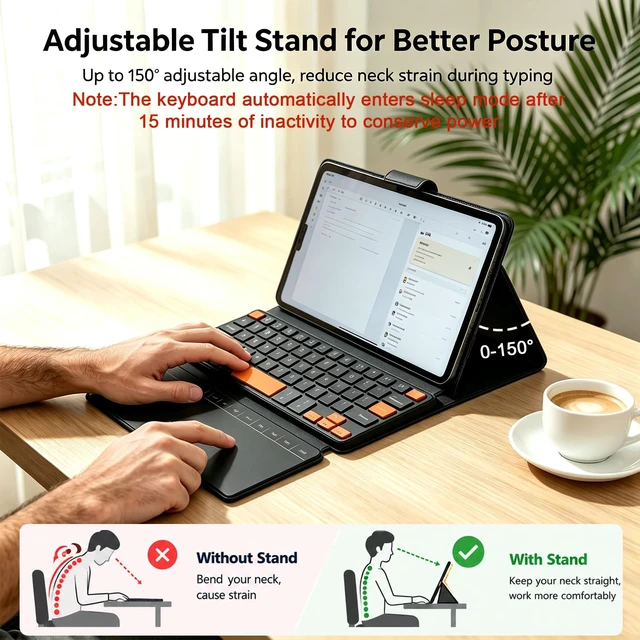
Case & Adjustable Stand: This orange keyboard features a built-in premium leather cover t. It merges an ergonomic keyboard and protective case into one compact piece. And when you're on the move, protect both the keyboard and your tablet from drops, scratches and dust everyday. The foldable keyboard built-in stepless hinge adjusts from 0 to 180lean back, sit up, or watch in bed.. Built for the way you actually work ^^ Quiet Keys & Highlighted Navigation Keys for
Fast Typing: Libraries, coffee shops, late-night work sessionsthis tablet keyboard stays under 30dB, quieter than a whisper. The scissor-switch keys give you 1.5 mm of satisfying travel without the clatter. Distinct accent navigation keys help you quickly locate arrow and function keys, lower typing errors and improve efficiency, ideal for document writing, data entry and daily text input ^^ 80 Hours of Typing90 Days on Standby Power anxiety is over. The iphone duo keyboard built-in 300mAh battery keeps you typing for 80 hours straight and stays on standby for up to 90 days. The keyboard automatically enters sleep mode after 15 minutes of inactivity to conserve power, no dead battery halfway through your day ^^
Simple Pairing & Reset Guide: Slide the mechanical power switch on the keyboard top from OFF to ON. Press Fn+1 or Fn+2 to enter pairing mode ( indicator light flash rapidly). Turn on Bluetooth on your device, search for "Wireless Keyboard", and tap to connect.
For failed or unstable connections: Delete the keyboard from your Bluetooth list, power cycle it, and hold the top rows first and last keys until all lights flash to reactivate pairing mode.
Keyboard with Touchpad: Integrated spacious touchpad removes the need for an independent mouse; equipped with complete F1-F12 function row to turn your smartphone and tablet into portable laptop workstation for office work, study and creative editing ^^ Wide Compatibility & Dual Device Quick Switch: The iPad keyboard works with iPhone Duo, iPad, Galaxy Z Fold 8 Ultra/Fold 8 Wide/7/6/5/4/3 Series, and smartphones or laptops running Windows, iOS, or Android, intelligent shortcut keys adapt to different operating systems, simply press Fn +1 or Fn +2 to freely switch input between two paired bluetooth devices (Note: not compatible with televisions and game consoles) ^^ Precision Touchpad & Operation GuideOur ipad a16 keyboard comes with a large high-precision touchpad and a full F1F12 function row to fully replace a standalone mouse. Hold 'Fn' for 2s + tap ESC to lock/unlock the touchpad. How to use touchpad pointer to "enter "? Press down the bottom zones of the touchpad to click, Single tap or double-tap does not work will not work. Press down the bottom-left area= Left Click (Confirm/Enter)/Press down the bottom-right area= Right Click (Context Menu) Tap the toprow keys directly to access F1F12 functions with no need to hold the Fn key ^^ Compact Portable Design with
Built-in Device Stand: This compact wireless keyboard measures only 7.6 3.4 0.8 inches and weighs 9.9 ounces. It folds down to pocket size, foldable lightweight structure for easy storage, so you can easily slip it into your bag or pocket for on-the-go use. The computer keyboards have in backpacks and bags; adjustable built-in stand holds your phone or tablet at ideal viewing angle for travel, library and cafe outdoor usage ^^ Leather
Case & Adjustable Stand: This orange keyboard features a built-in premium leather cover t. It merges an ergonomic keyboard and protective case into one compact piece. And when you're on the move, protect both the keyboard and your tablet from drops, scratches and dust everyday. The foldable keyboard built-in stepless hinge adjusts from 0 to 180lean back, sit up, or watch in bed.. Built for the way you actually work ^^ Quiet Keys & Highlighted Navigation Keys for
Fast Typing: Libraries, coffee shops, late-night work sessionsthis tablet keyboard stays under 30dB, quieter than a whisper. The scissor-switch keys give you 1.5 mm of satisfying travel without the clatter. Distinct accent navigation keys help you quickly locate arrow and function keys, lower typing errors and improve efficiency, ideal for document writing, data entry and daily text input ^^ 80 Hours of Typing90 Days on Standby Power anxiety is over. The iphone duo keyboard built-in 300mAh battery keeps you typing for 80 hours straight and stays on standby for up to 90 days. The keyboard automatically enters sleep mode after 15 minutes of inactivity to conserve power, no dead battery halfway through your day ^^
Simple Pairing & Reset Guide: Slide the mechanical power switch on the keyboard top from OFF to ON. Press Fn+1 or Fn+2 to enter pairing mode ( indicator light flash rapidly). Turn on Bluetooth on your device, search for "Wireless Keyboard", and tap to connect.
For failed or unstable connections: Delete the keyboard from your Bluetooth list, power cycle it, and hold the top rows first and last keys until all lights flash to reactivate pairing mode.
Warranty & Returns
Warranty, Returns, And Additional Information
Warranty
- Please contact the Seller directly for warranty information. Warranty information may also be found on the Manufacturer's website.
- CONTACT
Return Policies
- Return for refund within: 30 days
- Return for replacement within: 30 days
- This item is covered by Riveira Store Return Policy
Manufacturer Contact Info
- For a directory of all our manufacturers, please click below.
- Manufacturers Directory
LOADING...