

Your Browsing History
- Free 30-day Returns
$477.99

Meet Your Seller

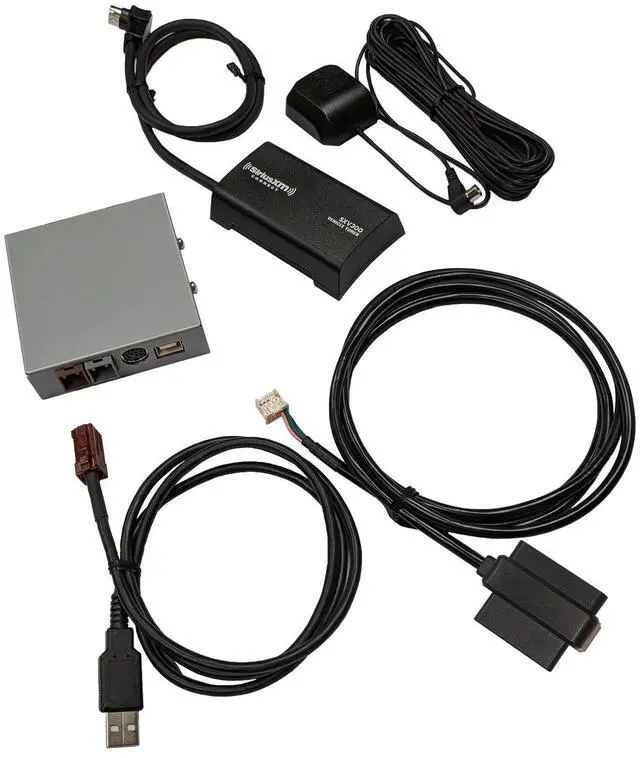
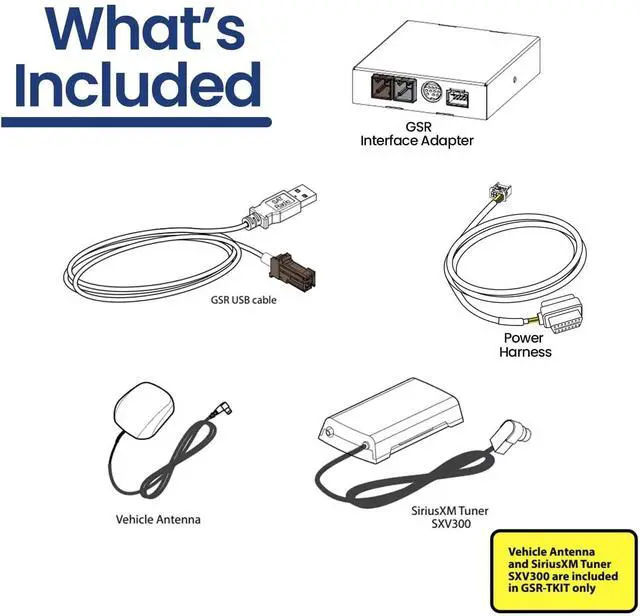


VAIS Technology GSR-FD05-w/Tuner Kit SiriusXM Satellite Radio Add-on Adapter - Compatible with Ford Models - Automotive Grade Quality & DIY Installation
- Seamless Integration and No Dash Clutter: Say goodbye to cluttered dash setups with our VAIS GSR-FD05 adapter seamlessly integrates SiriusXM Satellite Radio into your vehicle's factory radio system, preserving the original aesthetic and functionality. Our adapter eliminates the need for additional mounts or FM modulation adapters, keeping your interior clean and organized
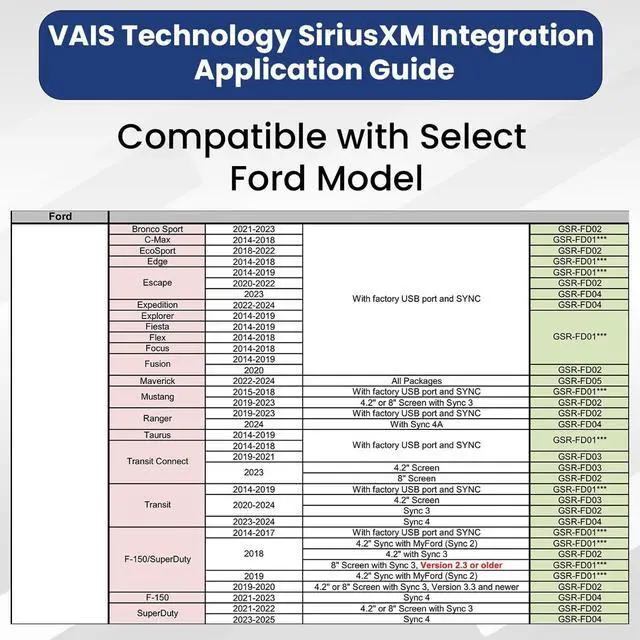
- Factory Radio Compatibility: Our VAIS - GSR-FD05 is specifically designed for select Factory Ford models, ensuring a precise fit and hassle-free installation process. Compatible Models: Maverick (2022-2024) - All package
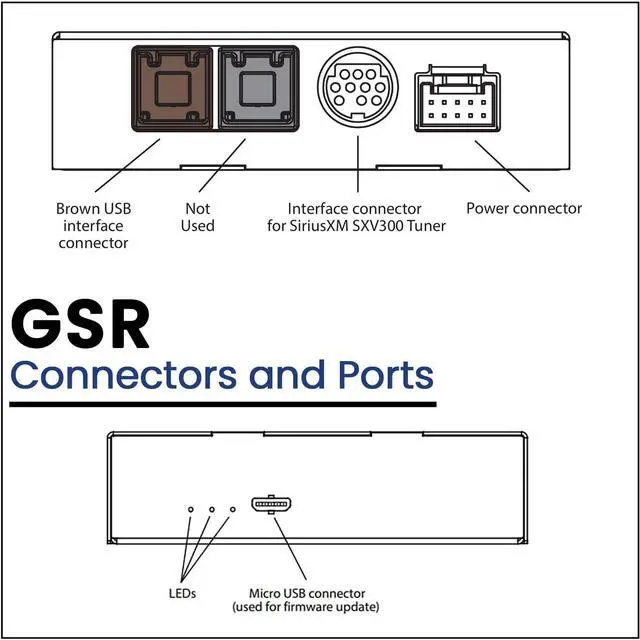
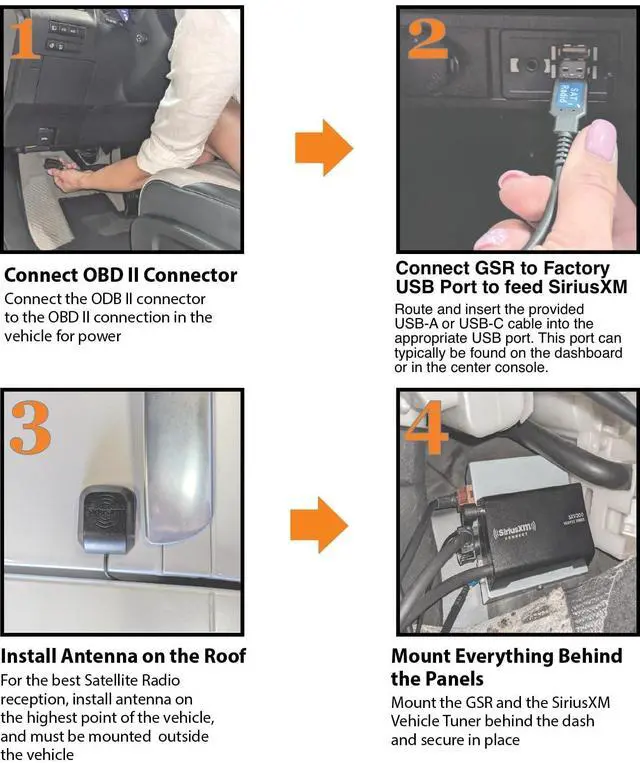
- How to Install: Connect the OBD II connector to your vehicle's OBD II port for power. Plug the VAIS adapter into the factory USB data port to send SiriusXM data to the radio. Mount the antenna on the highest point of the vehicles roof for the best reception. Secure the GSR and SiriusXM tuner behind the dash panels.
- How to Add SiriusXM to your factory radio: Find the USB port in your vehicle's
+
+
Overview
Specs
Reviews

Any questions? Our AI mode will help you find out quickly.
Try me now
Seamless Integration and
No Dash Clutter: Say goodbye to cluttered dash setups with our VAIS GSR-FD05 adapter seamlessly integrates SiriusXM Satellite Radio into your vehicle's factory radio system, preserving the original aesthetic and functionality. Our adapter eliminates the need for additional mounts or FM modulation adapters, keeping your interior clean and organized ^^
Factory Radio Compatibility: Our VAIS - GSR-FD05 is specifically designed for select Factory Ford models, ensuring a precise fit and hassle-free installation process.
Compatible Models: Maverick (2022-2024) - All package ^^ How to
Install: Connect the OBD II connector to your vehicle's OBD II port for power. Plug the VAIS adapter into the factory USB data port to send SiriusXM data to the radio. Mount the antenna on the highest point of the vehicles roof for the best reception. Secure the GSR and SiriusXM tuner behind the dash panels. ^^ How to Add SiriusXM to your factory radio: Find the USB port in your vehicle's dashboard then plug in the adapter and activate your subscription of SiriusXM. Turn on your vehicle and select SiriusXM from the source menu then use your factory radio controls to browse and enjoy SiriusXM channels ^^
Enhanced Entertainment: Unlock a world of entertainment with SiriusXM's vast array of music, sports, news, and entertainment channels, providing endless options for every taste and preference ^^
Wide Compatibility: VAIS Technology offers compatibility with a wide range of vehicle makes and models, ensuring that you can enjoy SiriusXM Satellite Radio in your vehicle regardless of brand and ensure compatibility with your specific vehicle model. Our adapter appeals to a vast market of vehicle owners seeking to upgrade their audio experience without replacing their factory radio
No Dash Clutter: Say goodbye to cluttered dash setups with our VAIS GSR-FD05 adapter seamlessly integrates SiriusXM Satellite Radio into your vehicle's factory radio system, preserving the original aesthetic and functionality. Our adapter eliminates the need for additional mounts or FM modulation adapters, keeping your interior clean and organized ^^
Factory Radio Compatibility: Our VAIS - GSR-FD05 is specifically designed for select Factory Ford models, ensuring a precise fit and hassle-free installation process.
Compatible Models: Maverick (2022-2024) - All package ^^ How to
Install: Connect the OBD II connector to your vehicle's OBD II port for power. Plug the VAIS adapter into the factory USB data port to send SiriusXM data to the radio. Mount the antenna on the highest point of the vehicles roof for the best reception. Secure the GSR and SiriusXM tuner behind the dash panels. ^^ How to Add SiriusXM to your factory radio: Find the USB port in your vehicle's dashboard then plug in the adapter and activate your subscription of SiriusXM. Turn on your vehicle and select SiriusXM from the source menu then use your factory radio controls to browse and enjoy SiriusXM channels ^^
Enhanced Entertainment: Unlock a world of entertainment with SiriusXM's vast array of music, sports, news, and entertainment channels, providing endless options for every taste and preference ^^
Wide Compatibility: VAIS Technology offers compatibility with a wide range of vehicle makes and models, ensuring that you can enjoy SiriusXM Satellite Radio in your vehicle regardless of brand and ensure compatibility with your specific vehicle model. Our adapter appeals to a vast market of vehicle owners seeking to upgrade their audio experience without replacing their factory radio
Warranty & Returns
Warranty, Returns, And Additional Information
Warranty
- Please contact the Seller directly for warranty information. Warranty information may also be found on the Manufacturer's website.
- CONTACT
Return Policies
- Return for refund within: 30 days
- Return for replacement within: non-replaceable
- This item is covered by Aptly Tech Return Policy
Manufacturer Contact Info
- For a directory of all our manufacturers, please click below.
- Manufacturers Directory
LOADING...