• $82.99
  • Free 30-day Returns
  • Price alert
    Shop it at NeweggBusiness.

    Meet Your Seller

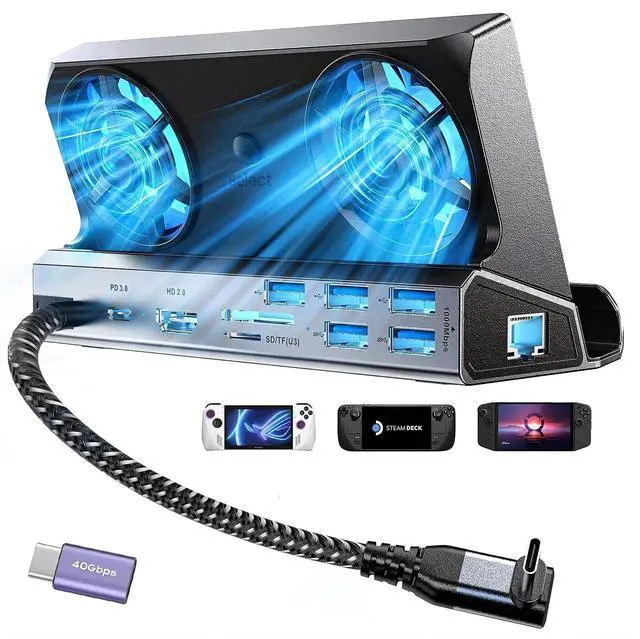
    Docking Station for Steam Deck ROG Ally with Dual Cooling Fans, 10-IN-1 Stream Deck Dock with 4K@60Hz, 1000Mbps Gigabit Ethernet, 5USB Ports and 100W Charging Port for Steam Deck OLED/Switch/Legion Go

    • 10-in-1 Handheld Console Dock:Transforms your Steam Deck OLED/ASUS ROG ALLY/ Legion Go's USB Type-C into 10 ports: 4K@60Hz, Gigabit Ethernet (1000Mbps),3 USB3.0 (5Gbps), 3 USB2.0, USB Type C PD 3.0 (100W),VGA,DP1.2 port,this docking station will meet your all need when you playing games.The package also includes a 40Gbps extension adapter.
    • Dual Cooling RGB Fans: Good heat dissipation not only extends the battery life of the steam deck, but also prevents other problems caused by overheat,increase the speed of cooling air entering steam deck so that heat dissipates faster.Say goodbye to the woes of system crashes or lost frames, and embrace a consistently smooth gaming experience.
    • 4K@60Hz Output: This Gamer Docking station comes with a 4K@60Hz ,When you connect an external 4K monitor, it can provide you sharper and smoother visual experience, so you can enjoy the visual feast on your games. to achieve higher resolutions, simply navigate to game settings > properties > general > gam
    +
    +
    Overview
    Specs
    Reviews
    avatar

    Any questions? Our AI beta will help you find out quickly.

    Q: Can it support ROG ALLY Turbo 30W mode?
    A: The Upgraded LISEN ROG ALLY dock perfectly supports Turbo 30W mode, just make sure you use a charger with 65W or aboveQ: Why does the Ethernet not work?
    A: After the SteamOS is upgraded, you need to manually enter the desktop mode and connect the wired network. Turn off Wi-Fi, or set the wired connection priorityQ: Why does the TV not recognize my sound barrier and deactivate the CEC device?
    A: In the Steam settings, click Audio, there is output, and click "External Devices", and the audio can be transmitted to the
    TVQ: How to use the storage function of the Steam Deck docking station correctly?
    A: You need to adjust from game mode to desktop mode, open the system tray to see the latest inserted memory card at the bottom. The storage function of the docking station in desktop mode can be used normallyQ: Can the docking station be used for cases with Kickstand?
    A: NOT compatible with Protective Case with Kickstand, Please ensure that the thickness of your protective case is less than 2mm

    Warranty & Returns

    Warranty, Returns, And Additional Information

    Warranty

    • Please contact the Seller directly for warranty information. Warranty information may also be found on the Manufacturer's website.
    • CONTACT

    Return Policies

    • Return for refund within: 30 days
    • Return for replacement within: 30 days
    • This item is covered by mafengkeji Return Policy

    Manufacturer Contact Info

    LOADING...