

Your Browsing History

Meet Your Seller


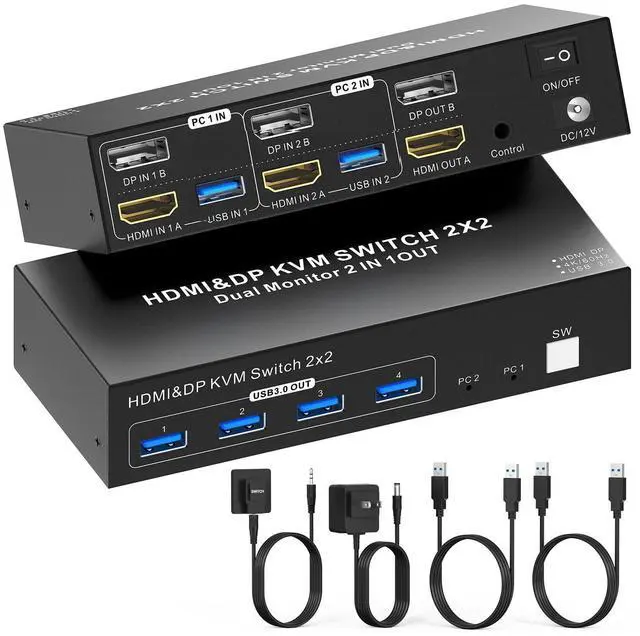


Dual Monitor KVM Switch- 4K@60Hz, HDMI+DP (Displayport) KVM Switch with 4 USB 3.0 Ports, Wired Remote & 2 USB 3.0 Cables Included
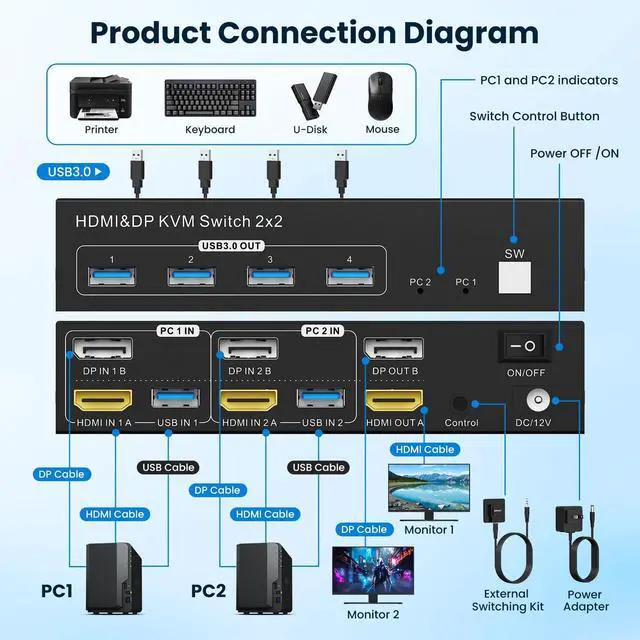
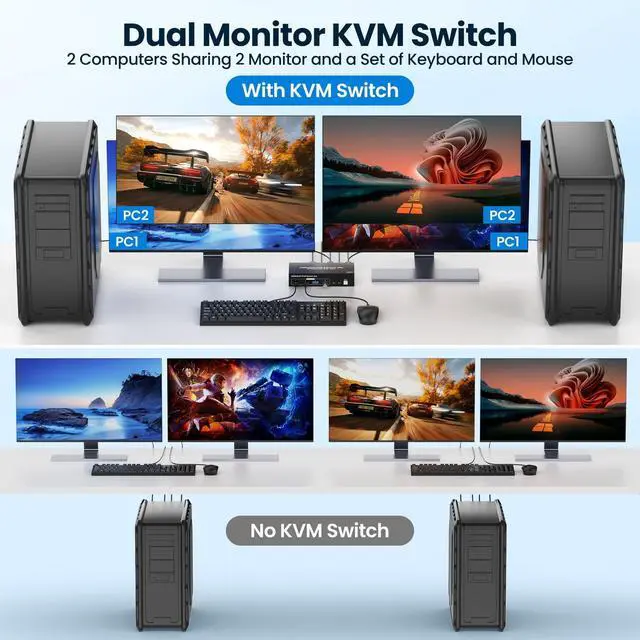
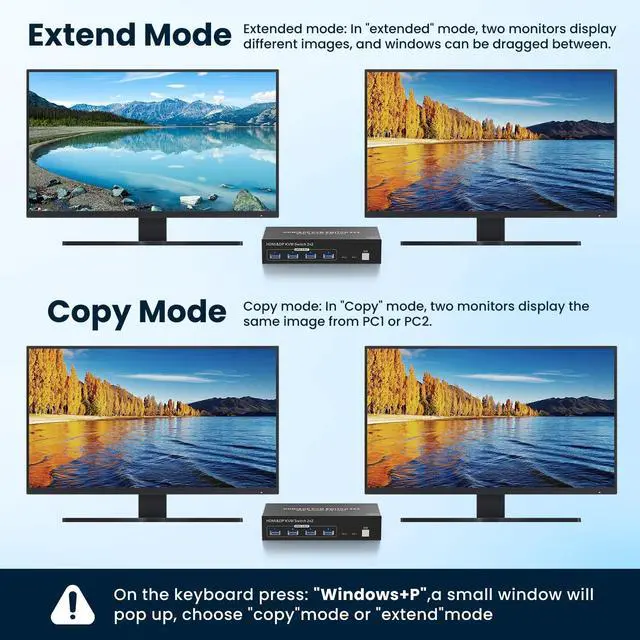
- 2-in-2-Out Dual Monitor KVM Switch Control 2 computers with 1 set of keyboard/mouse and 2 monitors (supports Extend/Copy display modes). Press "Window+P" to select display mode; use high-quality HDMI/DP cables for stable performance.
- 4K@60Hz Ultra-Clear Resolution USB 3.0 KVM switch supports up to 4K@60Hz resolution. Works with 2 computers that have different resolutions (compatible with HDMI 2.1 + DP 1.4).
- 4 USB 3.0 Ports for Devices Equipped with 4 USB 3.0 ports (5Gbps data transfer speed) compatible with keyboard, mouse, printer, scanner, etc. Ensure input USB 3.0 ports are correctly connected; otherwise, output devices wont be recognized.
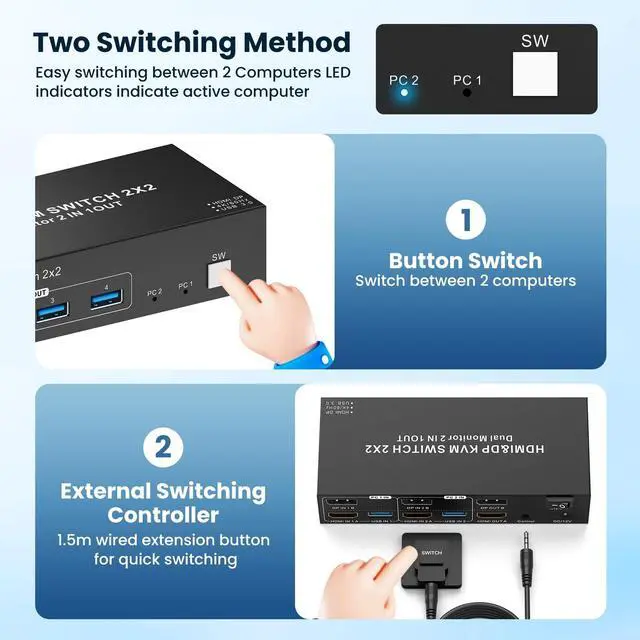
- 2 Switching Modes + LED Indicator Easily switch between computers via: Panel buttonIncluded wired controller. LED indicator (2 colors) shows which computer is active.
- Display Modes & Compatibility Notes Dual display requires 1 HDMI + 1 DP port per computer; for PCs with discrete/integrated GPUs, use ports from the discrete GPU. Limita
+
+
Overview
Specs
Reviews

Any questions? Our AI mode will help you find out quickly.
Try me now
2-in-2-Out Dual Monitor KVM Switch Control 2 computers with 1 set of keyboard/mouse and 2 monitors (supports Extend/Copy display modes). Press "Window+P" to select display mode; use high-quality HDMI/DP cables for stable performance. ^^ 4K@60Hz Ultra-Clear Resolution USB 3.0 KVM switch supports up to 4K@60Hz resolution. Works with 2 computers that have different resolutions (compatible with HDMI 2.1 + DP 1.4 ). ^^ 4 USB 3.0 Ports for Devices Equipped with 4 USB 3.0 ports (5Gbps data transfer speed) compatible with keyboard, mouse, printer, scanner, etc. Ensure input USB 3.0 ports are correctly connected; otherwise, output devices wont be recognized.
^^ 2 Switching Modes + LED Indicator Easily switch between computers via: Panel buttonIncluded wired controller. LED indicator (2 colors) shows which computer is active. ^^ Display Modes & Compatibility Notes Dual display requires 1 HDMI + 1 DP port per computer; for PCs with discrete/integrated GPUs, use ports from the discrete GPU.
Limitations: MAC M1/M2 only supports 1 external screen; MST multi-screen docking needs 11th-gen (or newer) CPU.
Driver-free & Plug-and-Play: If your device (e. g., laptop) lacks HDMI/DP ports, use an adapter (USB-C to HDMI/DP, not included). ^^ One-Key Power Switch Turn off the KVM with one key when not in use no need to re-plug, saves power. ^^ Package Included 1 Dual Monitor USB 3.0 HDMI+DP KVM Switch, 2 USB 3.0 Cables, 1 Wired Controller, 1 User Manual, 1 DC12V Power Adapter
^^ 2 Switching Modes + LED Indicator Easily switch between computers via: Panel buttonIncluded wired controller. LED indicator (2 colors) shows which computer is active. ^^ Display Modes & Compatibility Notes Dual display requires 1 HDMI + 1 DP port per computer; for PCs with discrete/integrated GPUs, use ports from the discrete GPU.
Limitations: MAC M1/M2 only supports 1 external screen; MST multi-screen docking needs 11th-gen (or newer) CPU.
Driver-free & Plug-and-Play: If your device (e. g., laptop) lacks HDMI/DP ports, use an adapter (USB-C to HDMI/DP, not included). ^^ One-Key Power Switch Turn off the KVM with one key when not in use no need to re-plug, saves power. ^^ Package Included 1 Dual Monitor USB 3.0 HDMI+DP KVM Switch, 2 USB 3.0 Cables, 1 Wired Controller, 1 User Manual, 1 DC12V Power Adapter
Warranty & Returns
Warranty, Returns, And Additional Information
Warranty
- Please contact the Seller directly for warranty information. Warranty information may also be found on the Manufacturer's website.
- CONTACT
Return Policies
- Return for refund within: 30 days
- Return for replacement within: 30 days
- This item is covered by ApexDash Return Policy
Manufacturer Contact Info
- For a directory of all our manufacturers, please click below.
- Manufacturers Directory
LOADING...