

Your Browsing History
- Free 30-day Returns
$36.99

Meet Your Seller

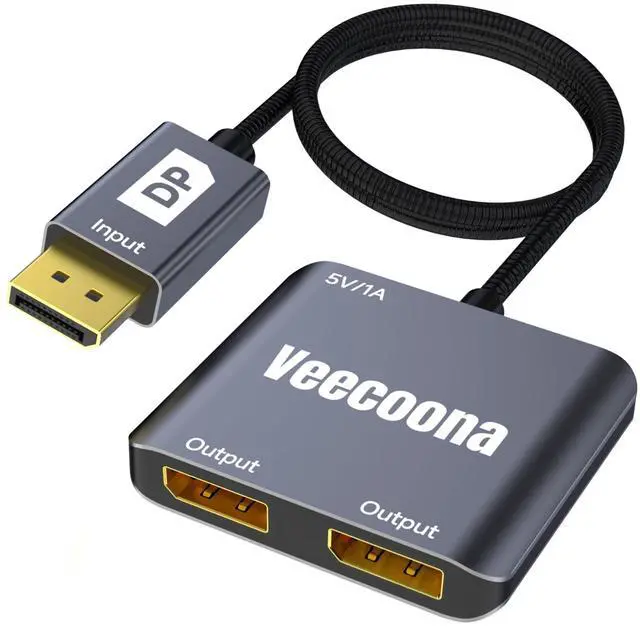
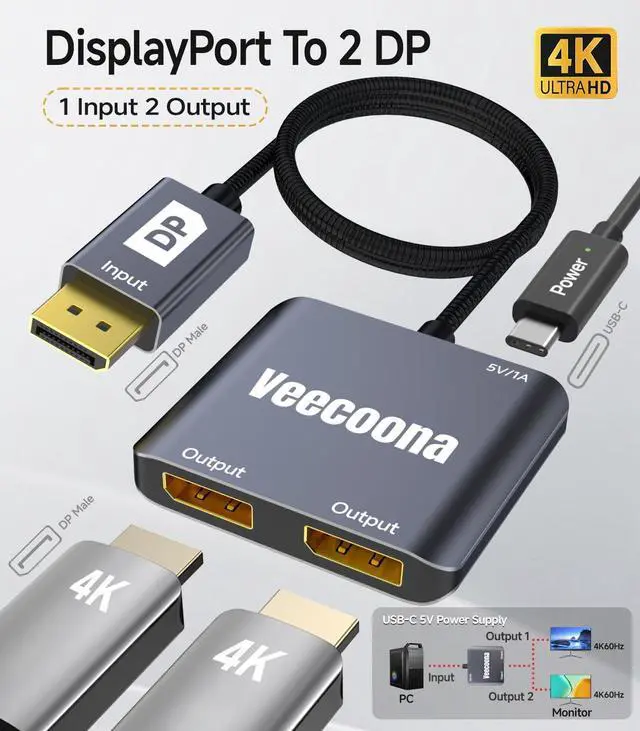
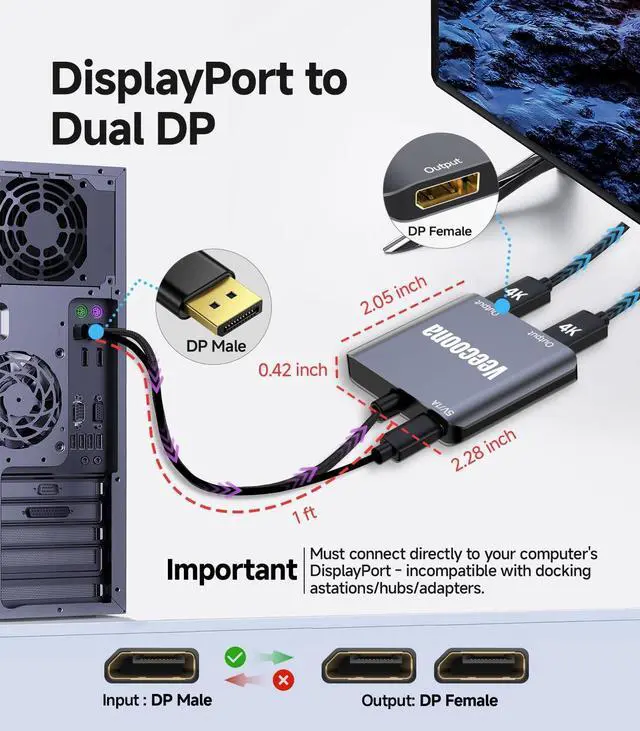


DisplayPort to Dual DisplayPort Splitter 1 in 2 Out ^^ 4K60Hz, DP Source to DP Splitter Extended Display port splitter for Dual monitors, for Desktop,NVIDIA, AMD Graphics Card - MACOS Not Support MS
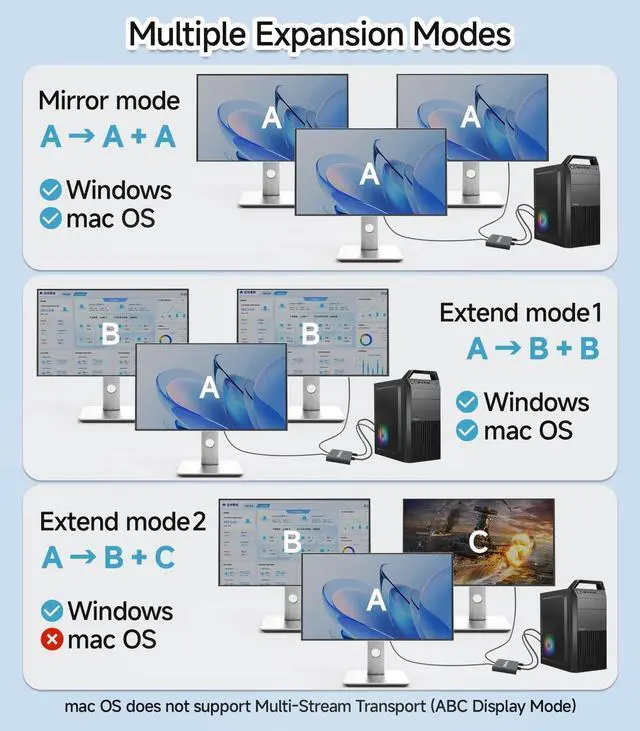
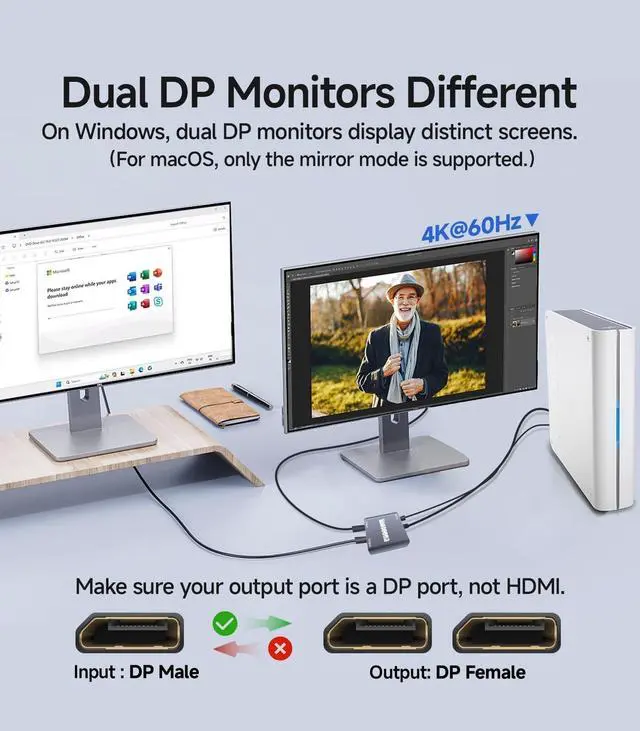
- DisplayPort to Dual DisplayPort AdapterFeaturing DP 1.2 to dual DisplayPort conversion, this adapter enables extended display on dual monitors for Windows PCs, supporting both SST and MST modes. Note: macOS only supports screen mirroring (no extended mode).
- 4K60Hz Ultra HDThis DisplayPort splitter for dual monitors delivers stunning 4K@60Hz resolution on both single display and dual extended monitors. Fully backward compatible with 2K/1080P/720P resolutions. Important: Must connect directly to your computer's DisplayPort - incompatible with docking stations/hubs/adapters.
- Plug and PlayFeaturing a hassle-free setup, this Display Port splitter for extended display works instantly. Here's how to use it: 1. Connect it to your display with a 4K@60Hz DP cable. 2. Power it via USB if needed. 3. Plug the DP connector into your PC's DisplayPort.
- Universal CompatibilityThis Display port splitter for dual monitors works seamlessly with Windows, macOS, and Linux systems, supporting variou
+
+
Overview
Specs
Reviews

Any questions? Our AI mode will help you find out quickly.
Try me now
DisplayPort to Dual DisplayPort AdapterFeaturing DP 1.2 to dual DisplayPort conversion, this adapter enables extended display on dual monitors for Windows PCs, supporting both SST and MST modes.
Note: macOS only supports screen mirroring (no extended mode). ^^ 4K60Hz Ultra HDThis DisplayPort splitter for dual monitors delivers stunning 4K@60Hz resolution on both single display and dual extended monitors. Fully backward compatible with 2K/1080P/720P resolutions.
Important: Must connect directly to your computer's DisplayPort - incompatible with docking stations/hubs/adapters. ^^ Plug and PlayFeaturing a hassle-free setup, this Display Port splitter for extended display works instantly.
Here's how to use it: 1. Connect it to your display with a 4K@60Hz DP cable. 2. Power it via USB if needed. 3. Plug the DP connector into your PC's DisplayPort. ^^ Universal CompatibilityThis Display port splitter for dual monitors works seamlessly with Windows, macOS, and Linux systems, supporting various devices including desktops, laptops, and workstations. Perfect for business presentations, home theaters, gaming setups, and office workstations. For best performance, ensure proper power connection via included USB cable. ^^ Premium Aluminum Housing Built with a durable aluminum alloy casing, this DisplayPort to Dual DP Splitter resists scratches, fingerprints, and overheating, making it perfect for travel, office, or home use. If any issues arise, our 18/7 customer support team guarantees a quick resolution. ^^ Key Tips1. Connect USB-C cable (5V/1A min. ) before use. 2. Not compatible with hubs, docking stations, KVM switches, or adaptersonly direct DP connection to graphics cards/laptops. 3. macOS supports mirroring (SST) but no MST extension. 4. Ensure DP device has >18Gbps; update GPU driver if no display.
Note: macOS only supports screen mirroring (no extended mode). ^^ 4K60Hz Ultra HDThis DisplayPort splitter for dual monitors delivers stunning 4K@60Hz resolution on both single display and dual extended monitors. Fully backward compatible with 2K/1080P/720P resolutions.
Important: Must connect directly to your computer's DisplayPort - incompatible with docking stations/hubs/adapters. ^^ Plug and PlayFeaturing a hassle-free setup, this Display Port splitter for extended display works instantly.
Here's how to use it: 1. Connect it to your display with a 4K@60Hz DP cable. 2. Power it via USB if needed. 3. Plug the DP connector into your PC's DisplayPort. ^^ Universal CompatibilityThis Display port splitter for dual monitors works seamlessly with Windows, macOS, and Linux systems, supporting various devices including desktops, laptops, and workstations. Perfect for business presentations, home theaters, gaming setups, and office workstations. For best performance, ensure proper power connection via included USB cable. ^^ Premium Aluminum Housing Built with a durable aluminum alloy casing, this DisplayPort to Dual DP Splitter resists scratches, fingerprints, and overheating, making it perfect for travel, office, or home use. If any issues arise, our 18/7 customer support team guarantees a quick resolution. ^^ Key Tips1. Connect USB-C cable (5V/1A min. ) before use. 2. Not compatible with hubs, docking stations, KVM switches, or adaptersonly direct DP connection to graphics cards/laptops. 3. macOS supports mirroring (SST) but no MST extension. 4. Ensure DP device has >18Gbps; update GPU driver if no display.
Warranty & Returns
Warranty, Returns, And Additional Information
Warranty
- Please contact the Seller directly for warranty information. Warranty information may also be found on the Manufacturer's website.
- CONTACT
Return Policies
- Return for refund within: 30 days
- Return for replacement within: non-replaceable
- This item is covered by SIMPLIZED Return Policy
Manufacturer Contact Info
- For a directory of all our manufacturers, please click below.
- Manufacturers Directory
LOADING...