

Your Browsing History

Meet Your Seller

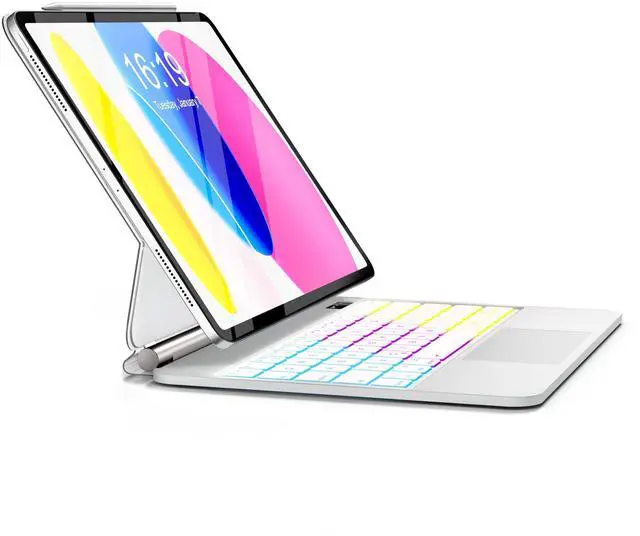



TabletKeyer Magic-Style Keyboard Case for iPad 11th Gen A16 (2025)/10th Gen 10.9" (2022) with Floating Magnetic Cover, Rainbow Backlit & Multi-Touch Trackpad - Gray
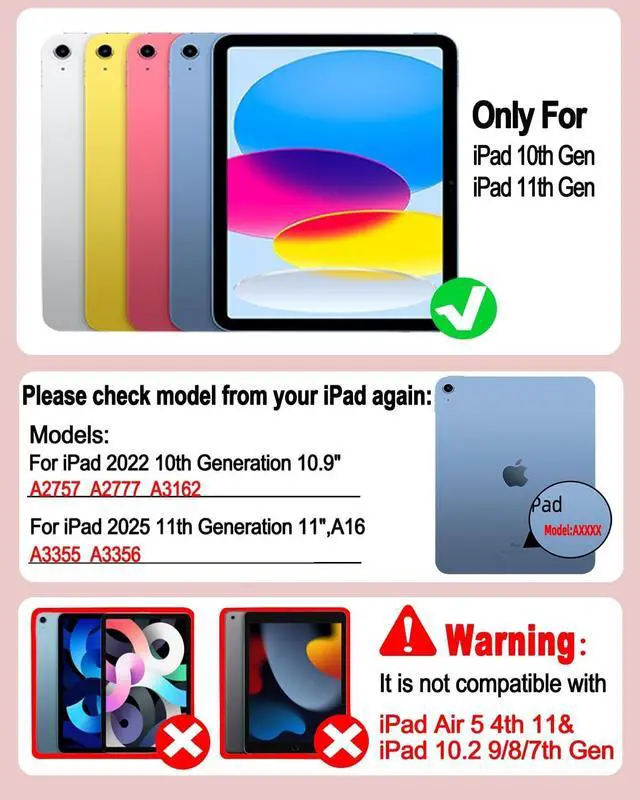
- Ultimate CompatibilityDesigned with precision for the latest iPad 11th Generation 11-inch (A16 2025, Models: A3355, A3356) and iPad 10th Generation 10.9-inch (2022, Models: A2696, A2757, A2777). Please check the "AXXXX" code on your iPad's back cover to ensure a perfect fit. Transform your iPad into a powerful laptop-like workstation in seconds. (Note: Pen and ipad not included in product.)
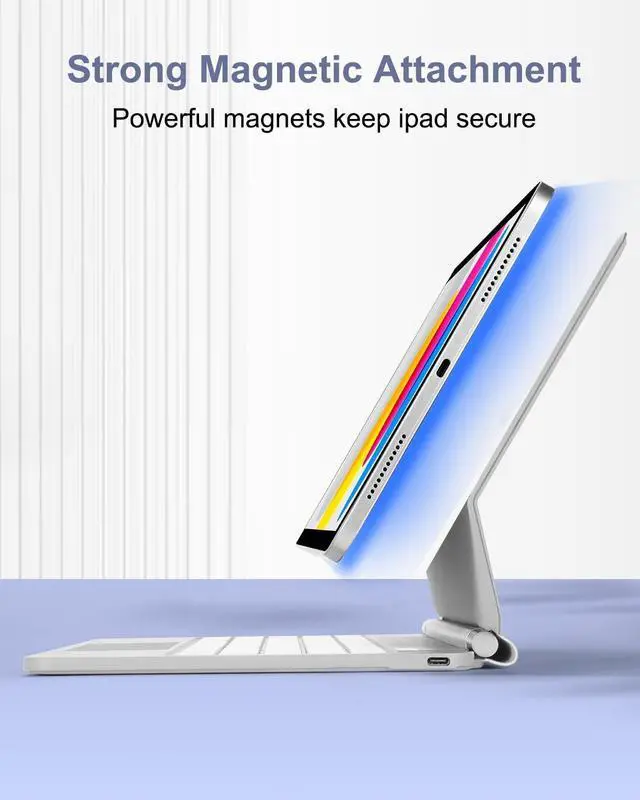
- Floating Cantilever Design: Your Personal Viewing & Typing StationThe built-in strong magnetic suspension instantly secures your iPad, offering a seamless floating effect. Effortlessly adjust to any anglefind the perfect ergonomic position for intense typing sessions, hands-free video calls, or watching lectures in the library or coffee shop. Its like having a portable MacBook-style stand built right into your case.
- Precision Touchpad & Shortcut Keys: Master Your WorkflowNavigate your iPad like a pro with the high-precision multi-touch trackpad. Swipe between apps, scroll through documents, an
+
+
Overview
Specs
Reviews

Any questions? Our AI mode will help you find out quickly.
Try me now
Ultimate CompatibilityDesigned with precision for the latest iPad 11th Generation 11-inch (A16 2025, Models: A3355, A3356) and iPad 10th Generation 10.9 -inch (2022, Models: A2696, A2757, A2777). Please check the "AXXXX" code on your iPad's back cover to ensure a perfect fit. Transform your iPad into a powerful laptop-like workstation in seconds.
(Note: Pen and ipad not included in product. ) ^^
Floating Cantilever Design: Your Personal Viewing & Typing StationThe built-in strong magnetic suspension instantly secures your iPad, offering a seamless floating effect. Effortlessly adjust to any anglefind the perfect ergonomic position for intense typing sessions, hands-free video calls, or watching lectures in the library or coffee shop. Its like having a portable MacBook-style stand built right into your case. ^^
Precision Touchpad & Shortcut Keys: Master Your WorkflowNavigate your iPad like a pro with the high-precision multi-touch trackpad. Swipe between apps, scroll through documents, and execute commands with fluid gestures. The top-row shortcut keys put control at your fingertipsadjust volume, screen brightness, or play/pause media instantly. Its not just a keyboard; its a productivity powerhouse designed to keep you focused. ^^ 7-Color
RGB Backlit & Breathing Light: Type in Style, Day or NightStand out with vibrant RGB backlighting! Cycle through 7 dynamic color combinations and 3 adjustable brightness levels to match your mood or environment. For a truly unique look, activate the Breathing Light modethe colors automatically and smoothly transition, adding a touch of personality to your setup while ensuring comfortable, accurate typing in any lighting condition.
(Tip: Fn + Light for brightness, Fn + RGB for color/breathing mode. ) ^^ Smart Power Management & Seamless ConnectionEnjoy MacBook-like convenience with auto wake/sleepopen the lid to start working instantly and close it to save battery. The reliable Bluetooth connection keeps you untethered, and the USB-C charging means powering up your keyboard is simple and fast. Plus, the stain-resistant surface repels fingerprints and dirt, making it the perfect, durable companion for students and professionals on the go.
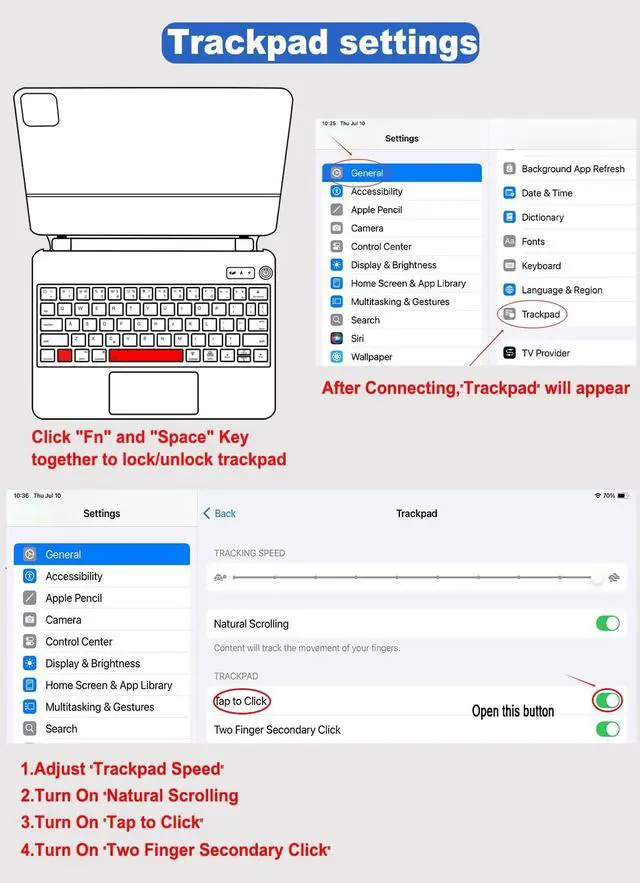
^^ Pro Tip: Customize Your TrackpadOnce connected via Bluetooth, a new "Trackpad" section appears in your iPad Settings General. Here you can adjust tracking speed, enable "Tap to Click, " or set up "Two Finger Secondary Click" just like on a Mac. Press fn + spacebar anytime to lock/unlock the trackpad and prevent accidental touches while typing.
(Note: Pen and ipad not included in product. ) ^^
Floating Cantilever Design: Your Personal Viewing & Typing StationThe built-in strong magnetic suspension instantly secures your iPad, offering a seamless floating effect. Effortlessly adjust to any anglefind the perfect ergonomic position for intense typing sessions, hands-free video calls, or watching lectures in the library or coffee shop. Its like having a portable MacBook-style stand built right into your case. ^^
Precision Touchpad & Shortcut Keys: Master Your WorkflowNavigate your iPad like a pro with the high-precision multi-touch trackpad. Swipe between apps, scroll through documents, and execute commands with fluid gestures. The top-row shortcut keys put control at your fingertipsadjust volume, screen brightness, or play/pause media instantly. Its not just a keyboard; its a productivity powerhouse designed to keep you focused. ^^ 7-Color
RGB Backlit & Breathing Light: Type in Style, Day or NightStand out with vibrant RGB backlighting! Cycle through 7 dynamic color combinations and 3 adjustable brightness levels to match your mood or environment. For a truly unique look, activate the Breathing Light modethe colors automatically and smoothly transition, adding a touch of personality to your setup while ensuring comfortable, accurate typing in any lighting condition.
(Tip: Fn + Light for brightness, Fn + RGB for color/breathing mode. ) ^^ Smart Power Management & Seamless ConnectionEnjoy MacBook-like convenience with auto wake/sleepopen the lid to start working instantly and close it to save battery. The reliable Bluetooth connection keeps you untethered, and the USB-C charging means powering up your keyboard is simple and fast. Plus, the stain-resistant surface repels fingerprints and dirt, making it the perfect, durable companion for students and professionals on the go.
^^ Pro Tip: Customize Your TrackpadOnce connected via Bluetooth, a new "Trackpad" section appears in your iPad Settings General. Here you can adjust tracking speed, enable "Tap to Click, " or set up "Two Finger Secondary Click" just like on a Mac. Press fn + spacebar anytime to lock/unlock the trackpad and prevent accidental touches while typing.
Warranty & Returns
Warranty, Returns, And Additional Information
Warranty
- Please contact the Seller directly for warranty information. Warranty information may also be found on the Manufacturer's website.
- CONTACT
Return Policies
- Return for refund within: 30 days
- Return for replacement within: non-replaceable
- This item is covered by VersaCom Return Policy
Manufacturer Contact Info
- For a directory of all our manufacturers, please click below.
- Manufacturers Directory
LOADING...