Your Browsing History
Meet Your Seller
Laptop Screen Extender 15.6", 5 Modes & Detachable Slim Portable Monitor
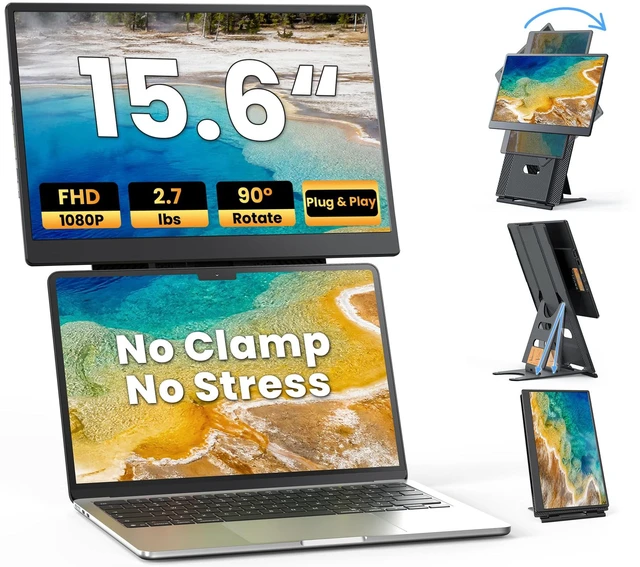
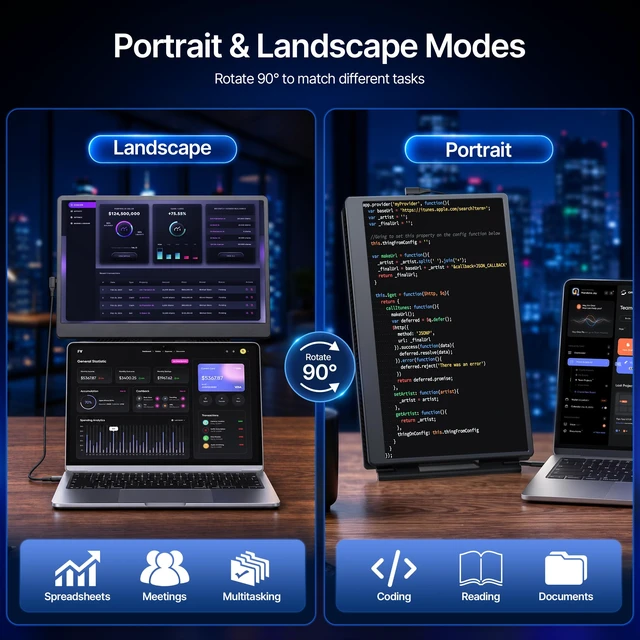
- INDEPENDENT SLIDE-RAIL STAND, NO LAPTOP CLAMPS NEEDEDS13's sturdy, free-standing frame holds the extra screen without clamping onto your laptop or weighing down its hinges. Two-stage slide-rail adjustment and 90 rotation let you tailor screen position to each task, while the detachable display supports 75 x 75mm VESA mounts. View spreadsheets in landscape, read more lines of code in portrait, or angle the screen toward a client when presentingat home, in shared offices, or on the go.
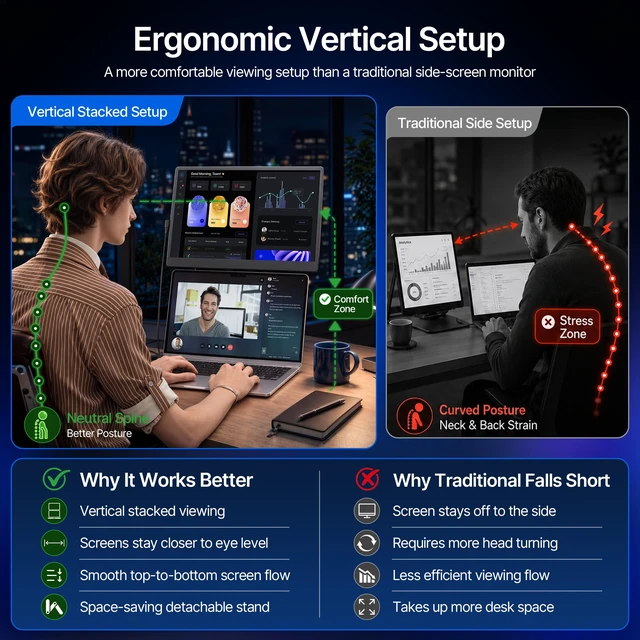
- ERGONOMIC VERTICAL SETUP, MORE COMFORTStack the second screen above your laptop so both displays stay in front of you. This vertical viewing flow can reduce frequent side-to-side head turning for more comfortable viewing. Put references or video calls above while you work below, and arrange content to fit your needs. Unlike side-by-side screens, stacking frees up desk width for your mouse, notes, or coffeeeven on small hotel desks and cafe tables.
- BOOST PRODUCTIVITY, FEWER TAB SWITCHESAdd a second sc
+
+
Overview
Specs
Reviews
Any questions? Ask CelesteSM will help you find out quickly.
Try me now
INDEPENDENT SLIDE-RAIL STAND, NO LAPTOP CLAMPS NEEDEDS13's sturdy, free-standing frame holds the extra screen without clamping onto your laptop or weighing down its hinges. Two-stage slide-rail adjustment and 90 rotation let you tailor screen position to each task, while the detachable display supports 75 x 75mm VESA mounts. View spreadsheets in landscape, read more lines of code in portrait, or angle the screen toward a client when presentingat home, in shared offices, or on the go. ^^ ERGONOMIC VERTICAL SETUP, MORE COMFORTStack the second screen above your laptop so both displays stay in front of you.
This vertical viewing flow can reduce frequent side-to-side head turning for more comfortable viewing. Put references or video calls above while you work below, and arrange content to fit your needs. Unlike side-by-side screens, stacking frees up desk width for your mouse, notes, or coffeeeven on small hotel desks and cafe tables. ^^ BOOST PRODUCTIVITY, FEWER TAB SWITCHESAdd a second screen to your laptop and give each task its own space. Edit spreadsheets, documents, or code on one display while keeping PDFs, emails, or chats open on the other.
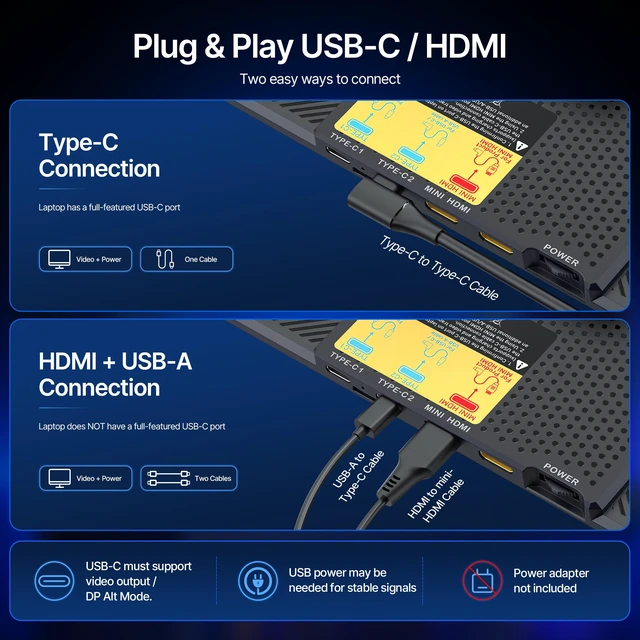
Spend less time switching tabs, minimizing windows, or searching for the page you just had open. Use Extend mode to show different content on each screen or Mirror mode to show the same content on both. Get more room when your laptop screen feels cramped or you're multitasking. ^^ PLUG & PLAY, NO DRIVERS NEEDEDNo dedicated display driver neededconnect S13 and start using it. If your laptop's USB-C supports DP Alt Mode video and supplies enough power, one cable handles video and power. For HDMI-only video output, use HDMI to Mini HDMI for video and USB for power.
With 2 full-function USB-C ports and 1 Mini HDMI port, S13
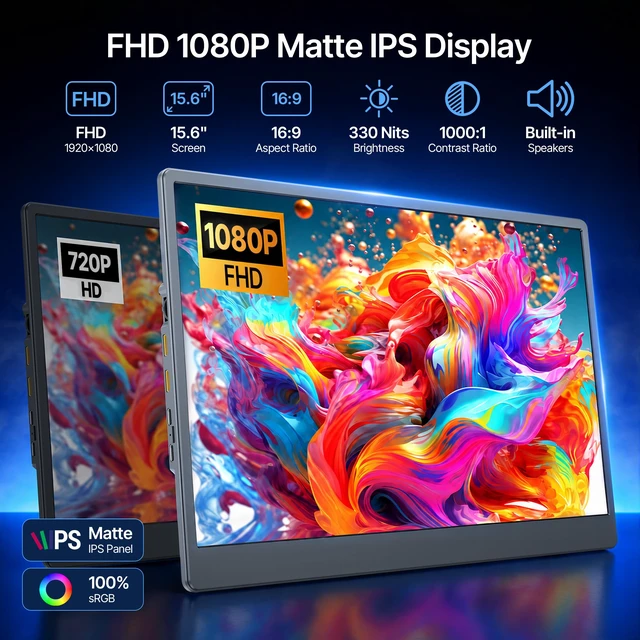
includes all 3 cables: USB-C to USB-C, HDMI to Mini HDMI, and USB-A to USB-C. It also connects to smartphones that support video output and compatible gaming consoles for a hassle-free setup. ^^ ULTRA-THIN, LIGHTWEIGHT & TRAVEL-READYGrab your productivity-boosting dual-screen setup and go. Detach the 0.52 -in-thick display and tuck it into the slide-rail stand, which helps shield the screen while packed. Folded, the unit measures about 14.6 x 8.9 x 1.3 in and weighs 2.7 lb, so it can fit alongside your laptop in a suitable bag. Whether you're away on business, road trip, or visiting clients, unpack and set up S13 to resume your dual-screen workflow whenever you need to work. ^^ 15.6" 1080P DISPLAY FOR CLEAR VIEWINGCheck spreadsheet figures, read code, and review emails or documents on S13's 15.6 -inch IPS screen. Full HD 1920 x 1080 resolution delivers clear text and practical detail for everyday work. Wide IPS viewing angles let you see the display from different positions, while 330-nit brightness supports viewing in typical indoor workspaces. With a 16:9 aspect ratio, 60Hz refresh rate, and 16.7 million colors, it's a practical second screen for daily tasks.
^^ STAY POWERED WITH PD PASS-THROUGH CHARGINGConnect a compatible external USB-C PD power source to S13 and keep working on two screens while charging a laptop that supports USB-C PD input. S13 supports PD 3.0 input up to 100W and pass-through output up to 85W; actual charging power depends on the adapter, cable, and laptop. A built-in speaker also plays basic audio for videos, meetings, or system alertssimply choose S13 as the sound output in your device settings. ^^ WIDELY COMPATIBLE WITH 12" 17.3" LAPTOPS & MOREOne display for work and play. S13 supports 12" 17.3" Windows or Mac laptops, Chromebooks, Linux computers, compatible USB-C phones, and HDMI consoles like docked Nintendo Switch, PS5, and Xbox. Connect via USB-C video (DP Alt Mode) or HDMI. For phones and consoles, confirm video output and provide separate power to S13. ^^ STURDY CONSTRUCTION, BUILT TO LASTS13's solid housing and independent slide-rail stand keep the display steady while you work. Its sturdy structure is built for repeated setup and daily ca
This vertical viewing flow can reduce frequent side-to-side head turning for more comfortable viewing. Put references or video calls above while you work below, and arrange content to fit your needs. Unlike side-by-side screens, stacking frees up desk width for your mouse, notes, or coffeeeven on small hotel desks and cafe tables. ^^ BOOST PRODUCTIVITY, FEWER TAB SWITCHESAdd a second screen to your laptop and give each task its own space. Edit spreadsheets, documents, or code on one display while keeping PDFs, emails, or chats open on the other.
Spend less time switching tabs, minimizing windows, or searching for the page you just had open. Use Extend mode to show different content on each screen or Mirror mode to show the same content on both. Get more room when your laptop screen feels cramped or you're multitasking. ^^ PLUG & PLAY, NO DRIVERS NEEDEDNo dedicated display driver neededconnect S13 and start using it. If your laptop's USB-C supports DP Alt Mode video and supplies enough power, one cable handles video and power. For HDMI-only video output, use HDMI to Mini HDMI for video and USB for power.
With 2 full-function USB-C ports and 1 Mini HDMI port, S13
includes all 3 cables: USB-C to USB-C, HDMI to Mini HDMI, and USB-A to USB-C. It also connects to smartphones that support video output and compatible gaming consoles for a hassle-free setup. ^^ ULTRA-THIN, LIGHTWEIGHT & TRAVEL-READYGrab your productivity-boosting dual-screen setup and go. Detach the 0.52 -in-thick display and tuck it into the slide-rail stand, which helps shield the screen while packed. Folded, the unit measures about 14.6 x 8.9 x 1.3 in and weighs 2.7 lb, so it can fit alongside your laptop in a suitable bag. Whether you're away on business, road trip, or visiting clients, unpack and set up S13 to resume your dual-screen workflow whenever you need to work. ^^ 15.6" 1080P DISPLAY FOR CLEAR VIEWINGCheck spreadsheet figures, read code, and review emails or documents on S13's 15.6 -inch IPS screen. Full HD 1920 x 1080 resolution delivers clear text and practical detail for everyday work. Wide IPS viewing angles let you see the display from different positions, while 330-nit brightness supports viewing in typical indoor workspaces. With a 16:9 aspect ratio, 60Hz refresh rate, and 16.7 million colors, it's a practical second screen for daily tasks.
^^ STAY POWERED WITH PD PASS-THROUGH CHARGINGConnect a compatible external USB-C PD power source to S13 and keep working on two screens while charging a laptop that supports USB-C PD input. S13 supports PD 3.0 input up to 100W and pass-through output up to 85W; actual charging power depends on the adapter, cable, and laptop. A built-in speaker also plays basic audio for videos, meetings, or system alertssimply choose S13 as the sound output in your device settings. ^^ WIDELY COMPATIBLE WITH 12" 17.3" LAPTOPS & MOREOne display for work and play. S13 supports 12" 17.3" Windows or Mac laptops, Chromebooks, Linux computers, compatible USB-C phones, and HDMI consoles like docked Nintendo Switch, PS5, and Xbox. Connect via USB-C video (DP Alt Mode) or HDMI. For phones and consoles, confirm video output and provide separate power to S13. ^^ STURDY CONSTRUCTION, BUILT TO LASTS13's solid housing and independent slide-rail stand keep the display steady while you work. Its sturdy structure is built for repeated setup and daily ca
Warranty & Returns
Warranty, Returns, And Additional Information
Warranty
- Please contact the Seller directly for warranty information. Warranty information may also be found on the Manufacturer's website.
- CONTACT
Return Policies
- Return for refund within: 30 days
- Return for replacement within: 30 days
- This item is covered by Hanbo Supply Store Return Policy
Manufacturer Contact Info
- For a directory of all our manufacturers, please click below.
- Manufacturers Directory
LOADING...