Your Browsing History
Meet Your Seller
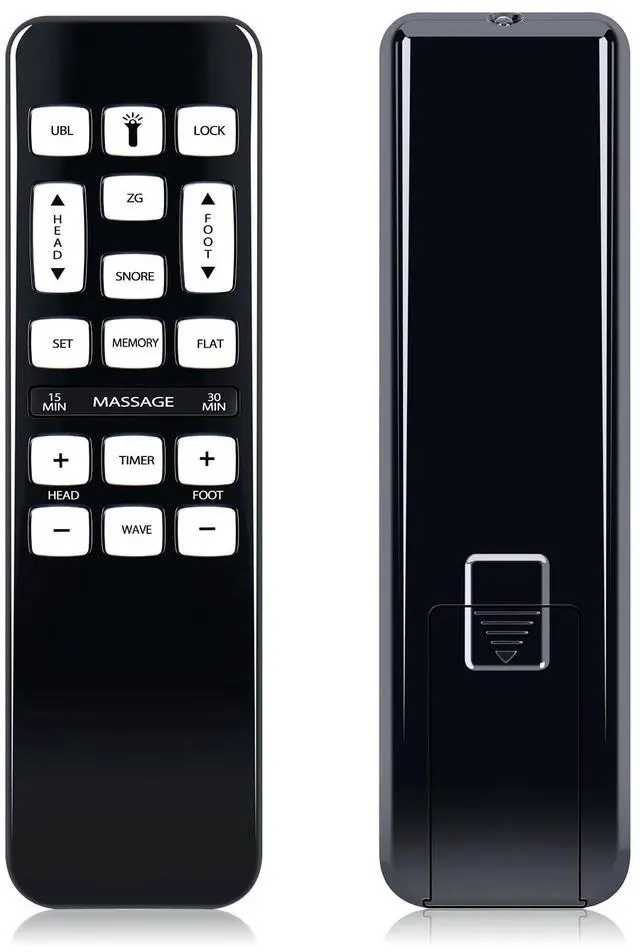
RYQIF Replacement Remote Control fits iDealBed iEscape Adjustable Bed Base 4AW110 4AW112 4AW113-(Pairing Required)
- Remote CompatibilityCompatible with iDealBed iEscape Adjustable Bed Base 4AW110 4AW112 4AW113
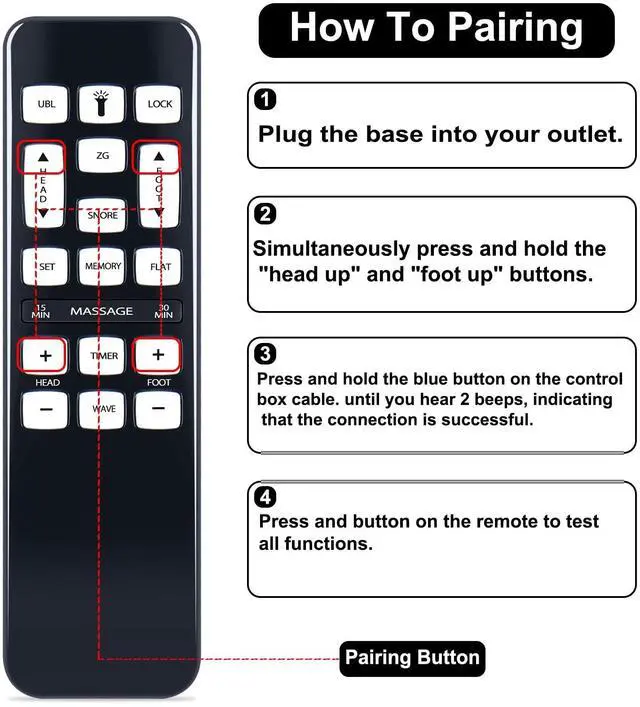
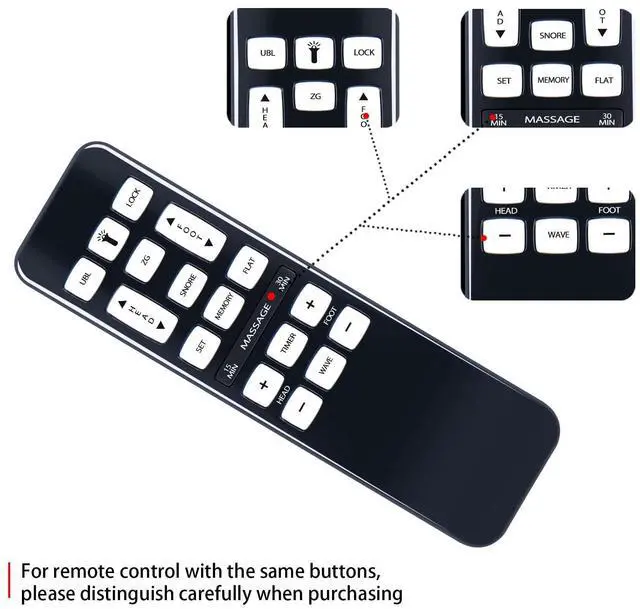
- PAIRING Method 1: Press and hold the remote's "Head Down" and "Foot Up" buttons for 10 seconds, At the same time, press and hold the Reset Coding button on the side of the control box (Sometimes it's on the power cord). You will hear a beep. That means it's paired.
- PAIRING Method 2: Press and hold the remote's "Head Up" and "Foot Up" for 10 seconds, At the same time, press and hold the Reset Coding button on the side of the control box (Sometimes it's on the power cord). You will hear a beep. That means it's paired.
- PAIRING Method 3: Press and hold the remote's "Head Up" and "Foot Down buttons for 10 seconds, At the same time, press and hold the Reset Coding button on the side of the control box (Sometimes it's on the power cord). You will hear a beep. That means it's paired.
- Excellent After- Sale ServiceProviding high-quality products and services is our top priority. If you have
+
+
Overview
Specs
Reviews
Any questions? Our AI beta will help you find out quickly.
Try me now
Remote CompatibilityCompatible with iDealBed iEscape Adjustable Bed Base 4AW110 4AW112 4AW113 ^^ PAIRING
Method 1: Press and hold the remote's "Head Down" and "Foot Up" buttons for 10 seconds, At the same time, press and hold the Reset Coding button on the side of the control box (Sometimes it's on the power cord). You will hear a beep. That means it's paired.
^^ PAIRING Method 2: Press and hold the remote's "Head Up" and "Foot Up" for 10 seconds, At the same time, press and hold the Reset Coding button on the side of the control box (Sometimes it's on the power cord). You will hear a beep. That means it's paired.
^^ PAIRING Method 3: Press and hold the remote's "Head Up" and "Foot Down buttons for 10 seconds, At the same time, press and hold the Reset Coding button on the side of the control box (Sometimes it's on the power cord). You will hear a beep. That means it's paired. ^^ Excellent After- Sale ServiceProviding high-quality products and services is our top priority. If you have any questions about the remote control (purchase/use), we will answer them for you as soon as possible. Thank you!

Method 1: Press and hold the remote's "Head Down" and "Foot Up" buttons for 10 seconds, At the same time, press and hold the Reset Coding button on the side of the control box (Sometimes it's on the power cord). You will hear a beep. That means it's paired.
^^ PAIRING Method 2: Press and hold the remote's "Head Up" and "Foot Up" for 10 seconds, At the same time, press and hold the Reset Coding button on the side of the control box (Sometimes it's on the power cord). You will hear a beep. That means it's paired.
^^ PAIRING Method 3: Press and hold the remote's "Head Up" and "Foot Down buttons for 10 seconds, At the same time, press and hold the Reset Coding button on the side of the control box (Sometimes it's on the power cord). You will hear a beep. That means it's paired. ^^ Excellent After- Sale ServiceProviding high-quality products and services is our top priority. If you have any questions about the remote control (purchase/use), we will answer them for you as soon as possible. Thank you!
Warranty & Returns
Warranty, Returns, And Additional Information
Warranty
- Please contact the Seller directly for warranty information. Warranty information may also be found on the Manufacturer's website.
- CONTACT
Return Policies
- Return for refund within: 30 days
- Return for replacement within: 30 days
- This item is covered by Luhang Return Policy
Manufacturer Contact Info
- For a directory of all our manufacturers, please click below.
- Manufacturers Directory
LOADING...