Your Browsing History
- Free 30-day Returns
$183.99
Meet Your Seller
LAMTTO 1080P Baby Car Camera & Wireless CarPlay Adapter, AirPlay Mirroring
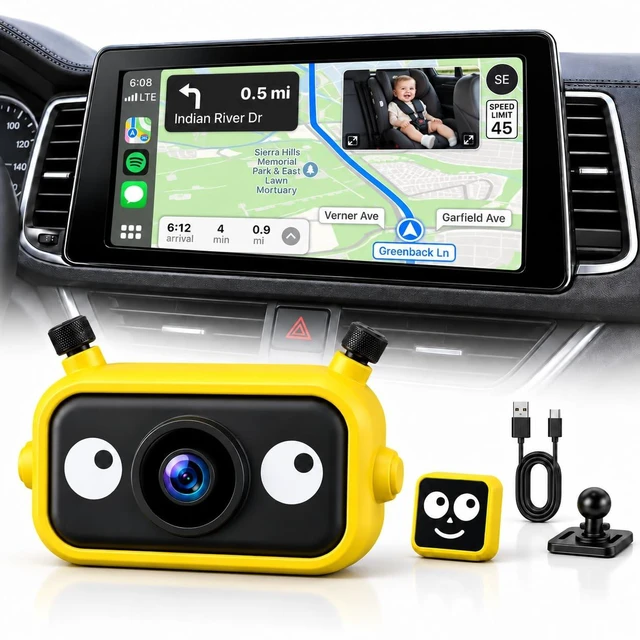
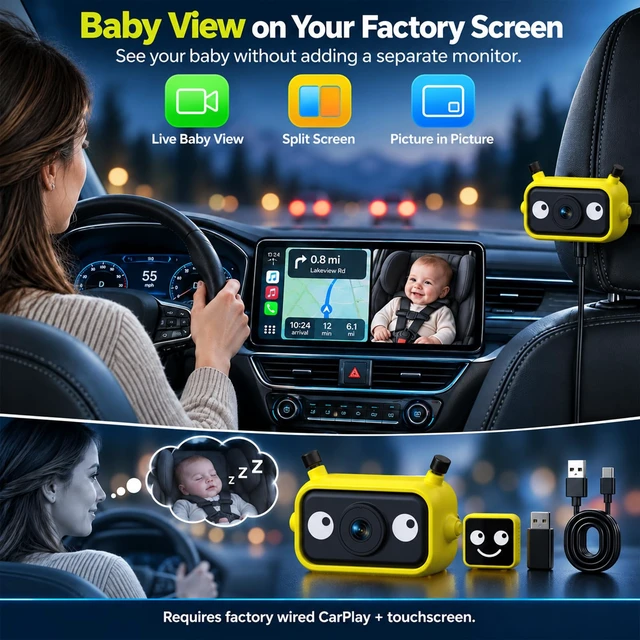
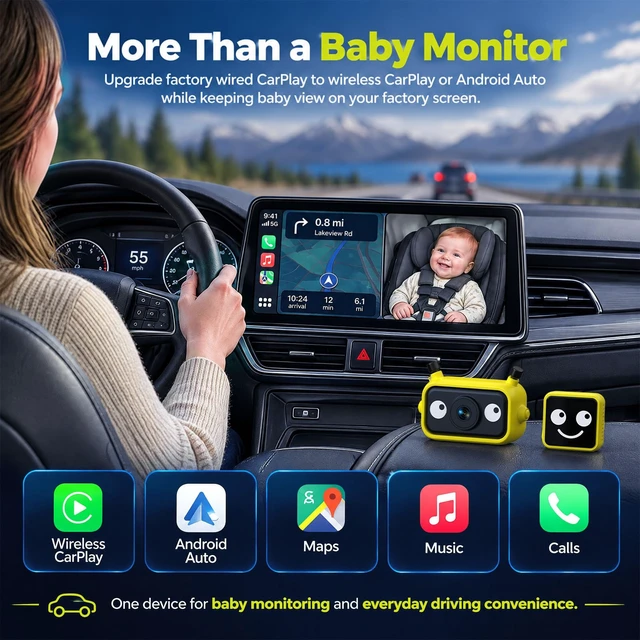
- [See Baby and Navigation Together] Driving alone with your baby in a rear-facing seat? View the rear-seat camera without turning around. Use PIP or split screen in the wireless carplay adapter interface to keep navigation and your baby visible at the same time.Use your existing factory touchscreen instead of adding a separate baby monitor display.
- [1080P View with Flexible Installation] The 1080P baby camera provides a 150 wide-angle view. For SUVs or sedans, choose the headrest-post mount or strap and adjust the camera to the right angle for your vehicle and rear-seat layout.The camera must remain connected to a power cable during use.
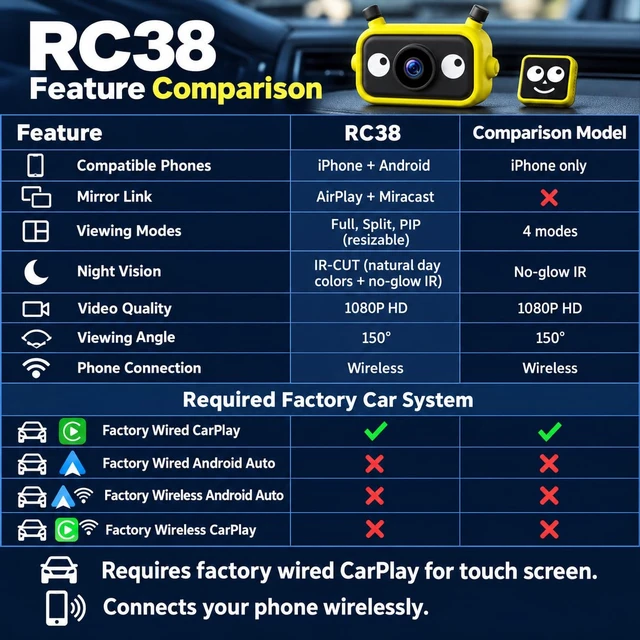
- [IR-CUT Clarity, Day & Night] The RC38 baby car camera automatically adjusts between daytime and night viewing with no manual switching. IR-CUT helps keep daytime colors natural, while no-glow infrared night vision lets parents check their baby on a compatible factory touchscreen after dark without turning on cabin lights.
- [CarPlay & And
+
+
Overview
Specs
Reviews
Any questions? Ask CelesteSM will help you find out quickly.
Try me now
[See Baby and Navigation Together] Driving alone with your baby in a rear-facing seat? View the rear-seat camera without turning around. Use PIP or split screen in the wireless carplay adapter interface to keep navigation and your baby visible at the same time. Use your existing factory touchscreen instead of adding a separate baby monitor display. ^^ [1080P View with Flexible Installation] The 1080P baby camera provides a 150 wide-angle view. For SUVs or sedans, choose the headrest-post mount or strap and adjust the camera to the right angle for your vehicle and rear-seat layout.
The camera must remain connected to a power cable during use. ^^ [IR-CUT Clarity, Day & Night] The RC38 baby car camera automatically adjusts between daytime and night viewing with no manual switching. IR-CUT helps keep daytime colors natural, while no-glow infrared night vision lets parents check their baby on a compatible factory touchscreen after dark without turning on cabin lights. ^^ [CarPlay & Android Auto for Phones] Baby car monitor first connects through your vehicle's factory wired CarPlay port and opens the RC38 interface on the original touchscreen. Select CarPlay for an iPhone or Android Auto for a compatible Android phone, then use maps, music, calls and voice assistants while keeping access to the baby camera.
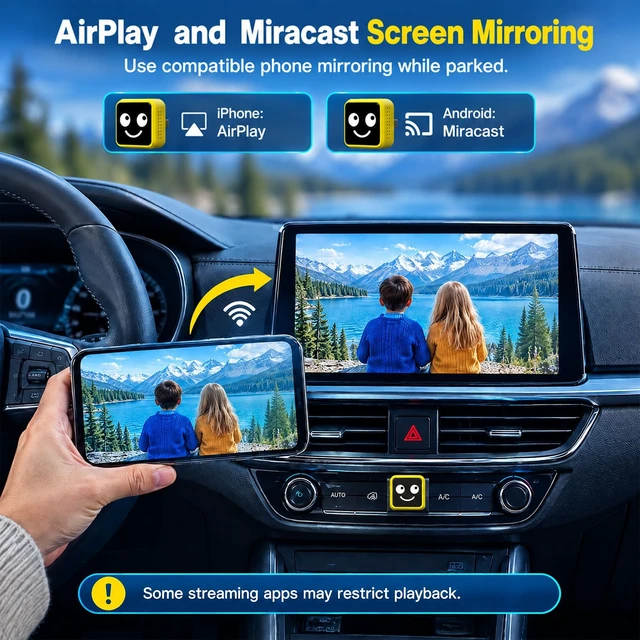
For family trips, this adds wireless phone connectivity to your baby-monitoring setup. ^^ [AirPlay & Miracast Screen Mirroring] When parked, mirror supported content from an iPhone via AirPlay or a compatible Android phone via Miracast to the original touchscreen. Availability varies by phone, app and content. DRM-protected or copyrighted streaming content may show a black screen, lose video/audio, or may not support mirroring. ^^ [Compatibility Before You Buy] Requires a touchscreen vehicle with factory wired CarPlay. Not compatible with vehicles that only support wired Android Auto or factory wireless CarPlay/Android Auto.
After baby car camera opens on the factory screen, connect an iPhone for CarPlay or a compatible Android phone for Android Auto. ^^ [How to Connect to Your Vehicle] Your vehicle must have factory wired CarPlay and a touchscreen. If it also supports Android Auto, select CarPlaynot Android Autoin your vehicles infotainment settings first. Plug RC38 into the USB Data port used for wired CarPlay. When the RC38 Home screen appears, the connection to your vehicle is complete. Vehicles with Android Auto only are not compatible. ^^ TIPSIf your iPhone is running the latest iOS 27.0, you may encounter issues with split-screen functionality during the connection process.
Simply perform an OTA (over-the-air) update for the adapter to resolve this.
The camera must remain connected to a power cable during use. ^^ [IR-CUT Clarity, Day & Night] The RC38 baby car camera automatically adjusts between daytime and night viewing with no manual switching. IR-CUT helps keep daytime colors natural, while no-glow infrared night vision lets parents check their baby on a compatible factory touchscreen after dark without turning on cabin lights. ^^ [CarPlay & Android Auto for Phones] Baby car monitor first connects through your vehicle's factory wired CarPlay port and opens the RC38 interface on the original touchscreen. Select CarPlay for an iPhone or Android Auto for a compatible Android phone, then use maps, music, calls and voice assistants while keeping access to the baby camera.
For family trips, this adds wireless phone connectivity to your baby-monitoring setup. ^^ [AirPlay & Miracast Screen Mirroring] When parked, mirror supported content from an iPhone via AirPlay or a compatible Android phone via Miracast to the original touchscreen. Availability varies by phone, app and content. DRM-protected or copyrighted streaming content may show a black screen, lose video/audio, or may not support mirroring. ^^ [Compatibility Before You Buy] Requires a touchscreen vehicle with factory wired CarPlay. Not compatible with vehicles that only support wired Android Auto or factory wireless CarPlay/Android Auto.
After baby car camera opens on the factory screen, connect an iPhone for CarPlay or a compatible Android phone for Android Auto. ^^ [How to Connect to Your Vehicle] Your vehicle must have factory wired CarPlay and a touchscreen. If it also supports Android Auto, select CarPlaynot Android Autoin your vehicles infotainment settings first. Plug RC38 into the USB Data port used for wired CarPlay. When the RC38 Home screen appears, the connection to your vehicle is complete. Vehicles with Android Auto only are not compatible. ^^ TIPSIf your iPhone is running the latest iOS 27.0, you may encounter issues with split-screen functionality during the connection process.
Simply perform an OTA (over-the-air) update for the adapter to resolve this.
Warranty & Returns
Warranty, Returns, And Additional Information
Warranty
- Please contact the Seller directly for warranty information. Warranty information may also be found on the Manufacturer's website.
- CONTACT
Return Policies
- Return for refund within: 30 days
- Return for replacement within: 30 days
- This item is covered by DuronTechnologies Return Policy
Manufacturer Contact Info
- For a directory of all our manufacturers, please click below.
- Manufacturers Directory
LOADING...