

Your Browsing History
- Free 30-day Returns
$131.99

Meet Your Seller

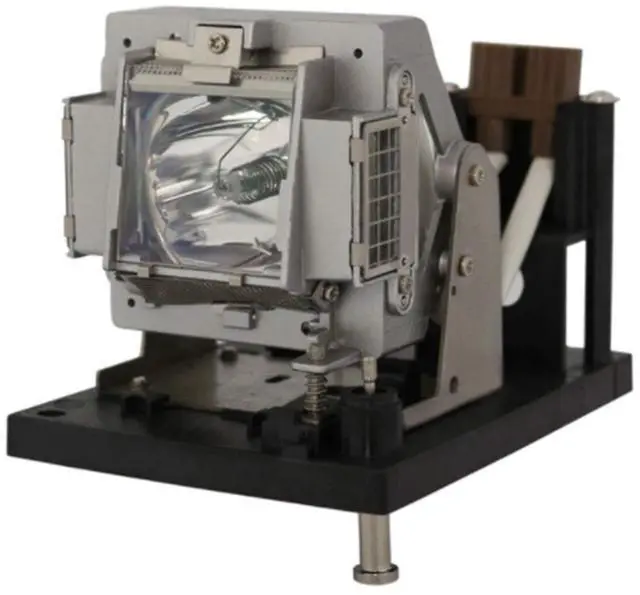

Rembam 5811100818-S/NP12LP Original Bulb Quality Projector Lamp with Housing for Vivitek D-6000 D-6500 D-6010 D-6510
- Rembam Projector Lamp Assembly with Premium Quality Genuine OEM Original Bulb Inside
- Lifetime:4500 hours life time and 180 days warr anty
- Install:is easy and quick for your installation to make sure your device is back in action
- Guar antee:Take strict test before delivery.Excellent return service and friendly customer service.Any other problems with the projector lamp,please contact us.
- Compatible projector:for Vivitek D-6000 Vivitek D-6500 Vivitek D-6010 Vivitek D-6510 BENQ PW9500 BENQ PX9600 NP4100 NP4100W NP4100-09ZL DIGITAL PROJECTION 112-204 113-311 E-Vision 6000 7000 XGA WXGA 600
+
+
Overview
Specs
Reviews

Any questions? Our AI mode will help you find out quickly.
Try me now
Rembam Information: Rembam has own factory and many experienced workers. The OEM bulb is engineered to perform to the exact specifications and requirements. Every lamp will be take strict quality test before leaving factory. So you don't need to doubt the quality.
number: 5811100818-S //
NP12LPWattage:
280WSpecification: E
20.6A pplication:
Business/Education/Home/SchoolCompatible: for Vivitek D-6000 Vivitek D-6500 Vivitek D-6010 Vivitek D-6510 PW9500 PX9600 NP4100 NP4100W NP4100-09ZL DIGITAL PROJECTION 112-204 113-311 E-Vision 6000 7000
XGA WXGA 600Package: 1 original bulb with housing1
Instructions sheetInstallation: 1. Use a screwdriver to remove the screw from the cover. 2. Push up and remove the cover. 3. Remove the lamp protection film. 4. Remove the screw that secures the lamp module. 5. Discont the lamp contor from the projector. Lift the handle so that it stands up. Pull out the lamp module by force.
Notes: 1). To reduce the risk of personal injury, do not drop the lamp module or touch the lamp bulb. The bulb may shatter and cause injury if it is dropped. 2). To avoid burns, allow the projector to cool for at least 60 minutes before replacing the lamp. 3). We provide excellent re fund service with no any contidition with 12 hours feedback. If you have any questions, please contact us. We will try our best to sole your problem as soon as possible.
Specifications
: Partnumber: 5811100818-S //
NP12LPWattage:
280WSpecification: E
20.6A pplication:
Business/Education/Home/SchoolCompatible: for Vivitek D-6000 Vivitek D-6500 Vivitek D-6010 Vivitek D-6510 PW9500 PX9600 NP4100 NP4100W NP4100-09ZL DIGITAL PROJECTION 112-204 113-311 E-Vision 6000 7000
XGA WXGA 600Package: 1 original bulb with housing1
Instructions sheetInstallation: 1. Use a screwdriver to remove the screw from the cover. 2. Push up and remove the cover. 3. Remove the lamp protection film. 4. Remove the screw that secures the lamp module. 5. Discont the lamp contor from the projector. Lift the handle so that it stands up. Pull out the lamp module by force.
Notes: 1). To reduce the risk of personal injury, do not drop the lamp module or touch the lamp bulb. The bulb may shatter and cause injury if it is dropped. 2). To avoid burns, allow the projector to cool for at least 60 minutes before replacing the lamp. 3). We provide excellent re fund service with no any contidition with 12 hours feedback. If you have any questions, please contact us. We will try our best to sole your problem as soon as possible.
Warranty & Returns
Warranty, Returns, And Additional Information
Warranty
- Please contact the Seller directly for warranty information. Warranty information may also be found on the Manufacturer's website.
- CONTACT
Return Policies
- Return for refund within: 30 days
- Return for replacement within: 30 days
- This item is covered by HyperCore Return Policy
Manufacturer Contact Info
- For a directory of all our manufacturers, please click below.
- Manufacturers Directory
LOADING...