

Your Browsing History
![AOACE Gaming PC AMD Ryzen 7 5700X [8-Core 4.6GHz], RTX 5060 8GB GDDR7, DLSS 4, VR Ready, WiFi 6E, 32GB DDR4, 1TB PCIe4 NVMe, 6 ARGB, Win11 Home](https://c1.neweggimages.com/ProductImageCompressAll60/C545S2607150J6GDT09.jpg "AOACE Gaming PC AMD Ryzen 7 5700X [8-Core 4.6GHz], RTX 5060 8GB GDDR7, DLSS 4, VR Ready, WiFi 6E, 32GB DDR4, 1TB PCIe4 NVMe, 6 ARGB, Win11 Home")
- $219.99
- Free 30-day Returns

Meet Your Seller

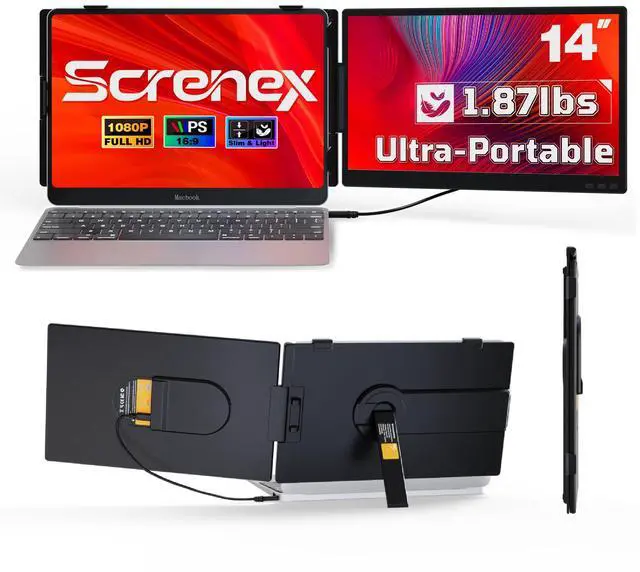


Laptop Screen Extender 0.27" Ultra-Thin, 14" FHD 1080P IPS Lightweight Dual Portable Monitor, USB-C/HDMI Plug & Play for 13-17" Laptops, Travel screen compatible with Windows/Mac/Chrome/Switch/Android
Limited time offer, ends 10/05 By Fornierwoly
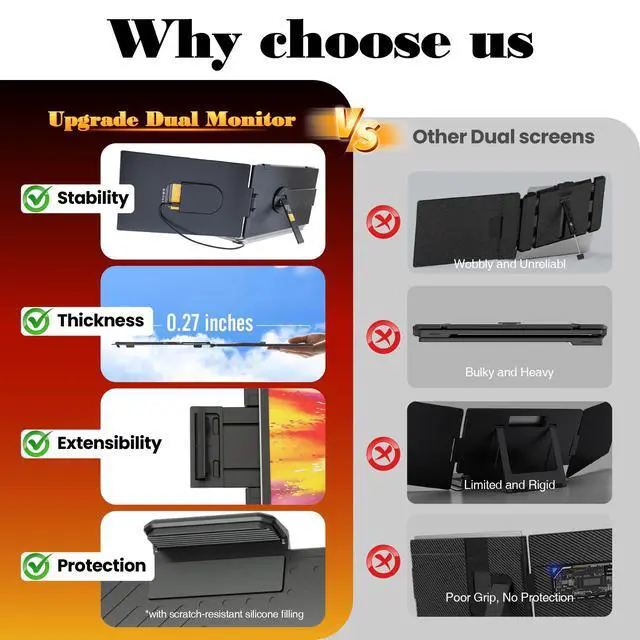
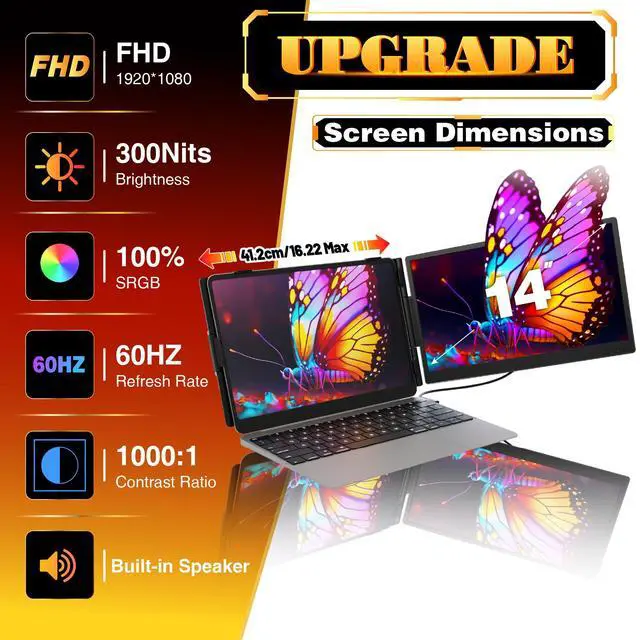
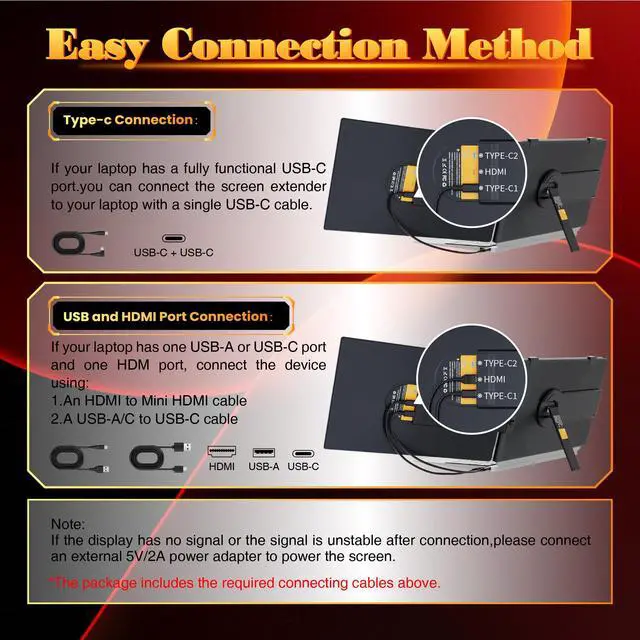
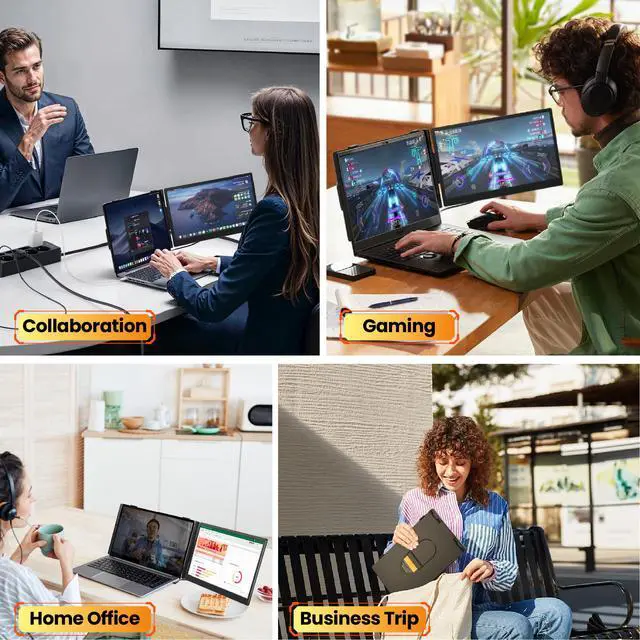
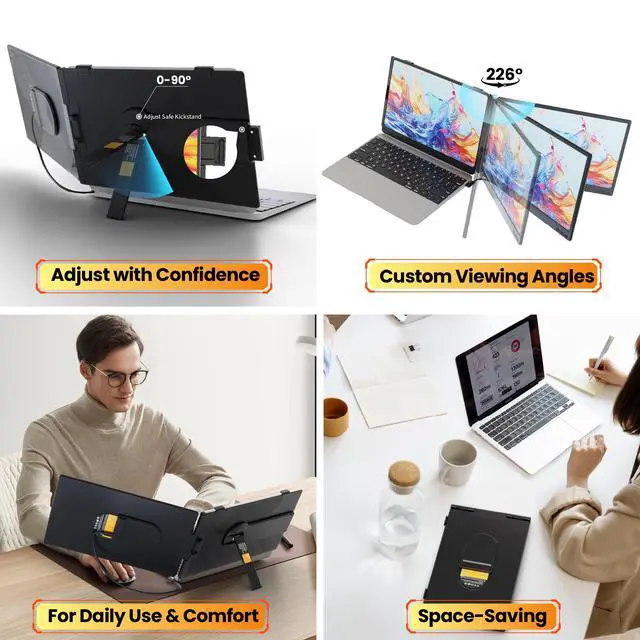
- Dual Display, Enhanced Efficiency Effortlessly transform your laptop into a dual-monitor workstation with Mirror, Extend, and Vertical modes. Utilize it as a secondary screen to edit documents, join video conferences, analyze data, or enjoy entertainment side-by-side, eliminating the need for constant tab switching. Establish a stable, productive workspace in seconds, even while on the move. A perfect companion for remote professionals, programmers, students, and gamers. One-Cable Connection, Broad Compatibility No additional drivers are required for genuine plug-and-play functionality. A single full-function Type-C cable carries video, audio, and power. For other devices, utilize the provided HDMI and USB-A cables. This versatile laptop screen extender operates smoothly with laptops, desktops, PS4, and Switch as a secondary display, and is compatible with Windows, MacOS, and Android systems. It includes all essential accessories for straightforward use. Ultra-Slim & Portable, Use It Everywhere Crafted for mobility, this portable screen extender weighs just 1.87lb and is only 0.27 thinlighter than most laptops and as slender as a tablet. It glides easily into your bag. Convert any café, airport, or hotel into a dual-screen productivity hub. 226° Rotation, Eye-Friendly Viewing Boasts a high-performance FHD IPS display (1920x1080) with a 60Hz refresh rate and 300nit brightness for vivid, crisp visuals. The 226° wide viewing angle is ideal for content sharing. A matte anti-gla
+
+
Overview
Specs
Reviews

Any questions? Our AI mode will help you find out quickly.
Try me now
Dual Display, Enhanced Efficiency Effortlessly transform your laptop into a dual-monitor workstation with Mirror, Extend, and Vertical modes. Utilize it as a secondary screen to edit documents, join video conferences, analyze data, or enjoy entertainment side-by-side, eliminating the need for constant tab switching. Establish a stable, productive workspace in seconds, even while on the move. A perfect companion for remote professionals, programmers, students, and gamers. One-Cable Connection, Broad Compatibility No additional drivers are required for genuine plug-and-play functionality. A single full-function Type-C cable carries video, audio, and power. For other devices, utilize the provided HDMI and USB-A cables. This versatile laptop screen extender operates smoothly with laptops, desktops, PS4, and Switch as a secondary display, and is compatible with Windows, MacOS, and Android systems. It includes all essential accessories for straightforward use. Ultra-Slim & Portable, Use It Everywhere Crafted for mobility, this portable screen extender weighs just 1.87lb and is only 0.27 thinlighter than most laptops and as slender as a tablet. It glides easily into your bag. Convert any café, airport, or hotel into a dual-screen productivity hub. 226° Rotation, Eye-Friendly Viewing Boasts a high-performance FHD IPS display (1920x1080) with a 60Hz refresh rate and 300nit brightness for vivid, crisp visuals. The 226° wide viewing angle is ideal for content sharing. A matte anti-glare coating and separate brightness controls aid in minimizing eye fatigue during extended use. Protective and Secure Design The adjustable telescopic stand provides a stable, tailored fit for 13-17.3 inch laptops, holding it securely during operation. Soft protective padding shields your laptops edges from scratches. Full Accessory Set All items required for immediate dual-screen setup are included: one screen monitor, one full-function Type-C cable, one USB-A to USB-C cable, one HDMI to Mini HDMI cable, and one quick guide. No further purchases are necessary
Warranty & Returns
Warranty, Returns, And Additional Information
Warranty
- Please contact the Seller directly for warranty information. Warranty information may also be found on the Manufacturer's website.
- CONTACT
Return Policies
- Return for refund within: 30 days
- Return for replacement within: 30 days
- This item is covered by Fornierwoly Return Policy
Manufacturer Contact Info
- For a directory of all our manufacturers, please click below.
- Manufacturers Directory
LOADING...