here!
I’m your shopping assistant for PC builds, upgrades, and everything tech.
Got questions? Ask away!
Start a conversation
here!
I’m your shopping assistant for PC builds, upgrades, and everything tech.
Got questions? Ask away!
Start a conversation


Any questions? Ask CelesteSM will help you find out quickly.


16 GB DDR5-6000
With its higher bandwidth, everything from multi-tasking to playing games gets a performance boost.

1 T NVMe M.2 Solid State Drive
Performance is Up to 10 x faster than traditional hard drives.

From a rejuvenated Start menu, to new ways to connect to your favorite people, news, games and content-Windows 11 is the place to think express, and create in a natural way

With 6 cores and 12 threads, ryzen 5 9600X comes with a higher 3.6-5.4 GHz base frequency. Processors without hyper-threading tend to perform better in some lightly-threaded workloads, so the lack of threading could help the AMD Ryzen 5 9600X in some tasks, like gaming. That's why Ryzen 5 9600X offers better overall performance in both gaming and productivity apps.

80 Plus Bronze Certified: High effcieincy operation for less excess heat and lower operating costs. Compatibility supports ATX12V 2.4/2.3/2.2/2.01 and EPS12V 2.92 standards. Thermally controlled fan: Silent operation at low and medium loads. Fan size is 4.72 inch Semi-Modular: Make your builds and upgrades easy, with clean, great-looking result.

Before shipped, each MXZ PC goes through stress testing. Every detail of MXZ PC system is carefully scrutinized and perfected through our QA testing. During testing, your system undergoes a lengthy, a rigorous quality control inspection, full optimization of the operating system, numerous benchmarks, and more to ensure the PC system operates at peak efficiency right out of the box.


RX 9070 XT Graphics Card
Stream Processors: The RX 9070XT more stream processors mean stronger parallel computing capabilities, which can significantly improve performance in tasks such as 3D game rendering and video encoding.
Ray Tracing: AMD has been continuously improving its ray - tracing technology. This would enable it to achieve more realistic ray - tracing effects, such as accurate reflections, refractions, and shadows in games.
AI - related Performance: With the development of AI in graphics processing, the RX 9070XT may also integrate more powerful AI - acceleration features. It could use machine - learning - based algorithms to optimize graphics rendering, such as upscaling low - resolution images to high - resolution ones with better quality, similar to NVIDIA's DLSS technology. This would enhance the overall gaming experience and also improve performance in professional applications that use AI - assisted graphics processing.

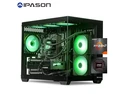
The MXZ High Performance Gaming PC is a ready-to-use gaming desktop with an AMD Ryzen 5 9600X processor, Radeon RX 9070 XT graphics, 16GB DDR5-6000 memory, and a 1TB NVMe SSD. It is suitable for gamers who want strong performance for modern games, esports titles, and everyday Windows 11 Pro use.
| Attribute | Value |
|---|---|
| Best For | Gaming desktop users who need a Ryzen 5 processor, Radeon RX 9070 XT graphics, 16GB DDR5 memory, and 1TB SSD storage for PC gaming and everyday performance |
| Processor And Core Count | AMD Ryzen 5 9600X processor from the Ryzen 5 9000 Series |
| GPU And VRAM | AMD Radeon RX 9070 XT graphics |
| Memory Configuration | 16GB of DDR5 memory |
| Storage And Expansion | 1TB SSD storage with no additional HDD |
| Operating System | Windows 11 Pro |
| Display Configuration | Desktop-only configuration with no included screen |
| Model Identifiers | MXZ; catalog model listed as R5 9600X RTX 4070 |
Q: Is this Ryzen 5 9600X and RX 9070 XT gaming PC better than an RTX 5070 Ti desktop?
A: Choose this PC when your priority is 1440p or 4K gaming with strong rasterized performance and 16GB of graphics memory. Review testing generally places the RX 9070 XT close to the RTX 5070 Ti in standard gaming, while the RTX 5070 Ti can be preferable for Nvidia-specific features such as DLSS, CUDA applications, and some demanding ray-tracing or path-tracing workloads. The decision depends mainly on the total system price and whether those Nvidia features matter to you.
Q: Should I buy this RX 9070 XT PC or a cheaper RX 9070 gaming PC?
A: Choose this RX 9070 XT configuration when you want higher 1440p and 4K frame rates and plan to keep the system for demanding newer games. In a 52-game comparison, the RX 9070 XT averaged about 9% faster at 1440p and 14% faster at 4K than the RX 9070. Choose the RX 9070 system when its lower price is more important and you are comfortable reducing some graphics settings or using upscaling.
Q: Is this 16GB gaming PC enough, or should I get the same system with 32GB of RAM?
A: The 16GB configuration is suitable for straightforward gaming, esports titles, and everyday use, but a 32GB version is the more flexible choice for modern AAA games, streaming, browser tabs, Discord, and multitasking. The RX 9070 XT provides the primary gaming performance, so upgrading system memory will not create the same frame-rate increase as changing the GPU; however, 32GB can reduce memory pressure and improve consistency in memory-heavy games and workloads. Confirm whether the PC uses one 16GB module or a dual-channel 2x8GB kit before buying.
Q: Should I choose this Ryzen 5 9600X PC or pay more for an RX 9070 XT system with a Ryzen 7 9800X3D?
A: Choose this Ryzen 5 9600X model when the system is primarily for 1440p or 4K gaming and the higher-tier CPU would substantially increase the price. The Ryzen 7 9800X3D is the stronger choice for CPU-limited gaming, very high refresh-rate 1080p play, simulation games, competitive esports, and heavier multitasking. With an RX 9070 XT at higher resolutions, the GPU often limits performance first, so the 9800X3D upgrade usually provides more value when you specifically need higher minimum frame rates or plan to use a 240Hz-class display.
Q: Is this gaming PC suitable for modern gaming at 1440p or 4K?
A: Yes. The Ryzen 5 9600X, Radeon RX 9070 XT, and 16GB of DDR5 memory make this configuration suitable for modern PC gaming, including high-resolution gaming. Actual frame rates will vary by game, resolution, graphics settings, and features such as ray tracing. The listing does not provide guaranteed FPS results, so buyers should not assume a specific frame rate for every title. ([bestbuy.com](https://www.bestbuy.com/site/questions/hp-omen-40l-gaming-desktop-intel-core-i5-12400f-hyperx-16gb-memory-nvidia-geforce-rtx-3060-1tb-ssd-nightfall-black/6504335?page=7&utm_source=openai))
Q: Does this PC have Wi-Fi, or do I need an Ethernet cable?
A: The product information states that Wi-Fi is included, so a wireless connection should be supported. The listing does not specify the Wi-Fi standard, Bluetooth support, or whether external antennas are included. Ethernet remains an option and may provide a more consistent connection for online gaming. ([bestbuy.com](https://www.bestbuy.com/site/questions/msi-codex-r-gaming-desktop-intel-core-i5-12400f-16gb-memory-nvidia-geforce-rtx-4060-1tb-ssd-black/6559039?utm_source=openai))
Q: Can the RAM, SSD, graphics card, or other parts be upgraded later?
A: The B650 motherboard and desktop form factor provide a reasonable upgrade path, but the listing does not identify the exact motherboard model, number of RAM slots, available M.2 slots, case clearance, or power-supply connectors. RAM and storage upgrades should be confirmed before purchase; graphics-card upgrades must also fit the case and remain compatible with the 800W power supply. ([bestbuy.com](https://www.bestbuy.com/site/questions/msi-codex-r-gaming-desktop-intel-core-i5-12400f-16gb-memory-nvidia-geforce-rtx-4060-1tb-ssd-black/6559039?utm_source=openai))
Q: Does this gaming PC come with a monitor, keyboard, or mouse?
A: It does not include a monitor because the product is listed as a desktop tower with no screen. The provided specifications do not confirm that a keyboard or mouse is included, so buyers should plan to provide those peripherals unless the seller explicitly lists them as bundled accessories. ([bestbuy.com](https://www.bestbuy.com/site/questions/clx-set-gaming-desktop-amd-ryzen-7-5700x-16gb-ddr4-3600-memory-geforce-rtx-4060-1tb-nvme-m-2-ssd-2tb-hdd-black/6560148/question/42e8d25b-6fe8-3b66-834c-c7cac4f5b976?utm_source=openai))
Q: Is 16GB of RAM and 1TB of storage enough for gaming and everyday use?
A: For typical gaming, schoolwork, office tasks, web browsing, and media use, 16GB of DDR5 RAM and a 1TB NVMe SSD are practical starting capacities. The main trade-off is limited headroom for demanding multitasking, content creation, large game libraries, or running multiple virtual machines. Additional storage or a RAM upgrade may eventually be useful. ([bestbuy.com](https://www.bestbuy.com/site/questions/ibuypower-scale-gaming-desktop-pc-amd-ryzen-5-8400f-nvidia-geforce-rtx-4060-8gb-16gb-ddr5-rgb-ram-1tb-nvme-ssd-black/6594147?utm_source=openai))
Q: Is this PC suitable for 1440p gaming?
A: Yes. The Ryzen 5 9600X and Radeon RX 9070 XT combination is commonly discussed as a strong 1440p gaming setup, including high or ultra settings. Actual performance will vary by game, ray tracing use, and upscaling settings.
Q: Is this prebuilt worth buying?
A: It may be worth buying if its price is competitive and the seller confirms the exact component models. The CPU and GPU are considered a strong gaming combination, but the value depends heavily on the quality of the unspecified motherboard, SSD, power supply, cooling, and case.
Q: Is 16GB of RAM enough for this gaming PC?
A: 16GB can be sufficient for current gaming, especially when the RX 9070 XT has ample graphics memory, but 32GB is a better choice for multitasking, newer AAA games, streaming, and longer-term use. Check whether the system uses one 16GB module or two 8GB modules before planning an upgrade.
Q: What should I verify before buying this PC?
A: Confirm the exact brands and models of the B650 motherboard, SSD, RAM configuration, power supply, CPU cooler, and RX 9070 XT. Also verify the listing details, because the specifications identify an RX 9070 XT while the model field references an RTX 4070. These details affect reliability, upgradeability, noise, and value.