here!
I’m your shopping assistant for PC builds, upgrades, and everything tech.
Got questions? Ask away!
Start a conversation
here!
I’m your shopping assistant for PC builds, upgrades, and everything tech.
Got questions? Ask away!
Start a conversation


Any questions? Ask CelesteSM will help you find out quickly.


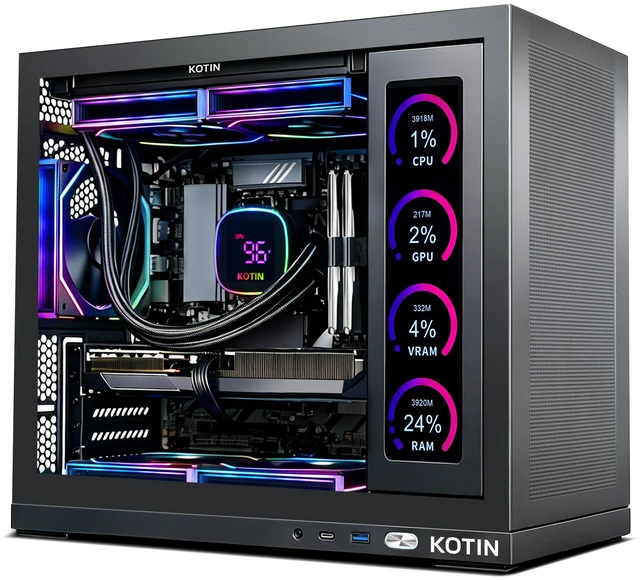
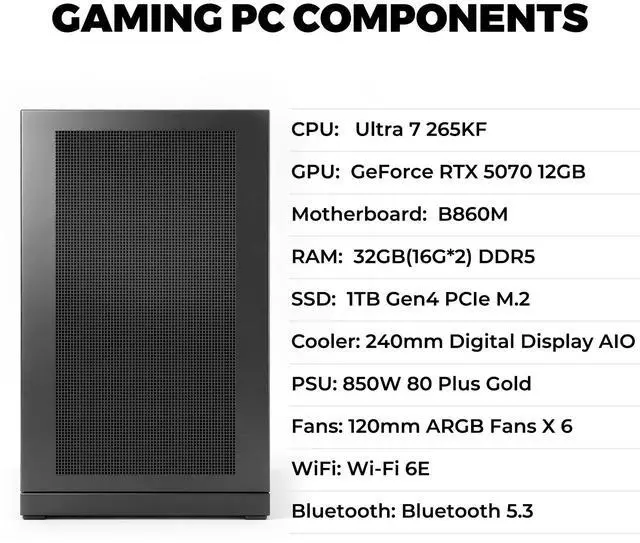
The KOTIN Gaming PC is a prebuilt Windows 11 desktop with an Intel Core Ultra 7 265KF, GeForce RTX 5070 12GB, 32GB DDR5, and 1TB PCIe 4.0 SSD, making it a strong fit for gamers who want high-FPS esports, 1440p play, ray tracing, and entry into 4K gaming in a ready-to-use setup.
| Attribute | Value |
|---|---|
| Best For | Prebuilt gaming desktop suited for 1440p and 4K gaming, high‑FPS esports, streaming, and content creation powered by an Intel Core Ultra 7 265KF (20 cores), NVIDIA GeForce RTX 5070 with 12 GB VRAM, 32 GB DDR5 memory, and a 1 TB NVMe SSD |
| Processor And Core Count | Intel Core Ultra 7 265KF — 20‑core processor, base 3.3 GHz and turbo up to 5.5 GHz, 36 MB L2 cache and 30 MB L3 cache, socket 1851 |
| GPU And VRAM | NVIDIA GeForce RTX 5070 (Blackwell architecture) with 12 GB GDDR7 VRAM; virtual‑reality ready and no SLI/Crossfire support |
| Memory Configuration | 32 GB total (16 GB x 2) DDR5 at 6000 MHz, 4 DIMM slots total with 2 available |
| Storage And Expansion | 1 TB NVMe SSD; no optical drive |
| Wired And Wireless Networking | 2.5 Gbps wired LAN and Wi‑Fi 6E wireless |
| Form Factor And Dimensions | Tower desktop form factor; chassis dimensions 20.6 x 19.6 x 13.1 inches |
| Operating System And Software | Windows 11 Home preinstalled |
| Power Supply | 850W internal power supply |
| Model Identifiers | Model KTG50BU765KF3250712G |
Q: Is this KOTIN RTX 5070 desktop a better choice than an RTX 4070 prebuilt for 1440p gaming?
A: Yes, this KOTIN configuration is the better fit if your goal is newer-generation 1440p gaming with stronger ray tracing features and access to DLSS 4 on the RTX 5070. NVIDIA positions the RTX 5070 as a Blackwell card with 12GB of GDDR7 memory, and review coverage plus community benchmark discussions commonly show it landing above the RTX 4070 in real game performance. An RTX 4070 prebuilt can still make sense if it is meaningfully cheaper, but this KOTIN system is the more forward-looking choice for higher settings, newer upscaling features, and a longer upgrade runway at 1440p.
Q: Should I choose this RTX 5070 desktop or spend more on an RTX 5070 Ti prebuilt?
A: Choose this KOTIN desktop if you mainly play at 1440p and want a balanced prebuilt without moving into a higher price tier. Move up to an RTX 5070 Ti prebuilt if you expect more 4K gaming, heavier ray tracing, or want extra GPU headroom for future games. NVIDIA officially places the RTX 5070 Ti above the RTX 5070 in the same product family, and review coverage consistently treats the Ti model as the stronger option for higher-resolution workloads. The trade-off is value: this KOTIN build is the more practical choice when 1440p performance is the priority and total system cost matters.
Q: Is this Core Ultra 7 265KF and RTX 5070 system worth getting over a lower-tier Core Ultra 5 or RTX 5060-class gaming PC?
A: Yes, this KOTIN system is the better choice if you want a gaming PC that is comfortable beyond entry-level 1080p use. The larger gain comes from the RTX 5070, which is better aligned with high-refresh 1440p and lighter 4K use than lower-tier graphics options. On the CPU side, Intel positions the Core Ultra 7 265KF above Core Ultra 5 desktop parts with more total cores, which helps if you game while streaming, multitask heavily, or keep many background apps open. A lower-tier system is still reasonable for budget-focused 1080p gaming, but this KOTIN build is the more suitable pick for users who want stronger GPU longevity and fewer near-term compromises.
Q: Is this RTX 5070 prebuilt a meaningful upgrade over an older RTX 3070 or RTX 4070-class desktop?
A: It is a clearer upgrade from an RTX 3070-class system than from an RTX 4070-class system. NVIDIA's architecture materials show the RTX 5070 moving to Blackwell with newer RT, Tensor, and memory technology, so users coming from RTX 3070-era desktops gain more than just frame rate: they also get newer feature support and a more current platform fit for modern upscaling and frame-generation workflows. Against an RTX 4070 desktop, the jump is more incremental, so the upgrade case is stronger if you specifically want DLSS 4-era features, improved ray-tracing behavior, or are replacing an older full system rather than just a GPU.
Q: Should I buy this desktop or a gaming laptop if I need portability?
A: Buy this KOTIN desktop if performance, cooling, and easier future upgrades matter more than mobility. Choose a gaming laptop instead if you need one system that can travel, even though mobile GPUs usually run at lower power than their desktop-name counterparts. Coverage of RTX 5070 laptops and general desktop-versus-laptop testing consistently frames the trade-off this way: desktops give more sustained performance and upgrade flexibility, while laptops prioritize convenience and space savings. This KOTIN system is the better fit for a stationary gaming setup; a laptop is the better fit for campus, travel, or shared-space use.
Q: Is this a good prebuilt for 1440p gaming, and can it handle some 4K gaming?
A: Yes. Based on its Core Ultra 7 265KF, RTX 5070 12GB, and 32GB DDR5 memory, this system is well suited to high-refresh 1440p gaming and can also handle 4K in many games with settings trade-offs. It is a stronger fit for buyers who prioritize gaming, ray tracing, VR readiness, and streaming than for buyers who need a compact or budget-focused desktop.
Q: Can the RAM or SSD be upgraded later?
A: Probably yes, and this is an important buyer question for prebuilts. The provided specs list 4 memory slots with 2 in use, which suggests memory expansion headroom. The 1TB NVMe SSD should also be replaceable, and similar RTX 5070 prebuilts on major retail sites commonly allow SSD and RAM upgrades after purchase. Buyers should still confirm the exact motherboard layout, free M.2 slots, and warranty terms before ordering.
Q: Who is this desktop most suitable for?
A: This desktop is best for gamers who want a ready-to-use tower for 1440p play, ray tracing, streaming, VR, and general multitasking without building a PC themselves. It also fits buyers who value extras like Wi-Fi 6E, 2.5Gb LAN, a Gold-rated 850W PSU, liquid cooling, and on-case status displays. It is less suitable for users who need a small, portable, office-first, or low-power system.
Q: What are the trade-offs versus a similar prebuilt from Acer or iBUYPOWER?
A: The main trade-off is feature mix rather than basic gaming capability. Compared with similar RTX 5070 prebuilts from Acer and iBUYPOWER, this KOTIN model stands out on paper for its 850W 80+ Gold PSU, Wi-Fi 6E, liquid cooling, and built-in 11.3-inch monitoring display. The trade-off is that newer or smaller brands may have less predictable part-brand visibility, fewer user-reported answers, and less retail Q&A history than major prebuilt brands.
Q: Is this a good choice for office work, meetings, or travel-style use?
A: It is good for office work and meetings in the sense that it has more than enough CPU, memory, storage, networking, and Windows support for productivity tasks. However, it is not a travel device. This is a full-size gaming desktop, so buyers choosing mainly for portability, battery use, or note-taking should look at a laptop instead. Its value is in stationary performance, not mobility.
Q: Is this KOTIN PC a good fit for 1440p gaming?
A: Yes for most buyers focused on 1440p. The RTX 5070 12GB is commonly discussed as a strong 1440p card, and this system pairs it with 32GB DDR5 and a Core Ultra 7 265KF, which is suitable for high-FPS esports, modern AAA gaming, and streaming. The main caveat is that some buyers may still prefer a higher-tier GPU if they want more long-term headroom.
Q: Is this PC a good choice for 4K gaming?
A: It can handle 4K, but it is better viewed as a 1440p-first system than a no-compromise 4K system. Community discussion around the RTX 5070 repeatedly points to 12GB VRAM as a practical limitation at 4K in heavier games, especially with max settings, ray tracing, or future titles. Buyers who mainly want smooth 4K with fewer compromises may prefer a higher-tier GPU.
Q: Who is this PC most suitable for?
A: This PC is best suited for buyers who want a ready-to-use prebuilt for 1440p gaming, esports, streaming, and general productivity without needing immediate upgrades. The 32GB DDR5 memory, 1TB NVMe SSD, Wi-Fi 6E, and 850W Gold PSU make it a balanced option for gaming plus everyday work. It is less ideal for buyers who specifically want the strongest possible 4K longevity from the GPU.
Q: What are the main trade-offs of buying this prebuilt instead of stepping up to a higher-end GPU system?
A: The main trade-off is GPU headroom. This KOTIN build looks well-rounded on memory, storage, networking, and power delivery, but the RTX 5070 12GB is the part most likely to limit ultra-settings 4K gaming over time. Buyers choosing this class of system are typically prioritizing strong 1440p performance and lower cost over maximum 4K margin.
Q: Is this worth buying if I want a prebuilt and do not want to build my own PC?
A: Yes if your target is a modern, ready-to-run 1440p gaming desktop and you value convenience. The included 32GB RAM, 1TB SSD, Windows 11, liquid cooling, Wi-Fi 6E, and 850W Gold PSU cover the core features buyers usually want in a current prebuilt. It is a weaker fit for buyers comparing strictly on maximum GPU value or targeting high-end 4K first.