Meet Your Seller
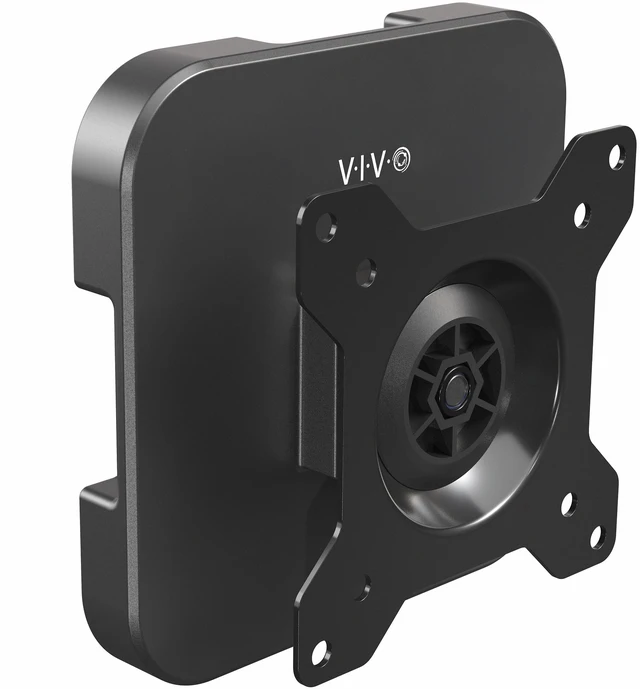
VIVO Magnetic 13 to 34 inch Computer Monitor Mount for Steel Surfaces
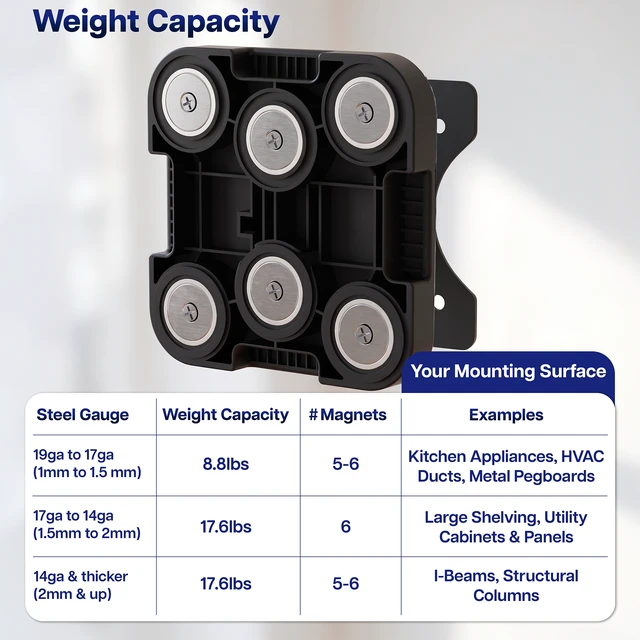
- Magnetic Monitor Mount: Elevate your monitor to a comfortable viewing height without having to drill into the wall! Attach this mount to steel surfaces at least 1mm thick for convenient placement. Holds up to 17.6 lbs on surfaces thicker than 1.5mm
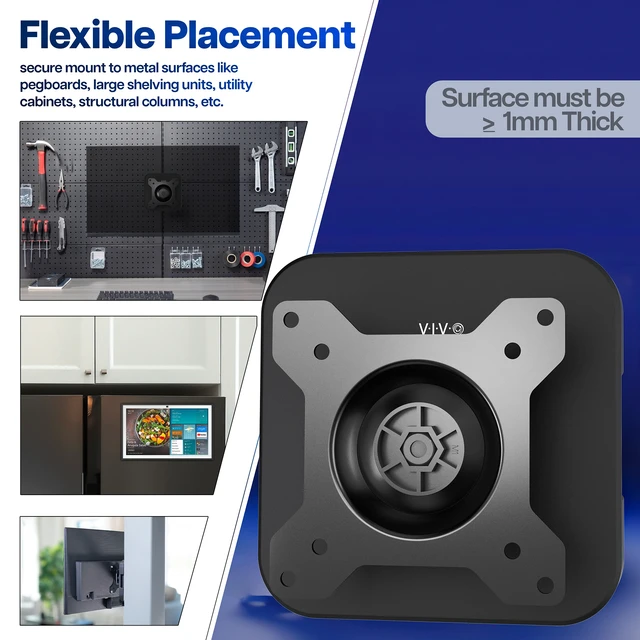
- Flexible Placement: Secure this mount to metal pegboards, large shelving units, utility cabinets, and more! Please ensure that the surface is at least 1mm thick (the thicker the mounting surface, the higher the weight capacity)
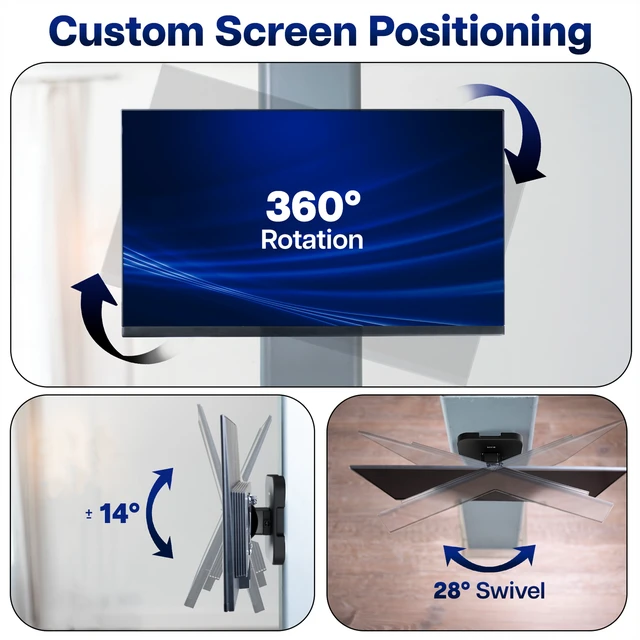
- Articulation: Experience comfortable viewing angles and reduce screen glare with +14° to -14° tilt, 28° swivel, and 360° rotation. Screen can be placed in portrait or landscape orientation
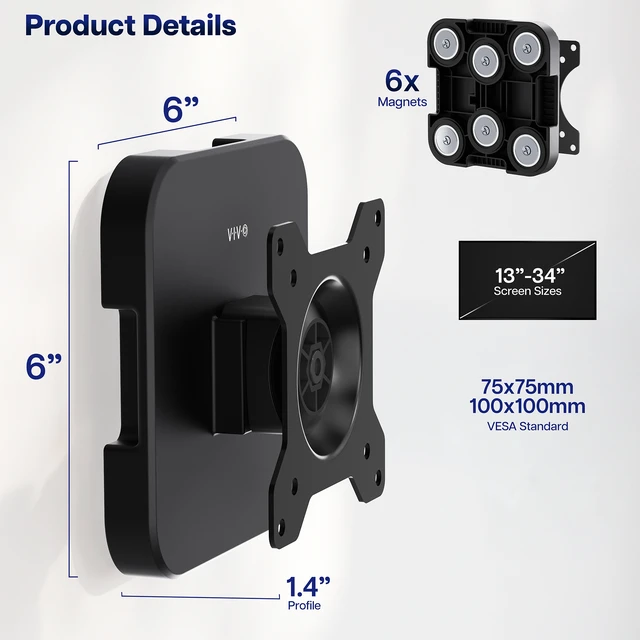
- Strong Magnets: 6 magnets are provided to increase or decrease the magnetic pull, letting you find just the right level of intensity for your setup
- Detachable VESA Plate: Mounting your monitor is easy with a detachable VESA plate supporting 75x75mm and 100x100mm VESA hole patterns
Any questions? Ask CelesteSM will help you find out quickly.
Mounting your monitor just got easier with the Magnetic Monitor Mount (MOUNT-MAG01) from VIVO! Featuring strong magnets, this product attaches to steel surfaces 1mm thick and greater for convenient monitor placement. No need to drill holes in the wall or take up space on your desktop. Now you can attach your VESA-compatible screen to metal pegboards, utility cabinets, structural columns, and more!
Compatibility
- Screen Sizes: 13 to 34
- VESA Standard: 75x75mm and 100x100mm
- Weight Capacity by Material Thickness (Steel Gauge): 1mm to 1.5mm: 8.8 lbs (Kitchen Appliances, HVAC Ducts, Metal Pegboards)1.5mm to 2mm: 17.6 lbs (Large Shelving, Utility Cabinets & Panels)2mm & up: 17.6 lbs (I-Beams, Structural Columns)
- Please Note: Weight capacity of the mount is affected by thickness, coating, texture, etc. of the intended mounting surface. Please use caution during first use until you have determined that a strong hold has been achieved.
Specifications
- Color: Black
- Material: Steel, Plastic
- Magnetic Wall Mount Dimensions: 6 x 6
- Included Magnets: 6
- Articulation: +14° to -14° tilt, 28° swivel, 360° rotation
- Profile: 1.4 (distance from magnetic surface)
- Screen Orientation: Portrait or Landscape
Warranty & Returns
Warranty, Returns, And Additional Information
Warranty
- Please contact the Seller directly for warranty information. Warranty information may also be found on the Manufacturer's website.
- CONTACT
Return Policies
- Return for refund within: 30 days
- Return for replacement within: 30 days
- This item is covered by VIVO Return Policy
Manufacturer Contact Info
- For a directory of all our manufacturers, please click below.
- Manufacturers Directory
The VIVO Magnetic Monitor Mount attaches a 13–34-inch VESA-compatible monitor to steel surfaces without drilling, making it suitable for users who want flexible placement on a pegboard, shelf, or utility cabinet; the surface must be at least 1 mm thick.
Recommended For
- People setting up a monitor on a smooth, sufficiently thick steel utility cabinet or equipment panel who want to avoid drilling holes or using desk space.
- Workshop or industrial users mounting a VESA-compatible monitor to a smooth steel pegboard, shelving unit, or structural surface, after checking that the surface and monitor meet the mount’s requirements.
- Users who need to choose between portrait and landscape monitor orientation and make modest tilt or swivel adjustments on a steel mounting surface.
- Space-constrained setups where a monitor needs to sit on a steel surface rather than occupy a desk or require a drilled wall mount.
Real-World Use Scenarios
- In a workshop with a compatible steel pegboard, attach the monitor without drilling into the wall and keep the work surface available for tools.
- At a utility cabinet or steel equipment panel, position a VESA-compatible monitor nearby for reference information while keeping the cabinet surface usable.
- In a compact workspace with a suitable steel shelf or surface, move the monitor off the desk to leave more room for a keyboard, paperwork, or other equipment.
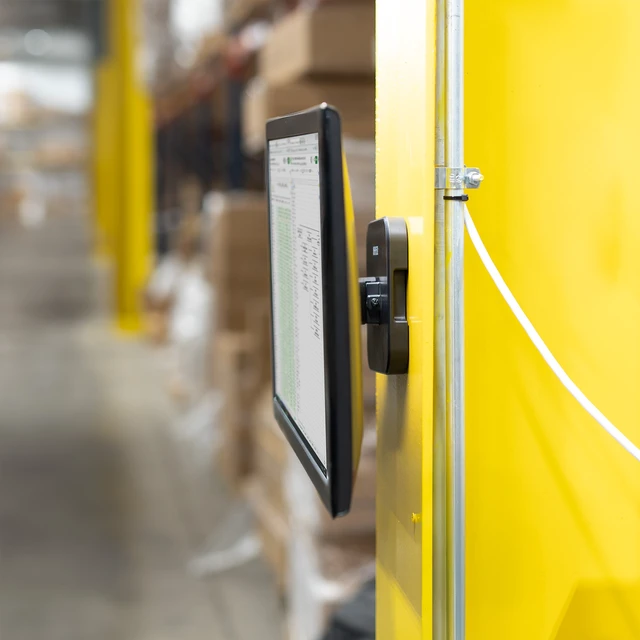
- When a monitor needs to sit beside a steel structural column, attach it there instead of adding a separate desk stand, then swivel or tilt the screen toward the viewing position.
- For a screen used to read long documents or code, rotate it to portrait orientation; switch back to landscape for video or general desktop work.
Spec Summary
| Attribute | Value |
|---|---|
| Best For | Monitor users seeking an articulating magnetic mount for placement on steel surfaces |
| Mount Compatibility And Capacity | For monitors up to 17.6 lb; listed as a wall mount |
| Movement And Adjustment | Articulating mount with up to 14° of tilt |
| Construction And Dimensions | Steel and plastic enclosure in black; 1.4-inch extension, with listed item dimensions of 6 × 1.4 × 6 inches |
| Model Identifiers | VIVO MOUNT-MAG01 |
Reference Q&A
Q: VIVO magnetic monitor mount vs. VIVO STAND-V001: which is better for a desk-free setup?
A: Choose the VIVO MOUNT-MAG01 when you want to attach a 13–34-inch VESA monitor to a steel surface without drilling or using desk space. Choose the VIVO STAND-V001 for a desk-mounted setup with a clamp or grommet, height adjustment along its pole, and support for monitors up to 22 lb.
Q: VIVO magnetic monitor mount vs. VIVO MOUNT-VW01A: which one is easier to position?
A: Choose the MOUNT-MAG01 for tool-free attachment to a suitable steel surface and monitor positioning with tilt, swivel, and rotation. Choose the MOUNT-VW01A for a wall-mounted setup with 6.3 inches of tool-less height adjustment after installation.
Q: Should I choose the VIVO magnetic monitor mount or the VIVO STAND-V002C for a monitor-and-laptop setup?
A: Choose the MOUNT-MAG01 to place one VESA monitor on a steel surface without a desk clamp. Choose the STAND-V002C to mount a monitor and hold a laptop on a desk; it supports screens up to 32 inches and laptops up to 17 inches.
Q: Will this mount fit my monitor?
A: It supports 13–34-inch monitors with 75 × 75 mm or 100 × 100 mm VESA mounting holes. Check your monitor’s VESA pattern and weight, and confirm the steel surface can support the combined setup.
Q: How much weight can it hold?
A: The capacity depends on the steel surface thickness: up to 8.8 lb on steel 1–1.5 mm thick, and up to 17.6 lb on steel thicker than 1.5 mm. Surface coating and texture can also affect the magnetic hold, so verify stability carefully before use.
Q: What surfaces can I attach it to?
A: It attaches magnetically to steel surfaces at least 1 mm thick, such as suitable metal pegboards, shelving, or utility cabinets. It is not intended for non-steel surfaces, and the surface must be strong enough for the monitor’s weight.
![AOACE Gaming PC AMD Ryzen 7 5700X [8-Core 4.6GHz], RTX 5060 8GB GDDR7, DLSS 4, VR Ready, WiFi 6E, 32GB DDR4, 1TB PCIe4 NVMe, 6 ARGB, Win11 Home AOACE Gaming PC AMD Ryzen 7 5700X [8-Core 4.6GHz], RTX 5060 8GB GDDR7, DLSS 4, VR Ready, WiFi 6E, 32GB DDR4, 1TB PCIe4 NVMe, 6 ARGB, Win11 Home](https://c1.neweggimages.com/ProductImageCompressAll60/C545S2607150J6GDT09.jpg)