




 here!
I’m your shopping assistant for PC builds, upgrades, and everything tech.
Got questions? Ask away!
Start a conversation
here!
I’m your shopping assistant for PC builds, upgrades, and everything tech.
Got questions? Ask away!
Start a conversation
Make informed decisions with expert advice. Learn More



Any questions? Ask CelesteSM will help you find out quickly.
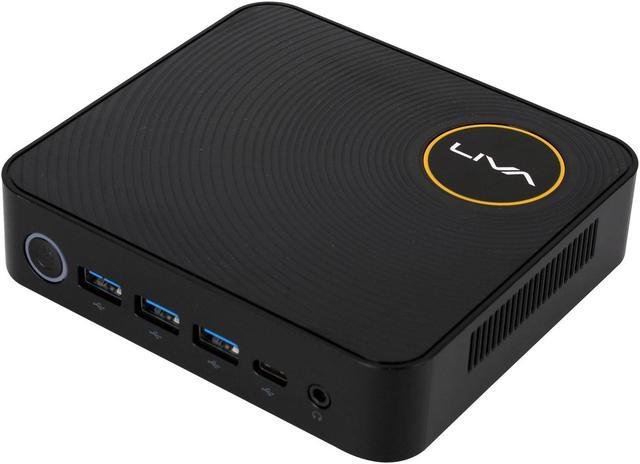
The ECS Elitegroup LIVA Z Plus is a compact Windows 10 Pro mini PC with a 7th Gen dual-core Intel Core i5-7200U, 64GB of DDR4 memory and a 128GB PCIe SSD, suited to everyday office work, web browsing and users who want a small desktop with ample RAM.
| Attribute | Value |
|---|---|
| Best For | Compact desktop computing with Windows 10 Pro, dual-core Intel Core i5 processing, and 64GB of memory |
| Processor And Core Count | 7th-generation Intel Core i5, 2.70GHz, dual-core |
| Cache | 3MB L3 Smart Cache |
| Graphics | Integrated Intel HD Graphics 620 |
| Memory | 64GB DDR4 |
| Storage And Expansion | No HDD, optical drive, or card reader |
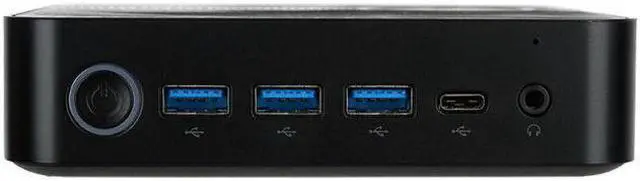
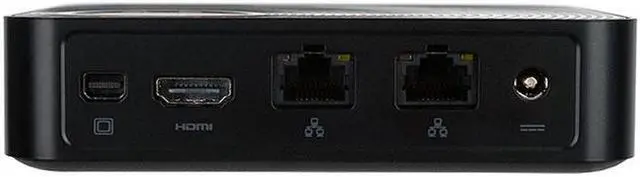
| Networking | 802.11ac Wi-Fi, Bluetooth 4.0, and RJ-45 Ethernet |
| Audio And Peripherals | Rear combo audio port; keyboard not included |
| Display And Included Equipment | No built-in screen; monitor not included |
| Power | 65W power supply |
| Form Factor And Color | Mini PC, black |
| Model Identifiers | ECS Elitegroup LIVA Z Plus |
Q: ECS LIVA Z Plus i5-7200U or i3-7100U: which should I choose?
A: Choose the LIVA Z Plus with the Core i5-7200U when you want its 2.50 GHz base frequency and Turbo Boost up to 3.10 GHz for responsive bursts of work. The i3-7100U version is clocked at 2.40 GHz and suits a configuration choice focused on everyday computing. Both processors use Intel HD Graphics 620; this Newegg listing is the i5-7200U configuration.
Q: ECS LIVA Z Plus or LIVA Z3 Plus: which is the newer option?
A: The LIVA Z3 Plus is the newer-generation choice, with ECS listing 10th Gen Core processor options, Wi-Fi 6 support on applicable SKUs, and HDMI 2.0. Choose this LIVA Z Plus listing when you want its specified Core i5-7200U, 128GB PCIe NVMe SSD, and Windows 10 Pro configuration. The LIVA Z Plus platform uses 7th Gen Core processors and HDMI 1.4.
Q: ECS LIVA Z Plus or LIVA Z2 for a compact desktop?
A: Choose the LIVA Z Plus when you want a Core i5 platform, DDR4 memory, and HDMI plus mini DisplayPort for displays. Choose the LIVA Z2 when a fanless design and two HDMI outputs better match your setup; ECS lists Celeron and Pentium processor options for that model. The Newegg LIVA Z Plus listing specifies the i5-7200U configuration.
Q: ECS LIVA Z Plus or the original LIVA Z: which fits a Core i5 setup?
A: Choose the LIVA Z Plus for its 7th Gen Core i5-7200U option, DDR4 memory platform, and M.2 storage support. The original LIVA Z is positioned around a fanless, lower-power Intel Celeron platform. AnandTech’s LIVA Z Plus review describes the Plus model as a different, Core-based system from the original LIVA Z.
Q: Is this mini PC suitable for everyday office work and video meetings?
A: It is configured for routine desktop tasks such as documents, web browsing, email, and video meetings. Its dual-core i5-7200U is an older processor, so it is less suitable for demanding workloads or heavy multitasking. A monitor, keyboard, and mouse are not included.
Q: Does it come with a monitor?
A: No. The product information says a monitor is not included. It has HDMI and mini DisplayPort outputs for connecting compatible displays; you will need the appropriate cable for your monitor.
Q: Is it suitable for gaming?
A: It uses integrated Intel HD Graphics 620 rather than a separate graphics card. It may suit basic or older games, but it is not a good fit for demanding modern games or graphics-intensive workloads.
Q: Is the LIVA Z Plus suitable for everyday office and web use?
A: It is suitable for basic browsing, video playback, and office tasks: a YouTube review tested those uses on the LIVA Z Plus. The listed i5-7200U is an older dual-core processor, so this is a less suitable choice for demanding workloads.
Q: Is it suitable for gaming?
A: It is best suited to light gaming or emulation rather than graphics-intensive games. A LIVA Z Plus review tested Rocket League and emulation, and recommended two memory sticks for better graphics performance; this listing does not specify whether its 64GB RAM is installed in a dual-channel configuration.
Q: Is it a good choice for a quiet living-room media or Plex PC?
A: The review covers Plex, Kodi, and video playback, so those are relevant uses for the LIVA Z Plus. It is not fanless, though; the reviewer describes the fan as not very loud. Avoid it if you require a completely silent PC.


