




 here!
I’m your shopping assistant for PC builds, upgrades, and everything tech.
Got questions? Ask away!
Start a conversation
here!
I’m your shopping assistant for PC builds, upgrades, and everything tech.
Got questions? Ask away!
Start a conversation





Any questions? Ask CelesteSM will help you find out quickly.


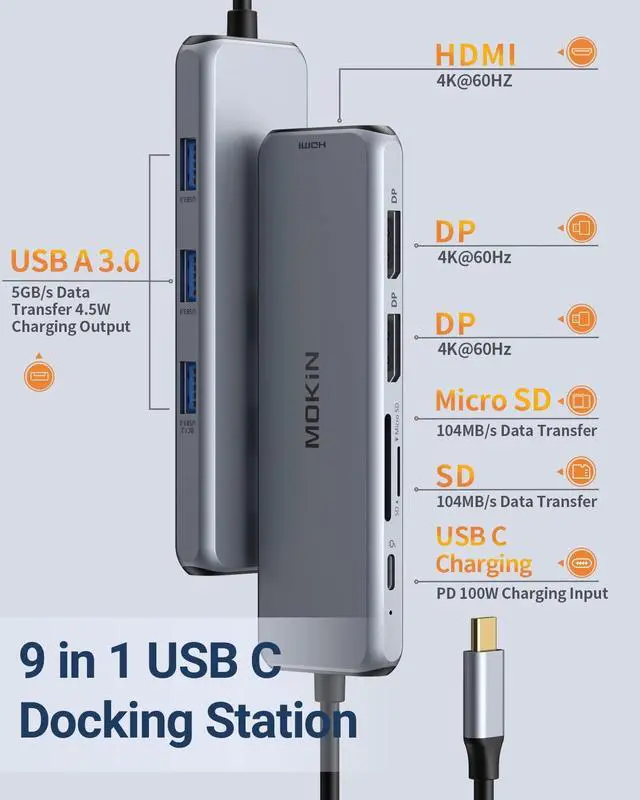
The MOKiN USB C Hub provides a stable connection and increases the productivity of your device by expanding the female USB C port to multiple possibilities of connectivity.
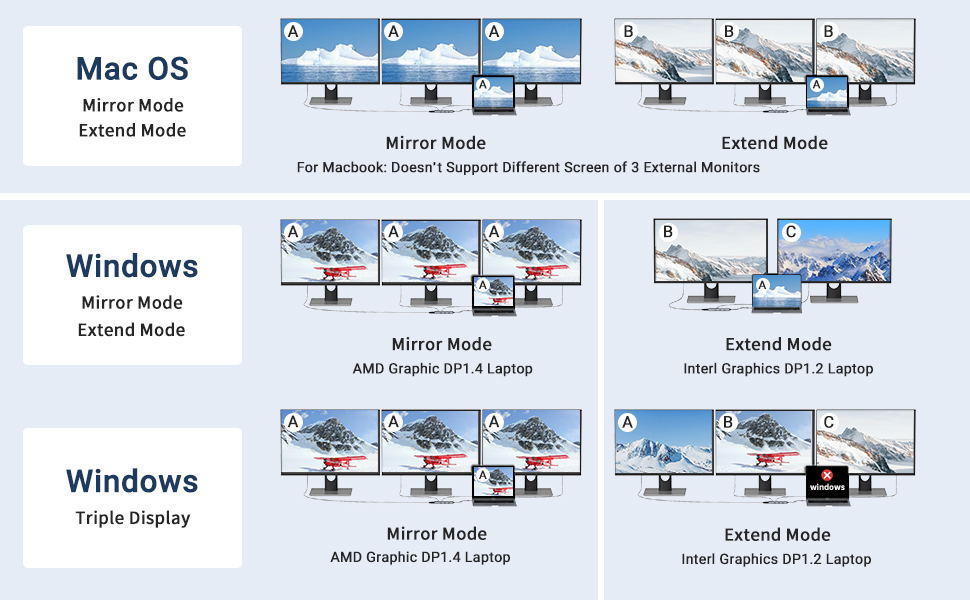
Mirror Mode: AA, AAA, AAAA
Extend Mode: AB, ABB, ABC, ABBB, AABC, ABCD
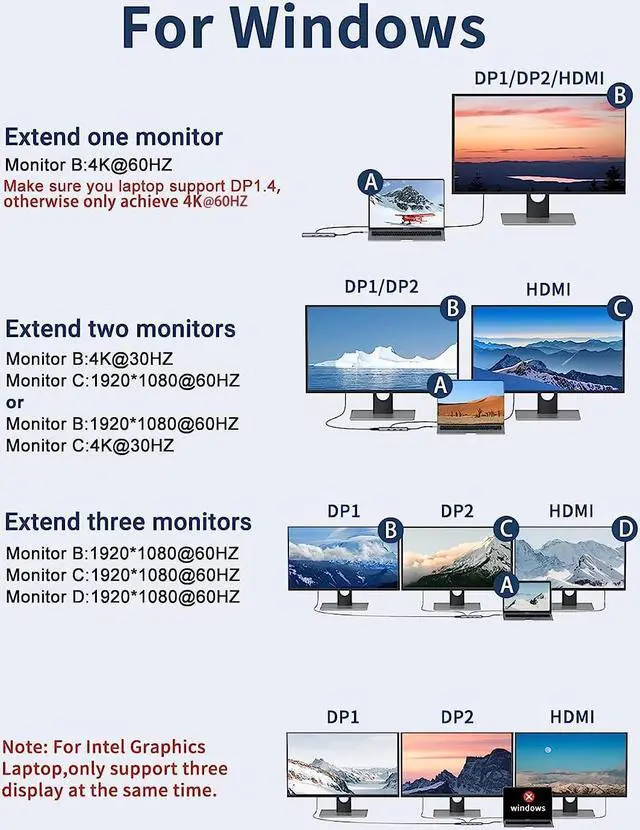
Resolution & Refresh Rate For Windows
1. HDMI or DP1 or DP2 = 4K@60HZ
(Make sure your host laptop support DP 1.4 protocol, otherwise it won't achieve 4k@60HZ)
2. DP + HDMI = 4K@30HZ : 4K@30HZ
(Make sure your host laptop support 4k resolution)
3. DP1 + DP2 + HDMI = 1920*1080P@60HZ : 1920*1080P@60HZ : 1920*1080P@60HZ
(For Windows computer, only DP1.4(AMD Graphics Card) can support 3 monitors display at the same time)
Mirror Mode: AA, AAA, AAAA
Extend Mode : AB, ABB, ABBB
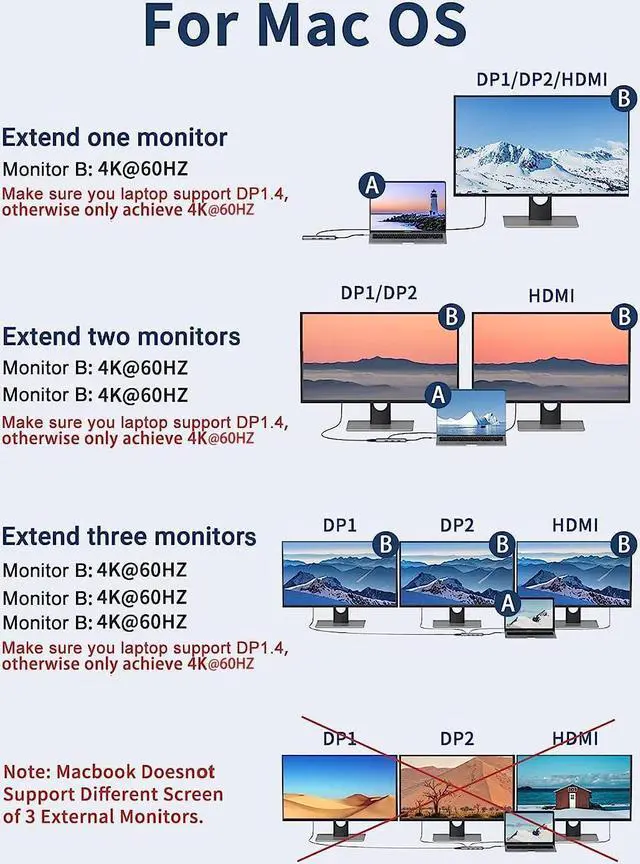
Resolution & Refresh Rate For Mac Os
1. HDMI or DP1 or DP2 = 4K@60HZ
2. DP + HDMI = 4K@60HZ : 4K@60HZ
3. DP1 + DP2 + HDMI = 4K@60HZ : 4K@60HZ : 4K@60HZ
(Make sure your host laptop support DP 1.4 protocol, otherwise it won't achieve 4k@60HZ)
Note:
1.Mac OS system, the screens of external monitors are the same, no matter they are displayed in mirror mode or extended mode
2.For MacBook with M1 or M2 chip only can extend or mirror 1 monitor, Because M1 and M2 chip's limitation, it won't allow dual monitor for displaying. So all these types of products won't support dual monitor for M1 and M2 chip.
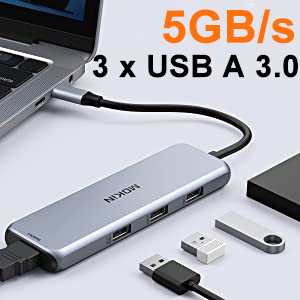
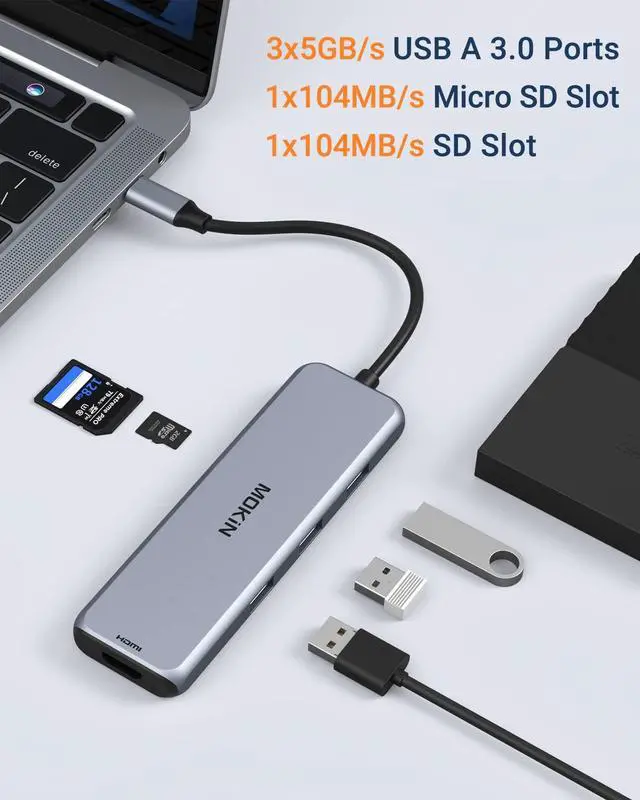
MOKiN 9-1 USB C Hub provides you 3 USB 3.0 ports and allows you to use them at the same time.
USB 3.0 Ports with 5Gbps data transfer rate and compatible with USB2.0/USB1.1.
Also can connect smartphones, tablet, hard drives, keyboard or mouse, GamePad etc.
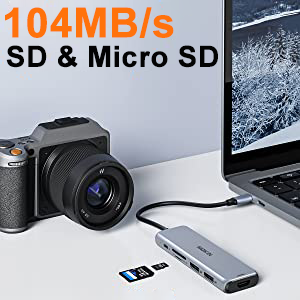
Built-in SD/TF card slots for Type-C devices to access files directly from an SD/TF card, support Memory card capacity up to 512GB.
Super fast read and write speed ,let you get access your files easily.SD card and Micro SD can work simultaneouly.
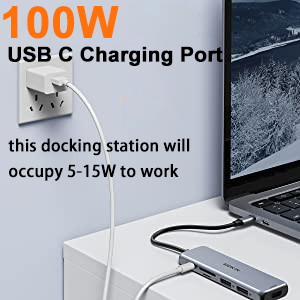
The USB Type-C PD charging port supports a maximum of 100W power (only for charging). charging limited to 87 for safety.
Quickly charge laptops and use other hub functions at the same time.
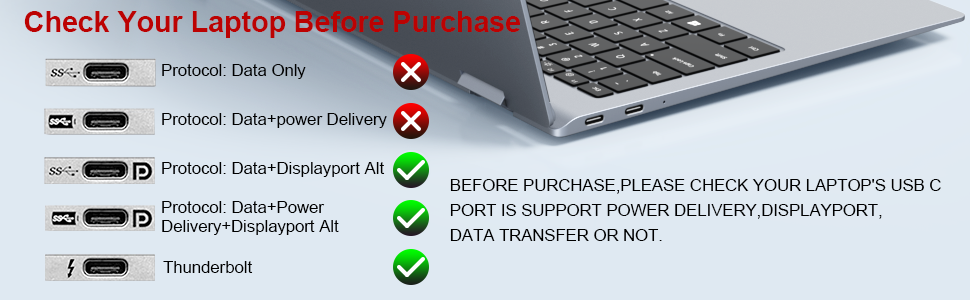
This docking station is only compatible with laptops with Thunderbolt or full function USB C ports.
Please check your laptop before purchasing. If you don't know if your laptop is compatible with our docking station, please let us know and we will check for you.
| Brand | MOKiN |
|---|---|
| Color | Gray |
| Hardware Interface | USB 3.0,PD 100W,HDMI,DP |
| Special Feature | Play, Plug |
| Total USB Ports | 9 |
| Compatible Devices | Smartphones, Projectors, Mouse, Tablets, Keyboards, Monitors, Laptops, Card Readers |
| Item Dimensions | 7.20*2.80*0.7inches |
The MOKiN MOUC2903-US is a 9-in-1 USB-C docking station for laptop users who need dual DisplayPort, HDMI, three USB-A 3.0 ports, SD and Micro SD card readers, and up to 100W PD charging in one compact hub. It suits home offices, creators, and multitaskers using compatible MacBook, Dell, HP, Lenovo, Surface, Chromebook, or Steam Deck devices.
| Attribute | Value |
|---|---|
| Best For | Laptops and compatible devices that need dual DisplayPort and HDMI monitor connections, USB-A peripherals, SD/TF card access, and USB-C PD charging |
| Display And Connectivity | Docking station with two DisplayPort outputs, one HDMI output, three USB-A ports, SD and TF card slots, and a PD charging port |
| Compatibility | Compatible with MacBook, Dell XPS, Steam Deck, HP, Lenovo ThinkPad, and Microsoft Surface devices |
| Physical Specifications | Gray finish with dimensions of 7.20 × 2.80 × 0.7 inches and a weight of 0.2 lb |
| Model Identifiers | MOKiN MOUC2903-US |
Q: Is the MOKiN 9-in-1 dock better than a basic USB-C hub for dual monitors?
A: Choose the MOKiN dock when you need two DisplayPort outputs, one HDMI output, three USB-A 3.0 ports, SD and microSD readers, and up to 87W of laptop charging after dock power use. A basic USB-C hub is the better fit when you only need one display, fewer peripherals, or a smaller travel accessory. The MOKiN’s multi-monitor advantage is primarily for compatible Windows and ChromeOS laptops that support USB-C DisplayPort Alt Mode and MST; on macOS, multiple displays may mirror instead of extend.
Q: Should I buy the MOKiN dock or a Thunderbolt dock for a MacBook with two extended monitors?
A: Choose a Thunderbolt dock when your priority is two independent extended displays from a MacBook through one dock connection. Choose the MOKiN dock when you mainly use Windows or ChromeOS, want driverless MST support, and need mixed DisplayPort, HDMI, USB-A, and card-reader connections. The MOKiN listing states that macOS mirrors connected external screens, while Thunderbolt or DisplayLink-based solutions are generally more appropriate for Mac multi-monitor extension.
Q: Is the MOKiN dock a better choice than a portable Steam Deck dock for a desk setup?
A: Choose the MOKiN dock for a fixed workstation that needs multiple DisplayPort or HDMI connections, three USB-A peripherals, SD or microSD access, and laptop charging. Choose a portable Steam Deck dock when travel size, TV connectivity, or console-focused use matters more than three-monitor output and card-reader expansion. For Steam Deck desktop use, verify that the dock’s video outputs and charging behavior match the display and power setup before buying.
Q: Should I choose the MOKiN dock or a premium USB4 or Thunderbolt dock for faster accessories?
A: Choose the MOKiN dock when 5Gbps USB-A connectivity, SD or microSD transfers, mixed monitor outputs, and up to 87W of practical laptop charging cover your needs. Choose a premium USB4 or Thunderbolt dock when you need faster 10Gbps or higher peripheral connections, faster wired networking, newer USB-C ports, or more advanced display configurations. The MOKiN also does not list Ethernet, USB-C data expansion, or audio output, so a higher-tier dock is more suitable when those ports are central to the workstation.
Q: Is the MOKiN dock worth upgrading to from a single-HDMI USB-C hub?
A: Upgrade to the MOKiN dock when you need more than one external display connection, multiple USB-A accessories, SD and microSD card support, or higher-power charging passthrough. Keep the single-HDMI hub when one monitor, basic peripherals, and maximum portability are sufficient. The MOKiN is a workstation-oriented option rather than a minimal adapter because it adds three video outputs and multiple expansion ports, but its actual display count depends on the laptop’s USB-C video capability and operating system.
Q: Will this docking station work with my laptop for external monitors?
A: It is suitable for laptops with a USB-C port that supports video output through DisplayPort Alternate Mode. If the USB-C port supports only data transfer, the USB and card-reader functions may work while the DisplayPort and HDMI video outputs do not.
Q: Can it connect three external monitors at the same time?
A: The product provides two DisplayPort outputs and one HDMI output and is designed to support three external monitors simultaneously. The actual monitor count and resolution depend on the laptop's USB-C video capabilities and the operating system.
Q: Does it support extended monitors on a Mac?
A: On macOS, the connected external monitors display the same image rather than providing separate extended desktops, according to the product information. It is therefore better suited to mirrored presentations or repeated content on multiple screens than to a multi-monitor Mac workstation.
Q: Is this docking station suitable for travel, meetings, and office work?
A: It is suitable for portable office setups that need multiple display outputs, three USB-A ports, SD and microSD access, and USB-C charging through one hub. Its main trade-offs are that it has no Ethernet port, requires compatible monitor cables, and passes up to 87W to the laptop because the dock uses approximately 13W itself.
Q: Will the 100W charging port fully charge my laptop?
A: The dock accepts up to 100W USB-C Power Delivery input, but approximately 13W is used by the dock, leaving up to about 87W for the connected laptop. This is generally appropriate for many productivity laptops, but higher-power systems may charge slowly or maintain their battery level rather than charge at full speed.
Q: Is the MOKiN MOUC2903-US a good choice for a multi-monitor work setup?
A: It can suit Windows users who need two or three external displays plus USB-A and card-reader ports, provided the laptop supports USB-C DisplayPort video output. The main trade-off is compatibility: monitor detection can vary by laptop, adapter, KVM, and graphics configuration. ([reddit.com](https://www.reddit.com/r/MacOS/comments/1gr9q71?utm_source=openai))
Q: Will it work well with a MacBook for multiple independent displays?
A: It is not the best fit if independent displays are essential on macOS. The product information states that macOS mirrors the external screens rather than providing separate extended desktops, and Reddit discussions also report limitations with multi-monitor Mac setups. ([reddit.com](https://www.reddit.com/r/MacOS/comments/1gr9q71?utm_source=openai))
Q: Is it worth buying if I mainly need dual DisplayPort outputs and basic peripherals?
A: It may be a practical value option when the laptop supports the required USB-C video standards and the user needs dual DisplayPort, three USB-A ports, SD/microSD access, and laptop charging from one hub. It is less suitable for users who need guaranteed enterprise-grade compatibility, Ethernet, or a built-in power adapter. ([reddit.com](https://www.reddit.com/r/UsbCHardware/comments/1fpxzud/is_mokin_a_reliable_brand_for_docking_stations/?utm_source=openai))
Q: What are the main trade-offs before buying this MOKiN dock?
A: The key trade-offs are compatibility and charging capacity. The dock reserves about 13W for its own operation, so a 100W input provides up to approximately 87W for the laptop. Community reports about MOKiN docks are mixed: some users report reliable long-term use, while others report monitor detection problems, heat, or premature failure with related models. ([reddit.com](https://www.reddit.com/r/UsbCHardware/comments/1fpxzud/is_mokin_a_reliable_brand_for_docking_stations/?utm_source=openai))


