here!
I’m your shopping assistant for PC builds, upgrades, and everything tech.
Got questions? Ask away!
Start a conversation
here!
I’m your shopping assistant for PC builds, upgrades, and everything tech.
Got questions? Ask away!
Start a conversation

Any questions? Ask CelesteSM will help you find out quickly.


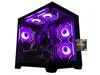
The Suevery Gaming Desktop is a Windows 11 Pro tower PC with an AMD Ryzen 5 6-core processor, RX 560 4GB graphics, 16GB DDR4 RAM, and a 512GB NVMe SSD, making it suitable for 1080p gaming, everyday computing, streaming, and multitasking.
| Attribute | Value |
|---|---|
| Best For | A tower desktop for gaming and everyday home or office computing, with a Ryzen 5 processor, RX 560 4GB graphics, 16GB DDR4 memory, and Windows 11 Pro |
| Processor | AMD Ryzen 5 processor |
| GPU And VRAM | Radeon RX 560 graphics with 4GB of video memory |
| Memory Configuration | 16GB DDR4 memory for multitasking |
| Storage | 512GB NVMe SSD storage for fast system startup and application loading |
| Operating System | Windows 11 Pro |
| Networking | Wi-Fi 6 wireless connectivity with 10/100/1000Mbps wired LAN |
| Power And Form Factor | 400W power supply in a tower desktop chassis |
| Model Identifiers | Model SUT1B1-SUT1B9 |
Q: Is the Suevery Ryzen 5 RX 560 desktop better than a GTX 1650 gaming PC?
A: Choose the Suevery PC when the price is substantially lower and your main games are esports, older AAA titles, or general desktop applications at 1080p. A GTX 1650 system is the stronger gaming choice when prices are similar: benchmark comparisons place the GTX 1650 clearly ahead of the RX 560 in average 1080p performance, while both cards have 4GB of VRAM. The Suevery listing also does not identify the exact Ryzen 5 model, so CPU performance should be verified before making a close comparison.
Q: Should I buy this RX 560 desktop or upgrade to an RX 6400 system?
A: Choose the Suevery RX 560 desktop when the lower purchase price and included 16GB RAM, 512GB NVMe SSD, Wi-Fi 6, and Windows 11 Pro matter most. Choose an RX 6400 system when gaming performance, newer graphics architecture, and lower GPU power use are higher priorities. The RX 6400 is a more meaningful graphics upgrade than the RX 560, but its performance can vary by platform because PCIe 3.0 systems may limit the card in some workloads.
Q: Is this better than a cheaper gaming PC with 8GB RAM and a 256GB SSD?
A: The Suevery configuration is the better choice for multitasking and everyday usability because it includes 16GB of DDR4 memory and a 512GB NVMe SSD. That gives more room for games, applications, browser tabs, and background tasks before upgrading. If the cheaper system has a noticeably faster graphics card, however, it may deliver higher gaming performance; RAM and storage capacity do not compensate for a large GPU difference.
Q: Should I spend more on an RTX 4060 gaming desktop instead of buying this one?
A: Choose an RTX 4060 desktop if you want substantially more graphics headroom for current AAA games, higher settings, ray tracing, upscaling features, or longer-term gaming use. Choose the Suevery PC when your budget is limited and you mainly play lighter 1080p games or use the computer for school, office work, streaming, and basic gaming. The RTX 4060 has 8GB of GDDR6 memory and modern ray-tracing and upscaling support, while the Suevery system uses the older RX 560 with 4GB of graphics memory.
Q: Is this desktop better than a gaming laptop for performance-focused use?
A: Choose the Suevery desktop for a fixed-location setup, easier component upgrades, and performance-first use. Choose a gaming laptop when portability, a built-in display, keyboard, battery, and moving between locations are essential. Desktop-versus-laptop performance depends on the exact components, but desktop systems generally provide more upgrade flexibility and stronger sustained performance at comparable component levels because they have more room for cooling.
Q: Who is this gaming desktop best suited for?
A: This desktop is best suited for users who want a ready-to-use Windows 11 Pro tower for 1080p gaming, web browsing, schoolwork, streaming, and general office tasks. Its RX 560 4GB graphics card is intended for popular online games and moderate settings rather than demanding modern games at high resolutions.
Q: Is this desktop suitable for office work, meetings, and everyday computing?
A: Yes. The Ryzen 5 processor, 16GB of RAM, 512GB NVMe SSD, Windows 11 Pro, Wi-Fi 6, and Bluetooth are suitable for web browsing, documents, video meetings, email, streaming, and multitasking. The listing does not confirm that a monitor, keyboard, mouse, webcam, or Microsoft Office license is included.
Q: Does it support Wi-Fi and Bluetooth without additional adapters?
A: Yes. The product specifications list built-in Wi-Fi 6 and Bluetooth, so it can connect to compatible wireless networks and peripherals without requiring a separate adapter. Ethernet is also available through the listed gigabit LAN connection.
Q: Can the RAM, storage, or graphics card be upgraded later?
A: The listing confirms 16GB of DDR4 RAM, a 512GB NVMe SSD, an RX 560 graphics card, and a 400W power supply, but it does not specify available motherboard slots or maximum supported upgrades. Additional RAM, storage, or a graphics-card replacement may be possible, but compatibility, case clearance, motherboard support, and power requirements should be verified before purchasing parts.
Q: Is this a good desktop to take between locations for work or school?
A: Not usually. This is a tower-format desktop that requires a separate display, keyboard, mouse, and power connection, so it is better suited to a fixed desk than frequent travel. It can be moved occasionally, but it is less convenient for transportation than a laptop or compact computer.
Q: Is the Suevery Gaming Desktop good for 1080p gaming?
A: It is best suited to esports, older, and less-demanding games at 1080p. The RX 560 4GB is an entry-level graphics card, so newer demanding games may require low settings or reduced resolution. ([youtube.com](https://www.youtube.com/watch?v=IkzfmhSDWkk&utm_source=openai))
Q: Can this PC run Minecraft with shaders?
A: It should handle standard Minecraft well, but shader performance depends on shader complexity and settings. The RX 560 may require lightweight shaders, reduced settings, or a future graphics-card upgrade for smoother results. ([reddit.com](https://www.reddit.com/r/PcBuild/comments/1tl14c2/removed/?utm_source=openai))
Q: Is the Suevery Gaming Desktop worth buying?
A: Its value depends heavily on the selling price. Reddit discussions questioned the value of Suevery systems using older entry-level graphics hardware, so compare the total price with newer prebuilts or a system using a stronger GPU before buying. ([reddit.com](https://www.reddit.com/r/PcBuild/comments/1tl14c2/removed/?utm_source=openai))
Q: Who is this Suevery desktop suitable for?
A: It is suitable for entry-level gaming, everyday computing, schoolwork, web use, and multitasking. The Ryzen 5 processor, 16GB of RAM, and NVMe SSD support general productivity, while the RX 560 makes it less suitable for high-end gaming, demanding AAA titles, or consistently high graphics settings. ([youtube.com](https://www.youtube.com/watch?v=IkzfmhSDWkk&utm_source=openai))